
1. Introduction
This user manual provides essential information for the safe and efficient operation of your Siemens iQ700 HB734G1B1 built-in oven. Please read these instructions carefully before using the appliance for the first time and keep them for future reference.

Image 1.1: Front view of the Siemens iQ700 HB734G1B1 built-in oven, showcasing its sleek black design and integrated display.
2. Safety Instructions
Always adhere to the following safety guidelines to prevent personal injury or damage to the appliance:
- Ensure the oven is properly installed by a qualified technician.
- Do not touch hot surfaces. Use oven mitts or pot holders.
- Keep children away from the appliance during operation. The oven features a child safety lock.
- Never use abrasive cleaners or sharp objects for cleaning.
- Unplug the appliance before performing any maintenance or cleaning.
3. Installation
The Siemens HB734G1B1 is designed as a built-in oven. Proper installation is crucial for performance and safety.
3.1 Dimensions and Placement
Refer to the diagram below for precise installation dimensions. Ensure adequate ventilation space around the appliance.

Image 3.1: Technical diagram illustrating the required installation dimensions (in cm) for the Siemens HB734G1B1 built-in oven, including depth, width, and height specifications for cabinet integration.
- Product Dimensions (L x W x H): 54.8 x 59.4 x 59.5 cm
- Weight: 37 kg
- Nominal Voltage: 220-240 V
- Total Electrical Connection Power: 3.6 kW
3.2 Initial Setup
After installation, connect the oven to your home network using the Home Connect app for smart features and voice control via Amazon Alexa. The full-touch TFT display will guide you through the initial setup process, including language selection and time setting.
4. Operating the Oven
Your Siemens iQ700 oven offers a wide range of cooking functions and intuitive controls.
4.1 Control Panel and Display
The oven is operated via a responsive full-touch TFT color display, providing clear menu navigation and settings adjustment.

Image 4.1: Close-up view of the Siemens HB734G1B1 oven's sleek black control panel, featuring the integrated full-touch TFT color display and touch-sensitive buttons for intuitive operation.
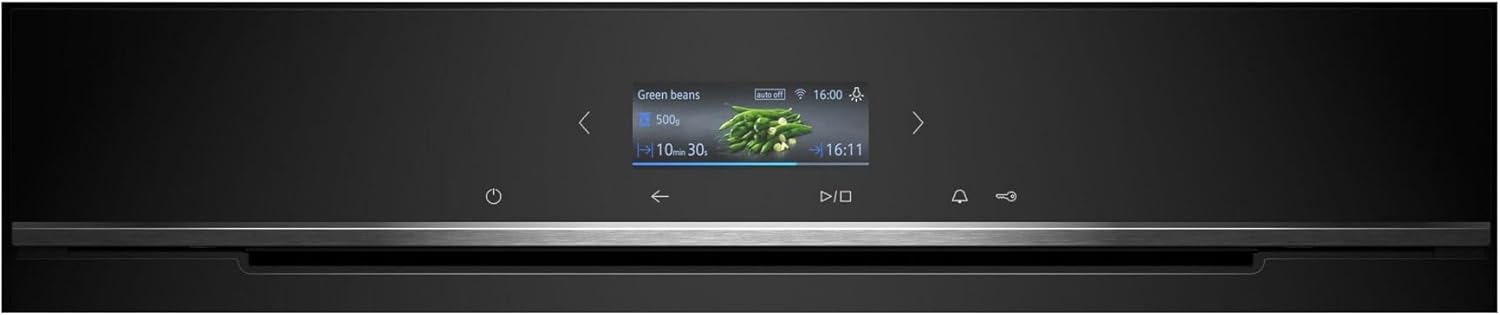
Image 4.2: Detailed view of the Siemens HB734G1B1 oven's TFT display, showing a cooking program in progress with time remaining and food type (green beans) indicated.
4.2 Heating Modes and Functions
The oven features 13 heating modes and various smart functions:
- 3D Hot Air: For even cooking results on up to three levels simultaneously.
- Top/Bottom Heat: Traditional heating for baking and roasting.
- Hot Air Grilling: Combines hot air with grilling for crispy results.
- Large Surface Grill: For grilling larger quantities.
- Small Surface Grill: For grilling smaller quantities.
- Pizza Setting: Ideal for crispy pizza bases.
- coolStart: No preheating needed for frozen foods.
- Separate Bottom Heat: For baking with a crispy base.
- Gentle Cooking: For tender and juicy results.
- Dish Preheating: To warm plates before serving.
- Keep Warm: Maintains food temperature.
- Gentle Hot Air: Energy-efficient cooking.
- Gentle Top/Bottom Heat: Energy-efficient traditional cooking.
Temperature can be set from 30°C to 300°C.
4.3 Special Features
- cookControl Plus: An intelligent system that recommends optimal settings based on food type and weight, ensuring perfect cooking results.
- Air Fry: Enjoy crispy, low-fat dishes with the integrated Air Fry function.
- Fast Heating: Quickly reaches the desired temperature.
- Home Connect: Control your oven remotely via the Home Connect app on your smartphone or tablet. You can also use voice commands through Amazon Alexa.

Image 4.3: A baking tray filled with sliced vegetables, illustrating the Air Fry function for healthy and crispy snacks.
4.4 Oven Capacity and Accessories
The oven has a generous cooking capacity of 71 liters with 5 insertion levels. It comes with essential accessories:

Image 4.4: The standard accessories included with the oven: an enameled baking tray, a combination grid, and a universal pan.
- 1 x Enameled Baking Tray
- 1 x Combination Grid
- 1 x Universal Pan
5. Maintenance and Cleaning
Maintaining your oven ensures its longevity and optimal performance. The Siemens HB734G1B1 features advanced self-cleaning functions.
5.1 ecoClean Self-Cleaning Aid
The ecoClean coating on the rear wall automatically absorbs and breaks down dirt and odors during cooking. Simply wipe away any residue with a damp cloth once the oven has cooled.
5.2 humidClean Cleaning Aid
The humidClean function uses steam to soften baked-on food residues, making them easier to wipe away. Add water and a drop of detergent to the oven floor and activate the program.
5.3 General Cleaning
The full glass inner door can be easily cleaned. For the exterior, use a soft, damp cloth and mild detergent. Avoid harsh chemicals or abrasive materials.
6. Troubleshooting
This section addresses common issues you might encounter. For more complex problems, contact Siemens customer service.
6.1 Common Issues
- Oven not heating: Check if the power cord is securely plugged in and if the circuit breaker has tripped. Ensure the oven door is fully closed.
- Display not working: Try restarting the oven by switching off the power at the main circuit breaker for a few minutes.
- Uneven cooking: Ensure food is placed correctly on the rack and that the correct heating mode is selected. Avoid overcrowding the oven.
6.2 Safety Features
The oven is equipped with several safety features:
- Very Low Window Temperature: The triple-glazed door ensures the exterior remains cool during operation.
- Child Safety Lock: Prevents accidental operation by children.
- Safety Shutdown: Automatically turns off the oven after a certain period of inactivity.
- Residual Heat Indicator: Shows if the oven cavity is still hot after use.
- Door Contact Switch: Halts operation when the door is opened.
7. Technical Specifications
| Specification | Value |
|---|---|
| Brand | SIEMENS |
| Model Number | HB734G1B1 |
| Product Dimensions (L x W x H) | 54.8 x 59.4 x 59.5 cm |
| Weight | 37 Kilograms |
| Energy Efficiency Class | A+ (on a scale of A+++ to D) |
| Capacity | 71 Liters |
| Installation Type | Built-in |
| Heating Method | Convection |
| Power Source | Electric |
| Color | TFT Full Touch Screen | Black |
| Special Features | ecoClean & humidClean - Self-cleaning - Air Fry, Home Connect |
| Included Components | 1 enameled baking tray, 1 combination grid, 1 universal pan |
8. Warranty and Support
Siemens is committed to quality and customer satisfaction.
8.1 Made in Germany
This appliance is manufactured in Germany, ensuring high standards of quality and precision engineering.
8.2 Spare Parts Availability
Siemens guarantees the availability of original spare parts for up to 15 years for functional and stockable parts produced after January 1, 2023, ensuring the longevity of your appliance.
8.3 Customer Service
For any questions, technical assistance, or service requests, please contact Siemens customer service. You can find contact information on the official Siemens website or in the documentation provided with your appliance.