
RC-309-B
Instruction Manual for Replacement Remote Control
Model: RC-309-B
Introduction
This document provides instructions for the Generic Replacement Remote Control, model RC-309-B, designed for NPG LCD LED TVs. This remote serves as a functional replacement for your original RC-309-B remote. Please note that as a replacement, some advanced or specific functions of your original remote may not be supported.
Key features of this replacement remote include:
- Compatible Remote: Designed to work with NPG LCD LED TVs.
- Durable Construction: Made of high-quality ABS plastic for longevity.
- Ergonomic Design: Features an ergonomic shape for comfortable handling.

Image 1: Front and back view of the RC-309-B replacement remote control. The front displays a standard layout of power, number, channel, volume, menu, and navigation buttons. The back shows a smooth surface with a battery compartment cover.
Setup
To begin using your replacement remote control, follow these simple steps:
- Install Batteries:
- Locate the battery compartment on the back of the remote control.
- Slide the battery compartment cover downwards or outwards to open it.
- Insert two AAA batteries (not included), ensuring the positive (+) and negative (-) terminals align correctly with the indicators inside the compartment.
- Close the battery compartment cover by sliding it back into place until it clicks securely.
- Initial Use:
This replacement remote is designed to work directly with compatible NPG LCD LED TVs without requiring complex programming. Simply point the remote towards your television and press the Power button to test its functionality.
- Color Variation:
Please note that the remote control may be supplied in either black or white color, depending on availability. The functionality remains identical regardless of color.
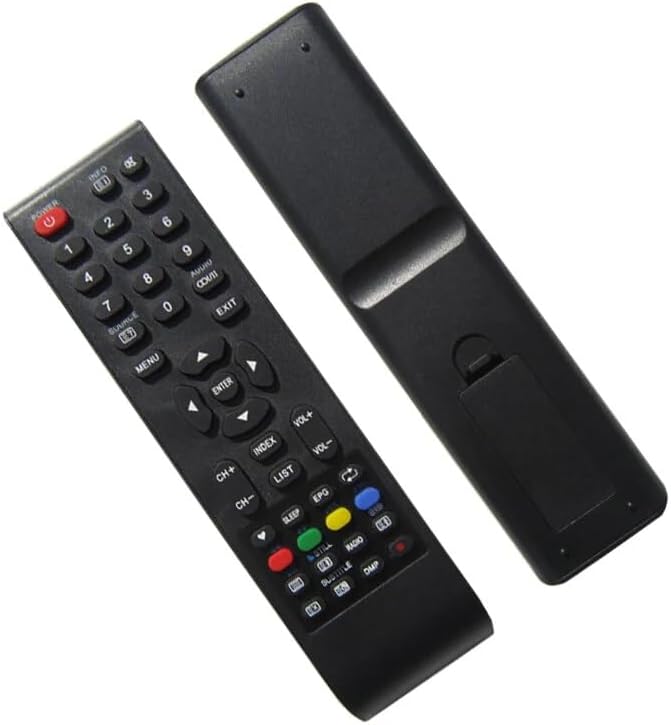
Image 2: Angled view of the RC-309-B replacement remote control. This perspective highlights the button layout and the sleek design of the remote.
Operating Instructions
The RC-309-B replacement remote control features a standard button layout for intuitive operation of your NPG LCD LED TV. Below are common functions:
| Button/Function | Description |
|---|---|
| Power | Turns the television on or off. |
| Number Buttons (0-9) | Directly select TV channels. |
| CH+/CH- | Navigate through channels sequentially. |
| VOL+/VOL- | Adjust the volume level. |
| Mute | Mutes or unmutes the television audio. |
| Menu | Accesses the television's main menu. |
| Navigation (Up, Down, Left, Right, Enter) | Used to navigate through menus and confirm selections. |
| Source/Input | Switches between different input sources (e.g., HDMI, AV). |
| Exit | Exits the current menu or on-screen display. |
| Info | Displays information about the current program or input. |
Important Note: As a replacement remote, certain specialized functions or buttons specific to your original remote or TV model (e.g., smart TV features, specific app buttons) may not be fully functional or present on this replacement unit. Its primary purpose is to provide essential control over your NPG LCD LED TV.
Maintenance
Proper care and maintenance will extend the life of your remote control:
- Battery Replacement: Replace batteries when the remote's response becomes sluggish or stops working. Always replace both batteries at the same time with new ones of the same type (AAA).
- Cleaning: Use a soft, dry cloth to wipe the surface of the remote. For stubborn dirt, slightly dampen the cloth with water or a mild, non-abrasive cleaner. Avoid using harsh chemicals or abrasive materials.
- Storage: Store the remote in a cool, dry place away from direct sunlight, extreme temperatures, and high humidity. If the remote will not be used for an extended period, it is advisable to remove the batteries to prevent leakage.
- Avoid Drops: Protect the remote from physical impact, as drops can damage internal components.
Troubleshooting
If you encounter issues with your replacement remote control, try the following troubleshooting steps:
- Remote Not Responding:
- Check Batteries: Ensure batteries are inserted correctly with the correct polarity (+/-). Replace old batteries with new ones.
- Line of Sight: Make sure there are no obstructions between the remote control and the TV's infrared receiver. Point the remote directly at the TV.
- Distance: Ensure you are within the effective operating range of the remote (typically up to 20 feet).
- Some Functions Not Working:
- As a replacement remote, it may not support all functions of your original remote, especially advanced or smart TV features. This is expected behavior for a generic replacement.
- Verify if the specific function you are trying to use is a standard TV control (e.g., volume, channel, power) or a specialized feature.
- Interference:
- Bright lights, especially fluorescent or LED lighting, can sometimes interfere with infrared signals. Try operating the remote in different lighting conditions.
If the issue persists after trying these steps, and you believe it's related to compatibility with your specific NPG TV model, it is recommended to contact the seller for further assistance. Providing your original remote's part number or your TV's unit model can help in identifying the best solution.
Specifications
| Feature | Detail |
|---|---|
| Model | RC-309-B (Replacement) |
| Brand | Generic |
| Compatible Devices | NPG LCD LED TV (also compatible with Set Top Box, Stereo System, Television, DVD/Blu-ray Player, Home Theater as per general remote capabilities) |
| Material | ABS plastic |
| Special Feature | Ergonomic design |
| Color | Black or White (randomly sent) |
| Max Number of Supported Devices | 5 (general remote capability, specific to this replacement is NPG TV) |
Warranty and Support
This product is a generic replacement remote control. Specific warranty details are typically provided by the point of purchase or the seller. For any questions regarding compatibility, functionality, or troubleshooting beyond the scope of this manual, please contact the seller directly. Providing your original remote's part number or your TV's unit model number can greatly assist in resolving any compatibility concerns.
Ask a question about this manual
Ask about setup, troubleshooting, compatibility, parts, safety, or missing instructions. Manuals+ will review the question and use this page’s manual context to help answer it.