
GOLDORO GD-ADJ
GOLDORO Queen Size Adjustable Bed Frame User Manual
Model: GD-ADJ
1. Introduction
This user manual provides essential information for the safe and effective use of your GOLDORO Queen Size Adjustable Bed Frame. It covers setup, operation, maintenance, and troubleshooting to ensure optimal performance and longevity of your electric bed base. Please read this manual thoroughly before assembly and use.
2. Important Safety Information
To reduce the risk of electric shock, burns, fire, or injury, please observe the following precautions:
- Always check the maximum weight capacity of the bed frame before use. The enhanced motor can lift up to 550 lbs for the head and 350 lbs for the foot.
- Ensure proper assembly of all components as instructed in this manual. Incorrect assembly can lead to instability and potential injury.
- Be cautious of pinch points during setup and operation, especially when adjusting the head and foot sections. Keep hands and feet clear of moving parts.
- Keep children and pets away from the adjustable bed frame during operation.
- Do not operate the bed frame if the power cord or plug is damaged.
- Unplug the bed frame from the power outlet before cleaning or performing any maintenance.
3. Package Contents
Please verify that all components are present before beginning assembly:
- Bed Base
- Motor (Dual Motor system)
- Slats
- Wireless Remote Control
- Mattress Retainer Bar
- Legs (12-inch, adjustable)
- Assembly Hardware and Tools (included)
Note: Mattress is NOT included with the adjustable bed frame.
4. Setup and Assembly
Assembly of the GOLDORO Adjustable Bed Frame is designed to be straightforward, though due to its weight, a team lift is recommended for moving the packaged unit. All necessary tools are provided.
- Unpacking: Carefully unpack all components from the box. The packaging is designed to protect the contents, so take your time during this step.
- Frame Assembly: Follow the detailed instructions provided in the included assembly guide to connect the frame sections. The main motor and moving parts come pre-assembled.
- Leg Installation: Attach the 12-inch legs to the bed frame. These legs are adjustable, allowing for compatibility with various bed frames and desired heights.
- Mattress Retainer Bar: Install the mattress retainer bar at the foot of the bed to prevent the mattress from sliding when the bed is adjusted.
- Power Connection: Connect the power cord to the bed frame's control box and then plug it into a grounded electrical outlet.
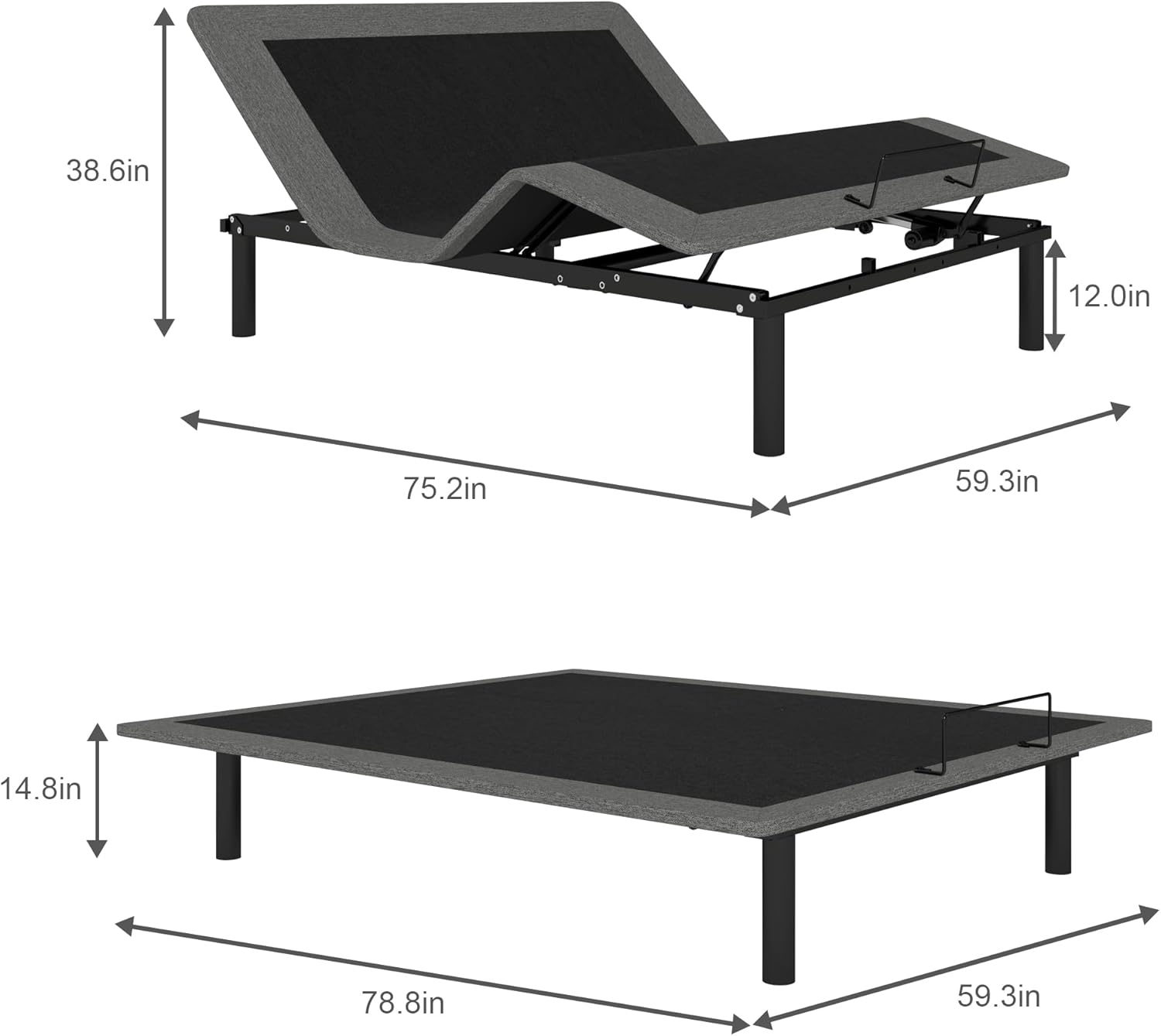
Figure 4.1: Dimensions of the adjustable bed frame.

Figure 4.2: Key components including the wireless remote, mattress retainer, and dual motor system.
The GOLDORO Adjustable Bed Frame is compatible with various mattress types, including memory foam, gel foam, latex foam, and soft hybrid mattresses. Ensure your mattress is suitable for an adjustable base.

Figure 4.3: Mattress compatibility with the adjustable bed frame.
5. Operating Instructions
Your GOLDORO Adjustable Bed Frame is operated using the included wireless remote control. The whisper-quiet durable motor ensures smooth and silent adjustments.
5.1 Wireless Remote Control
The wireless remote allows for easy adjustment of the bed's positions. Insert batteries into the remote control. No pairing is typically required as the remote is pre-paired with the bed base.
- Head Incline: Use the designated buttons to independently raise or lower the head section from 0 to 60 degrees.
- Foot Incline: Use the designated buttons to independently raise or lower the foot section from 0 to 40 degrees.
- Zero-Gravity Position: A dedicated button on the remote allows you to instantly adjust the bed to a zero-gravity position, which can help relieve stress and provide a feeling of weightlessness.
- Flat Position: A dedicated button will return the bed to a completely flat position.
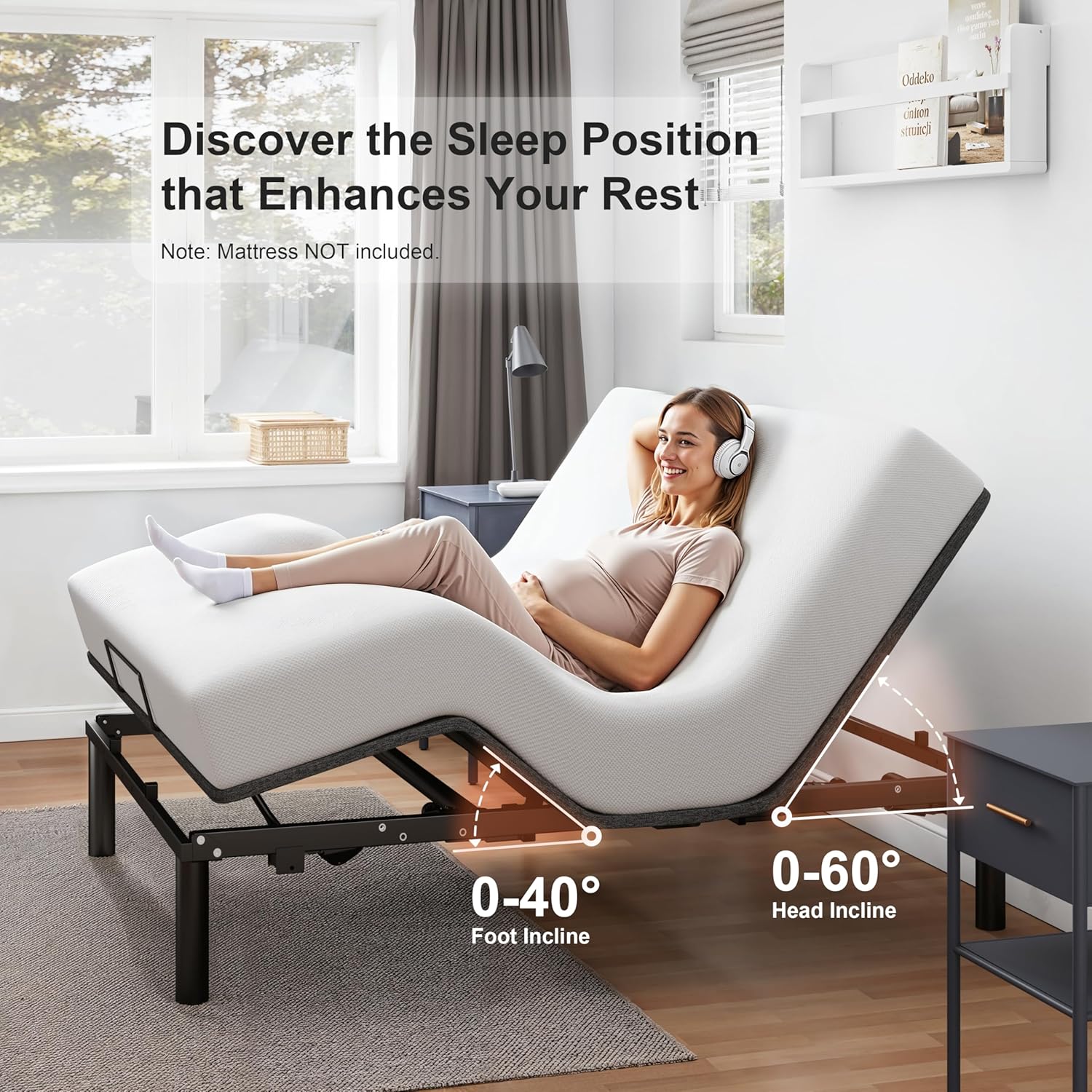
Figure 5.1: Independent head and foot incline adjustments.

Figure 5.2: Various adjustable bed positions for comfort and health benefits.
5.2 Health and Lifestyle Benefits
Utilizing the adjustable features of your bed frame can contribute to improved sleep quality and overall well-being. Benefits include:
- Relief from snoring by elevating the head.
- Reduction of back pain through customized support.
- Improved blood circulation and reduced swelling.
- Alleviation of acid reflux symptoms.
- Enhanced comfort for reading, watching TV, or working in bed.

Figure 5.3: Health and comfort benefits of using an adjustable bed frame.
6. Maintenance
Proper maintenance will extend the life of your adjustable bed frame. Always unplug the unit before cleaning or inspecting.
- Cleaning: Wipe down the fabric and metal surfaces with a soft, damp cloth. Avoid using harsh chemicals or abrasive cleaners.
- Motor and Electrical Components: Do not attempt to open or service the motor or electrical components. Refer to qualified service personnel if issues arise.
- Moving Parts: Periodically check all bolts and connections to ensure they are secure. Do not lubricate moving parts unless specifically instructed.
- Power Cord: Inspect the power cord regularly for any signs of damage. If damaged, discontinue use and contact customer support.
7. Troubleshooting
If you experience issues with your GOLDORO Adjustable Bed Frame, refer to the following common problems and solutions:
| Problem | Possible Cause | Solution |
|---|---|---|
| Bed does not respond to remote. | No power; Remote batteries low/dead; Remote not paired. | Ensure power cord is securely plugged in. Check household circuit breaker. Replace remote batteries. If remote is not pre-paired, refer to the specific pairing instructions in your included assembly guide. |
| Motor makes unusual noise or struggles. | Overload; Obstruction; Loose connections. | Ensure total weight on bed does not exceed capacity (550 lbs head, 350 lbs foot). Check for any objects obstructing the moving parts. Verify all assembly connections are tight. |
| Bed moves slowly or unevenly. | Low power; Motor issue. | Ensure the bed is plugged directly into a wall outlet, not a power strip. If the problem persists, contact customer support. |
If the problem persists after attempting these solutions, please contact GOLDORO customer support for assistance.
8. Specifications
| Feature | Detail |
|---|---|
| Brand | GOLDORO |
| Model Number | GD-ADJ |
| Size | Queen |
| Product Dimensions | 78.74"L x 59.1"W x 14.76"H |
| Color | Black |
| Material | Metal, Wood & Fabric |
| Weight Capacity (Head) | 550 lbs |
| Weight Capacity (Foot) | 350 lbs |
| Item Weight | 140 pounds |
| Head Incline Range | 0 to 60 degrees |
| Foot Incline Range | 0 to 40 degrees |
| Special Feature | Cordless Wireless Remote Control |
| Assembly Required | Yes |
| Country of Origin | China |
9. Warranty and Customer Support
For information regarding the product warranty, please refer to the documentation included with your purchase or contact GOLDORO customer support directly. The manufacturer is dedicated to customer satisfaction.
If you have any questions, require technical assistance, or need to report an issue, please reach out to GOLDORO customer support. Contact details can typically be found on the product packaging or the official GOLDORO website.
Ask a question about this manual
Ask about setup, troubleshooting, compatibility, parts, safety, or missing instructions. Manuals+ will review the question and use this page’s manual context to help answer it.