
1. Introduction
This manual provides detailed instructions for the assembly, operation, and maintenance of your Marada Foldable Racing and Flight Simulator Steering Wheel Stand. Designed for versatility and stability, this stand is compatible with a wide range of gaming devices, offering an enhanced simulation experience. Please read this manual thoroughly before use to ensure proper setup and safe operation.
2. Product Features
- Stable Structure: Features a unique X-shape design and non-slip feet for enhanced stability during intense gaming sessions.
- Wide Compatibility: Supports popular gaming devices including Logitech (G25, G27, G29, G920, G923, G PRO), Thrustmaster (T300RS, T500RS), PXN, X56, and X52.
- Shifter Upgrade: Equipped with three robust shifter platforms for mounting handbrakes, shifters, and flight joysticks.
- Innovative Seat Slot: Includes a slot unit designed to secure office chairs with wheels, providing a stable seating solution.
- Convenient Adjustment: Offers flexibility with foldable design, adjustable height, and adjustable pedal and wheel platform angles.
- Dual Mode Switching: Easily transitions between racing and flight simulation setups.
3. Package Contents
The Marada Foldable Racing and Flight Simulator Steering Wheel Stand package includes the following components:
- Main Stand Frame (partially pre-assembled)
- Steering Wheel Platform
- Pedal Platform
- Shifter/Joystick Platforms (3 units)
- Assembly Hardware (bolts, nuts, washers, tools)
- Instruction Manual
Note: Electronic devices such as steering wheels, pedals, joysticks, and other gaming equipment are not included and must be purchased separately.
4. Assembly and Setup
The stand is designed for straightforward assembly, with approximately 80% of the components pre-installed. Follow these steps to complete the setup.
4.1. Unpacking and Component Identification
- Carefully remove all components from the packaging.
- Verify that all items listed in the Package Contents section are present.
- Familiarize yourself with the main parts of the stand, including the base frame, wheel platform, pedal platform, and shifter platforms.

Figure 4.1: Overview of the Marada Steering Wheel Stand.
4.2. Step-by-Step Assembly
While much of the stand is pre-assembled, some final connections and adjustments are required.
- Attach the Wheel Platform: Secure the steering wheel platform to the main frame using the provided bolts and nuts. Ensure it is firmly tightened.
- Install the Pedal Platform: Connect the pedal platform to the lower section of the stand. This platform is adjustable, so ensure it is initially set to a comfortable angle for later fine-tuning.
- Mount Shifter/Joystick Platforms: Attach the desired shifter or joystick platforms to the side arms of the stand. The stand includes three platforms, allowing for flexible placement of peripherals.
- Secure Gaming Devices: Mount your steering wheel, pedals, shifter, and joysticks onto their respective platforms using the appropriate fasteners. The stand provides various mounting holes for wide compatibility.
- Connect Seat (Optional): If using an office chair with wheels, utilize the integrated seat slot at the base of the stand to secure the chair's wheels, preventing movement during use.

Figure 4.2: Detailed view of adjustable components and connection points.
5. Operating Instructions
Once assembled, the Marada stand offers various adjustments to optimize your gaming experience.
5.1. Adjusting the Stand
- Height Adjustment: The main bracket height can be adjusted to suit different user heights and seating positions. Loosen the adjustment knobs or bolts, slide the frame to the desired height, and re-tighten securely.

Figure 5.1: Illustration of the stand's height adjustment mechanism.
- Pedal Angle Adjustment: The pedal platform can be adjusted from approximately 10 to 35 degrees to provide an ergonomic and comfortable foot position. Loosen the relevant fasteners, set the angle, and re-secure.
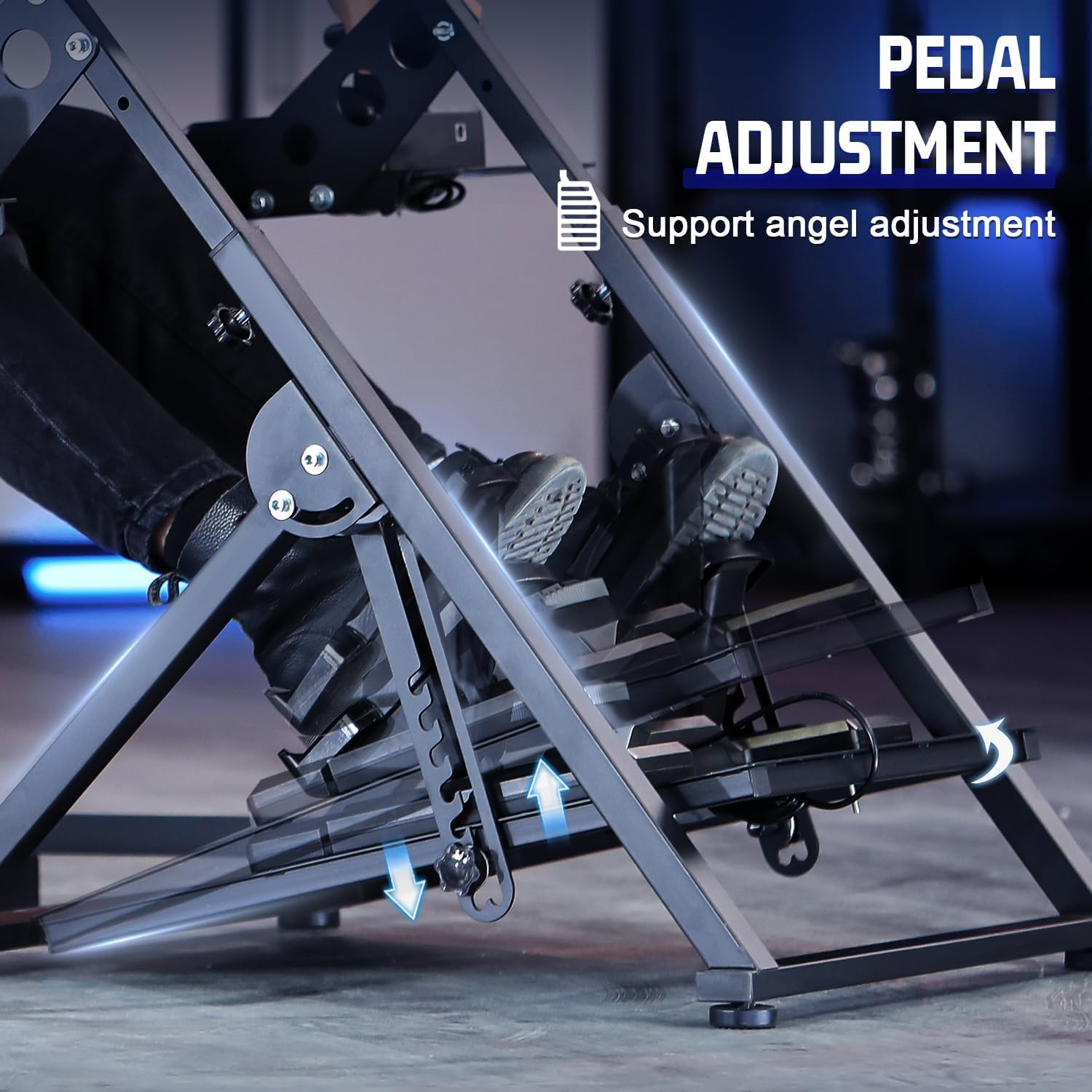
Figure 5.2: Illustration of the pedal platform angle adjustment.
- Steering Wheel Platform Angle: The angle of the steering wheel platform can also be adjusted to optimize your driving posture.
- Shifter/Joystick Platform Position: The side platforms for shifters and joysticks can be adjusted left or right to suit your preference.
5.2. Switching Between Racing and Flight Modes
The Marada stand is designed for quick conversion between racing and flight simulation setups. Depending on your peripherals, you can easily swap or reconfigure the platforms.
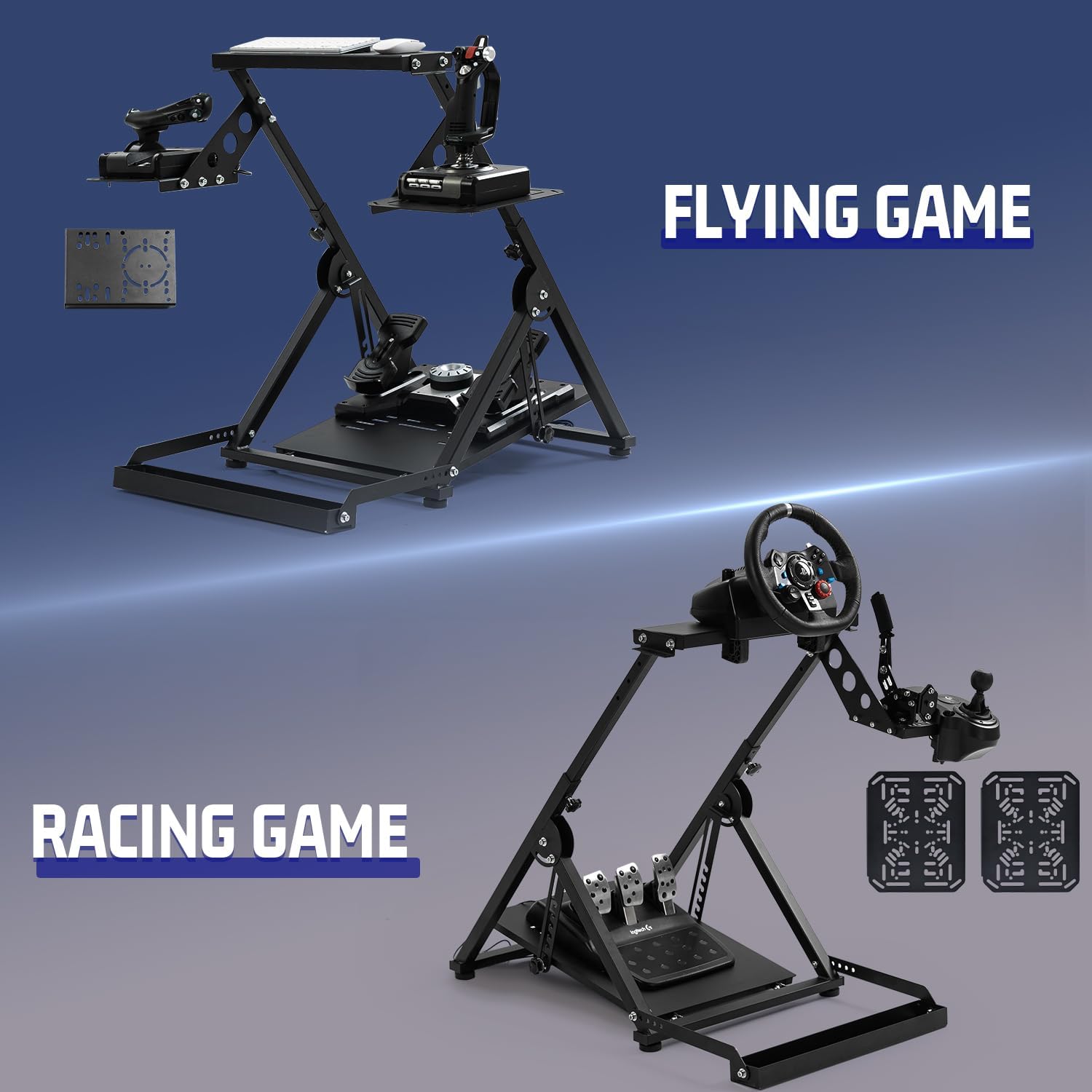
Figure 5.3: The stand configured for both racing and flight simulation.

Figure 5.4: Visual guide for dual mode switching and compatible devices.
5.3. Folding for Storage
The stand features a foldable design for convenient storage. To fold, ensure all peripherals are removed, then loosen the designated folding mechanisms (refer to the assembly diagram for specific points) and collapse the stand. Re-secure any locking pins or bolts to keep it in the folded position.

Figure 5.5: The stand in its folded configuration for compact storage.
6. Compatibility
The Marada Steering Wheel Stand is designed for broad compatibility with major gaming peripheral brands. Compatible devices include:
- Logitech: G25, G27, G29, G920, G923, G PRO
- Thrustmaster: T300RS, T500RS
- PXN
- Other Flight Devices: X56, X52
The stand features pre-drilled holes and adjustable mounting plates to accommodate various models from these brands. For specific mounting patterns, refer to the instructions provided with your gaming peripherals.

Figure 6.1: Compatibility with various gaming peripheral brands.
7. Maintenance
Regular maintenance ensures the longevity and optimal performance of your Marada Steering Wheel Stand.
- Cleaning: Wipe down the stand with a soft, damp cloth to remove dust and grime. Avoid abrasive cleaners or solvents that could damage the finish.
- Fastener Check: Periodically inspect all bolts, nuts, and adjustment knobs to ensure they are securely tightened. Loose fasteners can affect stability and performance.
- Structural Integrity: Check the frame for any signs of damage, bends, or cracks. If any damage is found, discontinue use and contact customer support.
- Storage: When not in use, especially for extended periods, fold the stand and store it in a dry, cool place to prevent corrosion or damage.
8. Troubleshooting
If you encounter issues with your Marada Steering Wheel Stand, refer to the following troubleshooting guide:
- Stand Feels Unstable:
- Ensure all assembly bolts and adjustment knobs are fully tightened.
- Verify that the stand is placed on a flat, level surface.
- If using an office chair, ensure its wheels are properly engaged in the stand's seat slot.
- Difficulty Adjusting Height/Angle:
- Loosen adjustment fasteners sufficiently before attempting to move components.
- Ensure no cables or peripherals are obstructing the movement.
- Peripherals Not Mounting Securely:
- Check the mounting holes on your peripheral against the stand's pre-drilled patterns. Some devices may require specific bolts or clamps (not included with the stand).
- Ensure you are using the correct size and type of fasteners for your specific peripheral.
- Missing or Damaged Parts:
- Review the package contents list. If any parts are missing or damaged upon arrival, contact Marada customer support immediately.
9. Specifications
| Product Dimensions | 37.5 x 38.4 x 28.3 inches |
| Item Weight | 37 pounds |
| Item Model Number | wheel stand 79 |
| Brand | Marada |
| Form Factor | Tripod style |
| Compatible Devices | Logitech, Fanatec, Thrustmaster, PXN |
10. Warranty and Support
Marada products are manufactured to high-quality standards. For warranty information, technical support, or assistance with parts, please refer to the contact information provided with your purchase or visit the official Marada website. Please retain your proof of purchase for warranty claims.