
1. Introduction
This manual provides detailed instructions for the use and maintenance of your Lekaby X08 Bluetooth 5.3 Earbuds. Please read this manual thoroughly before using the product to ensure proper operation and to maximize your listening experience.
2. Package Contents
Verify that all items listed below are included in your package:
- Lekaby X08 Bluetooth Earbuds (Left and Right)
- Charging Case
- USB-C Charging Cable
- Ear Cushions (various sizes)
- User Manual

Image: Contents of the Lekaby X08 Earbuds package.
3. Product Overview
Familiarize yourself with the components of your Lekaby X08 Earbuds and charging case.

Image: Diagram illustrating the key components of the Lekaby X08 Earbuds and charging case.
- Touch Control Area: For managing playback, calls, and voice assistant.
- Earbud Light & Mic: Indicator light and microphone for calls.
- Eartip: Silicone tips for comfortable fit and sound isolation.
- Charging Case Power Display: Digital display showing the charging case battery level.
- Earbuds Power Display: Digital display showing the individual earbud battery levels.
- Type C Charging Port: For charging the case.
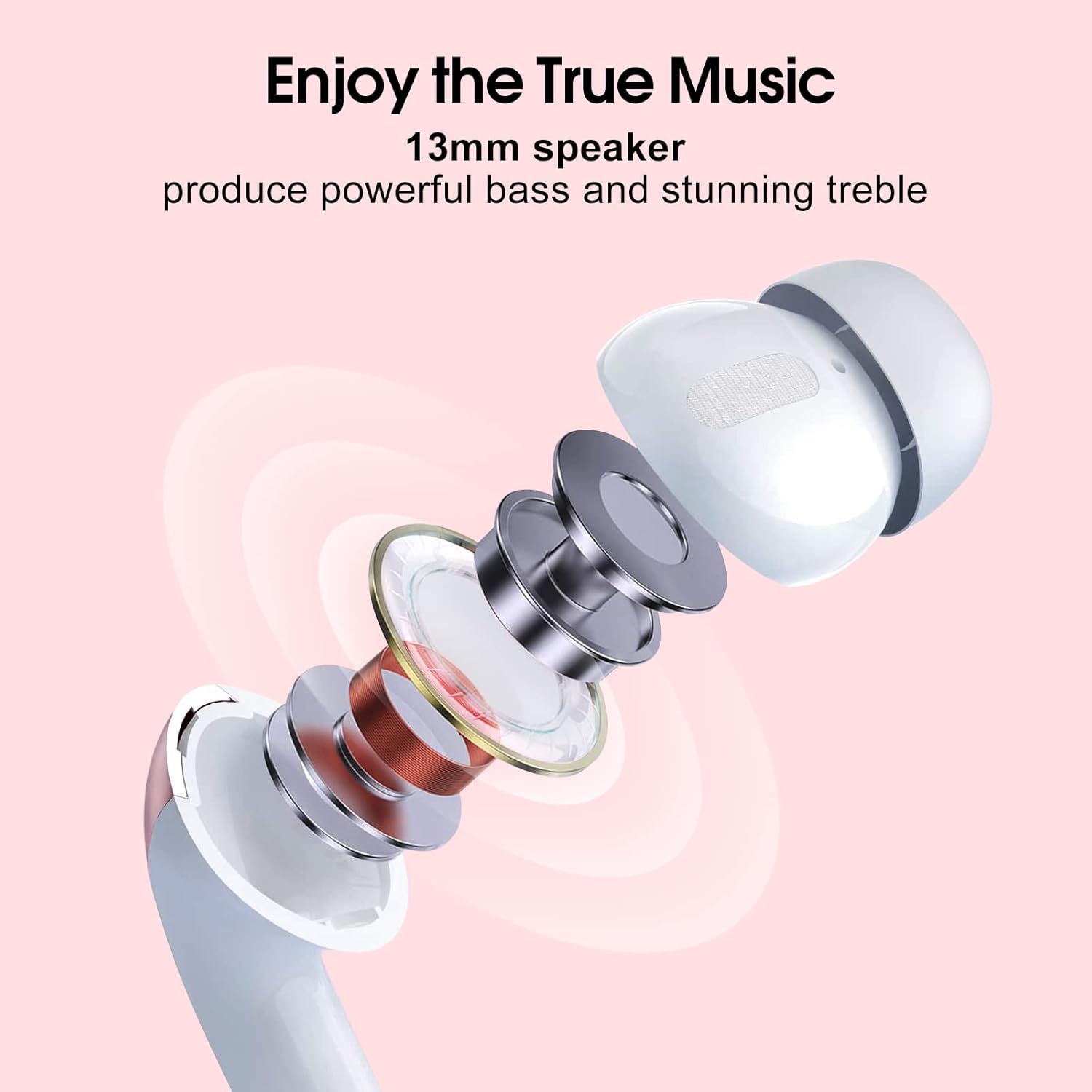
Image: Exploded view of an earbud, highlighting the 13mm speaker driver.
4. Charging
Ensure your earbuds and charging case are fully charged before first use.
4.1 Charging the Case
- Connect the provided USB-C cable to the charging port (6) on the case and to a USB power source.
- The digital display (4) on the case will show the charging progress.
- A full charge takes approximately 1.5 hours.
4.2 Charging the Earbuds
- Place the earbuds into the charging case. Ensure they are correctly seated.
- The digital display (5) on the case will show the charging status of each earbud.
- The earbuds will automatically charge when placed in the case.
Battery Life: The earbuds provide up to 6 hours of playtime on a single charge. The charging case extends total playtime to approximately 48 hours. A quick 10-minute charge can provide up to 2 hours of playtime.

Image: Digital power display on the charging case indicating battery levels.

Image: Battery life and quick charge capabilities of the Lekaby X08 Earbuds.
5. Pairing and Connection
The Lekaby X08 Earbuds utilize Bluetooth 5.3 for a stable and efficient wireless connection.
5.1 Initial Pairing
- Open the charging case. The earbuds will automatically power on and enter pairing mode.
- On your device (smartphone, tablet, PC), enable Bluetooth.
- Search for "X08" in the list of available Bluetooth devices and select it to connect.
- Once connected, you will hear a confirmation tone, and the earbud indicator lights will turn off.
5.2 Automatic Reconnection
After the initial pairing, the earbuds will automatically connect to the last paired device when the charging case is opened, provided Bluetooth is enabled on your device.
5.3 Single Earbud Mode
Either earbud can be used independently. Simply take one earbud out of the case, and it will connect to your device. The other earbud can remain in the case or be used later for stereo mode.

Image: Bluetooth 5.3 pairing process with a smartphone.
6. Touch Controls
The Lekaby X08 Earbuds feature intuitive touch controls on the outer surface of each earbud (1). Refer to the diagram in Section 3 for the exact location.
| Action | Function |
|---|---|
| One Tap (L/R) | Play/Pause music |
| Double Tap (R) | Next Track |
| Double Tap (L) | Previous Track |
| Triple Tap (R) | Volume Up (+) |
| Triple Tap (L) | Volume Down (-) |
| Long Tap 2s (L/R) | Hang Up Call |
| Press for 2s (L/R) | Activate Voice Assistant (Siri, Google Assistant) |
| One Tap (L/R) during incoming call | Answer Call |

Image: Overview of touch control functions.
7. Wearing the Earbuds
For optimal sound quality and comfort, choose the correct size ear tips and ensure the earbuds are properly seated in your ears.
- Select the ear tips that provide a snug and comfortable fit.
- Gently insert each earbud into your ear canal and twist slightly to secure it.
- The ergonomic design ensures a lightweight and secure fit for extended use.

Image: Proper wearing of the Lekaby X08 Earbuds.
8. Call Functions
The Lekaby X08 Earbuds are equipped with 4 AI-powered microphones for clear call quality, reducing environmental noise by up to -40 dB.
- Answering Calls: Tap either earbud once.
- Ending Calls: Long tap either earbud for 2 seconds.
- Rejecting Calls: Long tap either earbud for 2 seconds during an incoming call.

Image: Enhanced call clarity with AI noise reduction.
9. Maintenance and Care
To ensure the longevity and performance of your Lekaby X08 Earbuds, follow these care guidelines:
- Keep the earbuds and charging case clean and dry.
- Wipe the earbuds with a soft, dry cloth. Do not use abrasive cleaners.
- The earbuds are IPX7 waterproof, meaning they are resistant to sweat and splashes. Do not submerge them in water.
- Store the earbuds in the charging case when not in use to protect them and keep them charged.
- Avoid extreme temperatures.

Image: IPX7 waterproof and sweatproof design for active use.
10. Troubleshooting
If you encounter issues with your earbuds, refer to the following common solutions:
| Problem | Possible Solution |
|---|---|
| Earbuds not pairing |
|
| Only one earbud working |
|
| Low volume or poor sound quality |
|
| Earbuds not charging |
|
11. Specifications
Detailed technical specifications for the Lekaby X08 Bluetooth Earbuds:
| Feature | Detail |
|---|---|
| Model Number | X08 |
| Bluetooth Version | 5.3 |
| Driver Size | 13 mm |
| Audio Codecs | AAC/SBC/MSBC |
| Microphone Technology | AI Environmental Noise Cancellation (ENC), bi_directional_noise_cancellation |
| Noise Reduction Depth | Up to -40 dB |
| Playtime (Single Charge) | Up to 6 hours |
| Total Playtime (with Case) | Up to 48 hours |
| Charging Time (Case) | Approx. 1.5 hours |
| Quick Charge | 10 min charge = 2 hours playtime |
| Charging Port | USB Type-C |
| Water Resistance | IPX7 (Waterproof and Sweatproof) |
| Control Method | Touch |
| Weight (Earbuds) | Approx. 4g per earbud |
| Total Weight | Approx. 40 Grams |
| Battery Composition | Lithium-polymer |
| Compatibility | iOS 9.0+/Android 5.0+ and Bluetooth 4.0+ devices |
| Color | Rose Gold |
| Material | Plastic |
12. Warranty and Support
Lekaby provides a 2-year warranty for the X08 Bluetooth Earbuds. If the product experiences quality-related issues within 2 years of purchase, Lekaby will replace it free of charge or issue a full refund.
For customer support or warranty claims, please contact Lekaby customer service through the retailer where you purchased the product or visit the official Lekaby store online.

Image: Lekaby 2-Year Guarantee information.