
Introduction
This manual provides instructions for the installation, operation, and maintenance of the PonPed Water Pump accessory, designed for use with the Arnagar S8 Pro vacuuming robot. This accessory is part of a 2-in-1 dust tank and water tank system, which may also include a Nepa filter.
Product Overview
The PonPed Water Pump is a replacement component for the Arnagar S8 Pro vacuuming robot's water tank assembly. It is crucial for the robot's mopping function, ensuring efficient water dispensing.
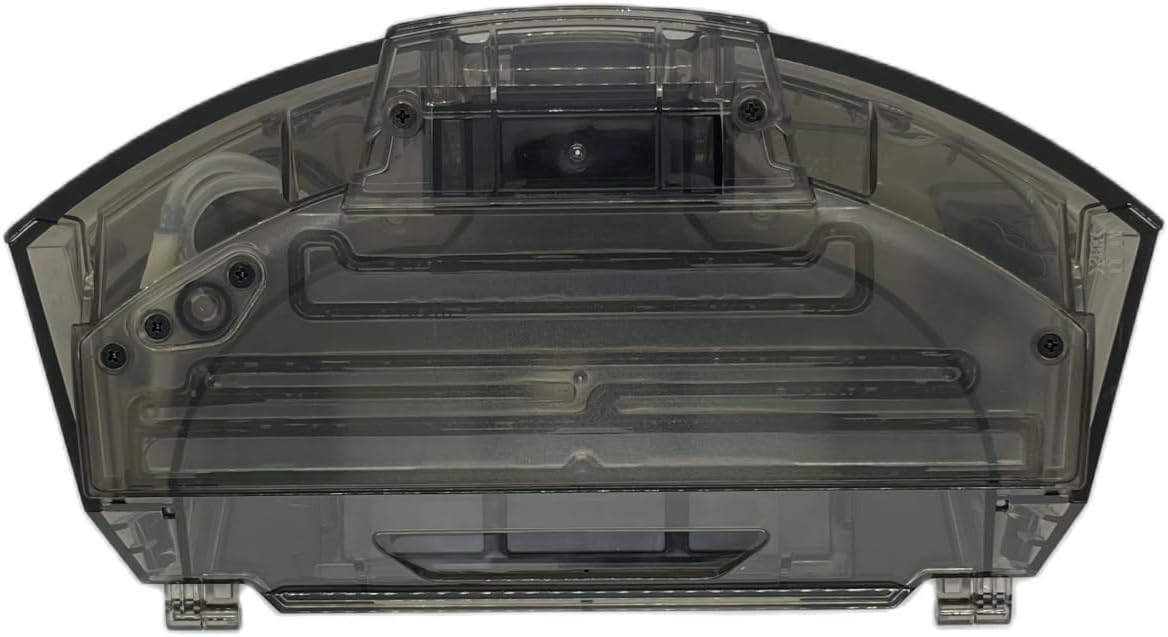
Figure 1: Top view of the water tank assembly, showing the transparent casing and internal structure.

Figure 2: Underside of the water tank, highlighting the filter slot and the pump's location.

Figure 3: The micro water pump, a key component for water dispensing.

Figure 4: Example of Hepa filters, which may be part of the 2-in-1 tank system.
Setup and Installation
Follow these steps to install the PonPed Water Pump accessory into your Arnagar S8 Pro vacuuming robot's water tank.
- Prepare the Robot: Turn off your Arnagar S8 Pro robot and disconnect it from its charging base.
- Remove Water Tank: Locate and carefully remove the existing water tank assembly from the robot. Refer to your robot's main instruction manual if you are unsure how to remove it.
- Access Pump Compartment: Depending on your water tank design, you may need to open a specific compartment or panel to access the old water pump.
- Remove Old Pump (if applicable): If replacing an existing pump, gently disconnect any wiring and carefully remove the old water pump from its housing.
- Install New Water Pump: Insert the new PonPed Water Pump (Figure 3) into the designated slot within the water tank. Ensure it is securely seated and any connections are properly made.
- Reassemble Tank: Close any compartments or panels you opened.
- Reinstall Water Tank: Slide the water tank assembly back into your Arnagar S8 Pro robot until it clicks into place.
Operating Instructions
The water pump operates automatically when the robot is in mopping mode. Ensure proper setup for optimal performance.
- Fill Water Tank: Open the water tank's fill port and carefully fill it with clean water. Do not overfill.
- Attach Mopping Pad: Ensure a clean mopping pad is securely attached to the robot's mopping module.
- Start Mopping Cycle: Place the robot on the floor and initiate a mopping cycle through the robot's controls or companion app, as per the Arnagar S8 Pro's main manual.
- Automatic Dispensing: The water pump will automatically dispense water to the mopping pad during the cleaning cycle, facilitating effective wet cleaning.
Maintenance
Regular maintenance ensures the longevity and optimal performance of your water pump and the robot's mopping function.
- Clean Water Tank: After each mopping session, empty any remaining water from the tank and rinse it thoroughly with clean water. Allow it to air dry completely to prevent mold or mildew buildup.
- Inspect Water Pump: Periodically inspect the water pump for any visible debris, blockages, or signs of wear. Gently clean any accessible parts if necessary.
- Filter Maintenance: If your water tank assembly includes a filter (Figure 4), clean or replace it regularly according to the Arnagar S8 Pro's maintenance schedule. A clogged filter can affect water flow.
- Replacement Schedule: For optimal performance, it is recommended to replace the water pump and other accessories every 2 to 3 months, depending on the frequency of use.
Troubleshooting
If you encounter issues with the water pump, refer to the following common problems and solutions.
- Issue: Water is not dispensing during mopping.
- Solution 1: Check if the water tank is filled with water.
- Solution 2: Ensure the water pump is correctly installed and securely connected within the tank.
- Solution 3: Inspect the water pump and water lines for any blockages or debris. Clean if necessary.
- Solution 4: If the pump is old, consider replacing it as per the recommended maintenance schedule.
- Issue: Robot is not mopping effectively or leaves streaks.
- Solution 1: Verify that the water tank is full and the water pump is dispensing water.
- Solution 2: Ensure the mopping pad is clean and properly attached. Replace if worn out.
- Solution 3: Check for any clogs in the water dispensing nozzles on the tank or mopping module.
Specifications
| Feature | Detail |
|---|---|
| Brand | PonPed |
| Compatibility | Arnagar S8 Pro Vacuuming Robot |
| Item Weight | 0.035 ounces |
| Reusability | Reusable (with proper maintenance) |
| Unit Count | 1.0 Count |
Warranty Information
Specific warranty details for this accessory are not provided in the product information. Please refer to the warranty policy provided with your original Arnagar S8 Pro vacuuming robot or contact PonPed customer support for accessory-specific warranty inquiries.
Customer Support
For any questions regarding the PonPed Water Pump accessory or for further assistance, please contact PonPed customer support. The manufacturer aims to reply within 24 hours.
Contact information may be available on the product packaging or through the retailer where the item was purchased.