
Introduction
The Nachukan Handheld Soil Tester is a professional device designed for comprehensive analysis of soil conditions. It accurately measures soil temperature, humidity, electrical conductivity (EC), pH levels, and NPK (Nitrogen, Phosphorus, Potassium) nutrient values. This manual provides detailed instructions for setting up, operating, maintaining, and troubleshooting your soil tester to ensure optimal performance and accurate results for various agricultural and gardening applications.
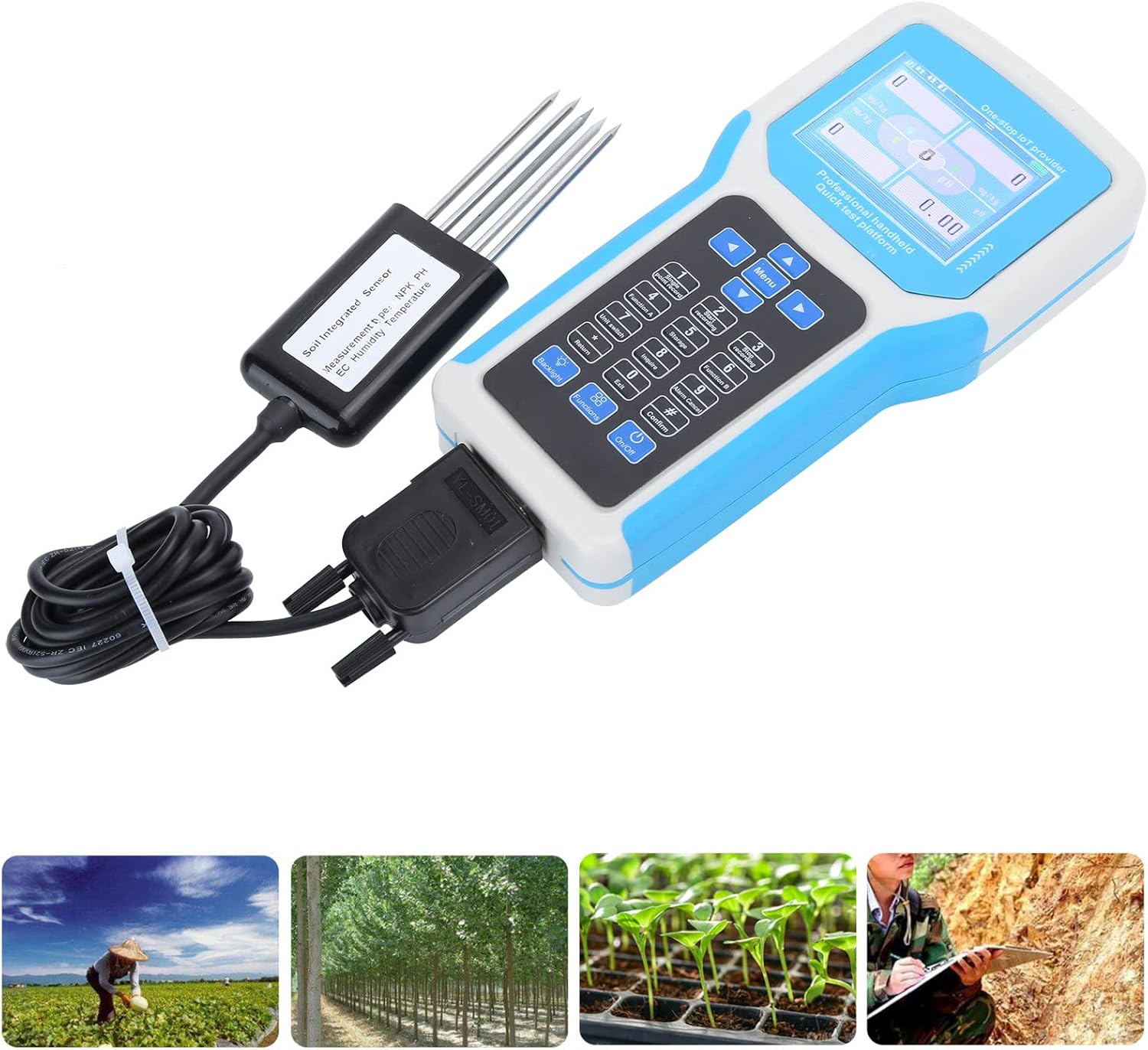
The Nachukan Soil Tester is suitable for a wide range of applications, from home gardening to professional agricultural use.
Package Contents
Please verify that all items listed below are present in your package:
- 1 x Handheld Terminal
- 1 x 5-Pin Sensor
- 1 x Power Adapter (Type may vary)
- 1 x Power Cord (Type may vary)
- 1 x Carrying Case

The complete package includes the handheld terminal, sensor, power accessories, and a protective carrying case.
Product Features
- Multi-Mode Display: Supports both single digital and meter displays, offering versatility in data visualization. Users can choose from multiple measurement data sets and even opt for real-time curve displays, catering to varied soil analysis needs.
- Intuitive Full-Color Interface: Equipped with a large-sized LCD screen, the Soil Detector boasts an embedded full-color interface. This allows for real-time querying, recording, and data display, providing an enhanced user experience.
- User-Friendly Operations: The Soil Temperature Humidity Tester comes with multifunctional buttons, including single-point recording and start/stop recording, ensuring easy and hassle-free operation even for beginners.
- Highly Reliable Performance: Designed for excellence, our Soil Conductivity Tester has a strong anti-interference ability and high sensitivity. It boasts a rapid response speed and comes with an automatic alarm/cancellation function, ensuring accurate soil nutrient measurements every time.
- Extensive Data Storage & Export: With the Soil Nutrient Tester's large capacity storage feature, users can optionally store up to 4MB of data. This data can be effortlessly exported to a computer via Excel, allowing customers to print and edit their findings directly in Excel.
Specifications
| Parameter | Value |
|---|---|
| Item Type | Soil Tester |
| Material | Plastic + Steel |
| Battery Information | 1pcs 7.4V 2500mAh LD74250 Lithium Battery (Built-In) |
| Testing Object | Temperature, Humidity, Conductivity, PH, NPK |
| Voltage | 100-240V |
| Power Supply | 12V DC, 2500mA.H (Standard Configuration) |
| Display Mode | 2.8in LCD Display |
| Communication Method | USB (DB9 interface) |
| Data Storage | 4MB (Standard) |
| Working Temperature | -20℃ to 50℃ |
| Working Humidity | 0-90% (Relative Humidity), Non-Condensing |
| Charging Time | ≤4 Hours |
| Weight | Approx. 4.91 pounds (2233g) |
| Handheld Terminal Size | Approx. 20x10cm (7.9x3.9in) |
| 5-Pin Sensor Size | Approx. 13.8x4.5cm (5.4x1.8in) |
| Manufacturer | Nachukan |
| ASIN | B0CKTM95XV |
Setup
1. Unpacking and Inspection
Carefully remove all components from the carrying case. Inspect each item for any signs of damage. If any components are missing or damaged, please contact customer support.
2. Battery Installation and Charging
The device comes with a built-in lithium battery. Before first use, ensure the battery is fully charged. Connect the provided power adapter and power cord to the handheld terminal's charging port. The charging time is approximately 4 hours.

The battery compartment is located on the rear of the handheld terminal. Ensure the battery is securely in place before closing the cover.
3. Sensor Connection
Locate the 5-pin sensor and the corresponding D-type data interface connector (DB9) on the handheld terminal. Carefully align the connector and plug the sensor cable into the terminal. Ensure a secure connection to prevent data transmission issues.

Connect the 5-pin sensor to the D-type data interface connector on the handheld terminal.
Operation
1. Powering On/Off
Press the On/Off button located at the bottom right of the membrane keyboard to power on the device. To power off, press and hold the On/Off button until the display shuts down.
2. Navigating the Interface
The device features a 2.8-inch LCD display with a full-color interface. Use the arrow keys (Up, Down, Left, Right) and the Menu button to navigate through the various display modes and settings. The Confirm (#) button is used to select options, and Return (*) to go back.

The handheld terminal features a clear LCD display and an intuitive button layout for easy navigation.
3. Performing Measurements
- Prepare the Soil: Ensure the soil is moist enough for accurate readings. If the soil is too dry, water it and wait 20-30 minutes before testing.
- Insert the Sensor: Gently insert the 5-pin sensor into the soil vertically to the desired depth. Ensure all five probes are fully submerged in the soil for accurate readings. Avoid forcing the sensor into hard soil to prevent damage.
- Read Measurements: Once the sensor is stable in the soil, the display will show real-time readings for temperature, humidity, conductivity, pH, and NPK values.
- Record Data: Use the Single point record (1) button to save individual readings, or Start recording (2) and Stop recording (3) for continuous data logging.
- Remove Sensor: After measurement, gently pull the sensor out of the soil.

Insert the sensor firmly into the soil to obtain accurate measurements of various parameters.
Data Management
1. Data Storage
The Nachukan Soil Tester has an internal 4MB storage capacity, allowing you to store a significant amount of measurement data. Use the Storage (5) button to access stored data and the Inquire (8) button to review records.
2. Data Export
To export data, connect the handheld terminal to a computer using a USB cable (via the DB9 interface). The stored data can be effortlessly exported to an Excel file, enabling easy analysis, printing, and editing of your findings.
Maintenance
1. Cleaning
After each use, especially after inserting the sensor into soil, clean the sensor probes thoroughly with a soft cloth and clean water. Remove any soil residue to prevent corrosion and ensure accurate future readings. Do not use abrasive cleaners or immerse the handheld terminal in water.
2. Storage
When not in use, store the Nachukan Soil Tester and its accessories in the provided carrying case. Store in a cool, dry place, away from direct sunlight, extreme temperatures, and corrosive substances. Ensure the battery is charged periodically if stored for long durations to maintain battery health.
Troubleshooting
| Problem | Possible Cause | Solution |
|---|---|---|
| Device does not power on. | Low or uncharged battery; incorrect battery installation. | Charge the battery fully; ensure battery is correctly inserted and connected. |
| Inaccurate or fluctuating readings. | Sensor not fully inserted into soil; sensor probes are dirty; soil is too dry or too wet; sensor damaged. | Ensure sensor is fully inserted and stable; clean sensor probes thoroughly; moisten dry soil or allow overly wet soil to drain; if issues persist, contact support. |
| Data export issues (e.g., not recognized by PC). | Incorrect USB cable connection; missing or outdated drivers on PC; software compatibility issues. | Verify USB cable is securely connected to both device and PC; try a different USB port; check manufacturer's website for drivers if needed; ensure PC operating system is compatible. |
| Display is blank or frozen. | Software glitch; low battery. | Try restarting the device by holding the power button; charge the battery. If problem persists, contact support. |
Warranty and Support
For warranty information, technical support, or service inquiries, please refer to the warranty card included with your product or visit the official Nachukan website. Please have your product model (Soil Tester B0CKTM95XV) and purchase details ready when contacting support.