
ZonQoonz ZQ01511US
ZonQoonz LED Par Light Instruction Manual
Model: ZQ01511US
1. Product Overview
The ZonQoonz LED Par Light (Model ZQ01511US) is a high-power, waterproof stage lighting fixture designed for various indoor and outdoor events. It features 18 RGBWA+UV 6-in-1 LED beads, providing a wide spectrum of colors and lighting effects including color changing, strobe, and gradient. Its robust aluminum and iron alloy construction ensures an IP67 waterproof rating, making it suitable for challenging environments. The light supports multiple control modes, including DMX512, self-propelled, voice-activated, and master/slave, offering versatile operation for professional and event applications.

Image: The ZonQoonz LED Par Light, showcasing its IP67 waterproof design with water splashing around the unit. This image illustrates the product's durability and suitability for outdoor use.
2. Safety Instructions
- Always ensure the power supply voltage matches the light's requirements (100-240V AC).
- Do not open the housing or attempt to repair the unit yourself. Refer all servicing to qualified personnel.
- Ensure proper grounding to prevent electrical shock.
- Avoid direct eye exposure to the light source, as it can cause eye damage.
- Maintain adequate ventilation around the unit to prevent overheating. Do not block ventilation openings.
- Despite its IP67 rating, avoid submerging the light in water for extended periods or using it in extreme conditions beyond its specified operating parameters.
- Disconnect power before cleaning or performing any maintenance.
3. Package Contents
Please verify that all items listed below are included in your package:
- Waterproof Par Light (1 unit)
- Waterproof power cord (1 unit)
- Waterproof signal cable (1 unit)
- Instruction manual (1 unit)
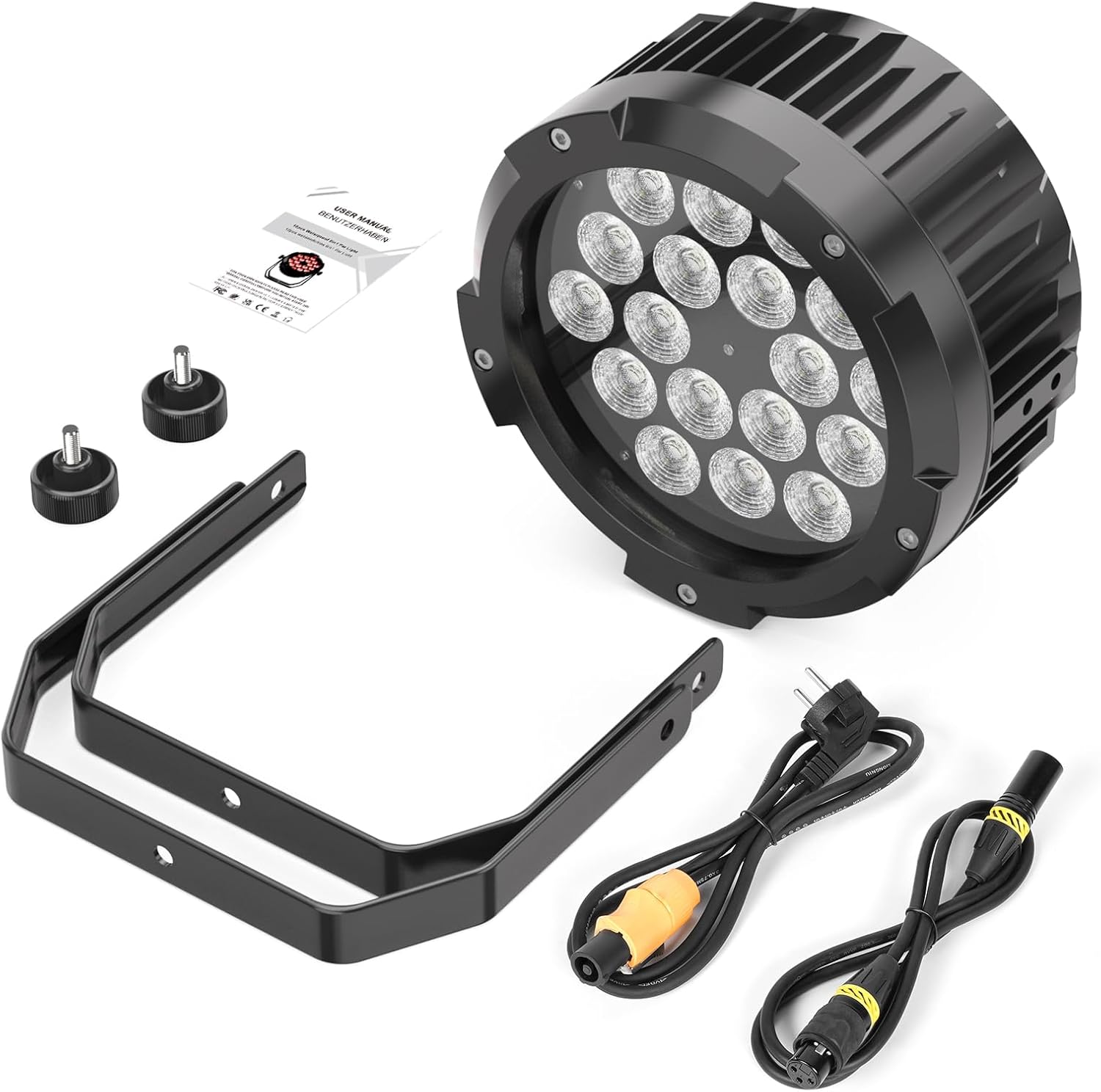
Image: A clear view of the ZonQoonz LED Par Light and its included accessories: the light unit itself, a power cable, a DMX signal cable, and the instruction manual. This confirms the standard contents of the product packaging.
4. Setup
4.1 Mounting
The LED Par Light is equipped with flexible dual brackets and knobs for easy adjustment and versatile mounting options. It can be installed on the floor, truss, or ceiling. Ensure the mounting surface or structure can safely support the weight of the fixture.
- Floor Mount: Place the light on a stable, flat surface using the integrated brackets as a stand.
- Truss/Ceiling Mount: Securely attach the brackets to a compatible truss or ceiling fixture using appropriate clamps (not included). Ensure all connections are tight and secure to prevent accidental falls.


Image: Left: A diagram illustrating the adjustable nature of the light's bracket, allowing for flexible positioning. Right: Various angles and dimensions of the LED Par Light, demonstrating its compact design and the versatility of its mounting bracket for different setups.
4.2 Connections
Connect the light to power and, if applicable, to a DMX controller or other lights for master/slave operation.
- Power Connection: Connect the provided waterproof power cord to the power input on the back of the light. Plug the other end into a suitable power outlet (AC 100-240V).
- DMX Connection (Optional): For DMX control, connect a DMX cable from your DMX controller's output to the "DMX IN" port on the light. To daisy-chain multiple lights, connect a DMX cable from the first light's "DMX OUT" port to the next light's "DMX IN" port.
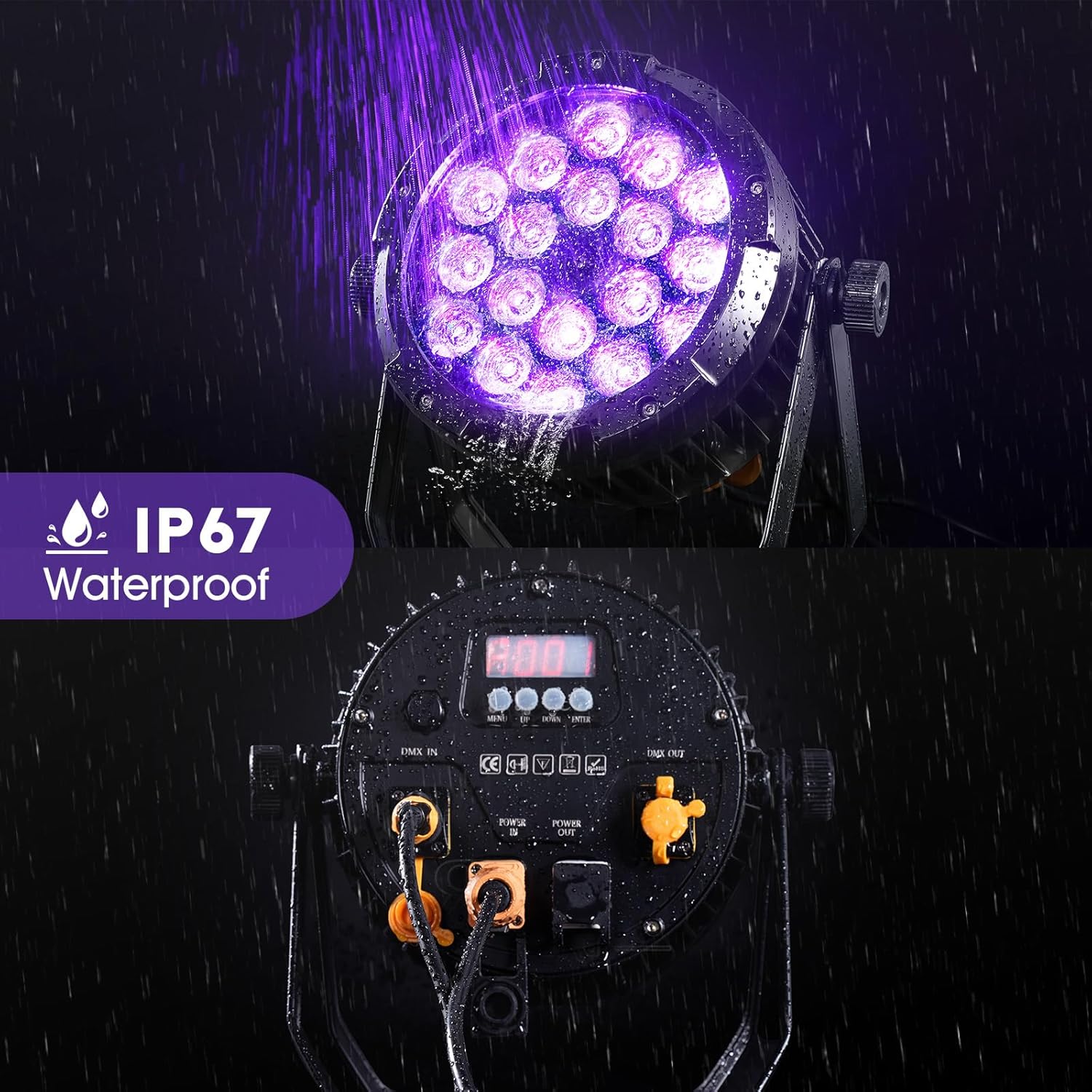
Image: A detailed view of the rear control panel of the LED Par Light, clearly showing the DMX IN, DMX OUT, and power input/output ports. This image is crucial for understanding how to connect the light for power and DMX control.
5. Operating Instructions
The LED Par Light offers multiple control modes for various applications.
5.1 Control Panel Overview
The light features a digital display and four control buttons (Menu, Up, Down, Enter) on the rear panel for mode selection and parameter adjustment.

Image: A close-up of the LED Par Light's digital display and the four control buttons (Menu, Up, Down, Enter) located on the back of the unit, used for navigating settings and modes.
5.2 Control Modes
- DMX512 Mode: Allows professional control over various parameters such as color, dimming, strobe, and effects using a DMX controller. The light supports 6 or 10 DMX channels. Refer to the DMX channel chart in the full manual for specific assignments.
- Auto (Self-Propelled) Mode: The light cycles through pre-programmed effects automatically. Use the control panel to select different auto programs.
- Sound Activated Mode: The light reacts to ambient sound or music, changing patterns and colors in sync with the beat. Adjust sensitivity via the control panel.
- Master/Slave Mode: Connect multiple lights via DMX cables. Set one light as the "Master" and others as "Slave" units. The slave units will mimic the master's operation, ensuring synchronized effects across all connected lights.


Image: Icons representing the various control modes: DMX, Sound Activated, and Auto (Self-Propelled) modes, indicating the versatility of the light's operation.
5.3 Color Mixing and Effects
The 18 RGBWA+UV 6-in-1 LED beads allow for a vast array of color combinations and dynamic effects.
- Color Mixing: Combine Red, Green, Blue, White, Amber, and UV to create millions of hues.
- Dimming: Built-in smooth electronic dimming from 0-100% for precise brightness control.
- Strobe: Adjustable strobe speed for dynamic pulse effects.
- Gradient: Smooth transitions between colors.

Image: A visual representation of the individual colors (Red, Green, Blue, White, Amber, UV) that the LED Par Light can produce, demonstrating its 6-in-1 LED capabilities for rich color mixing.

Image: A comprehensive display of the color spectrum achievable with the LED Par Light, showing distinct light beams for Red, Green, Blue, White, Amber, and UV, illustrating the extensive color palette.
6. Maintenance
- Cleaning: Regularly clean the lens and exterior housing with a soft, lint-free cloth. For stubborn dirt, use a mild, non-abrasive cleaner. Ensure the unit is unplugged before cleaning.
- Inspection: Periodically inspect power and DMX cables for any signs of damage. Replace damaged cables immediately.
- Storage: When not in use, store the light in a dry, dust-free environment, preferably in its original packaging or a padded case to prevent damage.

Image: The LED Par Light operating while being sprayed with water, visually confirming its IP67 waterproof rating and ease of maintenance in wet conditions.
7. Troubleshooting
| Problem | Possible Cause | Solution |
|---|---|---|
| Light does not turn on. | No power supply; faulty cable; internal issue. | Check power connection and outlet. Test with a different power cable. If problem persists, contact support. |
| No DMX control. | Incorrect DMX address; faulty DMX cable; DMX controller issue; incorrect mode. | Verify DMX address setting on the light. Check DMX cable connections. Ensure the light is in DMX mode. Test DMX controller. |
| Light flickers or behaves erratically. | Unstable power; DMX signal interference; overheating. | Ensure stable power supply. Check DMX connections and termination. Allow unit to cool down if hot. |
| Sound activated mode not working. | No sound input; sensitivity too low; microphone issue. | Ensure there is sufficient sound. Adjust sound sensitivity setting on the light. |
8. Specifications
| Brand | ZonQoonz |
| Model Number | ZQ01511US |
| Light Source Type | 18x RGBWA UV 6-in-1 LED |
| Wattage | 180 Watts (Max Compatible) |
| Voltage | 100-240 Volts (AC) |
| IP Rating | IP67 Waterproof |
| Material | Aluminum |
| Product Dimensions | 11.6"L x 5.2"W x 11.5"H |
| Item Weight | 9.68 pounds |
| Control Modes | DMX512 (6/10 channels), Auto, Sound Activated, Master/Slave |
| Dimming | 0-100% Electronic Dimming |
| Certifications | CE, RoHS |
9. Warranty and Support
ZonQoonz is committed to ensuring customer satisfaction and product quality.
- Return and Exchange: Enjoy 30 days of free return and exchange service from the date of purchase.
- Warranty Service: A 365-day warranty service is provided for this product, covering manufacturing defects and malfunctions under normal use.
- Customer Support: For any questions, concerns, or technical assistance, please contact our professional after-sales service team. We aim to resolve any issues within 24 hours.
Ask a question about this manual
Ask about setup, troubleshooting, compatibility, parts, safety, or missing instructions. Manuals+ will review the question and use this page’s manual context to help answer it.