
1. Introduction
Thank you for choosing the ALLPOWERS R600 Solar Generator with the SP027 Solar Panel. This portable power station is designed to provide reliable power for various applications, including camping, RVs, and emergency backup. Featuring a 600W pure sine wave AC inverter, 299Wh LiFePO4 battery, and 100W MPPT solar charging, the R600 offers versatile charging options and a long lifespan. This manual provides essential information for safe and efficient operation, setup, maintenance, and troubleshooting.

Figure 1: ALLPOWERS R600 Solar Generator with SP027 Solar Panel
2. Safety Instructions
- Read all instructions before using the product.
- Do not disassemble, repair, or modify the unit. Incorrect reassembly may cause fire or electric shock.
- Do not expose the unit to fire or excessive temperature. Exposure to fire or temperature above 130°C (266°F) may cause explosion.
- Do not use or charge the unit if it is damaged.
- Keep the unit away from water, high humidity, and direct sunlight.
- Ensure proper ventilation during use and charging to prevent overheating.
- Keep out of reach of children.
- Dispose of the product according to local regulations.
3. Product Overview
3.1 ALLPOWERS R600 Portable Power Station
The R600 is a compact and powerful portable power station designed for various power needs. It features multiple output ports and a clear LCD display for monitoring.

Figure 2: R600 Front and Rear Panel Overview
- Output Ports: 2 AC outlets (110V, 600W Max), 2 USB-A ports (18W Max), 2 USB-C ports (100W Max), 1 Cigarette Lighter port (120W Max), 1 Wireless Charger (15W Max).
- Input Ports: AC Input, Solar Input.
- Display: LCD screen showing battery percentage, input/output wattage, time remaining, and various icons (power saving, fast charge, mute, overload, fan operating, Bluetooth connection).
- Features: Hidden folding handle, LED light (Light mode / SOS mode), Dust cover for ports.

Figure 3: Detailed LCD Display Information
3.2 ALLPOWERS SP027 100W Solar Panel
The SP027 is a highly efficient and portable solar panel designed to charge your R600 power station. It's foldable and lightweight, making it ideal for outdoor use.

Figure 4: SP027 Solar Panel Construction for High Efficiency
- Efficiency: Up to 22% conversion efficiency.
- Portability: Folded size only 20x25.6x1.2 inches, 7.9 lbs.
- Durability: Waterproof and dustproof design.
- Compatibility: Features a solar port (25A max) and comes with various connectors for wide compatibility with solar generators.

Figure 5: SP027 Solar Panel is Waterproof and Dustproof
4. Setup
4.1 Initial Setup of R600
- Unpack the ALLPOWERS R600 unit and all accessories.
- Before first use, fully charge the R600 using the provided AC adapter.
- Press the Power On/Off button to turn on the unit and check the battery level on the LCD display.
4.2 Setting up the SP027 Solar Panel
- Unfold the SP027 solar panel.
- Locate the built-in kickstands on the back of the panel. Extend them to prop up the panel.
- Position the solar panel to face direct sunlight for optimal charging efficiency. Adjust the angle of the kickstands as needed.

Figure 6: Setting up the SP027 Solar Panel Kickstands
4.3 Visual Guide for Setup
Video 1: Setting up the ALLPOWERS R600 and SP027 Solar Panel for charging (Source: Influencer)
Video 2: Quick Review of ALLPOWERS R600 Portable Power Station (Source: Influencer)
5. Operating Instructions
5.1 Powering On/Off
Press and hold the Power On/Off button for 3 seconds to turn the R600 unit on or off. The LCD display will illuminate upon activation.
5.2 Using AC Outlets
To use the AC outlets, ensure the R600 is powered on. Press the AC On/Off button to activate the AC output. The indicator light next to the AC outlets will turn green. Plug in your devices (up to 600W continuous output per outlet, 1200W surge). Press the AC On/Off button again to turn off the AC output when not in use.
5.3 Using DC Outlets (USB-A, USB-C, Car Lighter)
To use the DC output ports, ensure the R600 is powered on. Press the DC On/Off button to activate the DC output. The indicator light next to the DC ports will turn green. Plug in your USB devices or car accessories. Press the DC On/Off button again to turn off the DC output when not in use.
5.4 Using the Wireless Charger
Ensure the R600 is powered on. Place your Qi-compatible device on the wireless charging pad located on top of the unit. The wireless charging icon on the display will indicate active charging.
5.5 Using the LED Light
Press the Light button once for regular light mode. Press again for brighter light. Press a third time for SOS mode (flashing emergency signal). Press a fourth time to turn off the light.
6. Charging the R600
The ALLPOWERS R600 can be charged using multiple methods:
- AC Wall Outlet: Connect the provided AC adapter to the AC input port on the rear of the R600 and plug it into a wall outlet.
- Car Charger: Use the car charger cable to connect the R600 to your vehicle's 12V cigarette lighter port.
- Solar Panel: Connect the SP027 solar panel (or other compatible solar panels) to the solar input port on the rear of the R600. Ensure the solar panel is positioned for maximum sunlight exposure.
Video 3: Hands-On Review of AllPower R600 Power Bank, showing charging setup (Source: Influencer)
7. Using the SP027 Solar Panel
The SP027 solar panel is designed for easy deployment and efficient power generation. It can be used individually or connected in parallel for increased power output.

Figure 7: Multiple SP027 Solar Panels can be connected in parallel for increased power.
Video 4: Demonstrating the setup and use of the ALLPOWERS R600 with Solar Panel (Source: Influencer)
8. UPS Function (Uninterruptible Power Supply)
The ALLPOWERS R600 is equipped with an Uninterruptible Power Supply (UPS) function. When connected to a wall outlet, the R600 can act as a pass-through power source for your devices. If the wall outlet power is interrupted, the UPS will automatically switch to battery power in less than 10ms, ensuring continuous operation for connected devices like computers or medical equipment.

Figure 8: R600 providing UPS battery backup for a computer setup.
9. Maintenance
9.1 Battery Longevity
The R600 uses durable LiFePO4 battery cells, designed for over 3500+ charge cycles, ensuring regular use for up to 10 years. The Battery Management System (BMS) optimizes the internal current cycle for extended battery life.
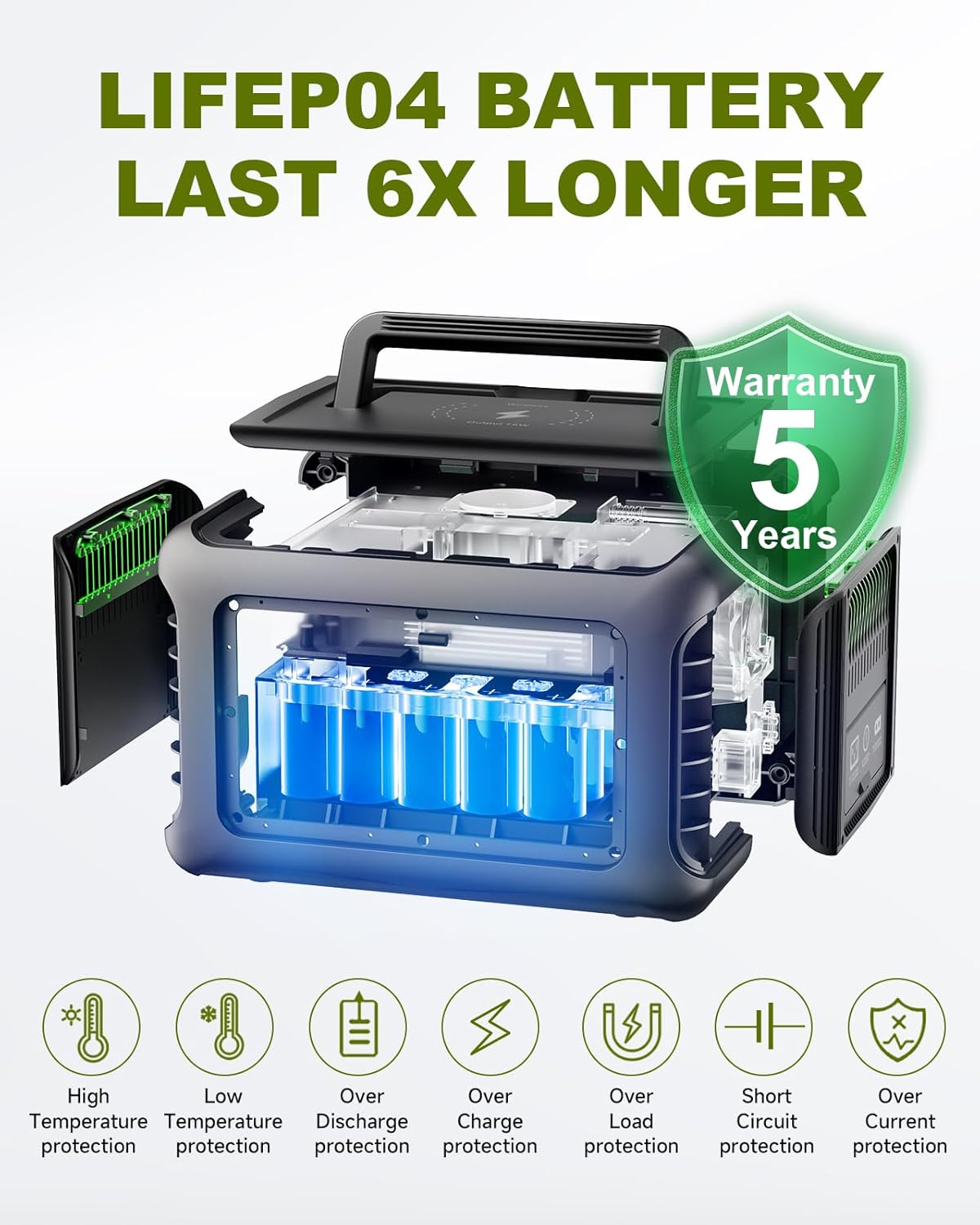
Figure 9: LiFePO4 Battery cells for extended lifespan.
9.2 Storage
Store the R600 in a cool, dry place away from direct sunlight and extreme temperatures. For long-term storage, charge the unit to 50-80% every 3-6 months to maintain battery health.
9.3 Cleaning
Wipe the unit with a dry, soft cloth. Do not use abrasive cleaners or immerse the unit in water.
10. Troubleshooting
If you encounter issues with your ALLPOWERS R600, please refer to the following common problems and solutions:
- Unit Not Turning On: Ensure the battery is charged. If not, connect to an AC outlet or solar panel for charging.
- No Output from Ports: Ensure the specific output section (AC/DC) is activated by pressing its respective button. Check the display for any error codes.
- E2 Error Code: Some users have reported an E2 error code, which may not be listed in the manual. This can often be resolved by turning the unit off and then back on. If the issue persists, contact customer support.
- Battery Not Holding Charge: If the unit does not hold a charge after being unplugged, ensure it is fully charged. If the problem continues, this may indicate a battery issue.
Video 5: Customer review highlighting a battery charge issue. If you experience this, please contact ALLPOWERS support.
For any persistent issues or error codes not listed, please contact ALLPOWERS customer support.
11. Specifications
| Feature | Specification |
|---|---|
| Brand | ALLPOWERS |
| Model Number | R600+SP-027-1 |
| Wattage | 600W (Continuous), 1200W (Surge) |
| Battery Type | LiFePO4 |
| Battery Capacity | 299Wh |
| Voltage | 110V (AC) |
| Frequency | 60 Hz |
| Total Power Outlets | 9 |
| Included Components | R600 Solar Generator, SP027 100W Solar Panel |
| Product Dimensions | 7.6 x 11.5 x 7.5 inches |
| Power Source | Solar Powered |
| Recommended Uses | Residential, Camping |
12. Warranty & Support
The ALLPOWERS R600 Solar Generator and SP027 Solar Panel come with a 5-year warranty, reflecting the high quality and durability of the product.
For technical support, warranty claims, or any questions regarding your product, please contact ALLPOWERS customer service through their official website or the contact information provided in your product packaging.