
1. Introduction
The Jebao RW-15 Wavemaker is designed to create natural wave-like water movement in your aquarium, promoting a healthier environment for aquatic life. This device features a powerful propeller pump and an external controller, allowing for adjustable flow rates and various operational modes to simulate diverse marine conditions. This manual provides detailed instructions for the safe installation, operation, and maintenance of your RW-15 Wavemaker.
2. Safety Information
- Always disconnect the power supply before performing any maintenance, installation, or removal of the wavemaker from the aquarium.
- Ensure your hands are dry when handling the power adapter and controller to prevent electrical shock.
- The wavemaker and controller are designed for indoor use only. Do not expose them to direct sunlight or extreme temperatures.
- Do not operate the pump out of water. Ensure the pump is fully submerged before connecting power.
- Keep all electrical connections away from water to prevent damage and ensure safety.
- This product is not intended for use by persons (including children) with reduced physical, sensory, or mental capabilities, or lack of experience and knowledge, unless they have been given supervision or instruction concerning use of the appliance by a person responsible for their safety.
3. Package Contents
Please verify that all the following components are included in your package:
- Jebao RW-15 Wavemaker Pump
- External Controller
- AC Power Adapter
- Connecting Cables

This image displays all components included in the package: the Jebao RW-15 wavemaker pump, its external controller, the AC power adapter, and connecting cables.
4. Product Features
- 8 different flow rates from 700 L/H to 8,000 L/H
- Easy installation with magnetic base
- Low voltage reliable power supply
- One-touch feed mode
- Power consumption of 12W to 35W
5. Setup and Installation
5.1 Mounting the Wavemaker
- Identify a suitable location within your aquarium for optimal water circulation. Avoid placing it directly against decorations or substrate that could impede flow.
- Place the wavemaker pump inside the aquarium, ensuring it is fully submerged.
- Position the external magnet on the outside of the aquarium glass, directly opposite the internal magnet of the pump. The strong magnetic force will secure the pump in place.
- Adjust the angle of the wavemaker to direct the water flow as desired. The pump head can be rotated up to 90 degrees.

This diagram illustrates how the wavemaker is securely attached to the aquarium glass using two strong magnets, suitable for glass up to 15mm thick. It also indicates the product's compatibility with both freshwater and saltwater environments without corrosion.
5.2 Connecting the Controller and Power
- Connect the wavemaker pump cable to the designated port on the controller.
- Connect the AC power adapter to the controller.
- Plug the AC power adapter into a suitable electrical outlet. Ensure a drip loop is formed with the power cord to prevent water from traveling along the cord to the outlet.

This image shows the wavemaker pump with its dimensions: 126mm height, 79mm width, and 55mm depth. A detailed view of the controller is also presented, highlighting its buttons and dial.
6. Operating Instructions
The controller allows you to customize the wavemaker's operation. Familiarize yourself with the buttons and dial:
- SPEED/NIGHT Button: Press to cycle through different flow speeds. Hold to activate/deactivate Night Mode (if light sensor is enabled).
- MODE/FEED Button: Press to cycle through different wave modes (W1, W2, Else, H, C). Hold to activate Feed Mode.
- Wi-Le/LOCK Button: Press to switch between Master/Slave mode for multiple wavemakers. Hold to lock/unlock controller settings.
- PUMP Dial: Adjusts the intensity or frequency of the wave patterns depending on the selected mode.
6.1 Operational Modes
- W1 Mode (Wave Mode): Creates a wave effect. Adjust the PUMP dial to change the wave frequency.
- W2 Mode (Sine Wave Mode): A smoother, more consistent wave pattern.
- Else Mode (Random Flow Mode): The pump operates at random speeds and intervals, simulating natural ocean currents.
- H Mode (Constant Flow Mode): The pump operates at a constant, user-selected speed. Use the SPEED button to adjust.
- C Mode (Alternating Flow Mode): If two wavemakers are connected (Master/Slave), they will alternate on and off.
6.2 Feed Mode
Hold the MODE/FEED button for 3 seconds to activate Feed Mode. The wavemaker will pause for 10 minutes, allowing fish to feed without food being swept away. The timer will be indicated by a flashing light. The wavemaker will automatically resume normal operation after 10 minutes, or you can press the MODE/FEED button again to exit Feed Mode manually.
6.3 Night Mode
The controller features a light sensor. Hold the SPEED/NIGHT button for 3 seconds to activate Night Mode. When the light sensor detects darkness, the wavemaker will automatically reduce its flow rate to a gentler setting, providing a calmer environment for nocturnal aquatic life. It will resume normal operation when light is detected.
6.4 Master/Slave Function
If you have multiple Jebao wavemakers, you can link them wirelessly. Designate one controller as the Master and others as Slaves using the Wi-Le/LOCK button. The Slave units will then mimic the operational settings of the Master unit.
6.5 Lock Function
To prevent accidental changes to your settings, hold the Wi-Le/LOCK button for 3 seconds to lock the controller. The indicator light will confirm the lock status. Repeat the action to unlock.

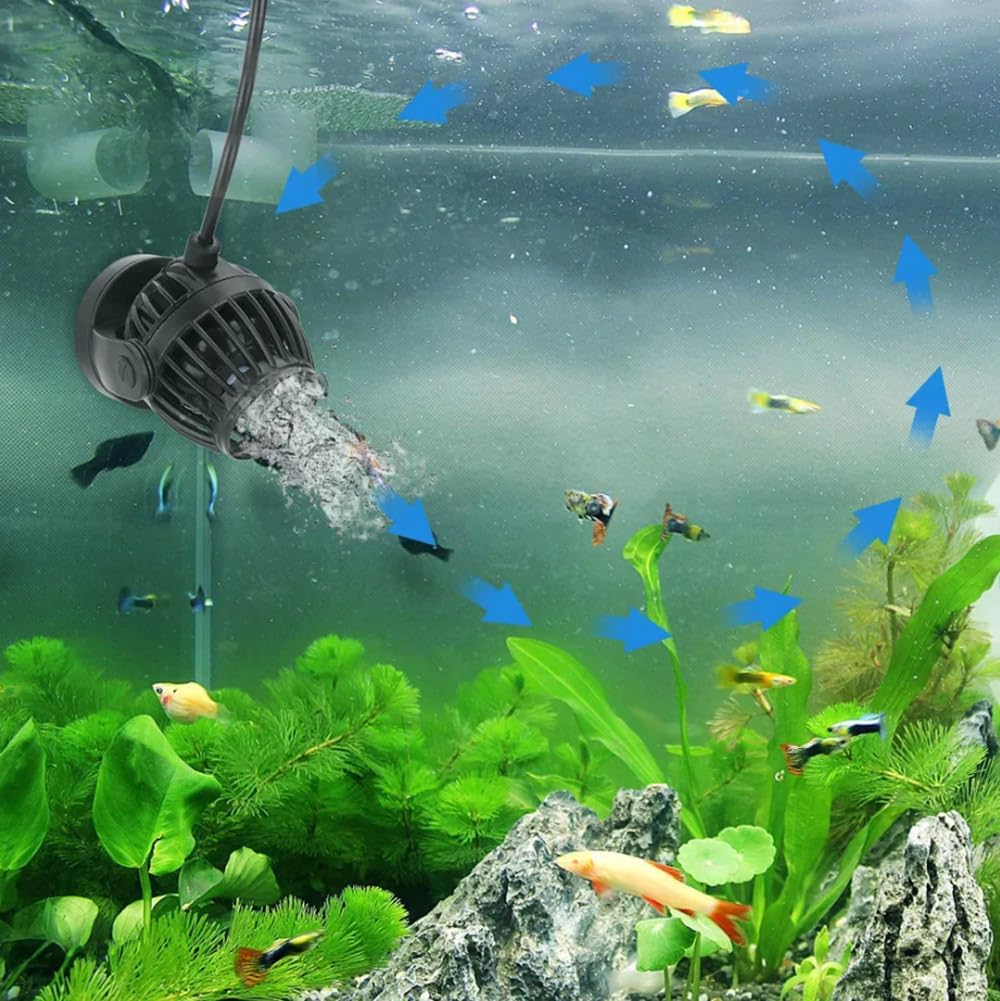
This image shows the Jebao RW-15 wavemaker installed and operating within a vibrant aquarium, demonstrating the water circulation it creates among fish and aquatic plants. Blue arrows indicate the direction of water flow.
7. Maintenance
Regular cleaning of your wavemaker is essential to ensure optimal performance and longevity.
- Disconnect Power: Always unplug the power adapter from the electrical outlet before handling the wavemaker.
- Remove from Aquarium: Carefully remove the wavemaker pump from the aquarium.
- Disassemble: Gently twist and pull apart the filter cover and propeller assembly from the main pump body. Refer to the exploded view diagram for guidance.
- Clean Components: Use a soft brush or cloth to remove any algae, detritus, or mineral deposits from the impeller, propeller, filter cover, and pump housing. For stubborn deposits, a mild vinegar solution or aquarium-safe cleaning agent can be used, followed by thorough rinsing with fresh water.
- Inspect: Check the impeller and spindle for any signs of wear or damage. Replace if necessary.
- Reassemble: Carefully reassemble all components, ensuring they fit securely.
- Reinstall: Place the cleaned wavemaker back into the aquarium and reconnect the power.
This exploded view breaks down the wavemaker into its main parts: the magnet seat for stable pump fixation, the spindle allowing 90-degree rotation adjustment, the propeller designed for strong flow, and the filter cover to prevent fish suction.
8. Troubleshooting
- Pump not running:
- Check if the power adapter is securely plugged into the outlet and the controller.
- Ensure the controller is connected correctly to the pump.
- Verify that the power outlet is functional.
- Inspect the cables for any visible damage.
- Weak or inconsistent flow:
- Clean the pump impeller and housing as described in the Maintenance section. Algae or debris can restrict flow.
- Ensure the pump is fully submerged and not drawing air.
- Adjust the speed setting on the controller.
- Unusual noise or vibration:
- Disconnect power and inspect the impeller for any foreign objects (e.g., sand, small snails) that may be causing obstruction.
- Ensure the pump is securely mounted and not vibrating against the aquarium glass.
- Clean the impeller and spindle thoroughly.
- Controller not responding:
- Unplug the power adapter, wait 30 seconds, and plug it back in to reset the controller.
- Ensure the controller is not in 'Lock' mode.
9. Specifications
| Feature | Specification |
|---|---|
| Brand | Himarine (Jebao) |
| Model Number | RW15 US |
| Power Source | AC |
| Voltage | 24 Volts |
| Maximum Flow Rate | 8000 Liters Per Hour (approx. 300-4000 GPH) |
| Power Consumption | 12W to 35W |
| Product Dimensions | 8.5"L x 6.5"W x 7"H |
| Material | Plastic |
| Color | Black |
| Tank Thickness Compatibility | Up to 15mm (for magnetic mount) |
10. Warranty and Support
For warranty information or technical support, please refer to the documentation provided with your purchase or contact the retailer or manufacturer directly. Keep your proof of purchase for warranty claims.