
VESOGY 9158F
VESOGY Infrared Thermometer Gun User Manual
Model: 9158F | Brand: VESOGY
1. Introduction
The VESOGY Infrared Thermometer Gun is a highly accurate and easy-to-use device designed for non-contact temperature measurement. It is suitable for a wide range of applications including cooking, industrial inspections, and home maintenance. This thermometer provides quick and reliable readings without direct contact, ensuring safety and convenience.
Important Safety Note: This thermometer is NOT suitable for measuring human or animal body temperature. It measures surface temperature only.

Figure 1: VESOGY Infrared Thermometer Gun
2. Setup
2.1 Battery Installation
The thermometer requires two AAA batteries (included). To install or replace batteries:
- Locate the battery compartment cover at the base of the handle.
- Slide the cover open in the direction indicated by the arrow.
- Insert two AAA batteries, ensuring correct polarity (+/-).
- Close the battery compartment cover securely.

Figure 2: Battery Installation
3. Operating Instructions
3.1 Basic Measurement
To take a temperature reading:
- Point the thermometer's laser at the desired target surface.
- Press and hold the trigger. The display will show a live temperature reading.
- Release the trigger to hold the last measured temperature on the display.

Figure 3: Laser Aiming for Accurate Readings
3.2 Display Features
The thermometer features an HD colorful VA display that illuminates numbers with distinct resolution, making it easy to read in low-light or no-light conditions. It also includes a 20-second auto-off function to conserve battery life and a low battery indicator.
- Scan Mode: Indicates active measurement.
- Hold Mode: Displays the last measured temperature.
- Max/Min/Avg Mode: Shows maximum, minimum, or average temperatures during a scan.
- Emissivity Icon: Indicates the current emissivity setting.
- Temperature Unit Icon: Displays temperature in °F or °C.
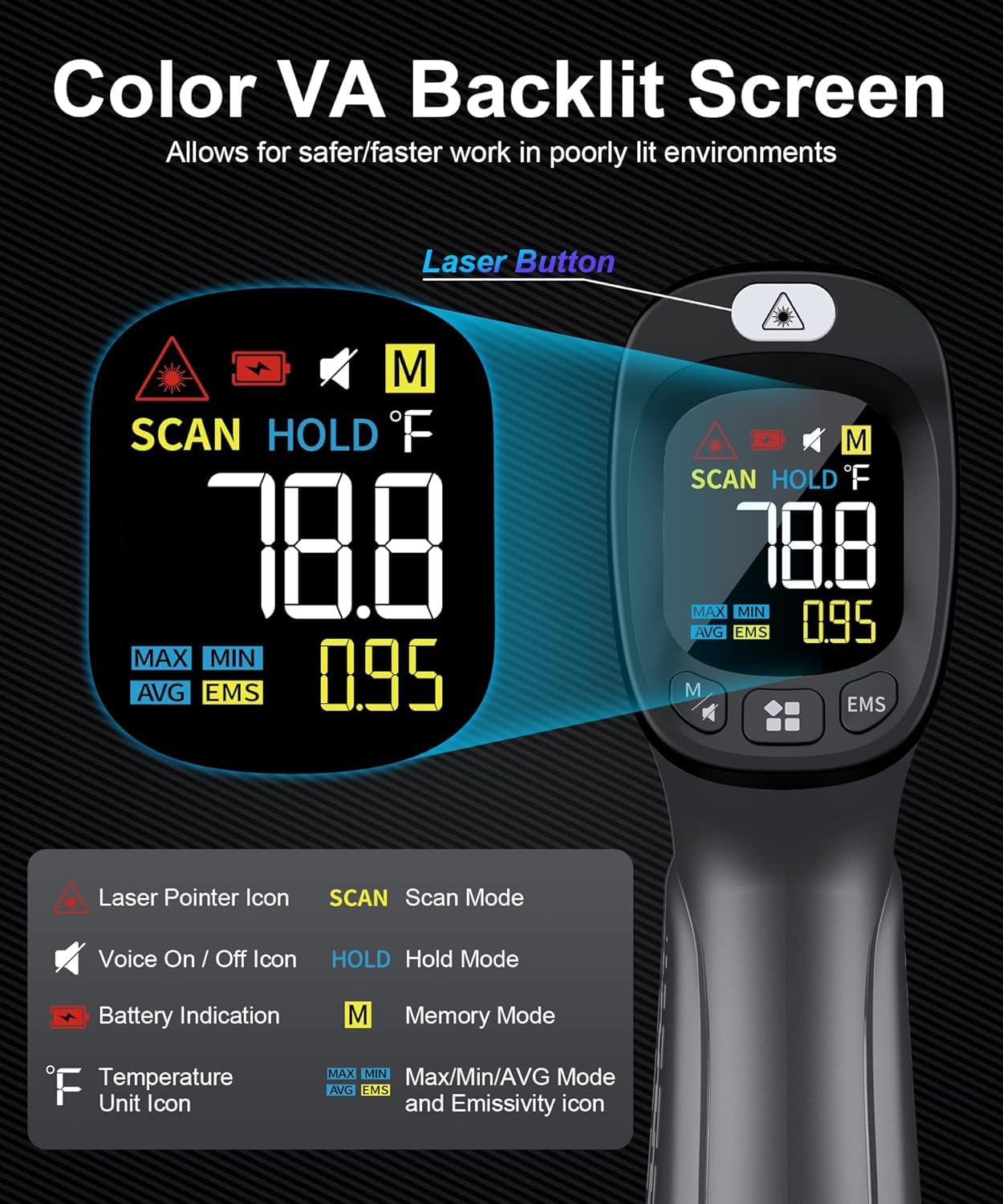
Figure 4: Detailed Display Information
3.3 Measurement Modes
The device offers multiple measurement modes for comprehensive analysis:
- Max Mode: Displays the highest temperature recorded during a continuous scan.
- Min Mode: Displays the lowest temperature recorded during a continuous scan.
- Average Mode: Calculates and displays the average temperature over a continuous scan.

Figure 5: Understanding Measurement Modes
3.4 Adjustable Emissivity and Distance-to-Spot Ratio (D:S)
Emissivity is crucial for accurate temperature readings, as different materials emit infrared energy differently. This thermometer allows for adjustable emissivity to ensure precise measurements on various surfaces. The D:S ratio of 12:1 means that from 12 inches away, the thermometer measures a 1-inch area.

Figure 6: Emissivity and Distance-to-Spot Ratio
Emissivity Table (Common Materials)
| Emissivity | Material |
|---|---|
| 0.98 | Limestone, frost crystals, filed surface graphite |
| 0.95 | Asbestos, asphalt, ceramic, concrete, copper, dirt, paper, black paint, rubber, candle soot, soil saturated with water, distilled water |
| 0.9 | Red brick, frozen food, sand, textile, planed wood, slight pattern red wallpaper, untreated plasterboard, black paper, lacquer enamel, untreated chipboard |
| 0.85 | Carbon, porous untreated fibre board, hard untreated fibre board, green paper, snow, common brass |
| 0.75 | Sawdust, fireclay, fused quartz, glazed grog |
4. Maintenance
To ensure the longevity and accuracy of your thermometer, follow these maintenance guidelines:
- Cleaning: Wipe the device clean with a soft, damp cloth. Do not use abrasive cleaners or immerse the device in water.
- Storage: Store the thermometer in a cool, dry place away from direct sunlight and extreme temperatures.
- Battery Care: Remove batteries if the device will not be used for an extended period to prevent leakage.
5. Troubleshooting
If you encounter issues with your thermometer, refer to the following common solutions:
- No Display/Power: Check battery installation and ensure batteries are not depleted. Replace if necessary.
- Inaccurate Readings: Verify the emissivity setting matches the material being measured. Ensure the target is within the optimal distance-to-spot ratio.