
1. Introduction
Thank you for purchasing the Sunbeam SIC-31A Single Plate Induction Cooker. This manual provides important information regarding the safe operation, maintenance, and troubleshooting of your new appliance. Please read it thoroughly before use and retain it for future reference.
The Sunbeam SIC-31A is a modern, efficient single induction cooker designed for convenient and precise cooking. It features touch controls, a durable crystal plate, and various cooking functions to enhance your culinary experience.
2. Important Safety Instructions
When using electrical appliances, basic safety precautions should always be followed to reduce the risk of fire, electric shock, and injury to persons, including the following:
- Read all instructions carefully before operating the appliance.
- Do not touch hot surfaces. Use handles or knobs.
- To protect against electrical shock, do not immerse cord, plugs, or the appliance in water or other liquid.
- Close supervision is necessary when any appliance is used by or near children.
- Unplug from outlet when not in use and before cleaning. Allow to cool before putting on or taking off parts.
- Do not operate any appliance with a damaged cord or plug or after the appliance malfunctions or has been damaged in any manner.
- The use of accessory attachments not recommended by the appliance manufacturer may cause injuries.
- Do not use outdoors.
- Do not let cord hang over edge of table or counter, or touch hot surfaces.
- Do not place on or near a hot gas or electric burner, or in a heated oven.
- Extreme caution must be used when moving an appliance containing hot oil or other hot liquids.
- Always attach plug to appliance first, then plug cord into the wall outlet. To disconnect, turn any control to "off", then remove plug from wall outlet.
- Do not use appliance for other than intended use.
- Only use induction-compatible cookware with a flat bottom.
- Do not place metal objects such as knives, forks, spoons, lids, cans, or aluminum foil on the induction cooktop as they can become hot.
- Ensure adequate ventilation around the appliance during operation.
3. Product Features
The Sunbeam SIC-31A Induction Cooker is equipped with advanced features for efficient and safe cooking:
- Sensor Touch Control: Easy-to-use touch interface on a sleek black crystal plate.
- Integrated Timer: Features a 2-hour timer for precise cooking durations.
- 24-Hour Preset Function: Allows for delayed cooking starts.
- Power and Voltage Display: Shows real-time voltage and power consumption during operation.
- Multiple Cooking Functions: Offers 5 distinct cooking functions for versatile meal preparation.
- Single Plate Design: Compact and ideal for small spaces or supplementary cooking.
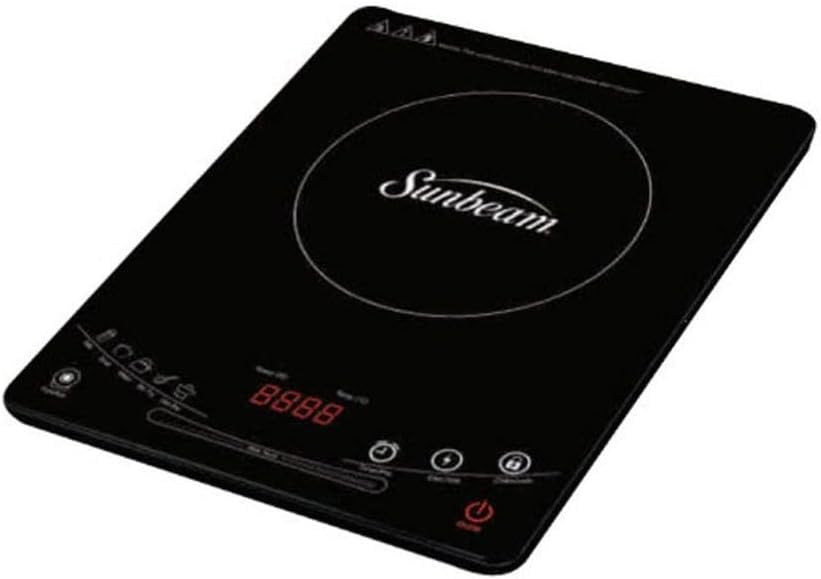
Image: The Sunbeam SIC-31A Single Plate Induction Cooker, showcasing its black crystal plate, touch control panel, and digital display. The Sunbeam logo is visible in the center of the cooking zone.
4. Setup
- Unpacking: Carefully remove the induction cooker from its packaging. Retain packaging materials for future storage or transport if needed.
- Placement: Place the induction cooker on a stable, flat, and heat-resistant surface. Ensure there is adequate space (at least 10-15 cm) around all sides for proper ventilation. Do not place it near water sources, open flames, or other heat-generating appliances.
- Power Connection: Ensure your hands are dry before plugging the appliance into a standard electrical outlet. Verify that the voltage rating of the cooker matches your local power supply.
- Cookware Check: Before first use, ensure you have suitable induction-compatible cookware. This typically includes pots and pans made of cast iron, enameled iron, or stainless steel with a magnetic bottom. The bottom of the cookware should be flat and cover a significant portion of the cooking zone.
5. Operating Instructions
Follow these steps to operate your Sunbeam SIC-31A Induction Cooker:
- Power On: Place suitable cookware with food on the center of the crystal plate. Plug the power cord into a wall outlet. Press the Power button (usually indicated by a power symbol) to turn on the cooker. The display will illuminate.
- Select Cooking Function: Use the touch controls to select your desired cooking function (e.g., Fry, Boil, Soup, etc.). The specific functions may be indicated by icons or text on the control panel.
- Adjust Power/Temperature: Once a function is selected, you can typically adjust the power level or temperature using the '+' and '-' buttons. The digital display will show the current setting.
- Using the Timer: To set a cooking time, press the Timer button. Use the '+' and '-' buttons to adjust the duration (up to 2 hours). The cooker will automatically turn off when the timer expires.
- Using the Preset Function: To use the 24-hour preset function, press the Preset button. Set the desired delay time using '+' and '-' buttons. After setting the delay, select your cooking function and power level. The cooker will start automatically after the preset time.
- Monitoring Display: The display will show the selected power/temperature, remaining timer, and may cycle to show current voltage and watts consumption.
- Power Off: After cooking, press the Power button to turn off the cooker. The fan may continue to run for a short period to cool down the internal components. Unplug the appliance from the wall outlet once it has cooled.
6. Maintenance and Cleaning
Proper maintenance ensures the longevity and optimal performance of your induction cooker:
- Always Unplug: Before cleaning, ensure the cooker is unplugged from the power outlet and has completely cooled down.
- Cleaning the Surface: Wipe the black crystal plate and control panel with a soft, damp cloth. For stubborn stains, a mild dish soap solution can be used. Avoid abrasive cleaners, scouring pads, or harsh chemicals, as they can scratch or damage the surface.
- Cleaning the Body: Wipe the exterior body with a soft, damp cloth.
- Ventilation Openings: Ensure the ventilation openings on the bottom and sides of the cooker are free from dust and debris. Use a soft brush or vacuum cleaner to gently clear them if necessary.
- Do Not Immerse: Never immerse the induction cooker in water or any other liquid.
- Drying: Ensure all parts are thoroughly dry before plugging the cooker back in or storing it.
- Storage: Store the appliance in a cool, dry place when not in use.
7. Troubleshooting
If you encounter issues with your Sunbeam SIC-31A, refer to the following common problems and solutions:
| Problem | Possible Cause | Solution |
|---|---|---|
| Cooker does not turn on. | No power supply; Power cord not properly plugged in; Appliance malfunction. | Check if the power cord is securely plugged into a working outlet. Try another outlet. If problem persists, contact customer support. |
| Cooker turns on but does not heat. | Cookware is not induction-compatible; Cookware is too small or not centered; No cookware on the plate. | Ensure cookware is induction-compatible (magnetic). Use cookware with a flat bottom that covers the cooking zone. Center the cookware on the plate. |
| Display shows an error code (e.g., E0, E1). | Specific error condition (e.g., overheating, voltage issue, sensor error). | Refer to the specific error code in a more detailed manual if available. Generally, unplug the unit, let it cool down, and plug it back in. If the error persists, contact customer support. |
| Fan continues to run after turning off. | Normal cooling process. | This is normal. The fan will stop automatically once the internal components have cooled down sufficiently. |
If the problem persists after attempting these solutions, please contact Sunbeam customer support or a qualified service technician. Do not attempt to repair the appliance yourself.
8. Specifications
| Attribute | Detail |
|---|---|
| Brand | Sunbeam |
| Model | SIC-31A |
| Colour | Black |
| Product Dimensions | 36 x 28 x 4 cm |
| Item Weight | 2.58 kg |
| Control Type | Sensor Touch |
| Timer | 2-hour timer |
| Preset Function | 24-hour preset |
| Display | Shows voltage and watts consumption |
| ASIN | B0CKSTWYZB |
| Date First Available | 10 October 2023 |
9. Warranty and Support
For warranty information and customer support, please refer to the documentation provided with your purchase or contact the retailer where the Sunbeam SIC-31A Induction Cooker was acquired. Keep your proof of purchase for warranty claims.
Spare part availability information was not provided with the product data. For inquiries regarding spare parts, please contact Sunbeam customer service directly.