
Sunbeam SIC-200A
Sunbeam SIC-200A Double Plate Induction Cooker
User Manual
Introduction
Thank you for choosing the Sunbeam SIC-200A Double Plate Induction Cooker. This appliance is designed for efficient and versatile cooking, offering both built-in and freestanding installation options. Featuring intuitive touch controls, a powerful 1800W large element, a 1200W small element, and five distinct cooking functions, it provides precise control for a wide range of culinary tasks. Please read this manual thoroughly before operation to ensure safe and optimal use of your new induction cooker.
Important Safety Instructions
When using electrical appliances, basic safety precautions should always be followed, including the following:
- Read all instructions before using the appliance.
- Do not touch hot surfaces. Use handles or knobs.
- To protect against electrical shock, do not immerse cord, plugs, or the appliance in water or other liquid.
- Close supervision is necessary when any appliance is used by or near children.
- Unplug from outlet when not in use and before cleaning. Allow to cool before putting on or taking off parts.
- Do not operate any appliance with a damaged cord or plug or after the appliance malfunctions or has been damaged in any manner.
- The use of accessory attachments not recommended by the appliance manufacturer may cause injuries.
- Do not use outdoors.
- Do not let cord hang over edge of table or counter, or touch hot surfaces.
- Do not place on or near a hot gas or electric burner, or in a heated oven.
- Extreme caution must be used when moving an appliance containing hot oil or other hot liquids.
- Always attach plug to appliance first, then plug cord into the wall outlet. To disconnect, turn any control to "off", then remove plug from wall outlet.
- Do not use appliance for other than intended use.
- Ensure proper ventilation around the appliance during operation.
- Use only induction-compatible cookware.
Product Overview
The Sunbeam SIC-200A features a sleek black crystal plate with two cooking zones and intuitive sensor touch controls.
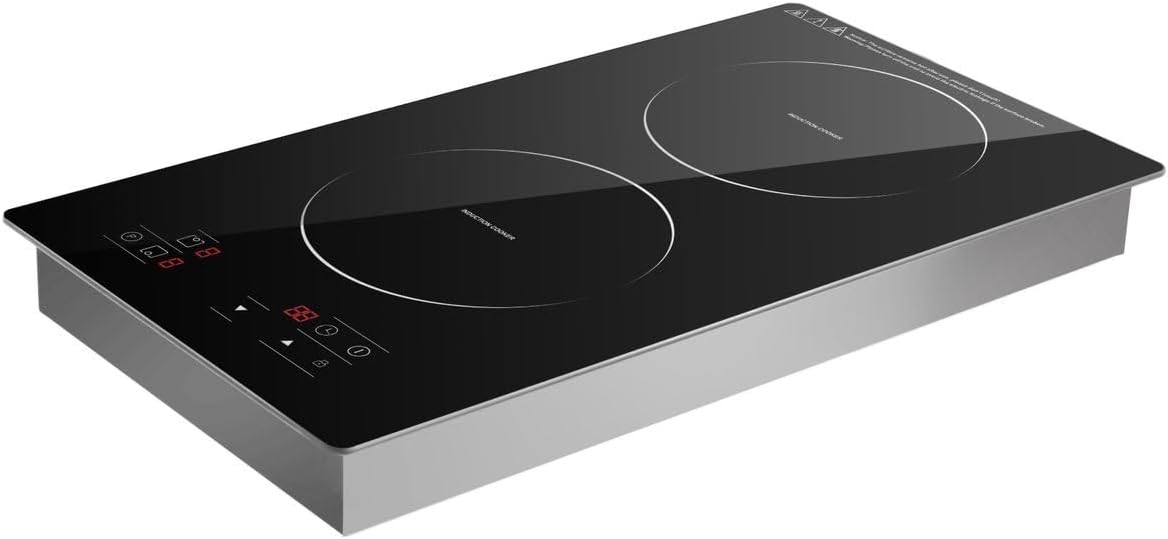
Image: Sunbeam SIC-200A Double Plate Induction Cooker. This image displays the top surface of the induction cooker, highlighting its two circular cooking zones and the digital touch control panel located at the front. The surface is black glass, and the controls include power, temperature/power level adjustments, and a timer function.
Components:
- Black Crystal Plate: Durable and easy-to-clean cooking surface.
- Large Element (1800W): For larger pots and faster heating.
- Small Element (1200W): For smaller pots and simmering.
- Sensor Touch Controls: Responsive panel for power, temperature, and timer settings.
- Ventilation Openings: Located on the sides/bottom for proper airflow.
Setup
Unpacking:
- Carefully remove the induction cooker from its packaging.
- Remove all packing materials, stickers, and labels.
- Inspect the appliance for any damage. Do not use if damaged.
Placement:
- Freestanding: Place the cooker on a stable, flat, heat-resistant surface, ensuring adequate ventilation around all sides. Do not block the ventilation openings.
- Built-in: If installing as a built-in unit, ensure the counter opening dimensions match the cooker's specifications and that there is sufficient clearance for ventilation beneath and around the unit. Consult a qualified installer if unsure.
- Keep the cooker away from water sources and heat-sensitive materials.
Initial Cleaning:
- Before first use, wipe the black crystal plate with a soft, damp cloth.
- Ensure the surface is completely dry before plugging in the appliance.
Operating Instructions
Compatible Cookware:
Induction cookers require cookware with a magnetic base. Look for the induction symbol on the bottom of your pots and pans. Suitable materials include cast iron, magnetic stainless steel, and enamel on steel. Cookware with non-magnetic bases (e.g., aluminum, copper, glass, ceramic) will not work.
Basic Operation:
- Place suitable cookware centrally on the desired cooking zone.
- Plug the power cord into a grounded electrical outlet.
- Press the Power On/Off button to activate the cooker. The display will light up.
- Select the desired cooking zone by pressing its corresponding zone selection button (if applicable, or it may activate automatically when cookware is detected).
- Adjust the power level or temperature using the +/- buttons or dedicated function buttons. The cooker offers flexible firepower and temperature modes.
- To turn off a cooking zone, press its zone selection button again or reduce the power level to zero. To turn off the entire cooker, press the main Power On/Off button.
Cooking Functions:
The Sunbeam SIC-200A features five cooking functions for various culinary needs. Refer to the control panel for specific function icons. These typically include modes for boiling, frying, simmering, and keeping warm, each with optimized power settings.
Timer Function:
- Press the Timer button.
- Use the +/- buttons to set the desired cooking time.
- The cooker will automatically shut off when the set time expires, providing added convenience and safety.
Maintenance and Cleaning
General Cleaning:
- Always unplug the cooker and allow it to cool completely before cleaning.
- Wipe the black crystal plate with a soft, damp cloth and mild detergent. For stubborn stains, use a non-abrasive ceramic hob cleaner.
- Do not use abrasive cleaners, scouring pads, or harsh chemicals, as these can scratch or damage the surface.
- Wipe the control panel gently with a damp cloth. Ensure no liquid enters the control area.
- Clean the exterior housing with a soft, damp cloth.
- Ensure all parts are thoroughly dry before storing or next use.
Storage:
- Store the cooker in a cool, dry place when not in use.
- Avoid placing heavy objects on the cooker surface during storage.
Troubleshooting
Before contacting customer service, please refer to the following common issues and solutions:
| Problem | Possible Cause | Solution |
|---|---|---|
| Cooker does not turn on. | Not plugged in; power outage; faulty outlet. | Ensure plug is securely in outlet; check circuit breaker; try a different outlet. |
| Cooker turns on but does not heat. | Incompatible cookware; cookware not centered; no cookware present. | Use induction-compatible cookware; center cookware on zone; place cookware on zone before activating. |
| Display shows an error code. | Overheating; internal malfunction; ventilation blocked. | Turn off and unplug; allow to cool; ensure ventilation is clear. If error persists, contact customer service. |
| Fan noise is loud. | Normal operation; fan activates to cool components. | This is normal. Ensure ventilation openings are not blocked. |
Specifications
| Brand | Sunbeam |
| Model Number | 6001889057981 (SIC-200A) |
| Colour | Black |
| Material | Glass |
| Package Dimensions | 55.8 x 36 x 11.8 cm |
| Item Weight | 5.52 kg |
| Large Element Power | 1800W |
| Small Element Power | 1200W |
| Control Type | Sensor Touch Control |
| Installation Options | Built-in or Freestanding |
Warranty and Support
Specific warranty details for the Sunbeam SIC-200A Double Plate Induction Cooker are not provided within this manual. For warranty information, product registration, or technical support, please refer to the warranty card included with your product or visit the official Sunbeam website. You may also contact Sunbeam customer service directly for assistance.
Keep your purchase receipt as proof of purchase for any warranty claims.
Ask a question about this manual
Ask about setup, troubleshooting, compatibility, parts, safety, or missing instructions. Manuals+ will review the question and use this page’s manual context to help answer it.