
1. Introduction
The DollaTek 60W Constant Current Electronic Load Module is a versatile device designed for electronic load discharge and battery capacity testing. It operates in a single-mode constant current, allowing precise control over discharge parameters. This module is suitable for various applications requiring controlled power dissipation and accurate measurement of battery performance.
Key features include intelligent fan control, multiple protection functions, and clear digital displays for voltage, current, Ah, and Wh readings.
2. Safety Information
- Always ensure proper ventilation during operation, as the module can generate heat.
- Do not exceed the maximum specified voltage and current ratings to prevent damage to the module or connected devices.
- Verify correct polarity when connecting power supplies and loads to avoid reverse polarity damage.
- Keep the module away from moisture and conductive materials.
- Handle with care to avoid electrostatic discharge (ESD) damage to electronic components.
3. Product Overview
The DollaTek 60W Constant Current Electronic Load Module features a robust design with an industrial-grade cooler for stable long-term operation. Below is an illustration of the module's main components and their functions.

Figure 1: DollaTek 60W Electronic Load Module with labeled components. This image shows the large radiator, intelligent temperature control fan, power entry terminal, 4-wire voltage interface, voltage display, Ah/Wh parameter indicators, setting bit indicator, adjustment knob, current display, and ON/OFF button.
Key Features:
- Industrial Cooler: Equipped with a large-tooth industrial cooler, ensuring long-term operational stability even in dusty environments.
- Automatic Current Limiting: Maximum power of 60W with automatic current limiting. For example, at 6V, it can handle up to 9.99A, while at 20V, it limits to a maximum of 3.00A to stay within the 60W power envelope.
- High Battery Test Statistics: Capable of recording up to 999.9 Ah or 9999 Wh. The test automatically stops when either value is reached.
- Comprehensive Protection Functions: Includes Over-Temperature Protection (otP), Instantaneous Over-Power Protection (oPP), Over-Voltage Protection (ouP), Reverse Polarity Protection, and Abnormal Power Supply Voltage Protection.
- Intelligent Fan Control: The cooling fan intelligently adjusts its speed based on the cooler's temperature, optimizing cooling efficiency and reducing noise.
4. Setup
Follow these steps to set up your DollaTek Electronic Load Module:
- Power Supply Connection: Connect a DC 12V power supply (0.5A or more) to the module's power entry terminal. Ensure the power supply uses a 5.5*2.1mm specification plug with inside positive and outside negative polarity.
- Load Connection: Connect the device or battery to be tested to the load terminals (P+ and P-). Ensure correct polarity: positive to P+ and negative to P-.
- Mounting (Optional): The module has positioning holes at 60mm * 88mm with a 3.2mm diameter. It can be mounted using 5mm pad columns (copper for 60W version).
- Initial Power On: After connecting the power supply and load, press the ON/OFF button to power on the module.
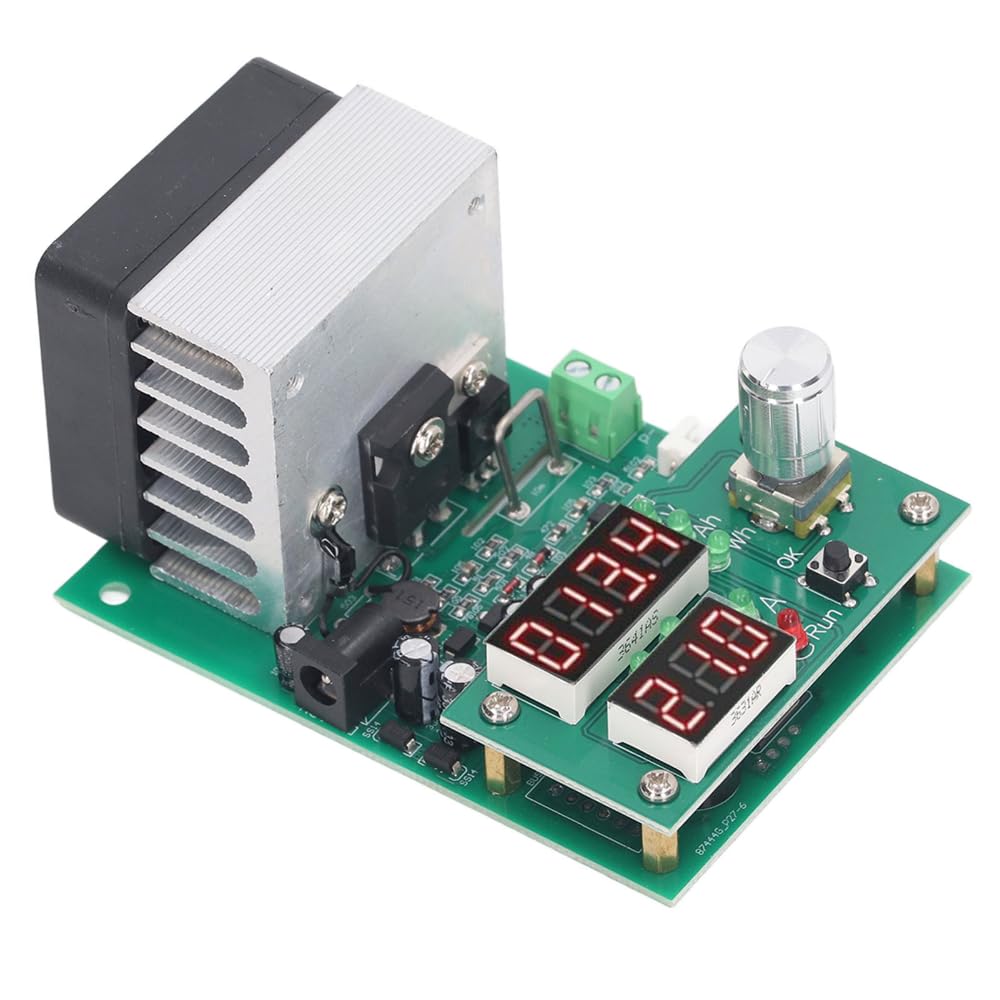
Figure 2: Top view of the DollaTek 60W Electronic Load Module, showing the digital displays and control knob.
5. Operating Instructions
5.1 Basic Operation
- Power On/Off: Press the ON/OFF button to turn the module on or off.
- Entering Settings Menu: Long press the ON/OFF button to enter the function setting menu.
- Adjusting Parameters: Use the adjustment knob (pushable) to navigate through settings and change values. Press the knob to confirm selections.
5.2 Setting Discharge Parameters
The module allows setting the discharge current and termination voltage. The display will show 'V' for voltage, 'A' for current, 'Ah' for Amp-hours, and 'Wh' for Watt-hours.
- Discharge Current: Adjustable from 0.20 A to 9.99 A, with steps of 0.1 A or 0.01 A.
- Termination Voltage: Adjustable from 1.0 V to 25.0 V, in increments of 1 V or 0.1 V. This is the voltage at which the discharge test will stop.

Figure 3: Examples of display settings, including entering the function setting menu and buzzer on/off options.
5.3 Starting and Stopping a Test
Once parameters are set, initiate the test. The module will discharge the connected battery or device at the set constant current until the termination voltage is reached, or the maximum Ah/Wh value is recorded.
- The test automatically stops when the set termination voltage is reached or when the statistical value (999.9 Ah or 9999 Wh) is met.
- The module provides real-time readings of voltage, current, and accumulated Ah/Wh during the test.
5.4 Buzzer Settings
The module includes a buzzer to signal events, such as reaching the termination voltage. You can enable or disable the buzzer through the settings menu.
- Long press the ON/OFF button to enter the settings menu.
- Navigate to the buzzer setting option (refer to Figure 3 for visual guidance).
- Use the adjustment knob to toggle the buzzer ON or OFF.
6. Maintenance
- Cleaning: Use a soft, dry cloth to clean the module. Do not use liquids or abrasive cleaners.
- Storage: Store the module in a cool, dry place away from direct sunlight and extreme temperatures.
- Inspection: Periodically check for any loose connections or visible damage to the components.
7. Troubleshooting
This section addresses common issues and their potential solutions.
| Issue/Error Code | Description | Solution |
|---|---|---|
| otP | Over-Temperature Protection activated. | Ensure adequate ventilation. Reduce the load or allow the module to cool down. Check if the fan is operating correctly. |
| oPP | Instantaneous Over-Power Protection activated. | The power drawn exceeds the 60W limit. Reduce the discharge current or increase the termination voltage to stay within the power limits. |
| ouP | Over-Voltage Protection activated. | The input voltage is too high. Ensure the connected power source or battery voltage is within the module's operating range (1-30V). |
| Reverse Polarity | Module does not power on or shows error. | Check the connections to the load and power supply. Ensure positive (+) and negative (-) terminals are connected correctly. |
| Abnormal Power Supply Voltage | Module does not power on or behaves erratically. | Verify that the input power supply is providing a stable 12V and at least 0.5A. |
| Fan not operating | Cooling fan is not spinning. | The fan is intelligently controlled and only activates when the cooler temperature rises. If the module is hot and the fan is still not spinning, check for obstructions or fan malfunction. |
8. Specifications
Technical specifications for the DollaTek 60W Constant Current Electronic Load Module:
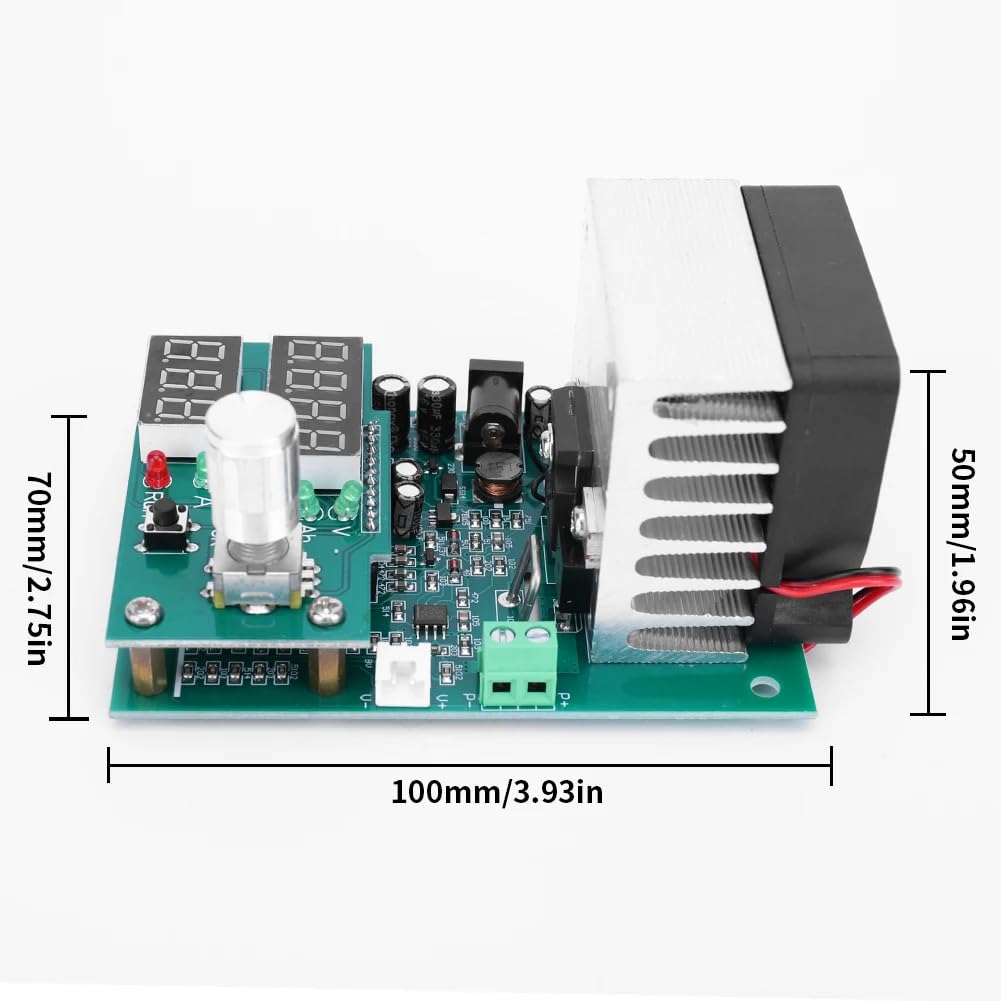
Figure 4: Dimensions of the DollaTek 60W Electronic Load Module (approx. 100mm x 70mm x 50mm).
| Parameter | Value |
|---|---|
| Operating Mode | Single-mode Constant Current |
| Discharge Current Range | 0.20 - 9.99 A (0.1 A or 0.01 A step) |
| Max Discharge Current Error | 0.7% @ 0.01 A |
| Max Capacity Test Error | 0.5 A: 2.5%, 2 A: 1.5%, 5 A and above: 1.2% |
| Termination Voltage Range | 1.0 - 25.0 V (1 V or 0.1 V increments) |
| Discharge Voltage Range | 1 - 30 V (Note: 9.99 A requires measured voltage > 1.3 V) |
| Max Voltage Measurement Error | 0.8% +-0.02 V |
| Maximum Power | 60 W (automatically limits current) |
| Max Battery Test Statistics | 999.9 Ah or 9999 Wh (test stops when either reached) |
| Positioning Hole Location | 60mm * 88mm, Hole Diameter 3.2mm |
| Mounting | 5mm Pad Column (60W: copper column) |
| Weight | 180 g (60W version) |
| Load Power Supply | DC 12 V, 0.5 A or more |
| Fan Control | Intelligent, temperature-based speed control |
| Protection Functions | otP, oPP, ouP, Reverse Polarity, Abnormal Power Supply Voltage |
| Dimensions (60W) | 112 x 70 x 57 mm (including fan projection approx. 12mm) |
| Compliance | CE, EMC, RoHS |
9. Warranty and Support
9.1 Warranty Information
This DollaTek product is covered by a standard limited warranty against manufacturing defects. For specific warranty terms and conditions, please refer to the purchase documentation or contact your retailer. Keep your proof of purchase for warranty claims.
9.2 Customer Support
For technical assistance, troubleshooting, or any inquiries regarding your DollaTek 60W Constant Current Electronic Load Module, please contact the seller or manufacturer directly. Provide your model number (DollaTek-60W-ECTD) and a detailed description of your issue for efficient support.