
Introduction
This manual provides comprehensive instructions for the safe and efficient operation of your THROLX Water Dancing Bluetooth Wireless Speaker, Model I6. Please read this manual thoroughly before use and retain it for future reference.

Image Description: A front view of the THROLX Water Dancing Bluetooth Wireless Speaker, showcasing its clear top housing with internal water jets and colorful LED lights, and a white base.
Important Safety Information
- This device is not waterproof. Avoid exposure to water or excessive moisture.
- Do not disassemble, repair, or modify the device. This may void the warranty and pose safety risks.
- Use only the charging cable provided or a certified equivalent.
- Keep out of reach of children.
- Avoid extreme temperatures and direct sunlight.
Package Contents
- THROLX Water Dancing Bluetooth Wireless Speaker (Model I6)
- 3.5mm AUX Cable
- Charging Cable
- Instruction Manual
Product Overview
Familiarize yourself with the speaker's components and controls.

Image Description: A detailed diagram of the THROLX Water Dancing Speaker, highlighting the control buttons on the front base (Mode, Previous/Volume Down, Play/Pause, Next/Volume Up) and the ports on the rear base (AUX port, Micro SD Card slot, Charging port, and a three-position switch for Power On/Off, Water Dance Mode, and Power Saving Mode).
Setup and Initial Use
1. Charging the Speaker
Before first use, fully charge the speaker. Connect the provided charging cable to the charging port on the speaker and a suitable USB power source. The charging indicator light will show charging status. A full charge takes approximately 1 hour and provides up to 4 hours of continuous playback.
2. Power On/Off
Locate the three-position switch on the rear base of the speaker. Slide the switch to the 'On' position to power on the device. To power off, slide the switch to the 'Off' position.
3. Bluetooth Pairing
- Ensure the speaker is powered on and in Bluetooth mode (indicated by a voice prompt 'Bluetooth mode').
- On your device (smartphone, tablet, etc.), enable Bluetooth and search for available devices.
- Select 'THROLX I6' from the list. A voice prompt will confirm successful pairing.
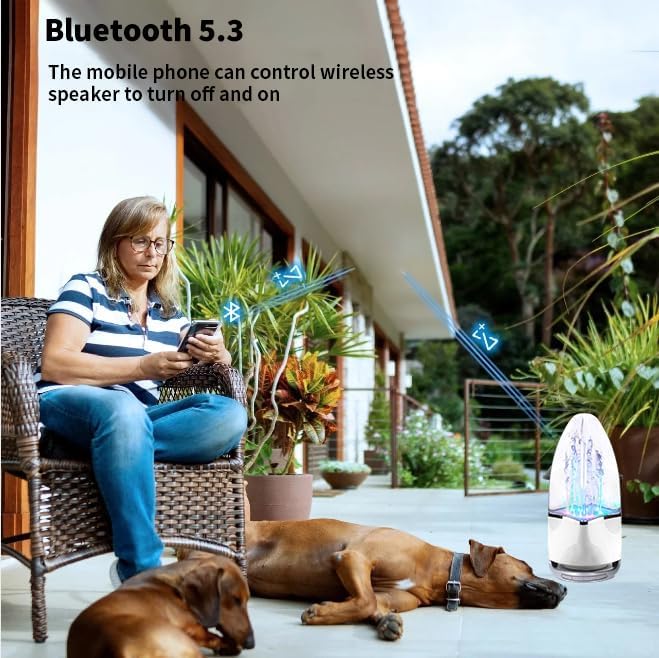
Image Description: A person sitting outdoors, using a smartphone to connect to the THROLX Water Dancing Speaker, illustrating the Bluetooth 5.3 connectivity.
4. TWS (True Wireless Stereo) Pairing
The TWS function allows you to connect two THROLX I6 speakers for a stereo sound experience. This function currently supports synchronization of two devices only.
- Ensure both speakers are powered on and in Bluetooth mode, but not yet connected to any device.
- On one of the speakers, long-press the 'MODE' button until you hear a 'Pair' voice prompt. The speakers will automatically connect to each other.
- Once paired, connect your device to one of the speakers via Bluetooth as described in step 3. Both speakers will now play synchronized audio.
Video Description: A demonstration of how to activate the TWS function to pair two THROLX Water Dancing Speakers for true wireless stereo sound. The video shows pressing the 'MODE' button to initiate pairing and the subsequent audio synchronization.

Image Description: Two THROLX Water Dancing Speakers placed on either side of a laptop, illustrating the True Wireless Stereo (TWS) function for an enhanced audio experience.
5. AUX Input
Connect an external audio device using the provided 3.5mm AUX cable to the AUX port on the speaker. The speaker will automatically switch to AUX mode.
6. Micro SD Card Playback
Insert a Micro SD card with audio files into the Micro SD card slot. The speaker will automatically detect and play music from the card.
Operation
1. Music Playback Controls
- Play/Pause: Press the Play/Pause button.
- Next Track: Press the 'Next/Volume Up' button.
- Previous Track: Press the 'Previous/Volume Down' button.
- Volume Up: Long-press the 'Next/Volume Up' button.
- Volume Down: Long-press the 'Previous/Volume Down' button.
2. Water Dance and Light Modes
The speaker features a dynamic water dance display with LED lights that synchronize with the music. The height of the water fountain adjusts with the music level.
To activate or deactivate the water dance and lights, use the three-position switch on the rear base. The 'Water Dance Mode' position enables both audio and the visual water and light effects. The 'Power Saving Mode' position allows audio playback only, with the water dance and lights turned off, extending battery life.
Video Description: A demonstration of the water dancing speaker's visual effects, showing colorful water jets moving in sync with music. The video highlights the dynamic interaction between sound and light.
Maintenance
- Clean the speaker with a soft, dry cloth. Do not use abrasive cleaners or solvents.
- Avoid exposing the speaker to direct sunlight or extreme temperatures.
- Store in a cool, dry place when not in use.
Troubleshooting
| Problem | Solution |
|---|---|
| Speaker does not power on. | Ensure the battery is charged. Connect the charging cable and try again. Check the power switch position. |
| Cannot pair via Bluetooth. | Ensure the speaker is in Bluetooth mode. Turn off Bluetooth on your device and turn it back on. Move the speaker closer to your device. Disconnect from other Bluetooth devices. |
| No water dance or lights. | Check if the speaker is in 'Water Dance Mode' using the three-position switch. Ensure music is playing and volume is sufficient. |
| Poor sound quality. | Ensure the speaker is within Bluetooth range. Check the audio source quality. Adjust volume on both the speaker and your device. |
| TWS pairing fails. | Ensure both speakers are not connected to any other device. Long-press the 'MODE' button on one speaker to initiate TWS pairing. Only two speakers can be paired via TWS. |
Specifications
| Feature | Detail |
|---|---|
| Model Name | I6 |
| Brand | THROLX |
| Material | Acrylonitrile Butadiene Styrene (ABS) |
| Product Dimensions | 4"D x 4"W x 8"H |
| Item Weight | 12.8 ounces |
| Wireless Communication Technology | Bluetooth 5.3 |
| Bluetooth Range | 10 Meters |
| Speaker Type | Surround Sound |
| Audio Output Mode | Mono |
| Speaker Maximum Output Power | 5 Watts |
| Signal-to-Noise Ratio | 75 dB |
| Power Source | Battery Powered (1 Lithium Polymer battery included) |
| Battery Capacity | 600 Milliamp Hours |
| Charging Time | 1 Hour |
| Continuous Playback Time | Up to 4 hours |
| Water Resistance Level | Not Water Resistant |
| Control Method | Touch |
| Included Components | 3.5mm aux cable, Charging Cable, manual, water dancing speaker |
Warranty and Support
This product comes with a limited warranty. For detailed warranty information or technical support, please refer to the contact information provided with your purchase or visit the official THROLX website.
Manufacturer: Dongguan Miaoyin Electronic Technology Co., Ltd.
UPC: 726929074044