
1. Introduction
The GOOVIS G3 Max XR Head Mounted Display with D4H1 Media Player offers an immersive visual experience. Featuring dual 2.5K Sony Micro OLED displays and a 120Hz refresh rate, it simulates a 1000-inch virtual screen. This device supports Blu-ray 3D content and is compatible with a wide range of devices including iPhone 15/16, Android phones, PCs, handhelds, PS5, and Blu-ray players. Designed for extended viewing comfort, it includes diopter and IPD adjustments to suit individual vision needs without requiring glasses.

Figure 1: User enjoying the GOOVIS G3 Max XR Head Mounted Display.
2. What's in the Box
Your GOOVIS G3 Max XR package includes the following components:
- GOOVIS G3 Max XR Head Mounted Display
- D4H1 Media Player
- Headband
- Type-C Detachable Cable
- HDMI to Type-C Adapter
- Type-C Power Cable

Figure 2: All components included in the GOOVIS G3 Max XR package.
3. Setup
3.1 Connecting to Type-C Devices (e.g., Android Phones, Laptops)
Follow these steps to connect your GOOVIS G3 Max XR to devices with a USB-C video output:
- Connect the Type-C detachable cable to the Type-C interface of the G3 Max headset.
- Connect the other end of the Type-C detachable cable to the Type-C port of your Android phone, handheld game console, or laptop.
- Assemble the headband to the G3 Max headset.
- Wear the GOOVIS G3 Max headset to enjoy your content.
Video 1: How to connect GOOVIS G3 Max with Type-C Devices.
3.2 Connecting to HDMI Devices (e.g., PS5, Switch, Xbox)
To connect your GOOVIS G3 Max XR to devices with HDMI output, you will need the HDMI to Type-C Adapter and a Type-C power cable:
- Connect the Type-C detachable cable to the Type-C interface of the G3 Max headset.
- Connect the other end of the Type-C detachable cable to the Type-C port of the HDMI to Type-C Adapter.
- Connect the HDMI to Type-C Adapter to the HDMI port of your game console (ensure the console is turned on).
- Connect the Type-C Power cable to a 5V/2A power supply.
- Connect the Type-C Power cable to the HDMI to Type-C Adapter.
- Assemble the headband to the G3 Max headset.
- Wear the GOOVIS G3 Max headset to enjoy your gaming time.
Video 2: How to connect GOOVIS G3 Max to PS5, Switch, and Xbox.
3.3 Diopter and IPD Adjustment
The GOOVIS G3 Max XR features patented wide-range diopter and IPD adjustments for personalized visual clarity:
- Diopter Adjustment: Adjust the diopter from +2.0D to -7.0D in precise 0.5D steps for each eye independently. Real-time digital feedback is provided for intuitive control, eliminating the need for glasses.
- IPD Adjustment: Mechanically adjust the Interpupillary Distance (IPD) from 58 to 74mm, with independent tuning on both sides. This ensures accurate focus and full-screen clarity by aligning the optical centers to each eye.

Figure 3: Controls for diopter and IPD adjustments.
4. Operating Instructions
4.1 Cinematic Viewing Experience
The GOOVIS G3 Max XR provides an IMAX-like visual experience with 45 PPD clarity and a 65° FOV. The image remains clear and stable across the entire screen, free from distortion, glare, or stray light. The 95% DCI-P3 color gamut ensures rich detail and vibrant contrast.
Figure 4: Immersive cinematic viewing experience.
4.2 Blu-ray 3D Support
Immerse yourself in a cinematic 3D world with support for Blu-ray 3D and Side-by-Side (SBS) 3D formats. A simple one-click switch allows you to instantly enable 3D mode, delivering a true sense of depth with vivid detail and layered dimensionality.

Figure 5: Blu-ray 3D content displayed on the headset.
4.3 Gaming with 120Hz Refresh Rate
Experience smooth gaming with up to 120Hz refresh rate, providing stunning detail and ultra-fast responsiveness for AAA titles. Enjoy rich, cinematic game worlds with lifelike clarity and minimal motion blur.

Figure 6: Comparison of 60Hz vs 120Hz refresh rate for gaming.
4.4 D4H1 Media Player and Streaming
The D4H1 Media Player provides seamless access to major video streaming platforms via the built-in Google Play Store. Enjoy Netflix, YouTube, Prime Video, Disney+, and more, with your favorite entertainment always just a tap away.
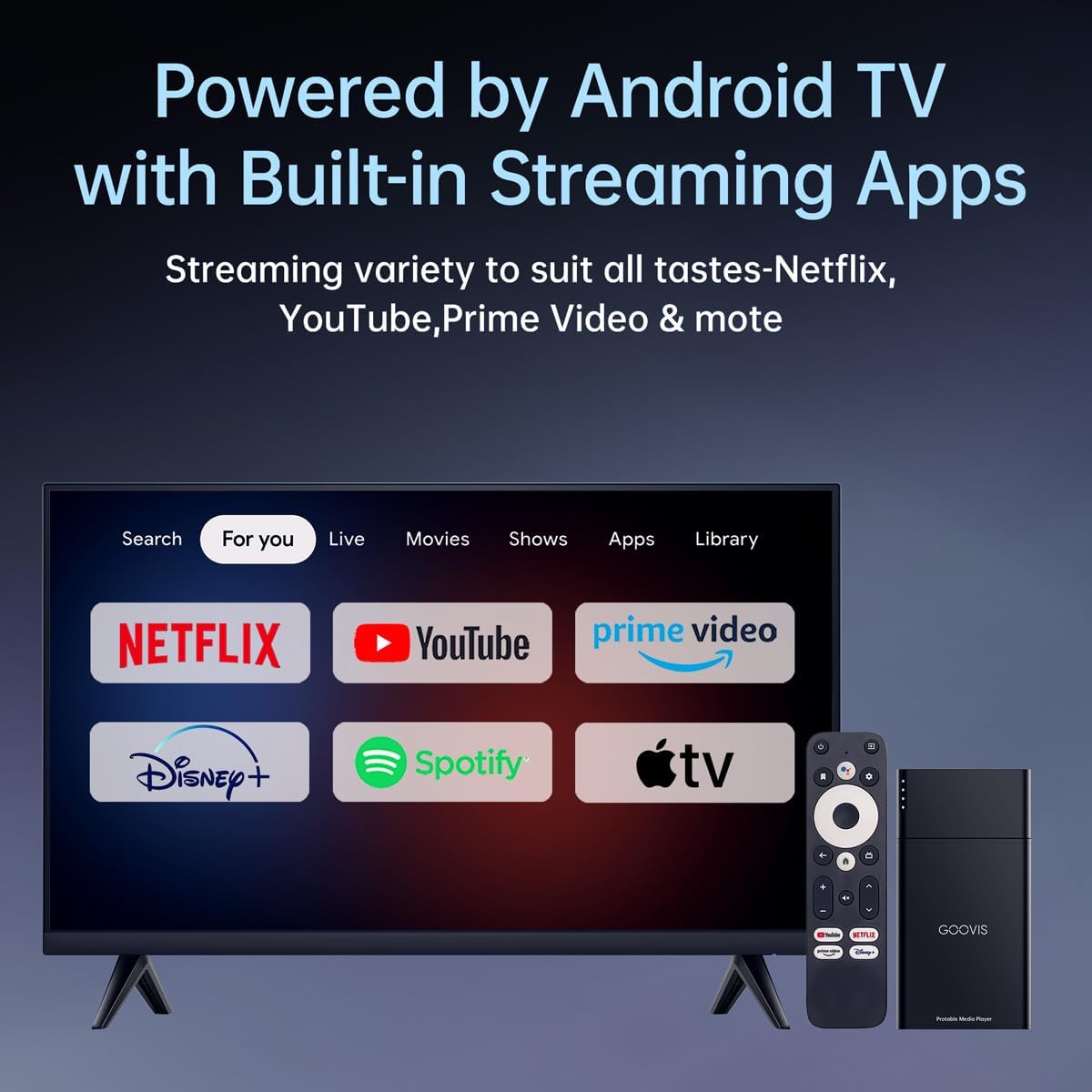
Figure 7: D4H1 Media Player interface showing various streaming applications.
4.5 Wearing Comfort and Convenience
Designed with gravity-balanced ergonomics and distributed pressure points, the headset minimizes facial pressure for a stable, secure fit during long viewing sessions. The flip-up visor allows you to quickly check your surroundings without removing the headset, maintaining an uninterrupted immersive experience.

Figure 8: GOOVIS G3 Max XR designed for comfort in different settings.
5. Maintenance
- Keep the lenses clean using a microfiber cloth. Avoid abrasive materials.
- Store the headset in its protective carrying case when not in use to prevent dust and scratches.
- Avoid exposing the device to extreme temperatures or direct sunlight.
- Do not attempt to disassemble or repair the device yourself. Contact customer support for assistance.
Video 3: How to put G3 Max and D4 Media player into the carry bag.
6. Troubleshooting
- No image on display: Ensure all cables are securely connected and the source device is powered on and outputting video. For HDMI connections, verify the Type-C power cable is connected to the adapter.
- Blurred image: Adjust the diopter and IPD settings carefully until the image is clear for both eyes.
- No sound: Check the volume settings on both the headset and the source device. If using external headphones, ensure they are properly connected.
- Headset not powering on: Ensure the source device is providing sufficient power via the Type-C connection. For HDMI connections, confirm the Type-C power cable is connected to a 5V/2A power supply and the adapter.
7. Specifications
| Feature | Detail |
|---|---|
| Brand | Goovis |
| Model Number | G3D4 |
| Color | Black |
| Display Type | OLED |
| Display Resolution Maximum | 2560 x 1440 pixels (per eye) |
| Refresh Rate | 120 Hz |
| Field Of View (FOV) | 65 Degrees |
| Diopter Adjustment | +2.0D to -7.0D |
| IPD Adjustment | 58-74mm |
| Connector Type | HDMI, USB Type C |
| Operating System | Android, Windows, iOS (via compatible devices) |
| Item Weight | 1.6 Kilograms |
| Battery Life (D4H1 Media Player) | 6 Hours (8000 Milliamp Hours) |
8. Warranty and Support
For warranty information, technical support, or service inquiries, please refer to the warranty card included in your product packaging or visit the official Goovis website. Keep your proof of purchase for any warranty claims.