
1. Introduction and Overview
This user manual provides essential information for the safe and effective use of your MTYTOT 12V 1A Universal AC/DC Power Adapter. This adapter is designed to convert standard AC household current (100-240V, 50/60Hz) to a stable 12V DC output at 1 Amp (1000mA), with a maximum power output of 10 Watts. It is suitable for a wide range of low-power 12V devices.
The adapter comes with multiple interchangeable DC tips to ensure compatibility with various devices. Please read this manual thoroughly before operation to ensure proper usage and to prevent damage to the adapter or your connected devices.
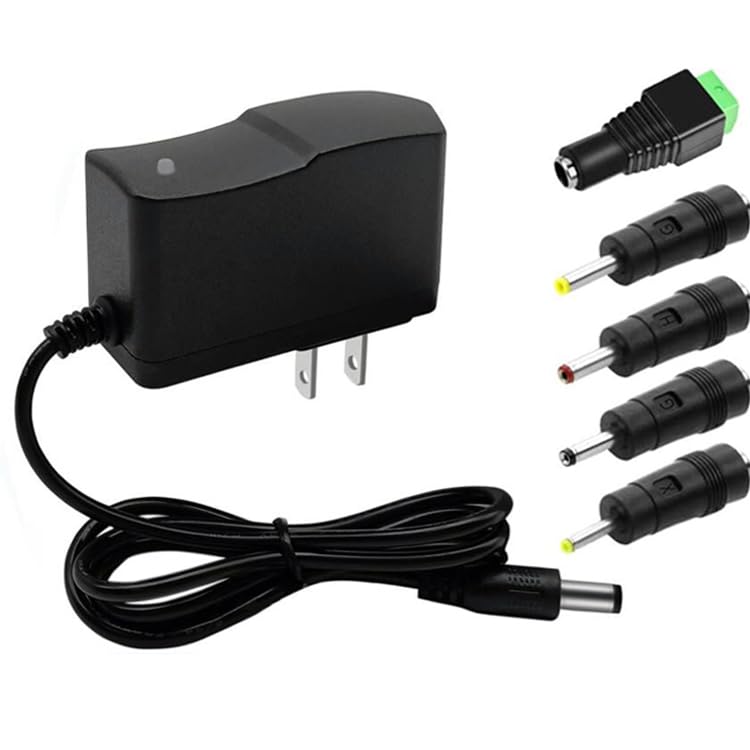
Image 1.1: MTYTOT 12V 1A Universal AC/DC Power Adapter with its main unit and five interchangeable DC tips.
2. Product Specifications
| Feature | Detail |
|---|---|
| Product Name | AC/DC Power Adapter |
| AC Input | 100-240V, 50-60Hz |
| DC Output | 12V 1A (1000mA) |
| Max Power Output | 10 Watts |
| Cable Length | 4.6 FT (1.4 meters) |
| DC Plug Size | 5.5mm x 2.1-2.5mm (main plug) |
| Polarity | Center Positive (+) |
| Product Dimensions | 2.91 x 1.06 x 1.65 inches |
| Item Weight | 3.63 ounces |
| Shell Material | Flame-retardant ABS & PC |
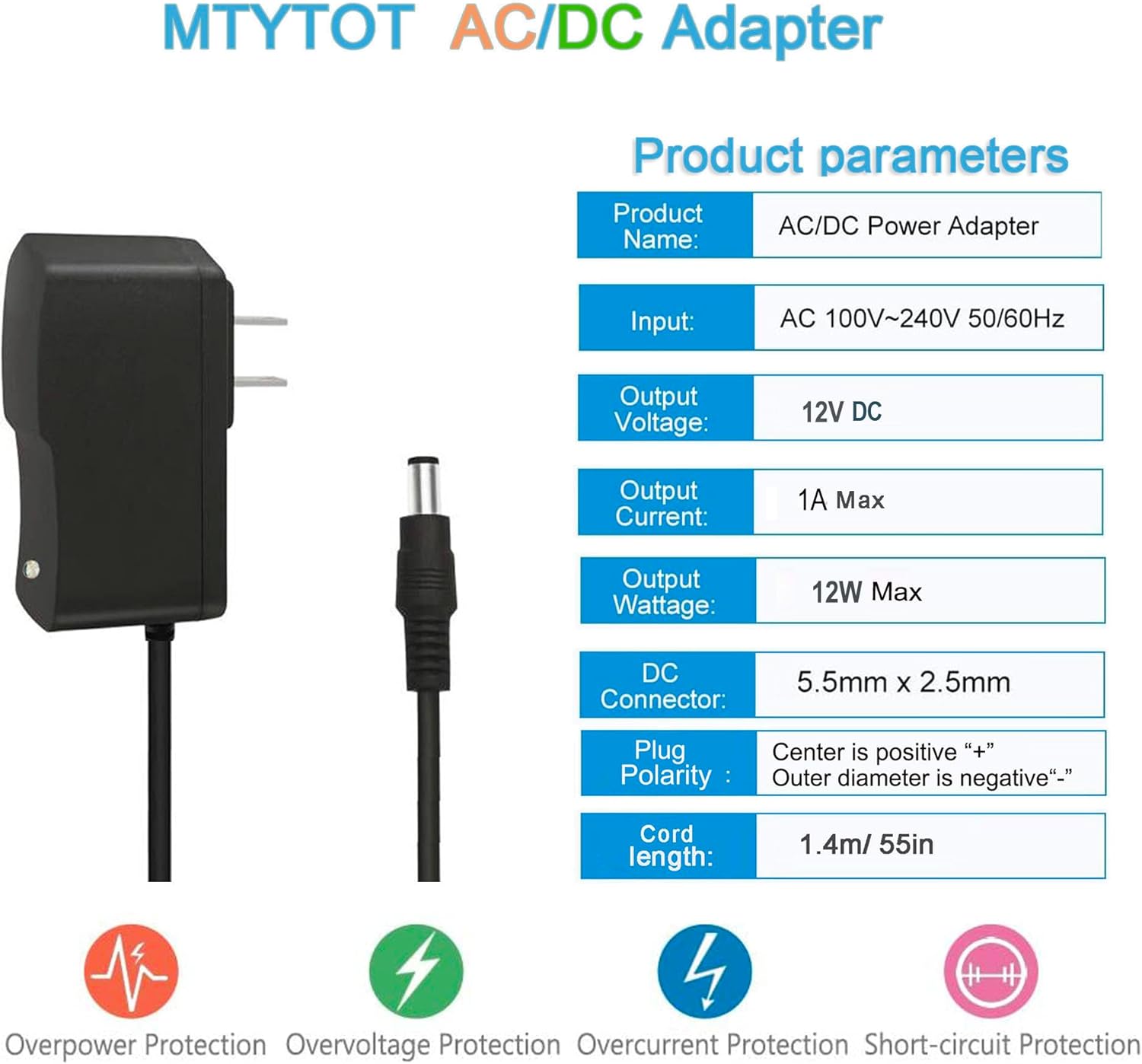
Image 2.1: Detailed product parameters including input, output, and connector specifications.
3. What's in the Box
Your MTYTOT 12V 1A Universal AC/DC Power Adapter package includes:
- 1 x 12V 1A Power Supply Unit
- 5 x Different Sizes DC Jacks (Tips):
- 5.5mm x 2.5mm / 2.1mm (main plug)
- 4.0mm x 1.7mm
- 3.5mm x 1.35mm
- 3.0mm x 1.1mm
- 2.5mm x 0.7mm

Image 3.1: The power adapter and its five included interchangeable DC tips, highlighting various features.
4. Setup Instructions
- Verify Device Requirements: Before connecting, confirm that your device requires a 12V DC input and that its current draw does not exceed 1 Amp (1000mA) or 10 Watts. Exceeding these limits can damage both the adapter and your device.
- Check DC Socket Size: Identify the correct DC jack size for your device from the five included tips. The main plug is 5.5mm x 2.5mm/2.1mm.

Image 4.1: Visual guide for checking DC plug dimensions (5.5mm outer, 2.5mm inner) and polarity (center positive).
- Confirm Polarity: This adapter has a Center Positive (+) polarity. Ensure your device also requires center positive. Connecting with incorrect polarity can cause severe damage. The included tips maintain this center positive polarity.
- Attach the Correct Tip: Select the appropriate DC tip and firmly attach it to the adapter's output cable.
- Connect to Device: Insert the attached DC tip into your device's power input port.
- Connect to Power Outlet: Plug the AC adapter into a standard 100-240V AC wall outlet. The adapter features a small blue indicator light that illuminates when power is supplied.
Warning: Always verify the DC socket type, power consumption, and polarity of your device before ordering and connecting. Incorrect usage may cause problems or damage to your device.

Image 4.2: Detailed diagram of the universal DC output tip, showing dimensions and polarity.
5. Operating Instructions
Once the adapter is correctly connected to your device and a power outlet, it will automatically supply the required 12V DC power. The adapter is designed for continuous operation within its specified limits.
Important Usage Guidelines:
- Load Capacity: The maximum recommended usage should not exceed 80% of the adapter's full load capacity (12W). For optimal performance and longevity, it is recommended to power devices that require 10W or less.
- Overload Protection: The adapter features built-in protections against overload, over-voltage, over-temperature, and short-circuits. If an issue occurs, the adapter may temporarily shut down to protect itself and the connected device. Disconnect from power, resolve the issue (e.g., reduce load, check for shorts), and then reconnect.
- Indoor Use Only: This adapter is designed for indoor use in dry environments. Do not expose it to water, high humidity, or extreme temperatures.

Image 5.1: Recommendation to use the adapter at or below 80% of its maximum load (10W for a 12W adapter).
6. Compatible Devices and Applications
This 12V 1A power adapter is widely compatible with various 12V devices that draw less than 12W of power. Common applications include:
- 2835, 5050, WS2811 12V LED strip lights
- Video surveillance systems (DVR, NVR, CCTV security cameras)
- Arduino projects
- Keyboard pianos
- Portable speakers and microphones
- Desktop switches and routers
- Small pumps
- LED signs and IR lamps
- Christmas displays
- Under-cabinet LED lighting
- DIY lamps
- Water purifiers
- DC motors
- Mini fans
- Humidifiers

Image 6.1: Visual examples of compatible devices such as LED strips, CCTV cameras, mini fans, routers, LED lamps, humidifiers, and speakers.
7. Safety and Durability Features
The MTYTOT 12V 1A Power Adapter is built with multiple safety and durability features to ensure reliable and long-lasting performance:
- Smart Chip Protection: Equipped with a smart chip for comprehensive protection, including:
- Automatic Overload Cut-off
- Over Voltage Cut-off
- Over Temperature Cut-off
- Short-circuit Cut-off
- Electromagnetic Wave Protection
- Solid PC & ABS Shell: The casing is made from flame-retardant and high-temperature resistant ABS & PC synthetic materials, providing sturdiness and durability.
- Safe & Strong Plug: Features a one-piece cast hardware plug designed to be safer and stronger, reducing the risk of detachment.
- Reinforced Stress Point: The cable connection points are reinforced to withstand wear and bending, preventing copper wire breakage.
- Safe & Reliable Power Cord: Made with high-quality oxygen-free copper for less resistance and better conductivity. The superior PVC cable jacket prevents leakage of electricity and breakdown.
8. Maintenance
To ensure the longevity and optimal performance of your power adapter, follow these simple maintenance guidelines:
- Keep Dry: Always use and store the adapter in a dry environment. Avoid exposure to water, rain, or high humidity, which can cause electrical hazards and damage.
- Clean Gently: Disconnect the adapter from the power outlet before cleaning. Use a soft, dry cloth to wipe the surface. Do not use liquid cleaners or abrasive materials.
- Avoid Extreme Temperatures: Do not expose the adapter to direct sunlight, heat sources, or extremely cold environments.
- Handle Cables Carefully: Avoid sharp bends, kinks, or excessive pulling on the power cord. Do not place heavy objects on the cord.
- Store Properly: When not in use, store the adapter in a cool, dry place, away from dust and direct sunlight.
9. Troubleshooting
If you encounter issues with your MTYTOT 12V 1A Power Adapter, please refer to the following common troubleshooting steps:
| Problem | Possible Cause | Solution |
|---|---|---|
| No power output / Adapter light off |
|
|
| Device not powering on (adapter light is on) |
|
|
| Adapter gets excessively hot |
|
|
10. Warranty and Support
MTYTOT stands behind the quality of its products. For any warranty claims, technical support, or inquiries regarding your 12V 1A Universal AC/DC Power Adapter, please contact MTYTOT customer service through the retailer where you purchased the product or refer to the contact information provided on the product packaging.
Please retain your proof of purchase for warranty purposes.