
1. Introduction
The JUCJET H888S is a high-performance UHF handheld two-way radio designed for reliable communication across various environments. This manual provides essential information for the proper setup, operation, and maintenance of your device.
2. Package Contents
Verify that all items are present in your package:
- H888S Walkie Talkie Units (quantity as purchased)
- Original Earpieces
- 1500mAh Rechargeable Batteries
- Charging Stations
- Type-C Charging Cables
- Belt Clips
- Antennas
- User Manual
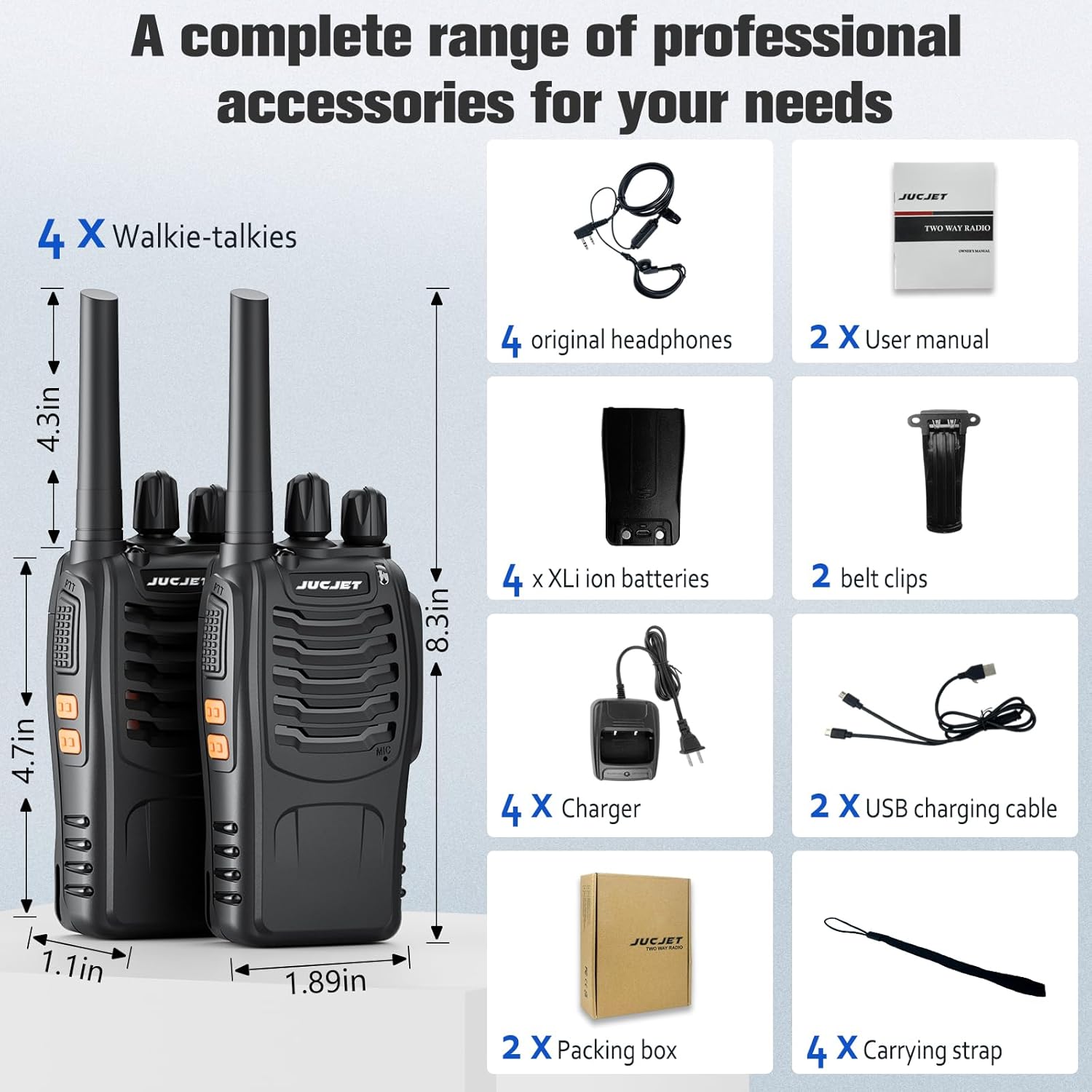
Image: A visual representation of the JUCJET H888S Walkie Talkie package contents, including multiple radio units, earpieces, batteries, charging stations, Type-C cables, belt clips, and user manuals.
3. Product Overview
Familiarize yourself with the main components and controls of your H888S Walkie Talkie:

Image: Diagram illustrating the key components of the JUCJET H888S Walkie Talkie, including the integrated sensitive antenna, flashlight, PTT button, MONI button, flashlight button, Micro USB interface, power switch/volume control, channel switch, LED indicator, and SP/MIC jacks.
4. Initial Setup
4.1 Attaching the Battery
- Align the battery with the back of the radio unit.
- Slide the battery upwards until it clicks securely into place.
4.2 Attaching the Antenna
- Screw the antenna clockwise into the connector on the top of the radio until it is firm. Do not overtighten.
5. Charging the Battery
The H888S Walkie Talkie features multiple charging options:
- Charging Station: Place the radio unit into the provided charging station. The indicator light on the station will show charging status.
- Type-C Cable: Connect the Type-C charging cable directly to the Micro USB interface on the radio unit for convenient charging on the go, such as in a car or with a power bank.
A full charge typically takes approximately 2.5 to 4 hours. The 1500mAh rechargeable battery provides 8 to 96 hours of use depending on transmission frequency.

Image: Illustration of two charging methods for the JUCJET H888S Walkie Talkie: using the dedicated charging station and direct USB-C cable charging via a car charger or laptop.

Image: Icons depicting typical use (1-2 days), standby time (5-7 days), full charging time (3-4 hours), and the Micro USB interface for the JUCJET H888S Walkie Talkie.
6. Basic Operation
6.1 Power On/Off and Volume Control
Rotate the Power Switch/Volume Control knob clockwise to turn the radio on and increase volume. Rotate counter-clockwise to decrease volume and turn off.
6.2 Channel Selection
Rotate the Channel Switch knob to select one of the 16 preset channels. Ensure all radios intended for communication are set to the same channel.
6.3 Transmitting and Receiving
To transmit, press and hold the PTT (Push-to-Talk) button on the side of the radio. Speak clearly into the microphone. Release the PTT button to receive.
6.4 VOX Voice Control
The radio supports VOX (Voice Operated Exchange) for hands-free operation. When VOX is enabled, the radio will transmit automatically when it detects your voice, without needing to press the PTT button.
6.5 Flashlight Function
Press the dedicated Flashlight Button to activate the built-in LED flashlight for illumination in low-light conditions.
7. Key Features
The JUCJET H888S incorporates several advanced features for enhanced communication:
- Noise Reduction: Intelligent acoustic noise cancellation ensures clear audio transmission and reception.
- Emergency Alarm: A dedicated function for signaling in urgent situations.
- Power Saving: Optimized battery management to extend operational time.
- CTCSS/50 DCS: Provides enhanced privacy and reduces interference from other users on the same frequency.
- Scanning: Allows the radio to scan through channels to find active transmissions.
- Night Flashlight: Integrated LED light for visibility.

Image: A detailed view of the internal high-performance chip of the JUCJET H888S Walkie Talkie, highlighting features like noise reduction, emergency alarm, power saving, CTCSS/50 DCS, and VOX/Hands-Free capabilities.
8. Range and Application
The communication range of the H888S is highly dependent on terrain and obstructions. It can achieve up to 5 miles in unobstructed areas, with reduced range in congested environments. These radios are suitable for various professional and recreational uses:
- Security teams
- Maintenance teams
- Construction sites
- Warehouses and factories
- Hotel and retail staff
- Event communications
- Outdoor activities like road trips, camping, and mountaineering

Image: Collage showing various application scenarios for the JUCJET H888S Walkie Talkie, including use in a storehouse, construction site, maritime environment, mountaineering, by security guards, and during cycling.
Official Product Video: JUCJET H888S Walkie Talkie Overview
Video Description: This official video from MOJIANKEJI provides an overview of the upgraded JUCJET 888S walkie talkie 4-pack, demonstrating its features and components.
9. Care and Maintenance
- Keep the radio dry. If it gets wet, wipe it immediately.
- Do not expose the radio to extreme temperatures.
- Clean the radio with a soft, damp cloth. Avoid using harsh chemicals.
- Ensure the antenna is securely attached but not overtightened.
10. Troubleshooting
| Problem | Possible Solution |
|---|---|
| No power | Check battery level; ensure battery is properly installed and charged. |
| Cannot transmit or receive | Verify all radios are on the same channel. Check antenna connection. Ensure PTT button is pressed correctly. |
| Poor audio quality | Adjust volume. Check for obstructions between radios. Ensure microphone and speaker are clear. |
| Short communication range | Range is affected by terrain and obstructions. Move to an open area if possible. |
11. Specifications
| Feature | Detail |
|---|---|
| Model Number | H888S |
| Power Output | 2W (Upgraded) |
| Frequency Range | 400-512 MHz |
| Number of Channels | 16 Preset Channels |
| Battery Capacity | 1500mAh Li-ion |
| Battery Life | 8-96 Hours (usage dependent) |
| Charging Time | Approx. 2.5-4 Hours |
| Maximum Talking Range | Up to 5 miles (unobstructed) |
| Water Resistance Level | Waterproof |
| Special Features | VOX, Scanning, Low Battery Alarm, Night Flashlight, Noise Reduction, CTCSS/50 DCS |
12. Warranty and Support
JUCJET provides a 24-month warranty for the H888S Walkie Talkie. Additionally, a 30-day no-reason return policy is offered. For any concerns or issues regarding the product, please contact JUCJET customer support through the Amazon platform. Our professional team is available to assist you promptly with any after-sales problems.