
1. Introduction
Thank you for choosing the Simple Deluxe 34 Inch Bladeless Tower Fan and Heater Combo. This innovative appliance is designed to provide both cooling and heating functions, ensuring year-round comfort in your home. Its bladeless design prioritizes safety, making it suitable for households with children and pets. This manual provides essential information for the safe and efficient operation, maintenance, and troubleshooting of your new device.
2. Important Safety Instructions
Please read all instructions carefully before using this appliance and retain for future reference. Failure to follow these instructions may result in electric shock, fire, or serious injury.
- Bladeless Design: The unique bladeless design eliminates fast-spinning blades, ensuring safety for children, pets, and during cleaning.
- Overheat Protection: The unit is equipped with an internal sensor that automatically shuts off the heater if it overheats.
- Tip-Over Protection: An integrated safety switch automatically turns off the unit if it is accidentally knocked over.
- Enhanced Safety Plug: Always use the appliance with a properly grounded outlet and ensure the plug is fully inserted.
- Indoor Use Only: This appliance is designed for indoor use in dry locations only. Do not use outdoors or in wet environments.
- Clearance: Maintain at least 3 feet (0.9 meters) clearance from walls, furniture, and curtains when operating the heater function.
3. Package Contents
- Simple Deluxe 34 Inch Bladeless Tower Fan and Heater Combo Unit
- Remote Control
- Instruction Manual
4. Setup
The Simple Deluxe Bladeless Tower Fan is designed for easy self-installation. Follow these steps to set up your unit:
- Carefully remove all packaging materials from the unit.
- Place the fan on a firm, level surface. Ensure it is stable and not prone to tipping.
- Plug the power cord into a standard 120V AC electrical outlet.
- Your fan is now ready for operation.

Figure 1: Simple Deluxe 34 Inch Bladeless Tower Fan and Heater Combo unit.
5. Operating Instructions
5.1 Control Panel & Remote Control
The fan can be operated using the LED touch screen control panel located on the base of the unit or via the included remote control.

Figure 2: LED Touch Screen Function on the fan base, showing Switch Button, 10 Speed Modes Adjustable, Hot and Cold Mode Adjustment, and 80° Left/Right Oscillation.
Video 1: Demonstration of remote control and touch screen functions for a bladeless heater and fan combo. This video illustrates how to power on/off, adjust fan speeds, and switch between heating and cooling modes using both the remote and the unit's control panel.
5.2 Fan Mode (Cooling)
- Power On/Off: Press the power button on the control panel or remote to turn the unit on or off.
- Adjusting Fan Speed: In fan mode, use the '+' and '-' buttons on the control panel or remote to select from 10 speed settings.
- Oscillation: Press the oscillation button to activate 80° left/right oscillation for wider air distribution.
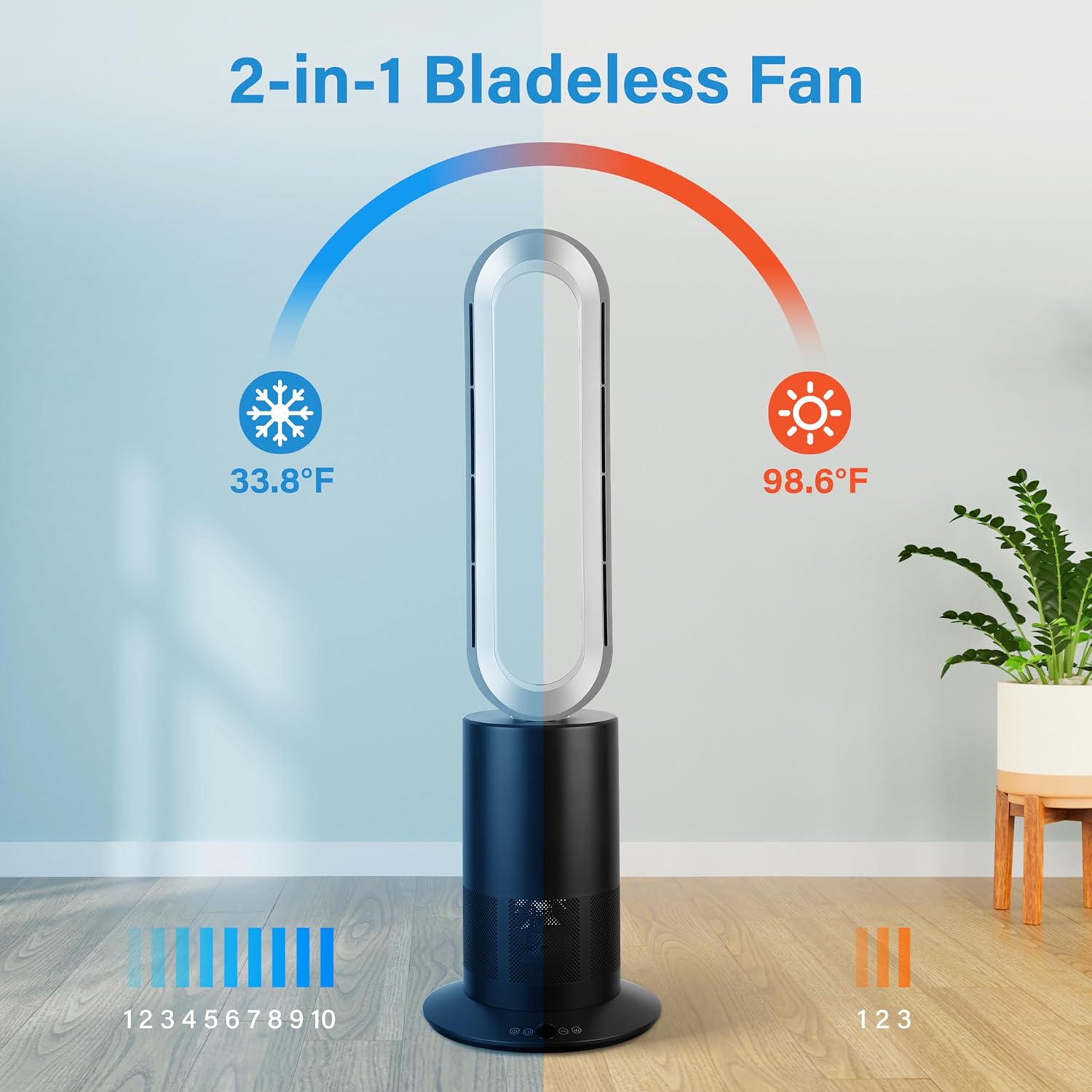
Figure 3: The 2-in-1 Bladeless Fan illustrating its cooling function with air flowing at 33.8°F and 10 speed levels.

Figure 4: Bladeless fan demonstrating 80° oscillation, a maximum CFM of 120, and a coverage distance of 16.4 feet.
5.3 Heater Mode (Warming)
- Activate Heater: Press the hot/cold mode adjustment button to switch to heating mode. The display will show the current temperature setting.
- Adjusting Temperature: Use the '+' and '-' buttons to set the desired temperature between 68°F and 99°F. The unit will automatically maintain the set temperature.
- Environmental Temperature Detection: The fan features an environmental temperature detection function. When the set temperature equals the ambient temperature, it switches to standby mode, blowing only cold air. If the ambient temperature is lower than 95°F, the warm air automatically activates; if the ambient temperature is greater than 95°F, the unit will not activate heating.

Figure 5: Bladeless fan illustrating its environmental temperature detection function, showing how it adjusts between cooling and heating based on ambient temperature.
5.4 Sleep Mode
- Activate Sleep Mode: Press the sleep mode button on the remote control. In sleep mode, the fan operates at a quiet, soft wind speed (first gear, 3.9ft/s) and the LED display automatically turns off after 5 seconds to minimize light interference.

Figure 6: Bladeless fan in sleep mode, highlighting features like no light interference, quiet and soft wind, and a 9-hour timing function for undisturbed sleep.
5.5 Timer Function
- Set Timer: Use the timer button on the remote control to set the operating duration. The timer can be set for up to 9 hours, after which the unit will automatically turn off.
Video 2: A seller video showcasing the Faryuan Bladeless fan's features, including quiet operation, remote control, and suitability for various indoor uses. This video highlights the safety aspects for children and pets.
6. Maintenance and Care
Proper maintenance ensures the longevity and optimal performance of your Simple Deluxe Bladeless Tower Fan.
- Cleaning the Exterior: If the machine has stains, wet a soft cloth with a neutral cleaner, and then wipe it clean.
- Avoid Harsh Cleaners: Do not use wire brushes, alcohol, gasoline, or other volatile corrosive liquid cleaning products.
- Power Cord and Host: Do not directly soak the power cord or clean the host with water.
- Drying: After cleaning, wait until the machine is completely dry before switching on the power supply.
- Manual Operation: In order to avoid damage to the machine, please do not turn the machine manually.

Figure 7: Visual guide to cleaning precautions, emphasizing gentle cleaning and avoiding water contact with electrical components.
7. Troubleshooting
If you encounter any issues with your Simple Deluxe Bladeless Tower Fan, please refer to the following common problems and solutions:
- Unit does not turn on: Ensure the power cord is securely plugged into a working electrical outlet. Check if the power button has been pressed. Verify that the tip-over safety switch is not activated (unit is upright).
- No air flow: Check if the fan speed is set to a visible level. Ensure no obstructions are blocking the air inlet or outlet.
- No heat: Confirm the unit is in heater mode and the desired temperature is set above the ambient room temperature. Check for overheat protection activation (unplug, wait 30 minutes, then restart).
- Remote control not working: Replace the batteries in the remote control. Ensure there are no obstructions between the remote and the unit.
- Unusual noise: Turn off the unit and check for any foreign objects inside the air inlet or outlet. If the noise persists, contact customer support.
8. Specifications
| Brand | Simple Deluxe |
| Model Name | Bladeless Tower Fan |
| Product Dimensions | 17.3"D x 7.9"W x 13.8"H |
| Item Weight | 14.42 pounds |
| Power Source | Corded Electric |
| Wattage | 65 watts |
| Noise Level | 60 Decibels |
| Control Method | Remote, Touch-screen |
| Special Feature | Bladeless, Heater and Fan Combo, Oscillating, Timer, Sleep Mode |
| Indoor/Outdoor Usage | Indoor |
| UPC | 840166282700 |
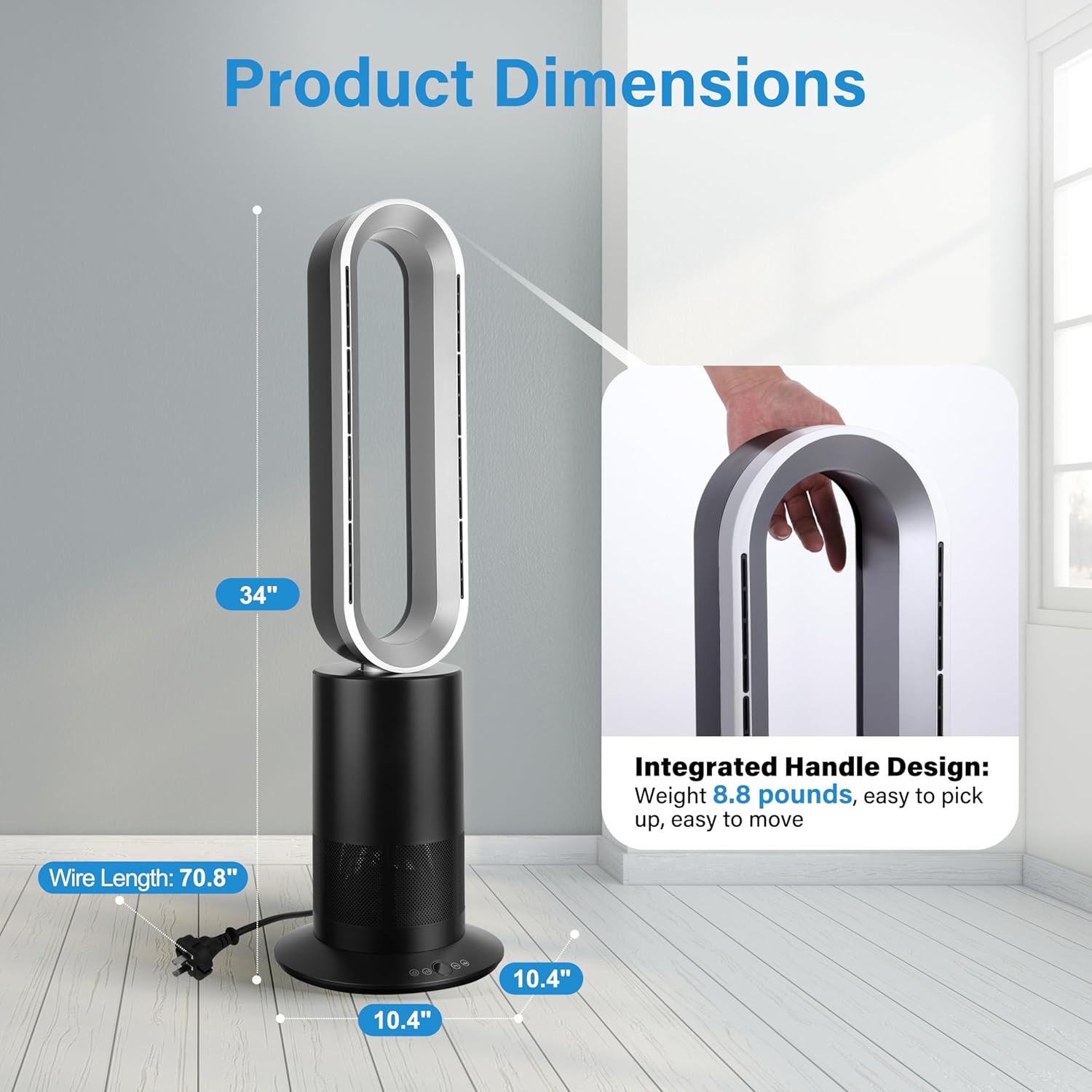
Figure 8: Detailed product dimensions, showing the 34-inch height, 10.4-inch base, and 70.8-inch wire length, along with an integrated handle design.
9. Warranty and Support
Simple Deluxe products are manufactured to the highest quality standards. For warranty information, technical support, or customer service inquiries, please refer to the contact information provided on the product packaging or visit the official Simple Deluxe website. Please have your model number and purchase date available when contacting support.


