
1. Product Overview
The GuliTech Victor 4090C is a high-precision 5-digit digital desktop LCR meter designed for accurate measurement of inductance (L), capacitance (C), and resistance (R). It features a 3.5-inch TFT display and offers various measurement functions suitable for a wide range of electronic component testing.

Figure 1: Front view of the Victor 4090C LCR Meter, showing the display and control panel.
Key Features:
- Measurement frequency up to 100kHz.
- Test level adjustable from 100mV to 2000mV.
- 3.5-inch TFT display with 5.5-digit resolution.
- Basic accuracy of 0.2%.
- Manual and automatic ranging capabilities.
- Equipped with open circuit and short circuit correction functions.
- Supports measurement of DC resistance (DCR) and electrolytic capacitors.
- Internal bias voltage output (1mV-1500mV) with 1mV step adjustment.
- Automatic identification of component measurement type.
- USB and RS232 communication interfaces for PC connectivity.
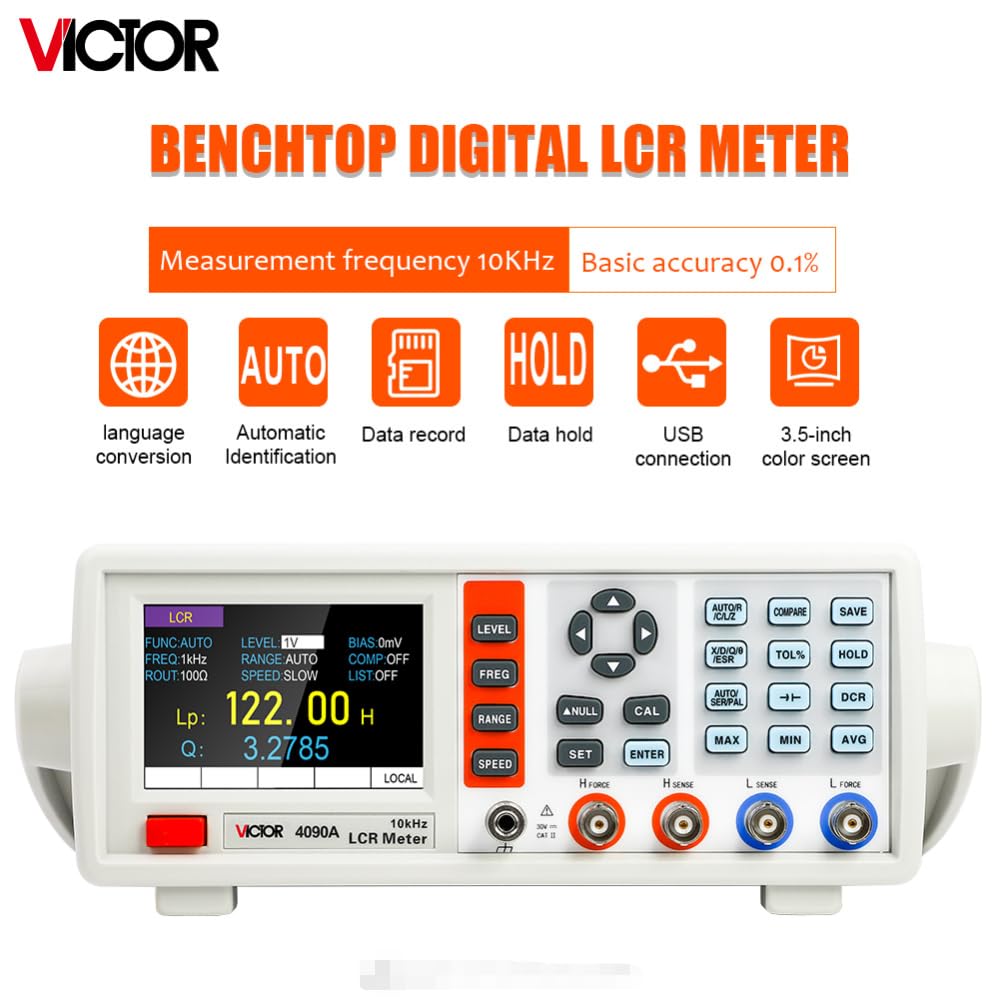
Figure 2: Overview of the LCR Meter's capabilities, including 10kHz measurement frequency, 0.1% basic accuracy, language conversion, automatic identification, data record, data hold, USB connection, and 3.5-inch color screen.
2. Setup and Connections
2.1 Unpacking and Initial Inspection
Carefully remove the LCR meter from its packaging. Inspect the device for any signs of damage during transit. Ensure all accessories listed in the packing list are present.
2.2 Power Connection
The Victor 4090C can be powered via its AC power input. Connect the provided power cord to the voltage jack on the rear panel and then to a suitable AC power outlet (AC 200-240V 50-60Hz). Ensure the voltage selection switch is set correctly for your region if applicable.
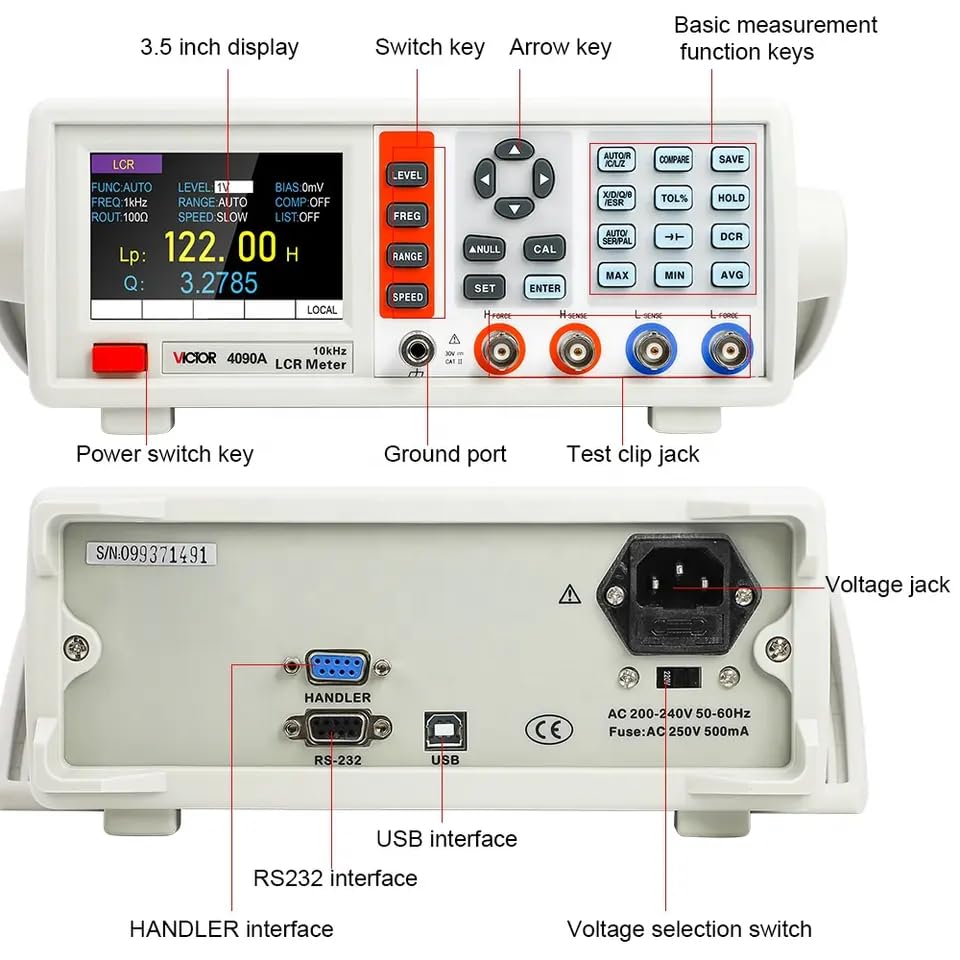
Figure 3: Rear panel showing the voltage jack, voltage selection switch, USB interface, RS232 interface, and HANDLER interface.
2.3 Adjusting the Handle
The LCR meter is equipped with an adjustable handle for convenient positioning. To adjust, hold the handles on both sides of the unit, pull them outward slightly, and then rotate them to the desired position. Release to lock the handle in place.

Figure 4: Step-by-step guide for adjusting the instrument's handle for optimal viewing angle.
2.4 PC Connection
The Victor 4090C supports RS232 and USB communication interfaces for connection to a computer. This allows for data transfer and remote control using compatible software. The Handler interface supports comparator sorting and list scanning.
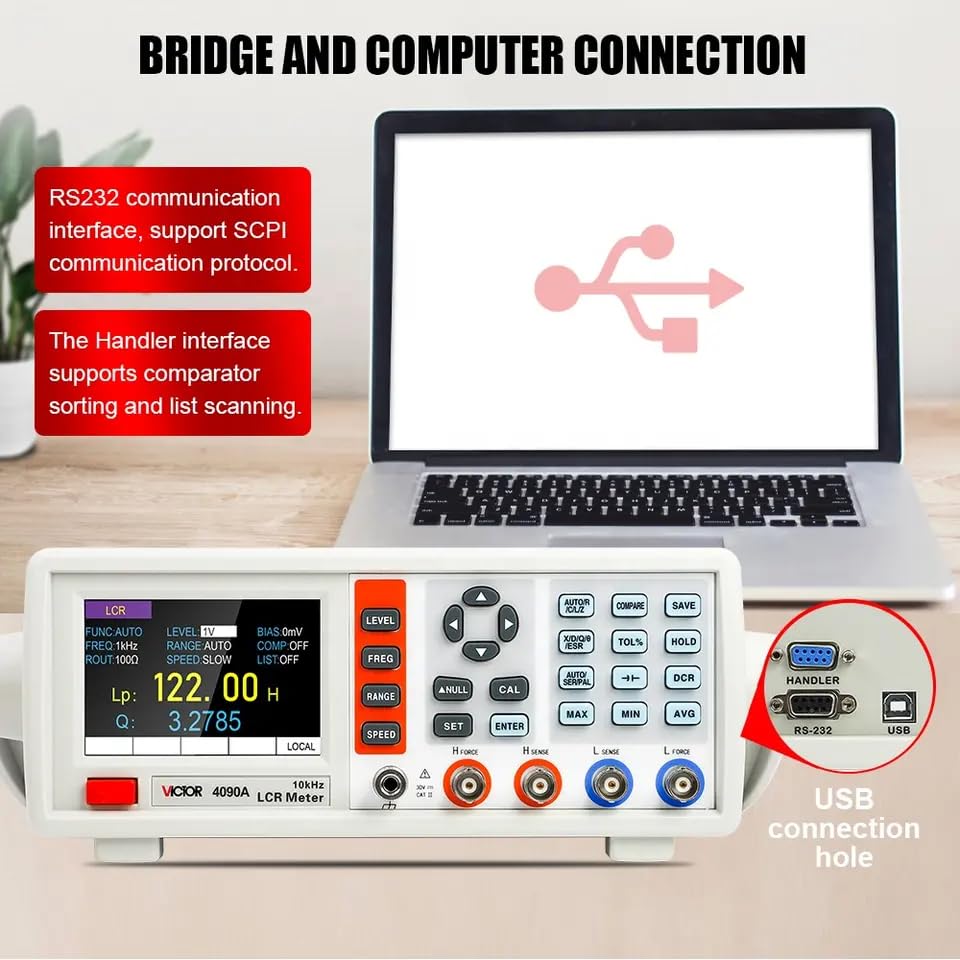
Figure 5: The LCR Meter connected to a computer, illustrating its RS232 and USB communication capabilities.
3. Operating Instructions
3.1 Power On/Off
Press the red power switch key located on the front panel to turn the device on or off.
3.2 Basic Measurement
Connect the component to be tested to the appropriate test clip jacks (H Force, H Sense, L Sense, L Force). Use the basic measurement function keys and arrow keys to navigate the menu and select desired parameters such as measurement frequency, test level, and range. The 3.5-inch TFT display will show the measurement results.
3.3 Measurement Speed
The Victor 4090C offers three measurement speeds to suit different testing requirements:
- FAST: 10 times/second
- MID: 5 times/second
- SLOW: 2 times/second
Figure 6: Display indicating the available measurement speeds: Fast, Mid, and Slow.
3.4 Internal Bias Voltage
The meter provides an internal bias voltage output adjustable from 1mV to 1500mV in 1mV steps. This feature is useful for testing components that require a DC bias.
3.5 Automatic Identification
The device can automatically identify the type of component being measured, simplifying the testing process.
3.6 Data Hold and Record
Use the 'HOLD' function to freeze the current measurement on the display. The 'Data record' feature allows for storing measurement data.
4. Maintenance
4.1 Cleaning
To clean the instrument, use a soft, dry cloth. For stubborn dirt, a slightly damp cloth with mild detergent can be used. Do not use abrasive cleaners or solvents, as these may damage the casing or display.
4.2 Calibration
The Victor 4090C is equipped with open circuit and short circuit correction functions. Regular calibration helps maintain measurement accuracy. Refer to the detailed calibration procedures in the full technical manual for precise instructions.
4.3 Storage
When not in use, store the LCR meter in a clean, dry environment, away from direct sunlight and extreme temperatures. Ensure all cables are disconnected and properly stored.
5. Troubleshooting
5.1 No Power
- Check if the power cord is securely connected to both the instrument and the power outlet.
- Verify that the power outlet is functional.
- Ensure the power switch is in the 'ON' position.
- Check the fuse located near the voltage jack on the rear panel (Fuse: AC 250V 500mA). Replace if blown.
5.2 Inaccurate Readings
- Perform open circuit and short circuit correction.
- Ensure the test leads are properly connected to the component and the LCR meter.
- Verify that the correct measurement frequency and test level are selected for the component type.
- Check for any external interference that might affect measurements.
5.3 Communication Issues (USB/RS232)
- Ensure the correct drivers are installed on your computer.
- Verify that the communication cable is securely connected.
- Check the communication settings (e.g., baud rate) on both the instrument and the computer software.
6. Specifications
The following table provides detailed technical specifications for the Victor 4090C LCR Meter.

Figure 7: Comparative specifications for LCR meter models 4090A, 4090B, 4090C, 4091A, 4091B, and 4091C.
| Specification | Value |
|---|---|
| Model Number | G-VICTOR 4090C |
| Measurement Frequency | Up to 100kHz (16 points: 100, 120, 200, 400, 800, 1K, 2K, 4K, 8K, 10K, 15K, 20K, 40K, 50K, 80K, 100K) |
| Test Level | 100mV ~ 2000mV (0.1V-2V adjustable, at a step of 1mV) |
| Display Screen | 3.5-inch TFT LCD |
| Number of Display Digits | Principal parameter: 5 digits, Secondary parameter: 5 digits |
| Measured Parameters | Principal: L/C/R/Z; Secondary: X/D/Q/θ/ESR |
| Measurement Range (L) | 0.001µH ~ 9999H |
| Measurement Range (C) | 0.001pF ~ 99.999mF |
| Measurement Range (R) | 0.0001Ω ~ 99.999MΩ |
| Basic Accuracy | 0.2% |
| Measuring Display Speed | 2 times/s (slow), 4 times/s (medium), 8 times/s (fast) |
| Internal Bias Voltage | 0-1500mV adjustable, at a step of 1mV |
| Calibration Function | Open circuit calibration, short circuit calibration |
| Screening Function | Limit range of screening can be set to -50% ~ +50%, and the fixed points are 1%, 5%, 10% and 20%. |
| Comparator | 5 groups sorting, 3 groups of qualified setting, one group of unqualified setting, one group of auxiliary setting |
| Interfaces | Standard: RS232 (or 485), USB Device, Handler; Optional: GPIB, USB Host |
| Other Features | Support DC resistance (DCR), electrolytic capacitor measurement, adjustable backlight brightness, Chinese and English modes. |
| Product Dimensions | 22 x 15 x 12 cm |
| Item Weight | 0.5 Kilograms |
| Power Source | Battery Powered (1 Lithium Ion battery included) |
| Manufacturer | Victor |
| Country of Origin | China |
| Specification Met | EMC, ISO 9001, RoHS |
| Upper Temperature Rating | 50 Degrees Celsius |
7. Warranty and Support
7.1 Warranty Information
This GuliTech Victor 4090C LCR Meter comes with a 1-year warranty from the date of purchase. This warranty covers manufacturing defects and malfunctions under normal use. Please retain your proof of purchase for warranty claims.
7.2 Customer Support
For technical assistance, troubleshooting, or warranty inquiries, please contact Gulitech customer support. Refer to your purchase documentation or the seller's contact information for the most up-to-date support channels.