
Introduction
This manual provides detailed instructions for the use and maintenance of your PERFASCIN 6711R1P072D replacement remote control. This remote is designed to function as a direct replacement for original Zenith DVD/VCR Combo Player remote controls, requiring no programming or pairing.
Product Overview
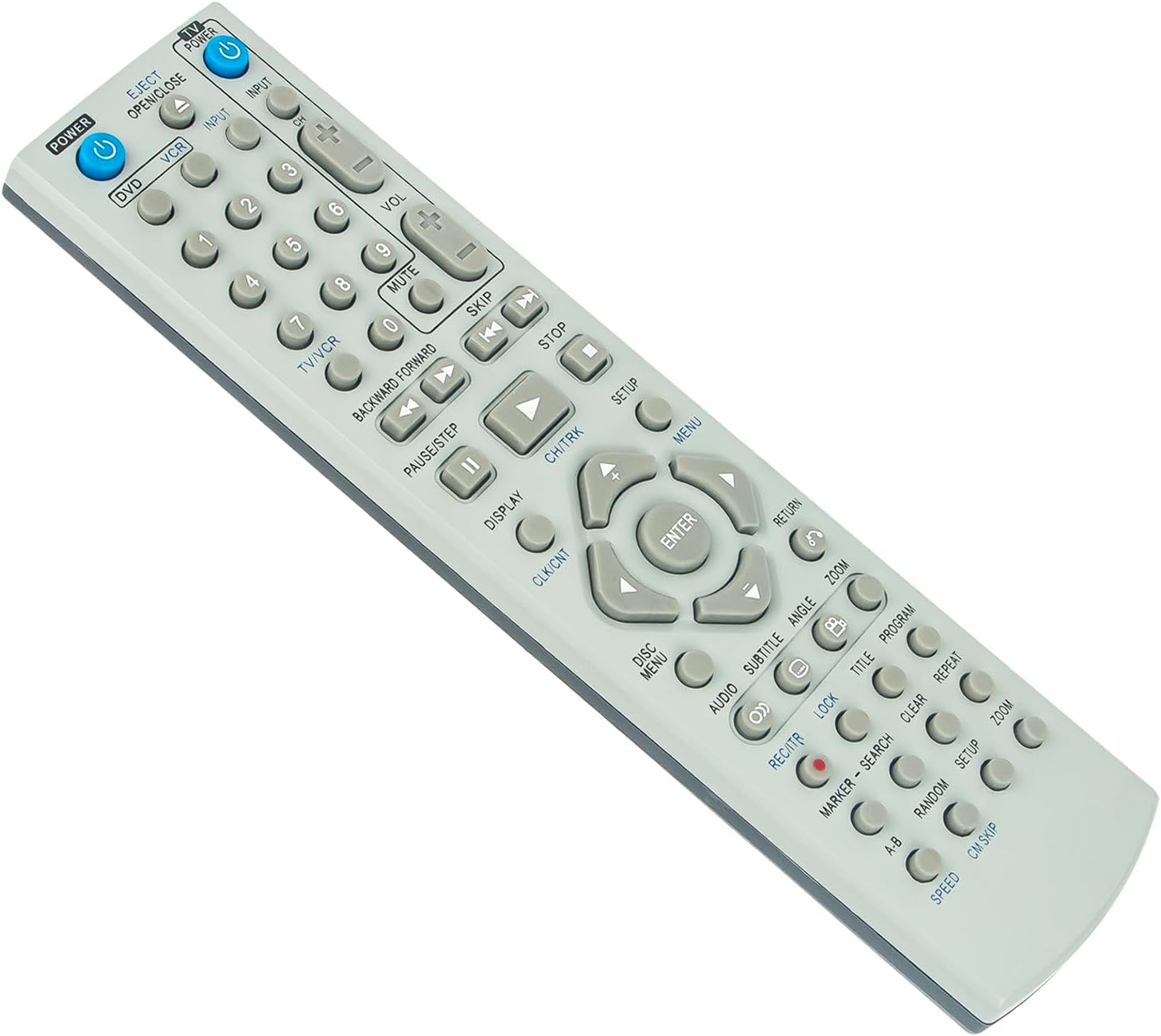
The PERFASCIN 6711R1P072D remote control is an infrared (IR) remote, constructed from durable ABS material. It is designed for ease of use and reliability.


Setup
Battery Installation
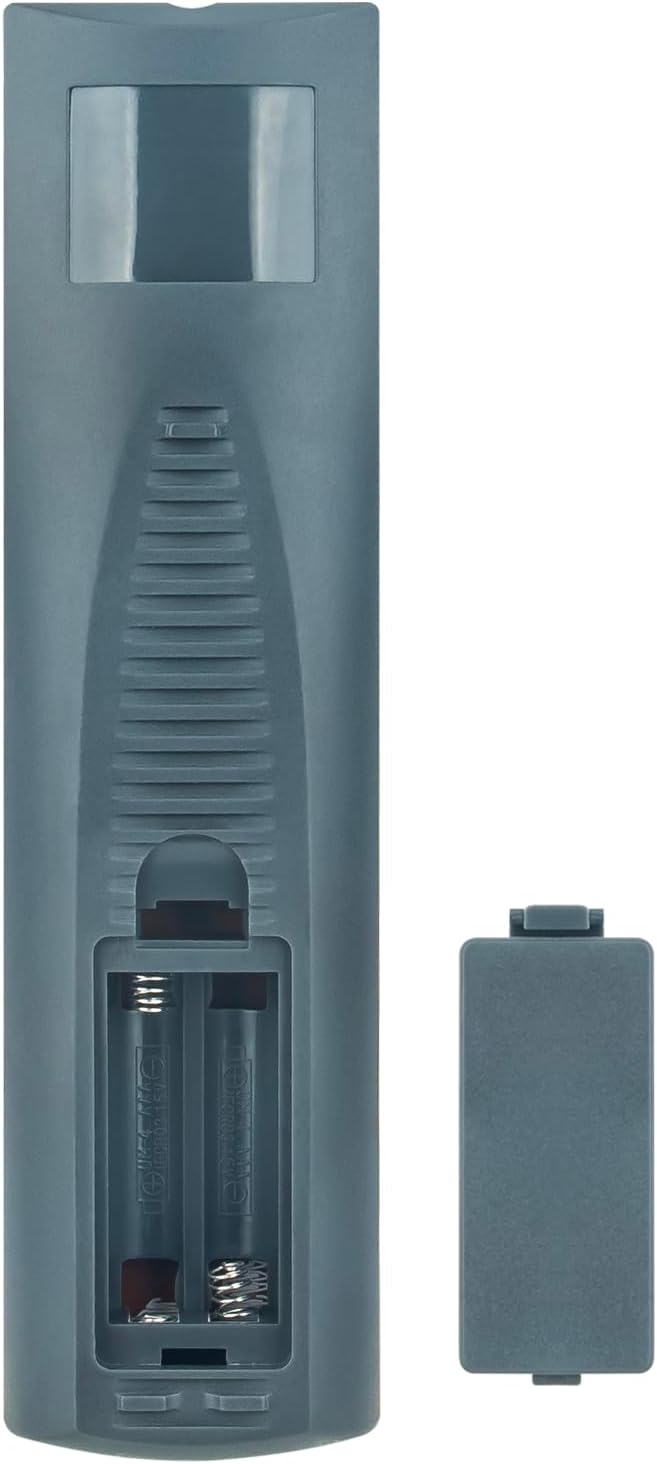
The remote control requires two (2) AAA alkaline batteries (not included) for operation.
- Locate the battery compartment on the back of the remote control.
- Slide the battery compartment cover downwards to open it.
- Insert two AAA batteries, ensuring the positive (+) and negative (-) terminals align correctly with the markings inside the compartment.
- Slide the battery compartment cover back into place until it clicks securely.
Once batteries are installed, the remote is ready for use with compatible Zenith DVD/VCR Combo Players. No programming or pairing is required.
Operating Instructions
This remote control provides full functionality for your Zenith DVD/VCR Combo Player. Refer to the original device's manual for specific functions if needed.
Basic Functions
- POWER: Turns the DVD/VCR Combo Player on or off.
- DVD/VCR: Switches between DVD and VCR modes.
- INPUT: Selects the input source for the player.
- Number Keys (0-9): Used for direct track/chapter selection or channel input.
- VOL (+/-): Adjusts the volume level.
- MUTE: Mutes or unmutes the audio.
- PLAY (▶): Starts playback of DVD or VCR.
- PAUSE/STEP (∥): Pauses playback or advances frame by frame.
- STOP (■): Stops playback.
- REWIND (◀◀): Rewinds the media.
- FAST FORWARD (►►): Fast forwards the media.
- SKIP (◀◀| / |►►): Skips to the previous or next track/chapter.
Navigation and Menu Functions
- MENU: Accesses the main menu of the DVD/VCR player.
- Navigation Arrows (▲ ◀ ▼ ►): Navigates through menus and options.
- ENTER: Confirms a selection in menus.
- DISPLAY: Shows on-screen display information.
- SETUP: Accesses the setup menu for the player.
- DISC MENU: Accesses the DVD disc menu.
- RETURN: Returns to the previous screen or menu.
Compatible Models
This remote control is compatible with the following Zenith DVD/VCR Combo Player models:
- XBV442
- XBV443
- XBV443CP
- ZDX313
- ZDX313DVD
- ZNV400
- XBV441VCR
- XBV442DVD
- XBV442CP
- XBV443DVD
- XBV410
- XBV441
Maintenance
- Cleaning: Use a soft, dry cloth to clean the remote control. Do not use liquid cleaners or abrasive materials.
- Battery Replacement: Replace batteries when the remote's response becomes sluggish or stops working. Always replace both batteries at the same time with new AAA alkaline batteries.
- Storage: If the remote control will not be used for an extended period, remove the batteries to prevent leakage and potential damage.
- Environment: Avoid exposing the remote control to extreme temperatures, direct sunlight, or high humidity.
Troubleshooting
| Problem | Possible Cause | Solution |
|---|---|---|
| Remote control not responding. |
|
|
| Some buttons not working. |
|
|
| Remote works intermittently. |
|
|
If you are unsure whether this remote is compatible with your specific model or if troubleshooting steps do not resolve the issue, please contact customer service for professional suggestions.
Specifications
- Model: 6711R1P072D
- Brand: PERFASCIN
- Power Supply: 2 x AAA Alkaline Batteries (Not Included)
- Material: ABS
- Dimensions: 5 x 2 x 0.5 inches (approximately)
- Item Weight: 2.3 ounces (approximately)
- Color: Black
- Special Feature: Ergonomic design
- Max Number of Supported Devices: 1
- Compatible Devices: Zenith DVD/VCR Combo Players (specific models listed in Operating Instructions section)
Customer Support
For any questions regarding the PERFASCIN 6711R1P072D replacement remote control, including compatibility inquiries or technical assistance, please contact our customer service. We aim to provide professional suggestions within 24 hours.
Please refer to your purchase documentation or the retailer's website for specific contact information.