
1. Introduction
This manual provides essential information for the safe installation, operation, and maintenance of the SPANN CS-PHS920SL Ni-MH replacement battery. This battery is designed to be compatible with various Philips HQ series devices, including models HQ5660, HQ58, HQ5801, HQ5802, HQ5815, HQ5819, HQ5821, HQ5825, HQ5826, HQ5830, HQ5841, HQ5842, HQ5845. Please read this manual thoroughly before use to ensure proper handling and to maximize battery life and safety.
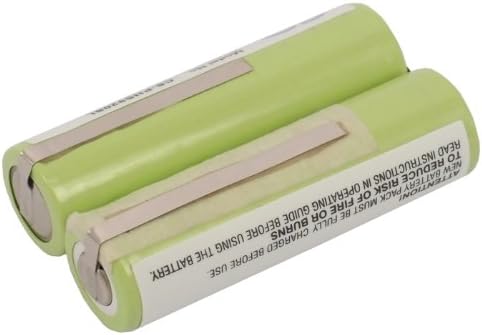
Image 1.1: The SPANN CS-PHS920SL Ni-MH replacement battery, showing its compact design. This battery is intended for use as a replacement in compatible Philips HQ series devices.
2. Safety Information
Observe the following safety precautions to prevent injury, damage to the battery, or damage to your device:
- Do not attempt to disassemble, open, or service the battery pack. This voids the warranty and can lead to hazardous situations.
- Do not crush, puncture, short external contacts, or dispose of in fire or water. Such actions can cause fire, explosion, or chemical burns.
- Do not store above 60°C (140°F). High temperatures can degrade battery performance and pose a safety risk.
- New battery packs must be fully charged before use. Refer to the operating guide of your device for initial charging instructions.
- This battery features built-in protection against over-charge, over-discharge, over-heat, over-current, and short-circuit conditions. However, always use appropriate charging equipment.
- Keep the battery out of reach of children.
- Dispose of used batteries responsibly according to local regulations. Do not dispose of with household waste.

Image 2.1: Side view of the battery showing important safety warnings and disposal symbols. These symbols indicate that the battery should not be disposed of in regular waste, exposed to high temperatures, or punctured.
3. Package Contents
The package contains the following item:
- 1 x SPANN CS-PHS920SL Ni-MH Replacement Battery

Image 3.1: A close-up view of the SPANN replacement battery, highlighting the connection tabs for installation. Ensure these tabs align correctly with your device's battery terminals.
4. Setup and Installation
This battery is intended as a replacement component. Installation typically involves opening your device and carefully replacing the old battery. It is highly recommended to consult your device's original instruction manual or a qualified technician for specific battery replacement procedures.
- Power Off Device: Ensure your Philips HQ series device is completely powered off and unplugged from any power source before beginning the replacement process.
- Access Battery Compartment: Locate and open the battery compartment of your device. This may require specific tools or procedures as outlined in your device's manual.
- Remove Old Battery: Carefully disconnect and remove the old battery. Note the orientation and connection points.
- Install New Battery: Insert the SPANN CS-PHS920SL battery, ensuring the polarity and connection tabs align correctly with the device's terminals. Do not force the battery into place.
- Secure Compartment: Close and secure the battery compartment.
- Initial Charge: After installation, fully charge the device with the new battery before its first use.
Note: Incorrect installation can damage the battery or your device. If you are unsure, seek professional assistance.
5. Operating Instructions
Once installed, the SPANN CS-PHS920SL battery operates in conjunction with your Philips HQ series device. Follow your device's original operating instructions for charging and usage.
- Initial Charge: For optimal performance, fully charge the battery before its first use.
- Regular Charging: Charge the battery as needed, following the recommendations in your device's manual. The Ni-MH chemistry does not suffer from significant memory effect, but regular charging practices are still beneficial.
- Discharge: Avoid completely draining the battery frequently, as this can reduce its overall lifespan.
6. Maintenance
Proper maintenance helps extend the life of your battery:
- Storage: If storing the device or battery for an extended period, store it in a cool, dry place, ideally at about 50% charge. Avoid extreme temperatures.
- Cleaning: Keep the battery contacts clean. Use a dry, soft cloth to wipe away any dust or debris.
- Avoid Physical Damage: Protect the battery from drops, impacts, and excessive vibration.
7. Troubleshooting
If you encounter issues with your SPANN replacement battery, consider the following:
- Device Not Powering On:
- Ensure the battery is correctly installed and fully charged.
- Verify that the device's power switch is in the ON position.
- Check if the device itself is functioning correctly with another known-good battery (if possible).
- Battery Not Charging:
- Confirm that the charging cable and adapter are properly connected and functional.
- Ensure the device's charging port is clean and free of debris.
- Allow sufficient time for charging, especially for the initial charge.
- Reduced Operating Time:
- Ensure the battery has been fully charged.
- Battery capacity naturally degrades over time and with usage cycles.
- Operating in extreme temperatures can affect battery performance.
If problems persist, refer to the "Warranty and Support" section for assistance.
8. Specifications
Technical details for the SPANN CS-PHS920SL Replacement Battery:
| Feature | Detail |
|---|---|
| Model Number | CS-PHS920SL |
| Part Number | 138 10609 |
| Battery Type | Ni-MH (Nickel-Metal Hydride) |
| Voltage | 2.4V |
| Capacity | 2000mAh / 4.80Wh |
| Dimensions (L x W x H) | 48.73 x 28.68 x 14.31mm (1.92 x 1.13 x 0.56 inches) |
| Weight | 104.0g (3.67 ounces) |
| Protection Features | Over-charge, Over-discharge, Over-heat, Over-current, Short-circuit |
| Compatible Philips HQ Models | HQ5660, HQ58, HQ5801, HQ5802, HQ5815, HQ5819, HQ5821, HQ5825, HQ5826, HQ5830, HQ5841, HQ5842, HQ5845 |

Image 8.1: Close-up of the battery label displaying the model number (CS-PHS920SL), part number (138 10609), voltage (2.4VDC), and capacity (2000mAh / 4.8Wh).
9. Warranty and Support
This SPANN replacement battery comes with a 365-day warranty from the date of purchase. This warranty covers manufacturing defects and issues arising from normal use.
For warranty claims, technical support, or any questions regarding the product, please contact your retailer or the manufacturer directly. Please have your purchase receipt and product model number (CS-PHS920SL) available when contacting support.
For further assistance, you may refer to the contact information provided by your point of purchase.