
Introduction
Welcome to the WOWGO 3E Electric Longboard E-Skateboard user manual. This guide provides essential information for the safe and effective operation, maintenance, and troubleshooting of your new electric skateboard. Please read this manual thoroughly before your first ride to ensure optimal performance and safety.
The WOWGO 3E is a high-performance electric longboard designed for commuting and recreational riding. It features powerful dual belt motors, a durable 8-ply Canadian maple wood deck, and smart app integration for a customizable riding experience.

Figure 1: WOWGO 3E Electric Longboard, remote control, and smartphone app interface.
Setup
Before your first ride, ensure your WOWGO 3E is properly set up and charged.
1. Unboxing and Inspection
Carefully remove all components from the packaging. Verify that all included items are present: the electric longboard, wireless remote, charger (50.4V-2A), DC cable, USB cable, T Allen Key Tool, Allen Wrench, and spare belts. Inspect the board for any visible damage during shipping.

Figure 2: Top and side view of the WOWGO 3E with dimensions, and a display of all included accessories.
2. Initial Charging
Fully charge the skateboard's battery before its first use. Connect the charger to the board's charging port and plug it into a standard wall outlet. The charging time is approximately 3 hours. Ensure the charger indicator light confirms charging is in progress and turns green when complete.
3. Remote Control Pairing
The remote control should be pre-paired with your skateboard. If re-pairing is necessary, refer to the detailed instructions in the separate user guide (PDF) provided with your purchase.
4. Tuya App Connection
Enhance your riding experience by connecting your skateboard to the Tuya Smart App. This app allows you to customize speed, torque, and brake settings, as well as monitor mileage and battery status.
Video 1: Demonstrates how to connect the WOWGO 3E skateboard with the Tuya App via a smartphone, showing the app interface and available settings.
Operating
The WOWGO 3E offers a versatile riding experience with multiple modes and intuitive controls.
1. Riding Modes
The skateboard features 4 riding modes (1, 2, 3, and T mode) with adjustable speeds, allowing you to gradually increase your speed up to 29 mph. Mode 1 is ideal for beginners, providing a slower, more controlled ride.
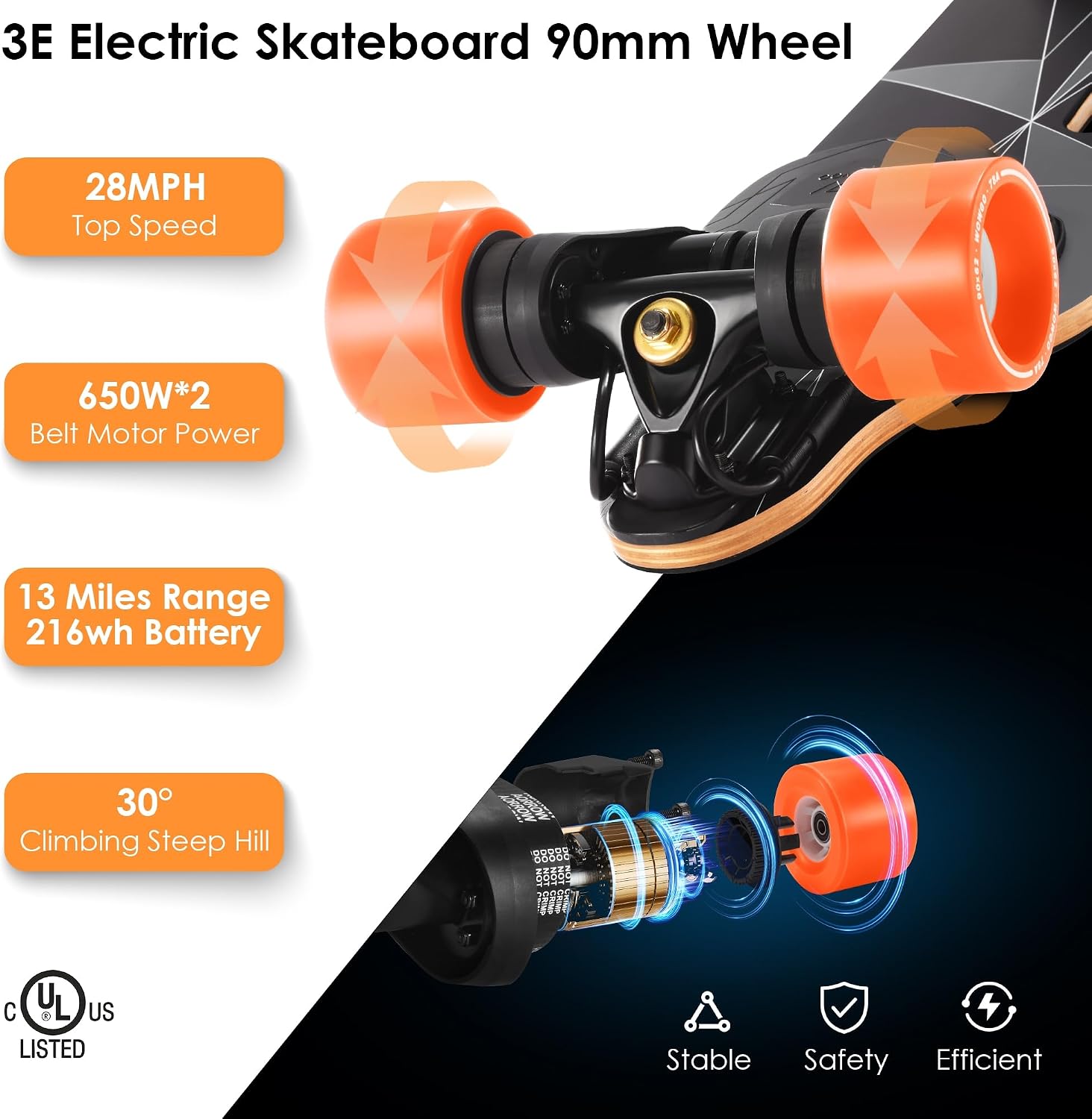
Figure 3: Key performance specifications of the 3E Electric Skateboard, highlighting its 90mm wheels, top speed, motor power, range, and climbing capability.
2. Remote Control Usage
The wireless remote allows for seamless control of acceleration and braking. Familiarize yourself with the remote's functions, including power on/off, mode selection, and direction change. The roller knob provides precise speed adjustments.
3. App Functions
The Tuya Smart App provides advanced customization options. You can fine-tune acceleration and deceleration settings for each speed mode, ensuring a personalized and safe ride. The app also displays real-time data such as single mileage and total mileage.

Figure 4: Detailed profile of the 3E Electric Skateboard, showcasing its ergonomic handle, dual belt motors, IPX5 water resistance, and protective nose guard.
4. Portability
The WOWGO 3E features a curved handle design, making it easy to carry at 16 lbs. This design is convenient for navigating stairs, crossing intersections, or transporting the board when not riding.

Figure 5: Illustrates the social aspect of the WOWGO 3E, showing users and highlighting the charging time and maximum weight capacity.
Maintenance
Regular maintenance ensures the longevity and safe operation of your electric skateboard.
1. General Care
- Keep the board clean and dry. Avoid riding in heavy rain or through deep puddles, despite its IPX5 rating, to prevent water damage to electronic components.
- Store the board in a cool, dry place away from direct sunlight and extreme temperatures.
2. Battery Care
- Charge the battery regularly, even if not in use, to maintain its health. Avoid completely draining the battery.
- If storing for an extended period, charge the battery to about 50-60% and check it periodically.
3. Wheel and Belt Inspection
- Regularly inspect the wheels for wear and tear. Replace them if they show significant damage or uneven wear.
- Check the drive belts for any signs of fraying, cracks, or excessive wear. Replace belts as needed using the provided spare belts and tools.
4. Truck and Bushing Maintenance
- Periodically check all screws and bolts, especially on the trucks and motor mounts, to ensure they are tight. Loose trucks can affect stability and safety.
- Inspect the bushings for wear. If the board feels unstable or makes unusual noises, the bushings may need adjustment or replacement.
Troubleshooting
This section addresses common issues you might encounter with your WOWGO 3E electric longboard.
1. Board Not Turning On
- Ensure the battery is sufficiently charged. Connect the charger and verify the charging indicator.
- Check the power button for proper function.
- If the issue persists, the battery or ESC (Electronic Speed Controller) may be defective. Contact customer support.
2. Loose or Unstable Ride
- Tighten the truck bolts. Adjust them to your preferred riding stiffness.
- Inspect the pivot cups and bushings for wear or damage. Replace if necessary.
3. Motor or Belt Noise/Grinding
- Check the drive belts for proper tension and alignment. Replace worn or damaged belts.
- Inspect the motor mounts and ensure all screws are securely fastened.
- Clean any debris that may be caught in the motor or wheel assembly.
4. Remote Control Issues
- Ensure the remote control is charged.
- Re-pair the remote with the skateboard if connection is lost.
- Check for any obstructions between the remote and the board that might interfere with the signal.
Specifications
| Feature | Specification |
|---|---|
| Brand | WOWGO |
| Model Name | WOWGO 3E - 90mm |
| Color | Black |
| Age Range (Description) | Youth, Adult, Teens |
| Skill Level | All |
| Deck Length | 38 Inches |
| Deck Width | 8.5 Inches |
| Item Weight | 16 Pounds |
| Material | Bamboo, Fiberglass, Maple Wood |
| Load Capacity | 330 Pounds |
| Wheel Size | 90 Millimeters |
| Charging Time | 3 Hour |
| Ply Rating | 8 Ply |
| Power Source | Battery Powered |
| Wheel Material | Polyurethane |
| Durometer Hardness | 78A |
Warranty and Support
WOWGO is committed to providing quality products and excellent customer service.
Warranty Information
Manufacturers' warranty for 180 days (approximately 6 months) since the date of purchase. This warranty covers manufacturing defects and material flaws under normal use. Please retain your proof of purchase for warranty claims.
Customer Support
For any questions, technical assistance, or warranty claims, please feel free to contact WOWGO customer support:
- Email: wowgoboard@163.com
- Service Hours: 7 days a week, 24 hours a day.
Our team is dedicated to providing prompt and helpful support for your WOWGO product.


