
1. Introduction
This manual provides detailed instructions for the TCNOUMT replacement remote control, designed for seamless compatibility with Manhattan T2-R, T2R, and T2 Freeview Player models. This remote offers a direct replacement solution, requiring no complex setup or programming.
Key Features:
- Direct replacement, no programming or pairing required.
- Constructed from high-quality ABS material for durability.
- Sensitive and responsive buttons for reliable operation.
- Ergonomic design for comfortable handling.
- Infrared connectivity with a maximum range of 10 meters (33 feet).

Image 1.1: TCNOUMT T2-R Remote Control, highlighting its function as a replacement for Manhattan Digital TV recorders.
2. Package Contents
Upon opening the package, verify that you have received the following items:
- 1 x TCNOUMT Replacement Remote Control (Model T2-R)
- 1 x User Manual (this document)
Note: Batteries are not included and must be purchased separately.
3. Setup
3.1 Battery Installation
The remote control requires two 1.5V AAA batteries for operation. Follow these steps to install them:
- Locate the battery compartment cover on the back of the remote control.
- Press down on the tab and slide the cover downwards to open the compartment.
- Insert two AAA batteries, ensuring the positive (+) and negative (-) terminals align correctly with the markings inside the compartment.
- Slide the battery compartment cover back into place until it clicks securely.

Image 3.1: Illustration of battery installation, showing the battery compartment and correct orientation for AAA batteries.
3.2 Initial Use
This replacement remote control is pre-programmed and does not require any additional setup or pairing. Once batteries are correctly installed, it is ready for immediate use with your compatible Manhattan Freeview Player.
- Ensure your Manhattan Freeview Player is powered on.
- Point the remote control directly at the Freeview Player.
- Press any function button (e.g., Power, Channel Up) to test its operation.
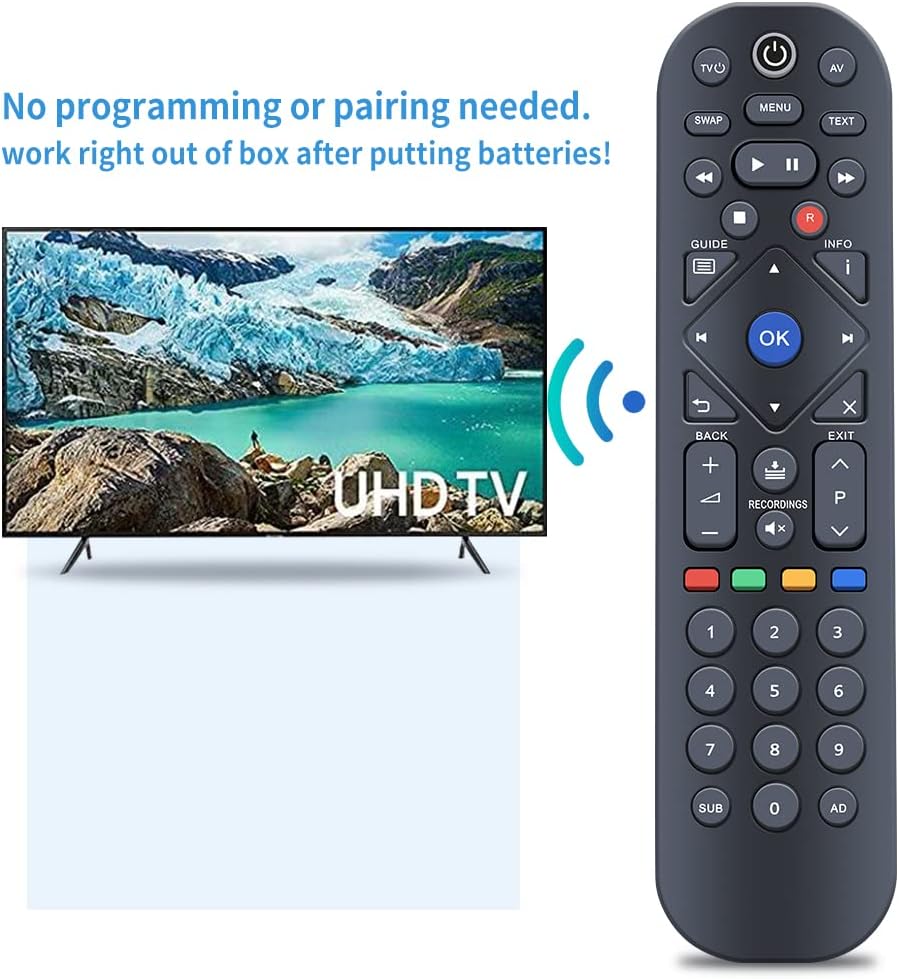
Image 3.2: The remote control in use with a television, illustrating that no programming or pairing is required after battery insertion.
4. Operating Instructions
4.1 Remote Control Layout
Familiarize yourself with the buttons and their general placement on the remote control:

Image 4.1: Front view of the TCNOUMT T2-R remote control, displaying the full button layout.
4.2 Button Functions
The following table outlines the primary functions of the buttons on your remote control:
| Button | Function |
|---|---|
| Power (⑁) | Turns the Freeview Player on or off. |
| TV/AV | Switches TV input source (if programmed or compatible). |
| MENU | Accesses the main menu of the Freeview Player. |
| TEXT | Activates or deactivates Teletext services. |
| SWAP | Switches between the current and previously viewed channel. |
| Play (▶) | Starts playback of recorded content. |
| Pause (⏸) | Pauses live TV or recorded content. |
| Stop (■) | Stops playback of recorded content. |
| Rewind (⏪) | Rewinds recorded content. |
| Fast Forward (⏩) | Fast forwards recorded content. |
| Record (R) | Initiates recording of the current program. |
| GUIDE | Accesses the Electronic Program Guide (EPG). |
| INFO (i) | Displays information about the current program. |
| Navigation Arrows (◀, ▶, ▲, ▼) | Navigates through menus and options. |
| OK | Confirms selections or displays channel list. |
| BACK (↶) | Returns to the previous screen or menu. |
| EXIT (X) | Exits the current menu or function. |
| Volume Up (+) / Down (-) | Adjusts the volume level. |
| Channel Up (▲ P) / Down (▼ P) | Changes the channel up or down. |
| RECORDINGS | Accesses the list of recorded programs. |
| Colored Buttons (Red, Green, Yellow, Blue) | Context-sensitive functions as indicated on screen. |
| Numeric Keypad (0-9) | Direct channel selection or data entry. |
| SUB | Activates or deactivates subtitles. |
| AD | Activates or deactivates Audio Description. |
4.3 Range and Performance
The remote control operates using infrared technology, providing precise control. For optimal performance, ensure a clear line of sight between the remote control and the Freeview Player. The maximum effective range is approximately 10 meters (33 feet).

Image 4.2: The remote control demonstrating its long-distance precise control capability, effective up to 10 meters.
5. Maintenance
To ensure the longevity and optimal performance of your remote control, follow these maintenance guidelines:
- Cleaning: Wipe the remote control regularly with a soft, dry cloth. For stubborn dirt, slightly dampen the cloth with water or a mild cleaning solution, then wipe dry immediately. Avoid using abrasive cleaners or solvents.
- Battery Replacement: Replace batteries promptly when the remote's responsiveness decreases or it stops functioning. Always replace both batteries at the same time with new ones of the same type (AAA).
- Storage: Store the remote control in a cool, dry place away from direct sunlight and extreme temperatures. If storing for an extended period, remove the batteries to prevent leakage.
- Avoid Drops: Protect the remote from physical impact, as drops can damage internal components.
6. Troubleshooting
If you encounter issues with your remote control, refer to the following troubleshooting steps:
- Remote not responding:
- Check if the batteries are inserted correctly with the correct polarity.
- Replace old batteries with new 1.5V AAA batteries.
- Ensure there is a clear line of sight between the remote control and the Freeview Player. Remove any obstructions.
- Confirm that the Freeview Player is powered on.
- Specific buttons not working:
- This often indicates low battery power. Replace the batteries.
- Ensure the buttons are not physically stuck or obstructed by debris.
- Short operating range:
- Replace the batteries.
- Ensure no strong light sources (e.g., direct sunlight) are interfering with the infrared signal.
7. Specifications
Detailed technical specifications for the TCNOUMT T2-R Replacement Remote Control:
- Model Name: T2-R
- Compatible Devices: Manhattan Freeview Player T2-R, T2R, T2
- Connectivity Technology: Infrared
- Number of Buttons: 40
- Controller Type: Button Control
- Maximum Range: 10 Metres (33 feet)
- Battery Type: 2 x 1.5V AAA Battery (not included)
- Item Weight: 100 g
- Material: High-quality ABS

Image 7.1: Dimensions of the TCNOUMT T2-R remote control.
8. Warranty and Support
For any questions, concerns, or issues regarding your TCNOUMT replacement remote control, please contact the seller or manufacturer directly through your purchase platform. Please refer to your purchase documentation for specific warranty terms and conditions.