
1. Introduction
Thank you for purchasing the ZHIWHIS ZWS-702 Multifunctional Emergency Radio. This device is designed to provide reliable communication, entertainment, and emergency functions in various situations, from daily use to outdoor adventures and disaster preparedness. It combines a Bluetooth speaker, multi-band radio, flashlight, and power bank capabilities with multiple charging options.

The ZHIWHIS ZWS-702 radio in an outdoor setting, highlighting its versatility for camping and emergency use.
2. Product Overview
Key Features:
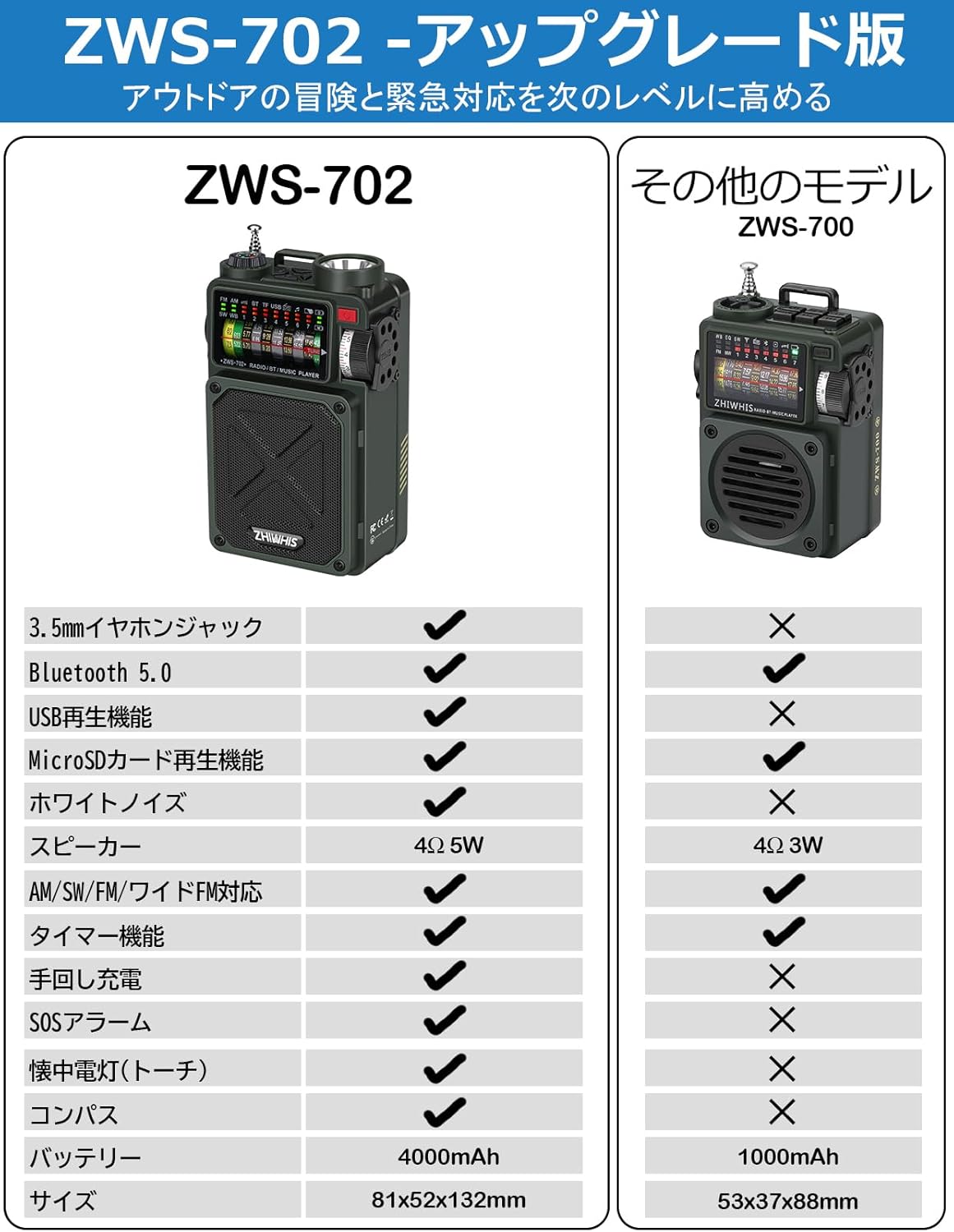
- Multifunctional: Bluetooth 5.0 playback, FM/AM/Shortwave/Wide FM radio reception, MicroSD card playback, USB playback, flashlight, SOS alarm, and white noise generator.
- Multiple Charging Methods: Built-in 4000mAh lithium battery rechargeable via solar panel, hand-crank dynamo, or USB-C.
- Enhanced Audio: High-quality 4Ω 5W speaker with passive radiator for powerful bass. Features a V/U meter for visual audio feedback.
- High Sensitivity DSP Reception: Advanced software programming for excellent reception across multiple bands (FM, AM, SW).
- White Noise & Timer: Provides 7 types of comfortable sounds for improved sleep and concentration, with a sleep timer adjustable from 10 to 70 minutes.
- Portable Design: Compact size (81x52x132mm, 360g) with an included strap for easy carrying.
- Emergency Ready: Integrated flashlight and SOS alarm function for critical situations.

An overview of the ZHIWHIS ZWS-702's diverse functionalities, including radio, Bluetooth, and various power options.
Components:
The ZWS-702 comes with the following components:
- 1 x ZWS-702 Portable Speaker Unit
- 1 x USB-Type-C Charging Cable
- 1 x Strap
- 2 x 2,000mAh Lithium Batteries (pre-installed)
- 1 x Military-style Packaging Box
The ZWS-702 package contents, showing the main unit, charging cable, strap, and user manual.
3. Setup
- Unpacking: Carefully remove all components from the packaging.
- Battery Check: The device comes with two 2000mAh lithium batteries pre-installed. Ensure they are securely in place.
- Initial Charge: For optimal performance, fully charge the device using the provided USB-C cable before first use. Connect the USB-C cable to the device's USB-C port and the other end to a compatible USB power adapter (not included, 5V/1-2A recommended).
- Antenna: Extend the telescopic antenna for improved radio reception.
4. Operating Instructions
Power On/Off:
- To power on, rotate the volume knob clockwise.
- To power off, rotate the volume knob counter-clockwise until it clicks.
Mode Selection:
Use the mode switch (RADIO/BT/M-PLAY) located on the side of the device to select your desired function:
- RADIO: For FM, AM, Shortwave, and Wide FM reception.
- BT (Bluetooth): For connecting to Bluetooth-enabled devices.
- M-PLAY (Music Play): For playing audio from MicroSD card or USB drive.

Detailed view of the ZWS-702's ports and mode selection switch for various playback options.
Radio Operation:
- Band Selection: Use the band switch to select FM, AM, SW, or Wide FM.
- Tuning: Rotate the tuning knob on the side to manually tune to desired frequencies. The display will show the frequency.
- Automatic Tuning (ATS): The device supports ATS for automatic station scanning and storage. Refer to the on-screen prompts or specific button functions for ATS activation.
- Antenna: Extend the telescopic antenna fully for best FM and SW reception. For AM, the internal antenna is generally sufficient.

The ZWS-702 with its antenna extended, demonstrating its ability to receive FM, AM, and Shortwave broadcasts.
Bluetooth Playback:
- Switch the mode to BT. The device will enter pairing mode, indicated by a flashing Bluetooth icon on the display.
- On your smartphone or other Bluetooth device, search for "ZWS-702" and connect.
- Once connected, you can play audio from your device through the ZWS-702 speaker.

The ZWS-702 connected via Bluetooth to a smartphone, ready for wireless audio streaming.
MicroSD/USB Playback:
- Insert a MicroSD card into the TF/MicroSD card slot or a USB flash drive into the USB port.
- Switch the mode to M-PLAY. The device will automatically detect and play supported audio files (MP3, WAV, APE, FLAC).
- Use the playback control buttons (Play/Pause, Next/Previous Track) on the device.
Flashlight:
- Press the flashlight button (usually located near the flashlight) to turn it on/off.
- The high-brightness LED provides illumination in dark environments.

The ZWS-702's powerful integrated flashlight illuminating a dark area.
SOS Alarm:
- Press and hold the SOS button to activate the loud emergency alarm and flashing light.
- Release the button to deactivate the alarm.

The ZWS-702's emergency features, including its flashlight and SOS alarm, designed for critical situations.
White Noise Function:
- Activate the white noise function (refer to specific button or menu option if available).
- Choose from 7 types of comfortable sounds, including white noise and natural sounds, to aid sleep or concentration.

The ZWS-702 offers a selection of white noise and natural sounds to promote relaxation and focus.
Sleep Timer:
- Set the sleep timer to automatically power off the device after a specified duration.
- The timer can be set from 10 to 70 minutes, in 10-minute increments.

The ZWS-702's sleep timer and white noise features are ideal for a relaxing bedtime routine.
5. Charging Methods
The ZWS-702 offers three convenient ways to charge its internal 4000mAh battery:
- USB-C Charging: Connect the provided USB-C cable to the device's USB-C port and a standard USB power source (e.g., wall adapter, power bank, computer USB port). This is the fastest charging method.
- Solar Charging: Place the device with its solar panel facing direct sunlight. The solar panel will slowly charge the battery, ideal for maintaining charge or emergency top-ups outdoors.
- Hand-crank Charging: Extend the hand-crank handle and rotate it clockwise or counter-clockwise at a steady pace. This method generates power manually, useful when no other power source is available.

The ZWS-702 can be charged via hand-crank, solar power, or USB-C, ensuring power availability in any situation.
6. Portability
The ZWS-702 is designed for maximum portability. Its compact dimensions (81mm x 52mm x 132mm) and light weight (360g) make it easy to carry in a pocket, bag, or attach to a backpack using the included strap. This ensures it's always ready for use, whether at home, camping, or during emergencies.

The ZWS-702's compact size makes it easy to hold and carry.

The included strap allows for easy attachment to a backpack, enhancing portability.
7. Specifications
| Feature | Specification |
|---|---|
| Model Number | ZWS-702 |
| Dimensions (L x W x H) | 81 x 52 x 132 mm |
| Weight | 360 g |
| Battery Capacity | 4000mAh (2 x 2000mAh Lithium Batteries) |
| Charging Methods | USB-C, Solar, Hand-crank |
| Radio Frequencies | FM, AM, Shortwave (SW), Wide FM |
| Bluetooth Version | 5.0 |
| Speaker Output | 4Ω 5W |
| Supported Audio Formats | MP3, WAV, APE, FLAC (via MicroSD/USB) |
| White Noise Sounds | 7 types |
| Sleep Timer | 10-70 minutes (10-minute increments) |
| Material | Plastic |
| Certifications | TELEC Certified |
8. Troubleshooting
If you encounter issues with your ZWS-702, please refer to the following common solutions:
- No Power: Ensure the battery is charged. Try charging via USB-C for at least 30 minutes. Check if the volume knob is turned on.
- Poor Radio Reception: Fully extend the telescopic antenna. Try repositioning the device. For AM, rotate the device for better signal.
- Bluetooth Pairing Issues: Ensure the device is in BT mode. Turn off and on Bluetooth on your connecting device. Make sure the ZWS-702 is not already connected to another device.
- No Sound from MicroSD/USB: Ensure the mode is set to M-PLAY. Check if the audio files are in a supported format (MP3, WAV, APE, FLAC). Ensure the MicroSD card or USB drive is properly inserted.
- Flashlight Not Working: Check if the battery is charged. Press the flashlight button firmly.
- SOS Alarm Not Activating: Ensure the SOS button is pressed and held down.
If the problem persists after trying these steps, please contact customer support.
9. Warranty and Support
ZHIWHIS provides a 1-year quality warranty for this product from the date of purchase. If you have any questions or concerns regarding your ZWS-702, please do not hesitate to contact our customer support team. We are committed to ensuring a satisfactory buying experience for our customers.
This product is TELEC certified, ensuring compliance with technical standards.