
1. Introduction
Thank you for purchasing the Amplify Elixir Series Dual Bluetooth Speaker. This manual provides essential information for the safe and efficient operation of your device. Please read it thoroughly before use and retain it for future reference.

Image: Angled view of the Amplify Elixir Series Dual Bluetooth Speaker, showcasing its compact design and dual speaker grilles.
2. Product Features
- Bluetooth v5.0 Connectivity: For wireless audio streaming from compatible devices.
- Multiple Input Options: Supports SD Card, USB, and Aux inputs.
- Dual Speakers: Provides enhanced audio output.
- RGB Lighting Effects: Integrated lighting for visual ambiance.
- FM Radio: Built-in tuner for local radio stations.
- Microphone Input: Allows for karaoke or public address functionality.
- True Wireless Technology (TWS): Enables pairing with another identical speaker for stereo sound.
- Portable Design: Lightweight and compact for easy transport.
3. Package Contents
- 1 x Amplify Elixir Series Dual Bluetooth Speaker, 3-Inch Size
- 1 x Charging Cable (USB)
- 1 x User Manual
4. Product Overview
Front View
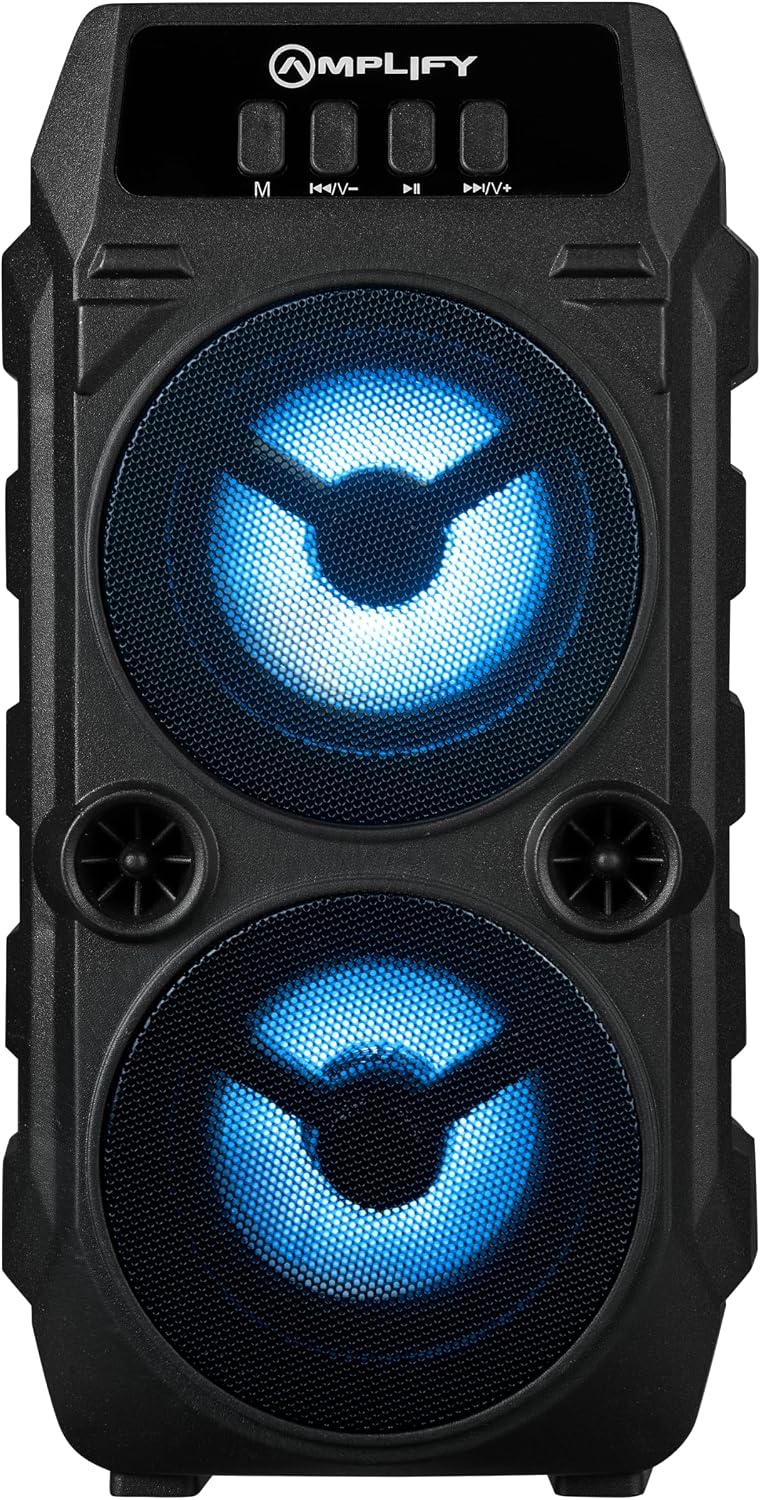
Image: Front view of the Amplify Elixir Series Dual Bluetooth Speaker, showing the dual speaker grilles with blue RGB lighting and the control panel at the top.
Control Panel and Ports

Image: Side view of the Amplify Elixir Series Dual Bluetooth Speaker, highlighting the top control panel with buttons and various input ports.
- M (Mode) Button: Switches between Bluetooth, FM Radio, USB, SD Card, and Aux modes.
- |< Short press for previous track/station; long press to decrease volume.
- || (Play/Pause) Button: Plays or pauses audio; in FM mode, long press to auto-scan.
- >>|/V+ (Next/Volume Up) Button: Short press for next track/station; long press to increase volume.
- USB Port: For USB flash drive playback.
- SD Card Slot: For SD card playback.
- AUX Input: 3.5mm jack for wired audio connection.
- MIC Input: 6.35mm jack for microphone connection.
- DC 5V Charging Port: Micro USB port for charging the speaker.
5. Setup
5.1 Charging the Speaker
- Connect the provided USB charging cable to the DC 5V charging port on the speaker.
- Connect the other end of the USB cable to a 5V USB power adapter (not included) or a computer USB port.
- The charging indicator light will illuminate during charging.
- Charging typically takes 3 to 4 hours. The indicator light will change or turn off once fully charged.
5.2 Powering On/Off
- To power on, locate the power switch (usually at the back or side) and slide it to the 'ON' position.
- To power off, slide the power switch to the 'OFF' position.
6. Operating Instructions
6.1 Bluetooth Pairing
- Ensure the speaker is powered on and in Bluetooth mode (press the 'M' button until you hear the Bluetooth prompt).
- On your mobile device, enable Bluetooth and search for available devices.
- Select "Amplify Elixir" from the list of devices.
- Once paired, the speaker will indicate a successful connection.
6.2 USB/SD Card Playback
- Insert a USB flash drive or an SD card (with MP3 files) into the respective port/slot.
- The speaker will automatically switch to USB or SD card mode and begin playing music. If not, press the 'M' button to select the correct mode.
- Use the '|<>|/V+' buttons to control playback.
6.3 AUX Input
- Connect one end of a 3.5mm audio cable (not included) to the AUX input port on the speaker.
- Connect the other end to the audio output of your device (e.g., smartphone, MP3 player).
- Press the 'M' button to switch to AUX mode.
- Control playback and volume from your connected device.
6.4 FM Radio Operation
- Press the 'M' button to switch to FM Radio mode.
- Long press the '||' (Play/Pause) button to initiate an automatic scan for FM stations. The speaker will save detected stations.
- Use the '|<>|/V+' buttons to navigate between saved stations.
6.5 Microphone Input
- Connect a microphone (not included) to the MIC input port.
- Adjust the microphone volume as needed.
6.6 True Wireless Technology (TWS) Pairing
TWS allows you to pair two Amplify Elixir Series Dual Bluetooth Speakers for a stereo audio experience.
- Ensure both speakers are powered on and in Bluetooth mode, but not connected to any device.
- On one speaker, long press the 'M' button (or a dedicated TWS button if available, refer to specific product markings) until you hear a pairing prompt.
- The two speakers will automatically connect to each other.
- Once connected, pair your mobile device to one of the speakers via Bluetooth as described in section 6.1.
7. Maintenance
- Cleaning: Use a soft, dry cloth to clean the speaker. Do not use abrasive cleaners or solvents.
- Storage: Store the speaker in a cool, dry place away from direct sunlight and extreme temperatures.
- Battery Care: To prolong battery life, charge the speaker regularly, even if not in use for extended periods. Avoid fully depleting the battery frequently.
- Water Exposure: This speaker is not waterproof. Avoid exposure to water or excessive moisture.
8. Troubleshooting
| Problem | Possible Cause | Solution |
|---|---|---|
| Speaker does not turn on | Low battery; Power switch off | Charge the speaker; Ensure power switch is in 'ON' position |
| Cannot pair via Bluetooth | Speaker not in pairing mode; Device Bluetooth off; Speaker already connected to another device | Ensure speaker is in Bluetooth mode; Enable Bluetooth on your device; Disconnect from other devices |
| No sound | Volume too low; Incorrect mode selected; Cable not connected properly (AUX) | Increase volume; Press 'M' to select correct input mode; Check AUX cable connection |
| FM radio static | Weak signal | Relocate the speaker for better reception; Re-scan for stations |
9. Specifications
| Feature | Specification |
|---|---|
| Model Number | AM-3900-3 |
| Bluetooth Version | v5.0 |
| Speaker Output Power | 6 Watts |
| Frequency Response | 18 KHz |
| Input Voltage | 5 Volts (DC) |
| Playback Time | 1.5 - 3 hours (depending on volume and usage) |
| Charging Time | 3 - 4 hours |
| Product Dimensions | 9.5D x 25.5W x 13.5H centimetres |
| Material | Plastic |
| Connectivity Technology | Bluetooth, USB, SD Card, AUX |
| Audio Output Mode | Stereo |
10. Warranty & Support
The Amplify Elixir Series Dual Bluetooth Speaker comes with a 1 Year Limited Warranty from the manufacturer.
For warranty claims or technical support, please refer to the contact information provided on your product packaging or the official Amplify website.