
Office Depot 56023
Office Depot® Brand W-2 Laser Tax Forms Instruction Manual
Brand: Office Depot | Model: 56023
Product Overview
Office Depot laser tax forms are specifically designed for accurate and efficient reporting of wages and tax statements for your employees. These 6-part, 2-up forms are compatible with laser printers and feature heat-resistant ink to prevent fading, ensuring longevity and compliance. The scannable sheets facilitate digital record keeping, streamlining your tax processes.
Key Features:
- Heat-resistant ink for long-lasting, fade-resistant records.
- Scannable sheets for convenient digital record keeping.
- Acid-free paper to resist yellowing and fading, ideal for archiving.
- Functional with standard laser printers.
- Includes 3 W-3 transmittal forms for SSA paper filings.
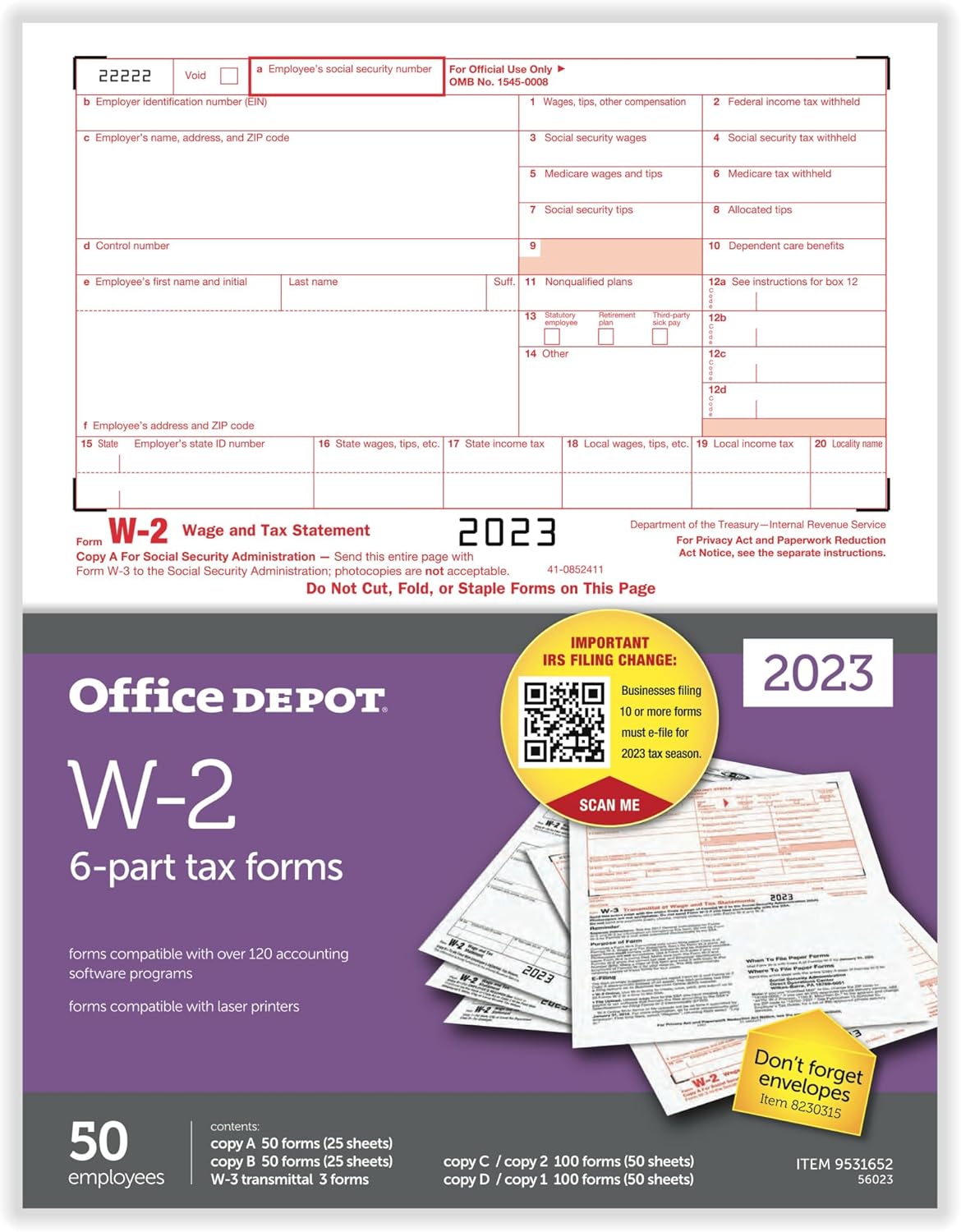
Image: Office Depot W-2 Laser Tax Forms package, showing the 6-part forms and a sample W-2 form for 2023.
Setup and Preparation
Proper setup ensures accurate printing and compliance. These forms are designed for use with laser printers.
Printer Compatibility:
- Ensure your printer is a laser printer. Inkjet printers are not recommended as they may not use heat-resistant ink and could cause smudging or fading.
- Verify your printer software settings are configured for 8.5" x 11" paper size.
Loading Forms:
- Carefully remove the desired number of form sets from the package.
- Load the forms into your laser printer's paper tray according to your printer's instructions for single-sheet or multi-sheet feeding. Ensure the forms are oriented correctly to print on the designated areas.
- It is recommended to print each group of forms at the same time. For example, print all 20 copies of Copy A, then all 20 copies of Copy B, and so on.

Image: Office Depot W-2 Laser Tax Forms package, illustrating the 'Prep tip' for printing and form distribution details.
Usage Instructions
These forms are designed to report wages and tax statements for your employees. Follow these guidelines for proper usage and distribution.
Printing W-2 Forms:
- Use compatible tax software or accounting software to generate the W-2 data.
- Select the option to print W-2 forms on pre-printed stock.
- Perform a test print on plain paper or a spare form to ensure alignment before printing all official forms. Adjust printer settings as needed.
- Print the required copies for each employee and for the Social Security Administration (SSA).
Form Distribution:
Each W-2 form set includes multiple copies for different recipients:
- Copy A: For Social Security Administration (SSA). This copy must be submitted with Form W-3.
- Copy B: For Employee's Federal Tax Return. Provide this copy to the employee.
- Copy C/2: For Employee's Records / State, City, or Local Tax Department. Provide this copy to the employee.
- Copy D/1: For Employer's Records / State, City, or Local Tax Department. Retain this copy for your records.
The package also includes 3 W-3 Transmittal Forms, which are used to summarize and transmit Copy A forms to the SSA. For paper filings, the W-3 form must accompany the Copy A forms.
These forms are designed for use with envelope #8230315 (sold separately).

Image: Detailed view of different W-2 copies (A, B, C/2, D/1) and the W-3 Transmittal form.
Important Resources:
- For important IRS filing changes and updates, visit: importantIRSchanges.com
- For additional employer tax information, visit: employertaxinfo.com
Care and Storage
To maintain the integrity and readability of your tax forms for archiving and future reference, follow these care and storage recommendations:
- Storage Environment: Store forms in a cool, dry place away from direct sunlight, excessive heat, and humidity.
- Protection: Keep forms in their original packaging or in a protective folder or box to prevent bending, creasing, or damage.
- Ink Longevity: The heat-resistant ink is designed to last longer without fading. Avoid exposing printed forms to harsh chemicals or extreme conditions that could degrade the ink.
- Acid-Free Paper: The acid-free nature of the paper helps resist yellowing and fading over time, making it suitable for long-term archiving.
Troubleshooting Common Issues
If you encounter problems while using your Office Depot W-2 Laser Tax Forms, consider the following:
Printing Alignment Issues:
- Software Settings: Ensure your tax or accounting software is correctly configured for printing on pre-printed W-2 forms. Look for alignment or offset settings.
- Printer Tray: Verify that the forms are loaded straight and securely in the printer tray, without any skewing.
- Test Prints: Always perform a test print on a blank sheet or a spare form to check alignment before printing official copies.
Fading or Smudged Ink:
- Printer Type: Confirm you are using a laser printer. Inkjet printers are not compatible and will likely result in smudged or non-permanent ink.
- Toner Level: Check your laser printer's toner cartridge level. Low toner can cause faded prints.
- Printer Maintenance: Refer to your printer's manual for routine maintenance, such as cleaning the fuser or toner cartridge area, which can affect print quality.
Scanning Issues:
- Flatness: Ensure the forms are completely flat and free of creases or folds when scanning.
- Scanner Settings: Adjust your scanner's settings for optimal contrast and resolution.
Product Specifications
| Attribute | Detail |
|---|---|
| Brand | Office Depot |
| Manufacturer | OFFICE DEPOT |
| Model Number | 56023 |
| ASIN | B0CKLMTWKT |
| UPC | 0735854711573 |
| Material Type | Paper |
| Sheet Size | 8.5 x 11 inches |
| Paper Finish | Uncoated |
| Number of Items | 50 Form Sets |
| Item Weight | 1.7 pounds |
| Product Dimensions | 11 x 8.6 x 0.7 inches |
| Date First Available | October 3, 2023 |
Warranty and Support
Specific warranty details for Office Depot Brand W-2 Laser Tax Forms are not provided with this manual. For any product-related inquiries, support, or to report issues, please contact Office Depot customer service directly. Refer to your purchase receipt or the Office Depot website for the most current contact information.
For general tax form information and updates, please consult official IRS publications or visit the IRS website.
Ask a question about this manual
Ask about setup, troubleshooting, compatibility, parts, safety, or missing instructions. Manuals+ will review the question and use this page’s manual context to help answer it.