1. Introduction
This manual provides detailed instructions for the installation, operation, and maintenance of your Kaishengyuan Phone Mount with Dashboard Tray System and Sun Visor Repair Kit. Please read this manual thoroughly before installation and use to ensure proper function and safety.
2. Compatibility
The Phone Mount with Dashboard Tray System is compatible with the following vehicle models:
- Jeep Wrangler JL JLU: 2018, 2019, 2020, 2021, 2022, 2023
- Jeep Gladiator JT: 2020, 2021, 2022, 2023
Note: Not suitable for Jeep Wrangler JL 4xe, Oil-electric hybrid versions, Jeep Wrangler Unlimited Willy edition JL, or Sahara unlimited models.
The Sun Visor Repair Kit is compatible with:
- Jeep Wrangler JK: 2018
- Jeep Wrangler JL: 2018-2022
- Jeep Gladiator: 2020-2022
Please verify your vehicle's model and year before proceeding with installation.
3. Package Contents
Please ensure all components are present before beginning installation:
- Dashboard Storage Tray
- Phone Mount Base with Extension Arm (Metal Rod)
- Adjustable Phone Holder
- Mounting Screw for Phone Mount
- Sun Visor Repair Plates (2 pieces)
- Mounting Screws for Visor Repair (4 pieces)
- Hex Keys (2 pieces)

Figure 3.1: This image displays the complete Kaishengyuan Phone Mount with Dashboard Tray System and the Sun Visor Repair Kit components. It includes the dashboard tray with an integrated phone mount arm, the phone holder, and the two metal plates for the sun visor repair.
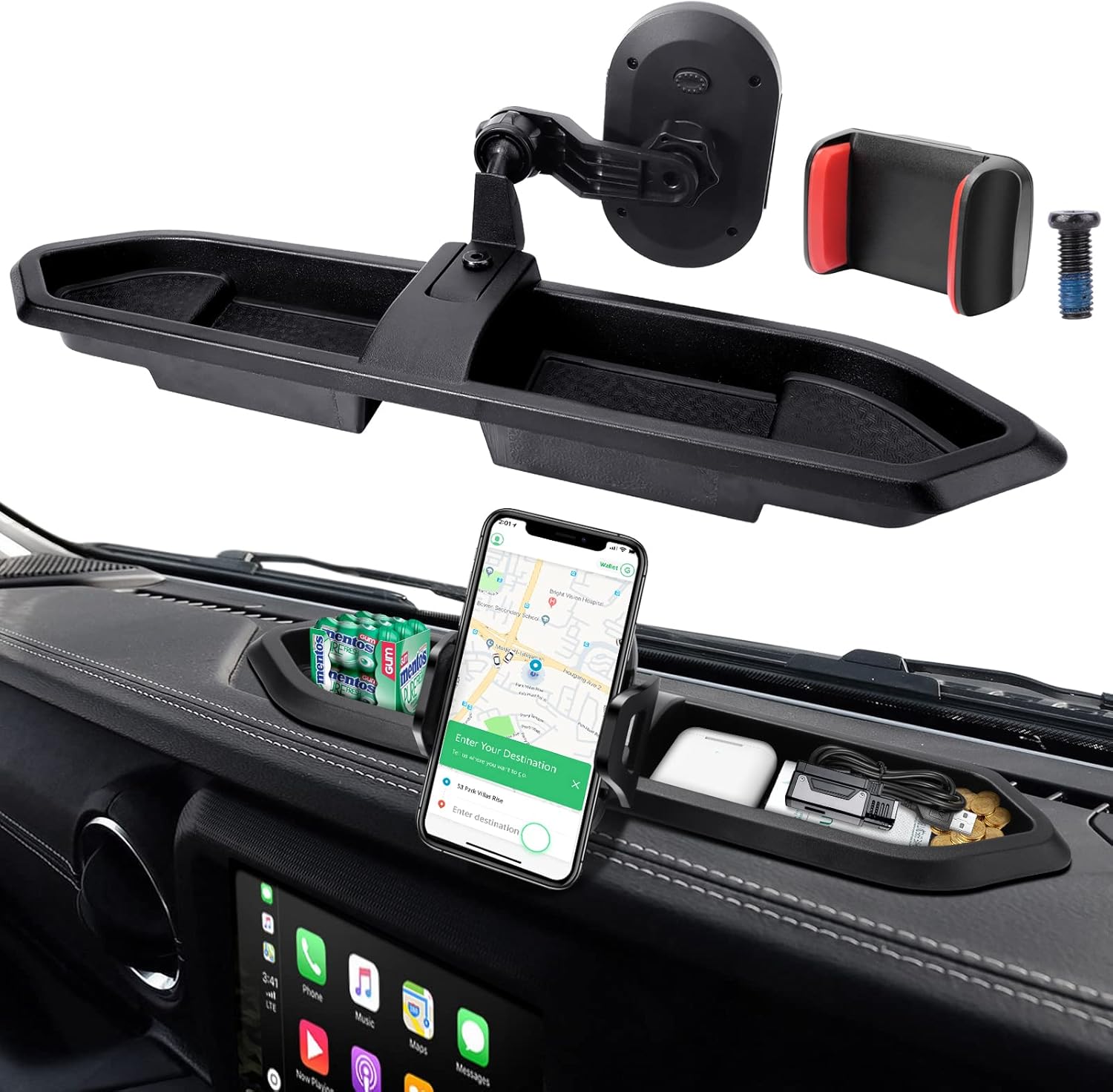
Figure 3.2: This image shows the individual components of the Kaishengyuan Phone Mount system. It features the dashboard tray, the adjustable phone holder, the mounting base, and a screw for installation.
4. Installation Instructions
4.1. Phone Mount and Dashboard Tray Installation
- Prepare the Dashboard: Ensure the dashboard surface where the tray will be placed is clean and dry.
- Position the Tray: Place the dashboard storage tray onto the designated area of your Jeep's dashboard. The tray is designed to fit snugly.
- Attach Phone Mount Base: Secure the phone mount base with its extension arm into the designated slot on the dashboard tray. Use the provided mounting screw to fasten it firmly.
- Install Phone Holder: Attach the adjustable phone holder to the ball joint of the extension arm. Tighten the collar to secure the holder in place.
- Adjust Angle: Adjust the phone holder to your preferred viewing angle.

Figure 4.1: This image illustrates the Kaishengyuan Phone Mount and Dashboard Tray installed on a Jeep dashboard. A smartphone is securely held in the mount, and the tray provides storage for small items like gum, earbuds, and charging cables.

Figure 4.2: This image provides a broader view of the Kaishengyuan Phone Mount installed in a Jeep Wrangler. A hand is shown interacting with a navigation application on a smartphone, demonstrating the mount's practical use for driver assistance.
4.2. Sun Visor Repair Kit Installation
- Identify Sagging Visor: Locate the sun visor that requires repair.
- Position Repair Plate: Place one of the metal repair plates over the pivot point of the sun visor, ensuring it aligns with the existing screw holes.
- Secure with Screws: Use the provided screws and hex key to firmly attach the repair plate to the visor's pivot. Ensure the screws are tightened securely but do not overtighten.
- Verify Stability: Test the sun visor's movement to confirm it is now stable and no longer sagging.

Figure 4.3: This image displays the components of the Kaishengyuan Sun Visor Repair Kit. It includes two black metal plates designed to reinforce the sun visor, four black screws for secure attachment, and two hex keys for installation.

Figure 4.4: This image provides a visual guide for installing the Sun Visor Repair Kit. It clearly shows the correct installation position for the driver's side, with the repair plate properly aligned, and an incorrect position for comparison, emphasizing proper alignment for effective repair.
5. Operating Instructions
5.1. Using the Phone Holder
- Insert Phone: Gently pull apart the adjustable clamps of the phone holder and insert your smartphone. The holder is compatible with phones between 4 and 7 inches in width.
- Secure Phone: Release the clamps to allow them to grip your phone securely. Ensure the phone is centered and stable.
- Adjust Viewing Angle: Loosen the collar on the ball joint to adjust the phone's angle and orientation (portrait or landscape). Tighten the collar once the desired position is achieved. The holder supports 360-degree rotation for optimal viewing.

Figure 5.1: This image details the adjustable dimensions of the Kaishengyuan Phone Holder. It shows measurements for width (4.5cm/1.77in to 7.2cm/2.83in) and height (11.2cm/4.41in), indicating compatibility with smartphones ranging from 4 to 7 inches.

Figure 5.2: This image highlights the 360-degree rotation capability of the Kaishengyuan Phone Holder. Arrows indicate the full range of motion, allowing users to adjust their phone's viewing angle for convenience and safety while driving.
5.2. Using the Dashboard Tray
The dashboard tray provides convenient storage for small items such as keys, coins, charging cables, or other accessories. The high-side base and non-slip texture help prevent items from sliding during vehicle movement.
6. Maintenance
- Cleaning: Wipe the dashboard tray and phone mount components with a soft, damp cloth. Avoid using harsh chemicals or abrasive cleaners.
- Inspection: Periodically check all mounting screws and connections to ensure they remain tight. Retighten if necessary.
- Visor Repair Kit: Once installed, the visor repair plates require minimal maintenance. Ensure screws remain secure.
7. Troubleshooting
- Phone Mount is Loose: Ensure the mounting screw for the phone mount base is fully tightened. Check that the collar on the ball joint is also tightened.
- Items Sliding in Tray: Verify that the tray is properly seated on the dashboard. The non-slip texture should prevent most items from sliding, but extreme driving conditions may still cause movement.
- Sun Visor Still Sags: Re-check the installation of the visor repair plates. Ensure they are correctly aligned and all screws are securely fastened. Refer to Figure 4.4 for correct positioning.
- Phone Holder Not Gripping: Ensure your phone's dimensions are within the 4-7 inch compatibility range. Check for any obstructions preventing the clamps from closing fully.
8. Specifications
- Brand: Kaishengyuan
- Model: Phone Mount with Dashboard Tray System Kits & Sun Visor Repair Kit
- Item Model Number: 478322d9-c845-4ed5-bf54-a3ac0a16f407
- Material (Phone Mount Support Rod): High hardness metal
- Phone Holder Compatibility: 4-7 inch smartphones
- Mounting Type: Dashboard
- Special Feature: Non-Slip (tray and phone holder)
- Color: Black
9. Safety Information
- Always ensure the phone mount and tray are securely installed before driving.
- Do not obstruct your view of the road or vehicle controls with the phone mount or phone.
- Avoid adjusting the phone mount or interacting with your phone while the vehicle is in motion. Pull over to a safe location if adjustments are necessary.
- Ensure all small items placed in the dashboard tray are secure and will not become projectiles during sudden stops or impacts.
10. Warranty and Support
For warranty information or technical support, please refer to the product packaging or contact Kaishengyuan customer service through your purchase platform. Keep your proof of purchase for warranty claims.


