
1. Introduction
Thank you for choosing the BOSSDUN 70mm Aperture Refractor Telescope. This portable and professional telescope is designed for astronomy beginners, adults, and children aged 8-12, offering a high magnification range of 20X to 150X with a 500mm focal length. Its 70mm objective lens features fully coated optics, ensuring clear and bright images of celestial bodies like the moon and planets, as well as terrestrial objects. This manual provides detailed instructions for assembly, operation, maintenance, and troubleshooting to help you explore the universe with ease.
2. Safety Information
Important Safety Warning:
- Never use the telescope to observe the sun directly. Doing so can cause severe and permanent eye damage.
- Always supervise children when they are using the telescope.
- Ensure all components are securely fastened before use to prevent accidental damage or injury.
3. What's in the Box
Your BOSSDUN Telescope package includes the following components:
- Telescope Optical Tube
- Adjustable Tripod (1.4m)
- Accessory Plate
- Finder Scope (5x24)
- 3X Barlow Lens (Extender)
- 45° Erect Image Diagonal
- Eyepiece 10mm
- Eyepiece 25mm
- Carry Bag
- Instruction Manual

Image: All included components of the BOSSDUN Telescope.
4. Assembly & Setup
The BOSSDUN telescope is designed for easy assembly, even for beginners. Follow these steps to set up your telescope:
- Set up the Tripod: Extend the legs of the adjustable tripod to your desired height (28'' to 55''). Secure the legs firmly. Attach the accessory plate to the tripod for holding eyepieces and other small items.
- Mount the Telescope Tube: Carefully place the telescope optical tube onto the tripod mount. Secure it using the provided screws or clamps until it is stable.
- Attach the Finder Scope: Slide the finder scope into its mounting bracket on the main telescope tube and tighten the screws to secure it. The finder scope helps in locating objects before viewing them through the main telescope.
- Insert the Diagonal: Insert the 45° erect image diagonal into the focuser of the telescope. This accessory provides a more comfortable viewing angle and corrects the image orientation, making it suitable for terrestrial viewing.
- Insert an Eyepiece: Choose either the 25mm or 10mm eyepiece. Insert it into the diagonal and gently tighten the small screw on the side to hold it in place. For higher magnification, you can also insert the 3X Barlow lens between the diagonal and the eyepiece.
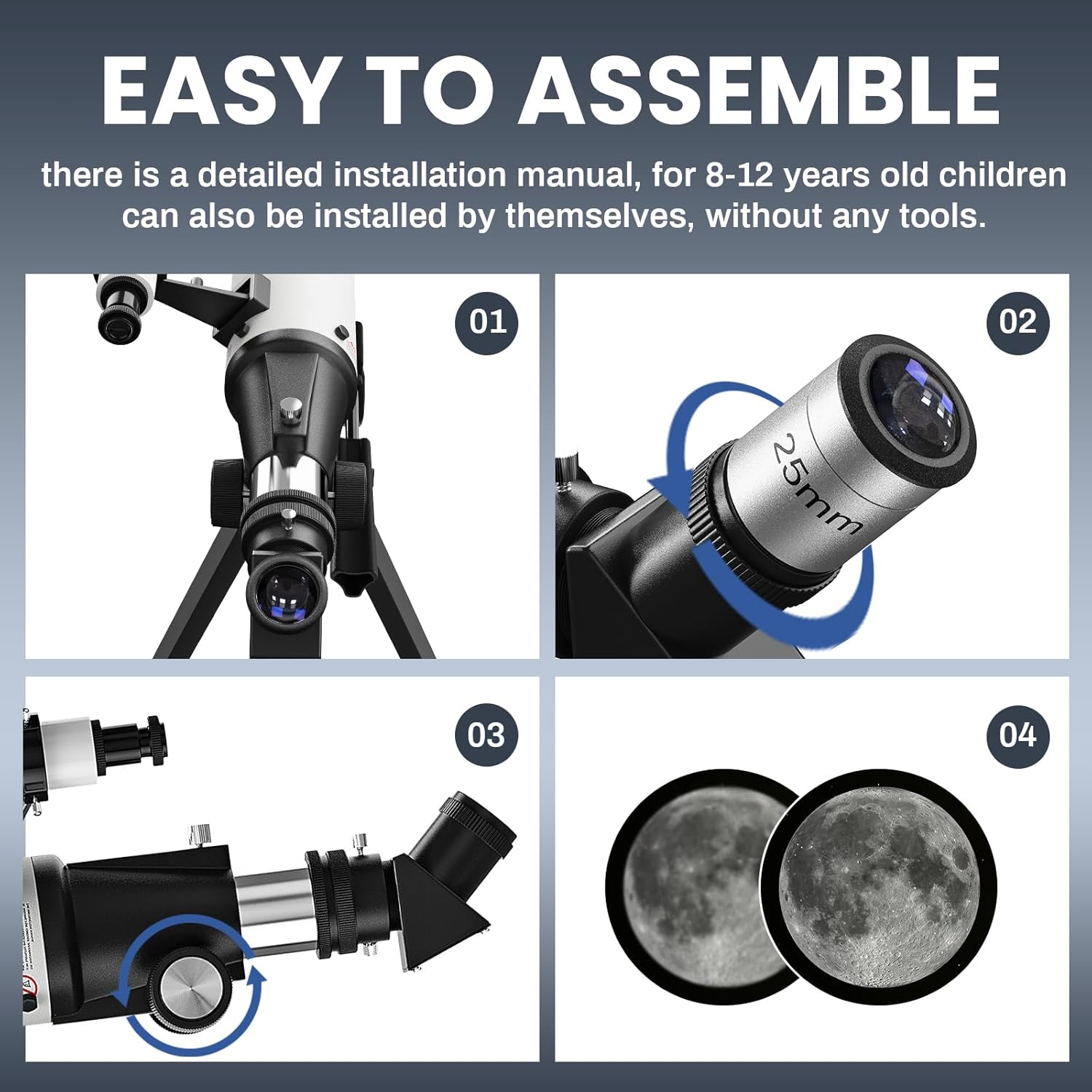
Image: Visual guide for telescope assembly and initial setup.
5. Operating Instructions
Once assembled, your telescope is ready for observation. Follow these steps for optimal viewing:
- Aiming the Telescope: Use the finder scope to locate your desired object. Look through the finder scope and align the crosshairs with the object. Once aligned, the object should be visible in the main telescope's field of view.
- Focusing: Look through the eyepiece and slowly turn the focus wheel until the image becomes sharp and clear.
- Changing Magnification:
- The 25mm eyepiece provides 20X magnification (500mm focal length / 25mm eyepiece = 20X). This is ideal for wide-field views and locating objects.
- The 10mm eyepiece provides 50X magnification (500mm focal length / 10mm eyepiece = 50X). This offers a more detailed view.
- For higher magnification, insert the 3X Barlow lens before the eyepiece. For example, with the 10mm eyepiece and 3X Barlow, you achieve 150X magnification (50X * 3 = 150X). This is suitable for detailed lunar and planetary observations.
- Observing the Moon: Start with the 25mm eyepiece for a full view of the moon. Once you have a clear focus, switch to the 10mm eyepiece or add the 3X Barlow lens for more detailed views of craters and lunar features.
- Observing Planets: Planets require higher magnification. Use the 10mm eyepiece, possibly with the 3X Barlow lens, to observe planets. Atmospheric conditions can significantly affect planetary viewing clarity.

Image: High magnification capabilities for lunar observation.

Image: The 70mm objective lens, providing a large aperture for brighter images.
6. Maintenance
Proper care and maintenance will extend the life of your telescope and ensure optimal performance:
- Cleaning Lenses: Use a soft, lint-free cloth specifically designed for optical lenses. Gently wipe the lens surfaces. For stubborn smudges, use a small amount of optical cleaning fluid. Avoid touching the lens surfaces with your fingers.
- Storage: When not in use, store the telescope in its carry bag in a dry, dust-free environment. Avoid extreme temperatures and humidity.
- Handling: Always handle the telescope and its components with care to prevent accidental drops or impacts.
- Dust Caps: Keep dust caps on the objective lens and eyepieces when not in use to protect them from dust and scratches.
7. Troubleshooting
If you encounter issues with your telescope, refer to the following common problems and solutions:
| Problem | Possible Cause | Solution |
|---|---|---|
| Image is blurry or out of focus | Improper focusing; atmospheric conditions | Adjust the focus wheel slowly. Wait for stable atmospheric conditions. |
| Cannot find objects | Finder scope not aligned; incorrect aiming | Align the finder scope with the main telescope. Practice aiming at distant terrestrial objects first. |
| Image is dim or dark | Light pollution; wrong eyepiece for conditions; dirty lens | Move to a darker viewing location. Use a lower magnification eyepiece. Clean the objective lens and eyepieces. |
| Image is upside down or reversed | Normal for astronomical telescopes; diagonal not used | Astronomical telescopes naturally produce inverted images. Use the 45° erect image diagonal for corrected views (especially for terrestrial). |
8. Specifications
| Feature | Detail |
|---|---|
| Model Name | Telescope |
| Item Model Number | BOSSDUN-50070 |
| Optical Design | Refractor |
| Objective Lens Diameter | 70 Millimeters |
| Focal Length | 500mm |
| Magnification Range | 20X - 150X |
| Eyepieces Included | 10mm, 25mm |
| Barlow Lens | 3X |
| Finderscope | 5x24 |
| Telescope Mount Description | Altazimuth Mount |
| Tripod Height (Adjustable) | 28 inches to 55 inches (70cm to 140cm) |
| Product Dimensions | 23.62 x 2.95 x 3.3 inches |
| Item Weight | 1.61 pounds (730 Grams) |
| Manufacturer | BOSSDUN |
| Date First Available | November 21, 2023 |
9. Warranty and Support
BOSSDUN is a registered trademark in the US, ensuring the authenticity and quality of your product. For any questions, technical assistance, or warranty claims, please contact BOSSDUN customer support through the retailer's platform or the official BOSSDUN website. Please retain your proof of purchase for warranty purposes.