1. Introduction
Thank you for choosing the Arrow Dancer CY T2 Crystal Transparent Wireless Earbuds. This manual provides essential information for setting up, operating, and maintaining your earbuds to ensure optimal performance and longevity. Please read this manual thoroughly before use.
2. Package Contents
- Arrow Dancer CY T2 Wireless Earbuds (Left and Right)
- Charging Case
- USB Charging Cable
- User Manual
3. Product Overview
Familiarize yourself with the components of your Arrow Dancer CY T2 earbuds.

Figure 3.1: Earbuds housed within the transparent charging case, displaying the battery percentage on the integrated LED screen.

Figure 3.2: Detailed view of the charging case's LED digital display, indicating battery levels for both the case and individual earbuds.

Figure 3.3: An individual wearing an earbud, illustrating the ergonomic design intended for a comfortable and secure fit within the ear canal.
4. Setup
4.1 Charging the Earbuds and Case
Before first use, fully charge the earbuds and charging case.
- Place the earbuds into the charging case. Ensure they are correctly seated.
- Connect the USB charging cable to the charging port on the case and to a 5V USB power source.
- The LED display on the case will show the charging status. When fully charged, the display will indicate 100% or stop flashing.
- Charging time for the case is approximately 45 minutes. Earbuds charge automatically when placed in the powered case.

Figure 4.1: Overview of battery performance, indicating up to 5 hours of music playback, 3 hours of call time, and 25 hours of total usage with the 500mAh charging case.
4.2 Bluetooth Pairing
Pair your earbuds with your device for wireless audio.
- Ensure the earbuds are charged and placed in the charging case.
- Open the charging case lid. The earbuds will automatically enter pairing mode.
- On your device (smartphone, tablet, etc.), enable Bluetooth and search for available devices.
- Select "AD Air 31 TWS" from the list of found devices.
- Once connected, a voice prompt will confirm successful pairing.
- For subsequent use, the earbuds will automatically connect to the last paired device when removed from the case.
5. Operating Instructions
The Arrow Dancer CY T2 earbuds feature smart touch controls for easy management of audio and calls.
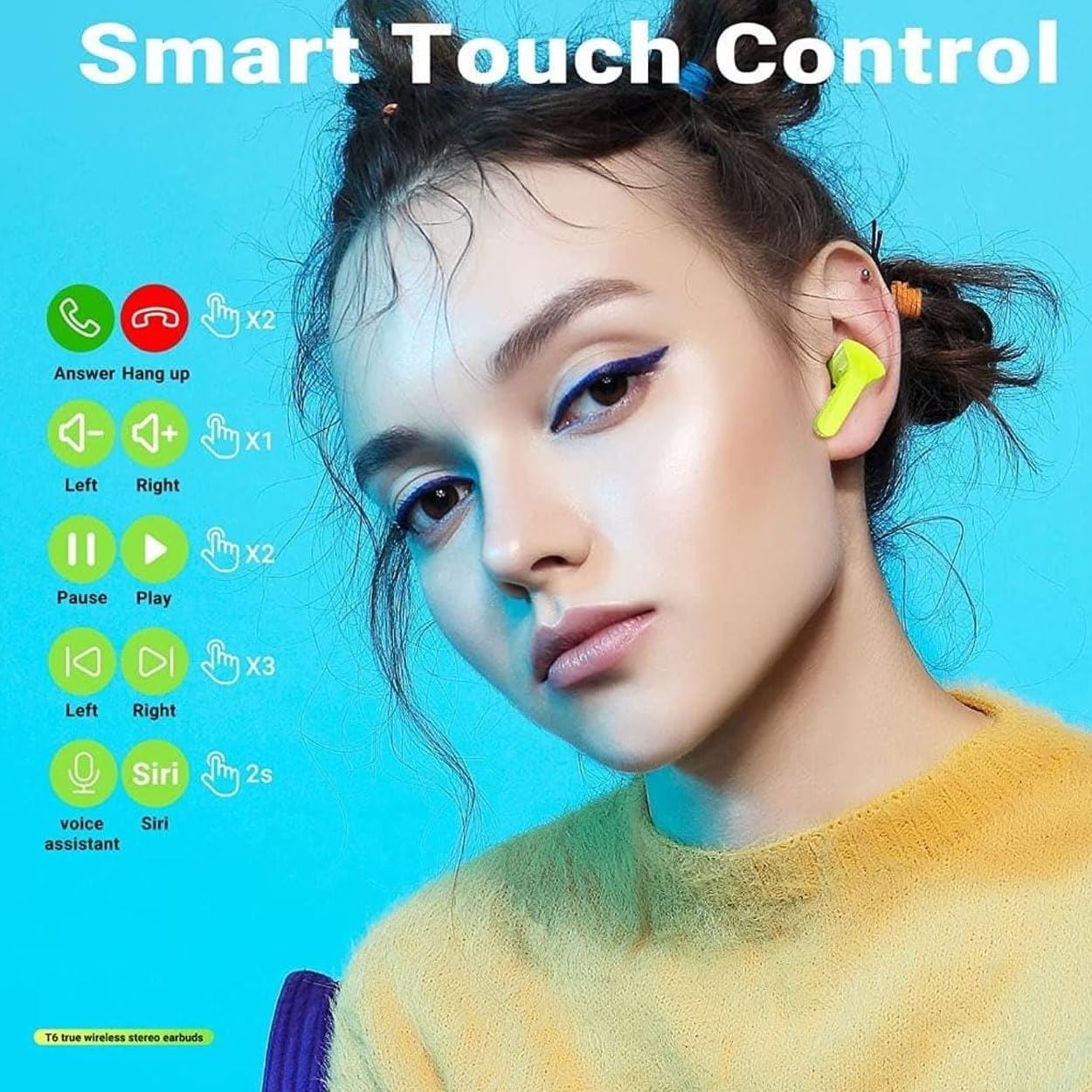
Figure 5.1: Visual guide to the smart touch controls for music playback, call management, and voice assistant activation.
5.1 Power On/Off
- Power On: Open the charging case lid, or long-press the touch area for 3 seconds if earbuds are out of case.
- Power Off: Place the earbuds back into the charging case and close the lid, or long-press the touch area for 5 seconds.
5.2 Music Playback
- Play/Pause: Double-tap the touch area on either earbud.
- Next Track: Triple-tap the touch area on the right earbud.
- Previous Track: Triple-tap the touch area on the left earbud.
- Volume Up: Single-tap the touch area on the right earbud.
- Volume Down: Single-tap the touch area on the left earbud.
5.3 Call Management
- Answer Call: Double-tap the touch area on either earbud.
- End Call: Double-tap the touch area on either earbud during a call.
- Reject Call: Long-press the touch area on either earbud for 2 seconds.
5.4 Voice Assistant
- Activate Voice Assistant (Siri/Google Assistant): Long-press the touch area on either earbud for 2 seconds.
6. Maintenance
6.1 Cleaning
- Regularly clean the earbuds and charging case with a soft, dry, lint-free cloth.
- Do not use harsh chemicals, cleaning solvents, or strong detergents.
- Clean the charging contacts on both the earbuds and the case to ensure proper charging.
6.2 Storage
- Store the earbuds in their charging case when not in use to protect them and keep them charged.
- Avoid storing in extreme temperatures (hot or cold) or in highly humid environments.
7. Troubleshooting
If you encounter issues, refer to the following common solutions:
| Problem | Solution |
|---|---|
| Earbuds not pairing |
|
| No sound from earbuds |
|
| Earbuds not charging |
|
8. Specifications
Key technical specifications for the Arrow Dancer CY T2 Wireless Earbuds:
- Model Name: AD Air 31 TWS
- Connectivity Technology: Wireless (Bluetooth 5.3)
- Headphones Form Factor: In Ear
- Headphones Ear Placement: In Ear
- Impedance: 32 Ohm
- Sensitivity: 95 dB
- Noise Control: None (Passive Noise Reduction)
- Product Dimensions: 10.16 x 7.62 x 3.94 cm
- Item Weight: 60 g
- Manufacturer: Arrow Dancer
- Color: Black (as reviewed)
9. Warranty and Support
For warranty information or technical support, please refer to the documentation provided at the time of purchase or contact your retailer. Keep your proof of purchase for any warranty claims.