
Introduction
Thank you for choosing the BMB WH-210 900MHz Dual Wireless Vocal Microphone System. This system is designed to provide clear and stable audio for a variety of applications, including karaoke, public address (PA) systems, meetings, parties, and other events. Please read this manual carefully to ensure proper setup, operation, and maintenance of your new microphone system.
What's in the Box
- 1 x Receiver
- 2 x Handheld Microphones
- 2 x Anti-Roller Rings
- 2 x Microphone Windscreens
- 1 x Lithium Ion Battery (included, 1 required)
Setup Instructions
Follow these steps to set up your BMB WH-210 wireless microphone system:
- Charge the Receiver: Ensure the compact receiver is fully charged before first use. The receiver has a rechargeable battery.
- Install Batteries in Microphones: Open the battery compartment of each handheld microphone and insert the required Lithium Ion batteries.
- Power On Components: Press and hold the power button on both the receiver and each microphone for approximately 2 seconds to power them on. The LED display on the microphones will illuminate.
- Connect the Receiver: Plug the receiver's 6.35mm jack into the microphone input of your audio device (e.g., amplifier, audio mixer, karaoke machine, PA system). The receiver features an adjustable angle plug for convenience.
- Automatic Pairing: The system features an automatic pairing function. Once both the microphones and receiver are powered on and within range, they should automatically connect. If there are no other devices, the system will reconnect with the last paired device.
- Adjust Volume: Use the volume buttons (+/-) on the microphones to adjust the input volume as needed.

Image: Two BMB WH-210 handheld wireless microphones and the compact receiver, ready for setup.
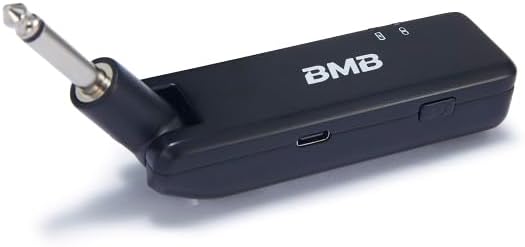
Image: A close-up view of the BMB WH-210 compact wireless receiver, highlighting its 6.35mm jack for audio connection.

Image: A diagram illustrating the key features of the BMB WH-210 system, such as the all-metal aluminum microphone, the rechargeable portable receiver with up to 6 hours of battery life, the large LED display on the handhelds, and the standard 6.35mm output plug with an adjustable angle for space-saving use.

Image: The BMB WH-210 handheld microphones positioned next to an audio device, with the receiver plugged into its input, demonstrating a typical setup.
Operating Instructions
Microphone Controls
- Power Button: Press and hold for 2 seconds to turn the microphone on or off. A short press will mute/unmute the microphone.
- Volume Buttons (+/-): Short press to increase or decrease the microphone's volume.
- Menu Button (M): Press and hold to disconnect from the current device or automatically connect to the next available device. If no other devices are found, it will attempt to reconnect with the last device.
- LED Display: The large LED display on the handhelds shows battery status and channel information.
Receiver Operation
- Power Button: Press and hold to turn the receiver on or off.
- Status Indicators: The receiver has LED indicators to show power and connection status.
- Connectivity: The receiver connects to your audio system via a 6.35mm jack.
General Usage
Once connected, ensure your audio device's volume is set appropriately. Speak or sing into the microphone from a comfortable distance. The UHF wireless technology provides stable signal transmission, making it suitable for dynamic performances and presentations.
Maintenance
Cleaning
- Wipe the microphone bodies and receiver with a soft, dry cloth.
- Do not use liquid cleaners or solvents, as these can damage the electronic components.
- Regularly clean the microphone windscreens to maintain sound quality.
Battery Care
- For the handheld microphones, replace the Lithium Ion batteries when the low battery indicator appears on the LED display.
- Recharge the receiver's internal battery as needed. Avoid fully draining the battery frequently to prolong its lifespan.
- If storing the system for an extended period, remove batteries from the microphones and ensure the receiver is partially charged (around 50%) to prevent battery degradation.
Storage
Store the microphone system in a cool, dry place away from direct sunlight and extreme temperatures. Use the anti-roller rings to prevent microphones from rolling off surfaces.
Troubleshooting
| Problem | Possible Cause | Solution |
|---|---|---|
| No sound from microphone | Microphone or receiver is off; low battery; microphone muted; incorrect connection to audio device. | Ensure both microphone and receiver are powered on. Check battery levels. Unmute microphone. Verify receiver is correctly plugged into the audio device's microphone input. |
| Poor sound quality/Interference | Out of range; environmental interference; low battery. | Move closer to the receiver. Avoid obstacles between microphone and receiver. Ensure no other 900MHz devices are causing interference. Check battery levels. |
| Microphone not pairing | Microphone or receiver not in pairing mode; out of range. | Ensure both devices are powered on. Try pressing and holding the Menu button on the microphone to force a reconnection. Move devices closer. |
| Receiver not charging | Faulty charging cable or power source. | Try a different USB charging cable and power adapter. Ensure the charging port is clean. |
Specifications
| Feature | Detail |
|---|---|
| Model Name | BMBMPWH0210 (WH-210) |
| Microphone Form Factor | Handheld |
| Connectivity Technology | UHF (900MHz, FCC compliant) |
| Number of Channels | 2 |
| Power Source (Microphone) | Battery Powered (1 Lithium Ion battery required per microphone, included) |
| Power Source (Receiver) | Rechargeable Internal Battery |
| Material | Aluminum |
| Item Weight | 400 Grams (approx. 14.1 ounces) |
| Frequency Response | 20 Hz |
| Connector Type | 6.35 mm Jack |
| Polar Pattern | Unidirectional |
| Special Features | Automatic Pairing Function, Curved For Comfortable Hand Grip, Dual Wireless Microphone (Comply with FCC in 902-928MHz), Large LED Display, Standard 6.35mm Plug with Adjustable Angle |
| Compatible Devices | Amplifier, Audio Mixer, Karaoke Machine, PA System |
Warranty and Support
For warranty information and technical support, please refer to the documentation included with your product or contact BMB customer service directly. Keep your purchase receipt as proof of purchase for any warranty claims.