
FIO MOTUS FM20-white
FIO MOTUS FM20 Noise Cancelling Headphones User Manual
Model: FM20-white
Introduction
Thank you for choosing FIO MOTUS FM20 Noise Cancelling Headphones. This manual provides essential information for setting up, operating, and maintaining your headphones to ensure optimal performance and longevity. Please read this manual thoroughly before use.

Image: FIO MOTUS FM20 Noise Cancelling Headphones in white, showcasing their sleek design and over-ear form factor.
What's in the Box
- FIO MOTUS FM20 Noise Cancelling Headphones
- Audio Cable (3.5mm)
- USB-C Charging Cable
- Protective Bag
- User Manual
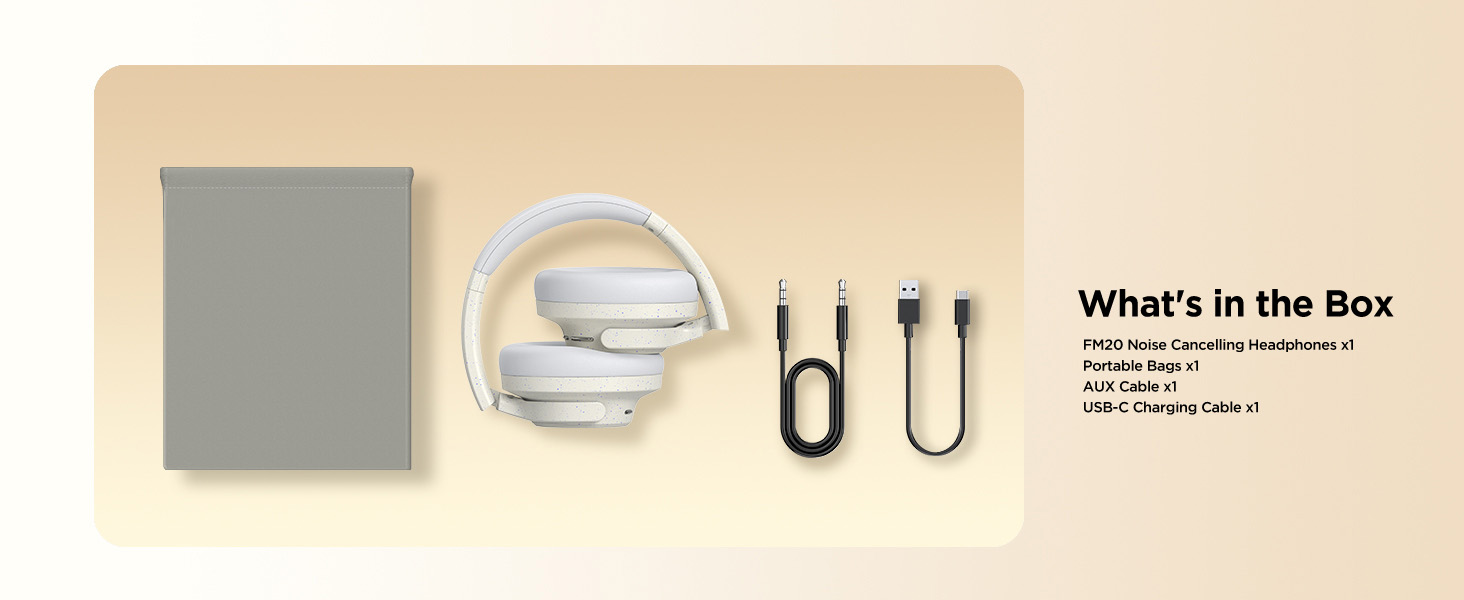
Image: An illustration showing the FIO MOTUS FM20 headphones, a portable bag, an AUX cable, and a USB-C charging cable, representing the items included in the product packaging.
Setup
Charging the Headphones
Before first use, fully charge your FIO MOTUS FM20 headphones. Connect the USB-C charging cable to the charging port on the headphones and the other end to a USB power adapter (not included) or a computer's USB port.
- A full charge provides up to 130 hours of playtime in standard mode or 75 hours with Active Noise Cancellation (ANC) enabled.
- A quick 10-minute charge can provide up to 12 hours of listening time.

Image: A visual representation of the FIO MOTUS FM20 headphones' impressive battery life, highlighting 75 hours with ANC, 130 hours in normal mode, and a quick 10-minute charge providing 12 hours of playback.
Powering On/Off
- To power on: Press and hold the Multifunctional Button for 3 seconds.
- To power off: Press and hold the Multifunctional Button for 3 seconds.
Bluetooth Pairing
- Ensure the headphones are powered off.
- Press and hold the Multifunctional Button until the LED indicator flashes blue and red, indicating pairing mode.
- On your device (smartphone, tablet, computer), enable Bluetooth and search for "FIO MOTUS FM20".
- Select "FIO MOTUS FM20" from the list of available devices to connect. Once connected, the LED indicator will turn solid blue.
The headphones utilize Bluetooth 5.3 for stable and efficient wireless connectivity.

Image: A detailed view of a microchip, emphasizing the FIO MOTUS 5.3 wireless connection technology, which ensures stable and efficient Bluetooth pairing.
Operating Instructions
Button Functions
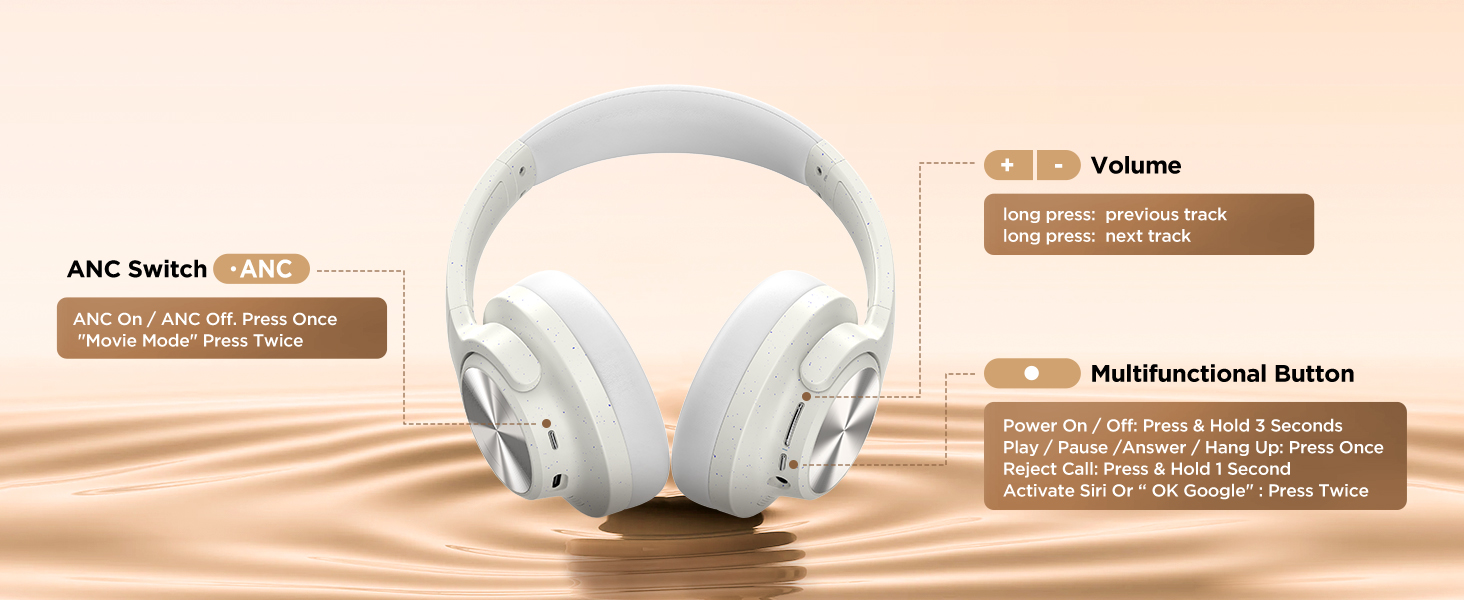
Image: A clear diagram illustrating the location and function of each button on the FIO MOTUS FM20 headphones, including the ANC switch, volume controls, and the versatile multifunctional button.
| Button/Control | Action | Function |
|---|---|---|
| ANC Switch | Press once | Toggle ANC On / ANC Off / Transparency Mode |
| Volume + | Short press | Increase Volume |
| Volume + | Long press | Next Track |
| Volume - | Short press | Decrease Volume |
| Volume - | Long press | Previous Track |
| Multifunctional Button | Press & Hold 3 Seconds | Power On / Off |
| Multifunctional Button | Press Once | Play / Pause / Answer / Hang Up Call |
| Multifunctional Button | Press & Hold 1 Second | Reject Call |
| Multifunctional Button | Press Twice | Activate Siri or Google Assistant |
Active Noise Cancellation (ANC) and Transparency Mode
The FM20 headphones feature hybrid ANC technology to reduce ambient noise and a Transparency Mode to allow you to hear your surroundings without removing the headphones.
- ANC On: Reduces low and mid-frequency sounds, ideal for travel or noisy environments.
- Transparency Mode: Amplifies ambient sounds, useful for awareness in urban settings or conversations.
- Toggle between ANC On, ANC Off, and Transparency Mode by pressing the ANC Switch button.

Image: A man wearing FIO MOTUS headphones, accompanied by a graphic demonstrating the effectiveness of hybrid active noise cancellation, showing a reduction of up to -38dB in ambient noise.

Image: A collage of four scenarios (Outdoor, Flight, Indoor, Sports) depicting individuals using FIO MOTUS headphones, illustrating how the tailored noise cancellation adapts to various environments for optimal listening.
Wired Connection
For a wired connection, use the included 3.5mm audio cable. Plug one end into the headphone's 3.5mm jack and the other end into your audio device. This mode is useful when battery is low or for devices without Bluetooth.
Using the FIO MOTUS App
Enhance your listening experience by downloading the FIO MOTUS app. The app allows for custom EQ settings, personalized spatial audio, and fine-tuning of noise cancellation and transparency modes.
- Custom EQ: Adjust sound profiles (e.g., Deep Bass, Hi-Res Sound) to your preference.
- Personalized Spatial Audio: Experience immersive sound, creating a concert-like environment.
- Game Mode: Enable low latency mode (0.038s) for enhanced audio-visual synchronization during gaming.
- ANC/Transparency Mode Settings: Fine-tune the intensity of noise cancellation or transparency.

Image: A detailed view of the FIO MOTUS mobile application interface, displaying options for battery status, custom sound equalization, ANC and transparency mode adjustments, and toggles for spatial audio and game mode.

Image: A woman enjoying music while wearing FIO MOTUS headphones, with visual cues highlighting the 3D spatial audio feature, offering immersive sound for both movie and music listening experiences.

Image: A woman engaged in mobile gaming while wearing FIO MOTUS headphones, prominently featuring a graphic that highlights the ultra-low latency of 0.038 seconds in Game Mode, ensuring seamless audio-visual synchronization.
Maintenance
Cleaning
- Wipe the headphones with a soft, dry cloth.
- Do not use abrasive cleaners or solvents.
- Keep the charging port and audio jack free of dust and debris.
Storage
When not in use, store the headphones in the provided protective bag to prevent scratches and damage. The headphones are designed to be foldable for compact storage.

Image: A series of four illustrations showcasing the ergonomic design of the FIO MOTUS headphones, including soft earcups for comfort, a fully foldable structure for portability, an adjustable headband for a custom fit, and 90-degree rotatable earcups for versatile use and storage.
Battery Care
- Avoid exposing the headphones to extreme temperatures.
- Do not fully discharge the battery for extended periods. Charge regularly to maintain battery health.
Troubleshooting
| Problem | Possible Cause | Solution |
|---|---|---|
| Headphones won't turn on | Low battery | Charge the headphones fully. |
| Cannot pair via Bluetooth | Headphones not in pairing mode / Device Bluetooth off | Ensure headphones are in pairing mode (flashing blue/red LED). Turn off and on Bluetooth on your device. Forget device and re-pair. |
| No sound | Volume too low / Not connected / Wrong audio source | Increase volume on headphones and device. Ensure headphones are connected. Check audio output settings on your device. |
| ANC not effective | ANC mode not active / Environmental noise type | Press the ANC switch to activate ANC. ANC is most effective on low-frequency, constant noises. |
| Sound distortion | Volume too high / Interference | Lower the volume. Move away from sources of strong electromagnetic interference. |
Specifications
| Feature | Detail |
|---|---|
| Model Name | FM20-white |
| Connectivity Technology | Wireless (Bluetooth 5.3), Wired (3.5mm Jack) |
| Noise Control | Active Noise Cancellation, Hybrid Noise Cancellation |
| Audio Driver Type | 40mm Dynamic Driver |
| Frequency Response | 20 Hz - 40 kHz |
| Impedance | 16 Ohm |
| Sensitivity | 100 dB |
| Bluetooth Range | 10 Meters |
| Battery Life (ANC On) | Up to 75 Hours |
| Battery Life (ANC Off) | Up to 130 Hours |
| Quick Charge | 10 minutes charge for 12 hours playtime |
| Charging Time | Not specified for full charge, but 10 mins for 12 hours playtime. |
| Control Method | App, Button |
| Material | Plastic, Protein Leather (earcups) |
| Item Weight | 9.9 ounces (0.28 Kilograms) |
| Product Dimensions | 7.9 x 6.8 x 3.2 inches |

Image: An illustration of the 40mm large dynamic driver, emphasizing its role in producing deep bass, providing hearing protection, and delivering Hi-Fi stereo sound for an enhanced audio experience.
Warranty and Support
Each FIO MOTUS product comes with an 18-month after-sales warranty. For any inquiries, technical support, or warranty claims, please contact FIO MOTUS customer service. They offer 24-hour online service.
For more information and support, visit the official FIO MOTUS store: FIO MOTUS Store on Amazon.
Environmental Responsibility
FIO MOTUS is committed to reducing environmental impact. The packaging for these headphones uses FSC-certified, 100% paper-sourced materials.

Image: A visual emphasizing FIO MOTUS's commitment to sustainability, featuring a product box and text highlighting the use of FSC-certified, 100% paper-sourced materials for packaging, promoting a greener future.
Ask a question about this manual
Ask about setup, troubleshooting, compatibility, parts, safety, or missing instructions. Manuals+ will review the question and use this page’s manual context to help answer it.