
Introduction
This manual provides detailed instructions for the installation, operation, and maintenance of your Denler FLv2 Smart Door Lock. Please read this manual thoroughly before installation and use to ensure proper functionality and security.
Package Contents
Verify that all components are present in the package:
- Smart Lock x 1
- Mortise x 1
- User Manual x 1
- RFID Cards x 2
- Physical Keys x 2
Key Features
The Denler FLv2 Smart Door Lock offers multiple advanced features for enhanced security and convenience:
- 3D Face Recognition: Advanced technology for precise and secure access.
- Multiple Access Methods: Unlock via 3D Face ID, Fingerprint, RFID Card, PIN Code, Mobile App, or Mechanical Key.
- Wi-Fi Remote Unlock: Control your lock remotely using the dedicated smartphone application.
- LCD Camera & Video Intercom: On-demand video intercom and remote viewing capabilities.
- Long-lasting Battery: Equipped with a 4200mAh rechargeable battery, providing 2-3 months of usage per charge.
- Smart Home Integration: Supports voice control via Alexa and Google Assistant.
- Anti-Theft Alarm: Triggers an alarm and app notification upon multiple incorrect attempts or tampering.

Figure 1: Overview of the 7 unlocking options available with the Denler FLv2 Smart Door Lock.
Installation
Professional installation is recommended for optimal performance and security. Denler provides installation services in various cities across India. Please submit an installation request on the official Denler website after receiving your lock.
Compatible Door Directions
Ensure your door's opening direction is compatible with the lock's design. Refer to the diagram below to identify your door type:

Figure 2: Compatible door opening directions for installation.
Operating Instructions
The Denler FLv2 Smart Door Lock offers multiple ways to unlock your door. Familiarize yourself with each method for convenient access.
Unlocking Methods
- 3D Face Recognition:
Stand directly in front of the lock. The 3D facial scanner will identify authorized users for quick access. This system prevents unlocking with photos or videos.

Figure 3: 3D Face Recognition in use, featuring anti-counterfeiting technology.
- Fingerprint Unlock:
Place your registered finger on the fingerprint sensor. The lock will verify your fingerprint and unlock.
- RFID Card:
Present a registered RFID card to the designated area on the lock to gain access.
- PIN Code:
Enter your registered PIN code on the keypad, then press the confirm button to unlock.
- Mobile App Remote Unlock:
Use the Denler smartphone application to unlock the door remotely. You will receive notifications when someone presses the doorbell on the lock, allowing you to unlock from anywhere.
- Mechanical Key:
In case of emergencies or battery depletion, use the provided mechanical key to manually unlock the door.

Figure 4: Visual guide to the various unlocking options.
Using the Mobile Application
The Denler app allows you to manage your lock, view activity logs, and unlock remotely. Ensure your lock is connected to your home Wi-Fi network.
- Anytime Live Video: View live feed from the lock's camera.
- Remote Unlock: Unlock the door from your smartphone.
- Temporary Passwords: Generate time-limited access codes for guests.
- Unlocking Log: Review a history of all lock and unlock events.

Figure 5: Mobile application features and user interaction with the lock.
Maintenance
- Battery Charging: The lock is powered by a 4200mAh rechargeable Li-ion battery. Charge the battery when the low battery indicator appears. A full charge typically lasts 2-3 months depending on usage.
- Cleaning: Wipe the lock's surface with a soft, dry cloth. Avoid using abrasive cleaners or solvents that may damage the finish or electronic components.
- Sensor Care: Keep the fingerprint sensor and face recognition camera clean and free from dust or smudges for optimal performance.
Troubleshooting
| Problem | Possible Cause | Solution |
|---|---|---|
| Lock does not respond. | Battery is depleted. | Charge the battery. Use the mechanical key for immediate access. |
| Fingerprint/Face recognition fails. | Sensor/camera is dirty; unregistered user; improper placement. | Clean the sensor/camera. Ensure your fingerprint/face is registered. Try repositioning your finger/face. |
| Remote unlock not working. | No Wi-Fi connection; app not configured correctly. | Check Wi-Fi connectivity. Ensure the lock is paired with the app and has internet access. |
| Alarm triggers unexpectedly. | Multiple incorrect attempts; tampering detected. | Verify access attempts. If tampering, inspect the lock for damage. |

Figure 6: Anti-Theft Alarm activation.
Specifications
| Feature | Detail |
|---|---|
| Model Number | F4 |
| Product Dimensions (LxWxH) | 42 x 7 x 5 cm |
| Item Weight | 4 kg |
| Battery Type | 4200mAh Rechargeable Li-ion |
| Connectivity | Inbuilt Wi-Fi |
| Access Methods | 3D Face ID, Fingerprint, App, RFID, PIN, Key |
| Included Components | Smart Lock, Mortise, User Manual, 2 RFID Cards, 2 Physical Keys |
Warranty and Support
Warranty Information
- Smart Lock: 3-Years standard on-site warranty.
- Li-ion Battery: 1 Year warranty.
This warranty covers manufacturing defects and ensures the quality and durability of your product.
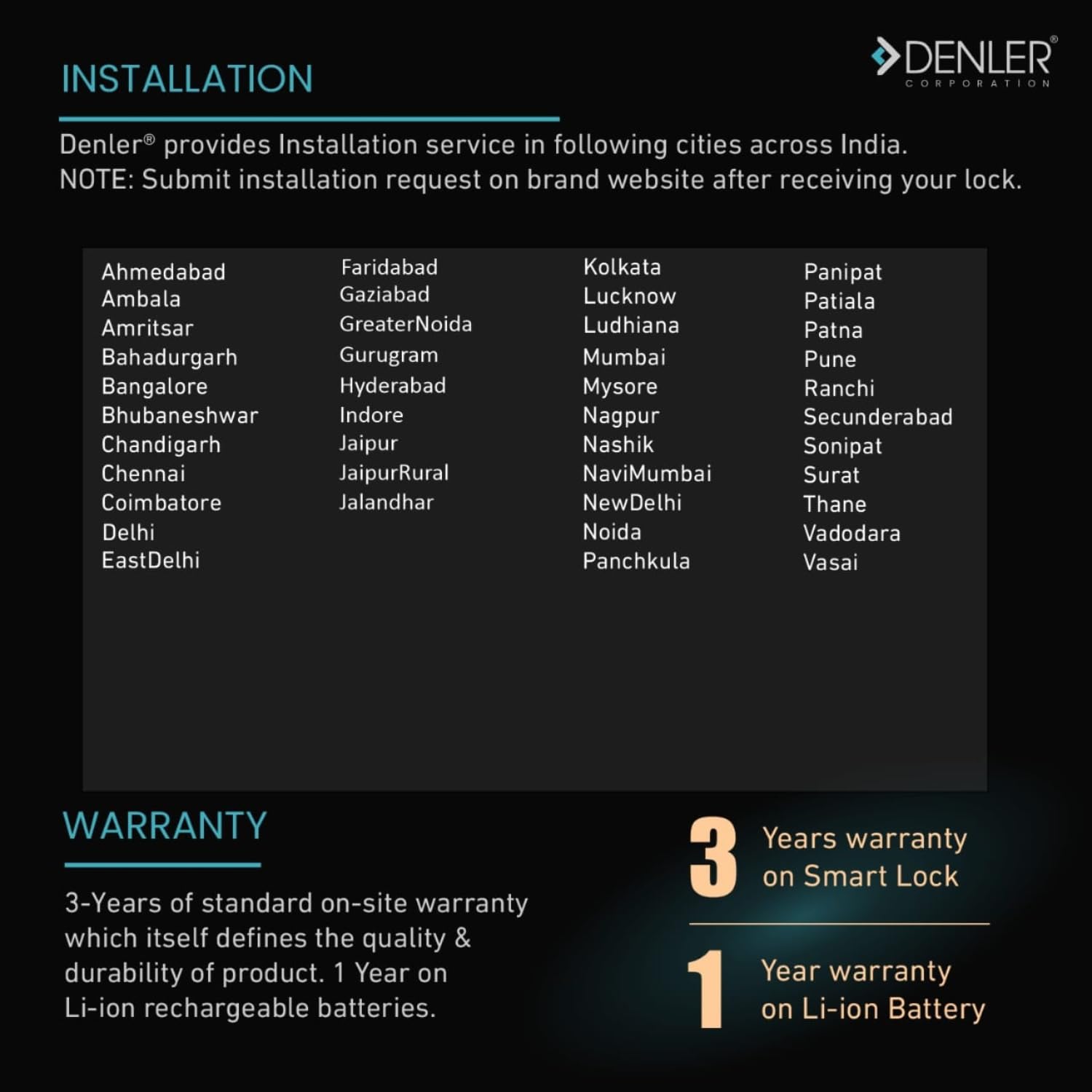
Figure 7: Warranty details and installation service areas.
Customer Support
For any queries, technical assistance, or to schedule an installation, please contact Denler Customer Care:
- Customer Care Number: 7028229001
- Manufacturer: Denler Corporation, Pune
You can also visit the official Denler website for more information and support resources.