
Mellerware 27330A
Mellerware Horizon 30 Mini Oven Instruction Manual
Model: 27330A
1. Introduction
Thank you for purchasing the Mellerware Horizon 30 Mini Oven. This appliance is designed for baking, grilling, and cooking with its integrated solid hot plates. Please read this instruction manual carefully before use to ensure safe operation and optimal performance. Keep this manual for future reference.
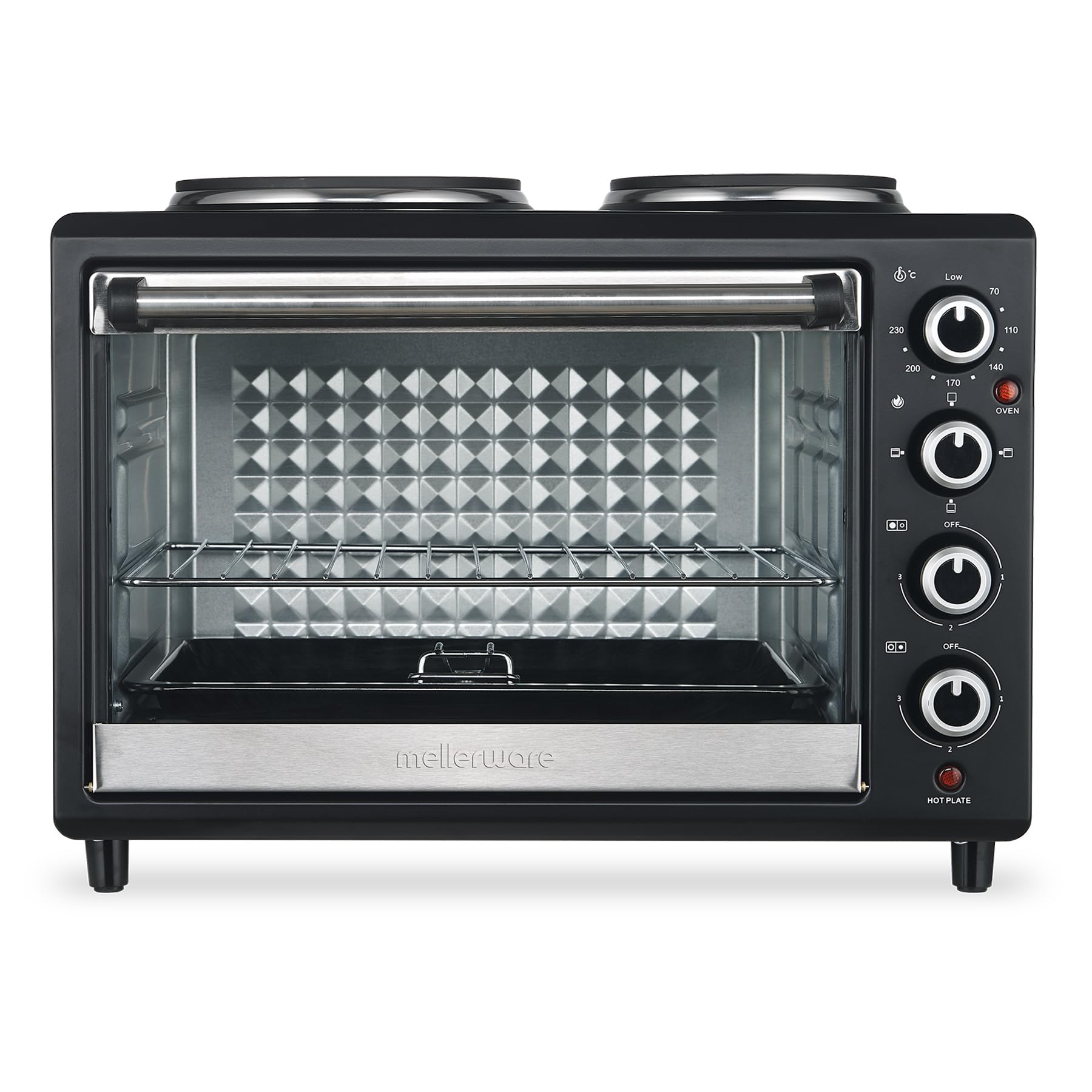
Figure 1: Mellerware Horizon 30 Mini Oven
2. Important Safety Instructions
When using electrical appliances, basic safety precautions should always be followed, including the following:
- Read all instructions before operating the appliance.
- Do not touch hot surfaces. Use handles or knobs.
- To protect against electrical shock, do not immerse cord, plugs, or the appliance in water or other liquid.
- Close supervision is necessary when any appliance is used by or near children.
- Unplug from outlet when not in use and before cleaning. Allow to cool before putting on or taking off parts.
- Do not operate any appliance with a damaged cord or plug, or after the appliance malfunctions or has been damaged in any manner.
- The use of accessory attachments not recommended by the appliance manufacturer may cause injuries.
- Do not use outdoors.
- Do not let cord hang over edge of table or counter, or touch hot surfaces.
- Do not place on or near a hot gas or electric burner, or in a heated oven.
- Extreme caution must be used when moving an appliance containing hot oil or other hot liquids.
- Always attach plug to appliance first, then plug cord into the wall outlet. To disconnect, turn any control to "off", then remove plug from wall outlet.
- Do not use appliance for other than intended use.
- Oversize foods or metal utensils must not be inserted in a toaster oven as they may create a fire or risk of electric shock.
- A fire may occur if the oven is covered or touching flammable material, including curtains, drapes, walls, and the like, when in operation.
- Do not place any materials other than manufacturer's recommended accessories in the oven.
- Do not place cardboard, plastic, paper, or similar materials in the oven.
- Do not store any materials, other than manufacturer's recommended accessories, in this oven when not in use.
- Always wear protective, insulated oven mitts when inserting or removing items from the hot oven.
3. Product Overview
The Mellerware Horizon 30 Mini Oven features a 30-liter oven capacity and two solid hot plates. It includes various controls for temperature, cooking functions, and hot plate power levels.
3.1 Components
- Oven with Glass Door
- Two Solid Hot Plates (750W and 1000W)
- Temperature Control Dial (70°C - 230°C)
- Oven Function Selector Dial (Off, Top Heat, Bottom Heat, Both)
- 60-Minute Timer Dial
- Hot Plate Power Control Dials (Off, 1, 2, 3)
- Oven Indicator Light
- Hot Plate Indicator Light
- Bake Tray
- Wire Rack
- Tray Handle
3.2 Control Panel
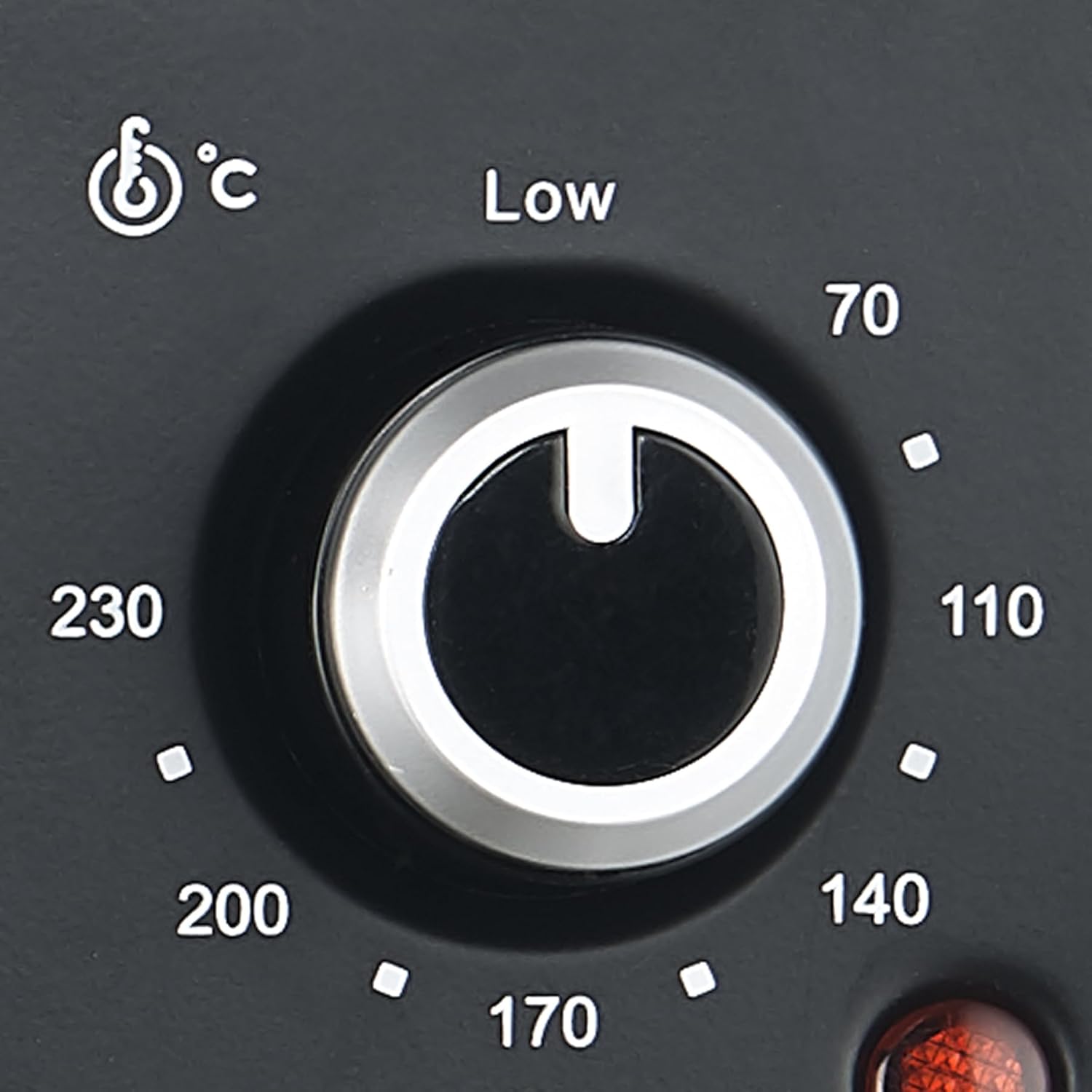
Figure 2: Temperature Control Dial

Figure 3: Oven Function Selector Dial

Figure 4: Hot Plate Power Control Dials

Figure 5: Hot Plate Indicator Light
4. Setup
- Unpacking: Carefully remove the oven and all accessories from the packaging. Retain packaging for future storage or transport.
- Placement: Place the oven on a stable, heat-resistant, and level surface. Ensure there is adequate ventilation around the appliance (at least 10-15 cm clearance on all sides). Do not place near flammable materials.
- Initial Cleaning: Wipe the exterior of the oven with a damp cloth. Wash the bake tray, wire rack, and tray handle in warm, soapy water. Rinse and dry thoroughly.
- First Use (Burn-in): Before first use, operate the oven empty for approximately 15 minutes at the maximum temperature setting (230°C) with the oven function set to both top and bottom heat. This will burn off any manufacturing residues and odors. A slight smoke or odor is normal during this process. Ensure the area is well-ventilated.
- Power Connection: Ensure the power supply matches the voltage specified on the appliance rating label. Plug the power cord into a grounded electrical outlet.
5. Operating Instructions
5.1 Using the Oven
- Prepare Food: Place food on the bake tray or wire rack. Use the tray handle to safely insert or remove the tray/rack.
- Position Rack: The wire rack and bake tray can be adjusted to different heights within the oven. Select the appropriate height for your cooking needs.

Figure 6: Oven Interior with Rack and Tray
- Set Temperature: Turn the Temperature Control Dial to the desired temperature (70°C - 230°C).
- Select Function: Turn the Oven Function Selector Dial to choose the heating mode:
- Top Heat: For grilling or browning the top of food.
- Bottom Heat: For baking bases or slow cooking.
- Both (Top & Bottom Heat): For general baking and roasting.
- Set Timer: Turn the 60-Minute Timer Dial to the desired cooking time. The oven will begin heating, and the oven indicator light will illuminate. The oven will automatically turn off when the timer reaches zero, and a bell will sound. To turn off manually, turn the timer dial to "OFF".
- Monitoring: Monitor food through the glass door. Always use oven mitts when handling hot items.
5.2 Using the Hot Plates
The oven and hot plates can be used simultaneously.

Figure 7: Top View with Hot Plates
- Place Cookware: Place appropriate cookware (flat-bottomed, heat-resistant pots/pans) on the desired hot plate.
- Select Power: Turn the corresponding Hot Plate Power Control Dial to the desired setting (1, 2, or 3).
- Setting 1: Low heat for simmering or keeping warm.
- Setting 2: Medium heat for general cooking.
- Setting 3: High heat for boiling or searing.
- Indicator Light: The hot plate indicator light will illuminate when a hot plate is active.
- Turn Off: After use, turn the hot plate power control dial back to "OFF".
6. Maintenance and Cleaning
Regular cleaning and maintenance will ensure the longevity and safe operation of your appliance.
- Before Cleaning: Always unplug the oven from the power outlet and allow it to cool completely before cleaning.
- Exterior: Wipe the exterior surfaces with a damp cloth and mild detergent. Do not use abrasive cleaners or scouring pads, as they may damage the finish.
- Interior: Clean the interior walls, floor, and glass door with a damp cloth and mild detergent. For stubborn stains, a non-abrasive oven cleaner designed for conventional ovens can be used, but ensure to wipe thoroughly with a clean, damp cloth afterwards to remove all residue.
- Accessories: The bake tray, wire rack, and tray handle can be washed in warm, soapy water. Rinse thoroughly and dry before storing or re-using.
- Hot Plates: Wipe the solid hot plates with a damp cloth. For baked-on food, allow the plate to cool, then gently scrape off residue with a plastic scraper. Do not immerse the hot plates or the entire unit in water.
- Storage: When not in use, ensure the oven is clean and dry. Store it in a cool, dry place.
7. Troubleshooting
| Problem | Possible Cause | Solution |
|---|---|---|
| Appliance does not turn on. | Not plugged in; power outage; timer not set. | Ensure the plug is securely in the outlet. Check household circuit breaker. Turn the timer dial to the desired cooking time. |
| Oven not heating. | Temperature dial not set; function dial not set. | Set the temperature dial to the desired temperature. Select an oven function (Top, Bottom, or Both). |
| Hot plates not heating sufficiently. | Power setting too low; incorrect cookware. | Increase the hot plate power setting. Ensure cookware has a flat bottom and is suitable for electric hot plates. |
| Smoke or odor during first use. | Manufacturing residues burning off. | This is normal for initial use. Ensure good ventilation. It should subside after 15-20 minutes. |
| Food not cooking evenly. | Incorrect rack position; uneven food distribution. | Adjust the rack height. Ensure food is spread evenly on the tray. The diamond back heat reflection plate is designed for even distribution. |
If the problem persists after attempting these solutions, please contact customer support.
8. Specifications
- Brand: Mellerware
- Model Number: 27330A
- Color: Black
- Oven Capacity: 30 Liters
- Total Power: 3250W
- Oven Power: 1500W
- Hot Plate Power: 750W (small), 1000W (large)
- Product Dimensions: 50 x 39 x 36 cm
- Item Weight: 10.7 kg
- Material: Stainless Steel
- Timer: 60 Minute
- Temperature Control: Individual, up to 230°C
- Features: 2 solid hotplates, glass door, adjustable tray & rack height, diamond back heat reflection plate.
- Accessories: Bake tray, wire rack, tray handle.
9. Warranty and Support
For warranty information or technical support, please refer to the warranty card included with your purchase or visit the official Mellerware website. Keep your proof of purchase for any warranty claims.
Spare part availability information is not provided in the product details.
Related documents27330A

Ask a question about this manual
Ask about setup, troubleshooting, compatibility, parts, safety, or missing instructions. Manuals+ will review the question and use this page’s manual context to help answer it.