
SPANN CS-MKT226PX
SPANN Battery Replacement User Manual
Model: CS-MKT226PX
1. Introduction
This manual provides essential information for the safe and effective use of your SPANN 12.0V Lithium-ion Battery Replacement. This battery is designed to be compatible with various Makita power tools and battery models, including BL1015, BL1016, BL1020B, BL1021, BL1021B, BL1040, BL1040B, BL1041, and BL1041B. Please read this manual thoroughly before initial use and retain it for future reference.
2. Safety Information
Always observe the following safety precautions to prevent injury or damage to the battery and connected devices.
- Do not disassemble, open, or service the battery pack. Unauthorized modification can lead to severe injury or fire.
- Replace only with the battery pack designated for this product. Using incompatible batteries may cause damage or safety hazards.
- Do not crush, puncture, short external contacts, or dispose of in fire or water. These actions can cause the battery to explode, ignite, or leak.
- Do not store above 60°C (140°F). High temperatures can degrade battery performance and pose a fire risk.
- Keep out of reach of children.
- Dispose of used batteries responsibly according to local regulations. Do not dispose of with household waste.
- If the battery leaks, avoid contact with skin and eyes. If contact occurs, wash immediately with plenty of water and seek medical advice.
3. Product Overview
The SPANN replacement battery is a high-quality Lithium-ion power source designed for specific Makita 12.0V tools. It offers reliable performance with built-in protection features.
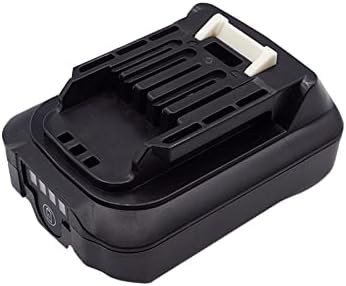
Figure 3.1: Front view of the SPANN 12.0V Lithium-ion Battery Replacement.
What's in the Box
- 1 x SPANN Battery Replacement (Model: CS-MKT226PX)
4. Specifications
Detailed technical specifications for the SPANN Battery Replacement.

Figure 4.1: Bottom label of the battery showing model and rating information.
| Specification | Value |
|---|---|
| Model Number | CS-MKT226PX |
| Compatible Part Numbers | BL1015, BL1016, BL1020B, BL1021, BL1021B, BL1040, BL1040B, BL1041, BL1041B |
| Battery Type | Lithium Ion |
| Voltage | 12.0V |
| Capacity | 2500mAh / 30.00Wh |
| Product Dimensions | 2.51 x 1.58 x 3.41 inches (86.70 x 63.70 x 40.20mm) |
| Item Weight | 9.9 ounces (282g) |
| Protection Features | Over-charge, Over-discharge, Over-heat, Over-current, Short-circuit protection |
5. Setup
Before using your new SPANN battery replacement, it is recommended to fully charge it.
Initial Charging
- Ensure you are using a compatible Makita 12.0V Lithium-ion battery charger. Refer to your tool's original charger manual for specific instructions.
- Insert the SPANN battery into the charger, aligning the terminals correctly.
- Connect the charger to a power outlet.
- Allow the battery to charge until the charger's indicator light signals a full charge. This may take several hours for the first charge.
- Once fully charged, disconnect the battery from the charger.
6. Operating
Instructions for using the SPANN battery with your compatible power tools.
Inserting the Battery
- Ensure the power tool is turned off and disconnected from any power source if applicable.
- Align the battery with the battery slot on your Makita power tool.
- Slide the battery firmly into the slot until it clicks into place. A click indicates that the battery is securely locked.
Removing the Battery
- Ensure the power tool is turned off.
- Locate the battery release button(s) on the tool.
- Press and hold the release button(s) while sliding the battery out of the tool.
Recharging the Battery
When the battery's power level is low, recharge it using a compatible Makita 12.0V Lithium-ion battery charger. Follow the same steps as for initial charging.
7. Maintenance
Proper care and maintenance will extend the lifespan of your battery.
- Cleaning: Keep the battery terminals clean and free of dirt or debris. Use a dry cloth to wipe them if necessary. Do not use liquids or solvents.
- Storage: Store the battery in a cool, dry place away from direct sunlight, heat sources, and moisture. For long-term storage, it is recommended to store the battery at approximately 50% charge.
- Charging Habits: Avoid completely draining the battery before recharging. Lithium-ion batteries do not suffer from memory effect, so partial charges are acceptable.
- Temperature: Do not charge or use the battery in extreme temperatures (below 0°C or above 40°C).
8. Troubleshooting
If you encounter issues with your SPANN battery, refer to the following common problems and solutions.
| Problem | Possible Cause | Solution |
|---|---|---|
| Battery not charging | Charger not plugged in; Faulty charger; Dirty battery terminals; Battery too hot/cold. | Ensure charger is properly connected. Try a different charger. Clean battery terminals. Allow battery to reach room temperature before charging. |
| Battery not fitting into tool | Incorrect alignment; Debris in tool slot. | Ensure correct alignment. Check tool's battery slot for obstructions. Do not force the battery. |
| Tool not operating with battery | Battery not fully inserted; Battery discharged; Faulty tool. | Ensure battery is clicked into place. Recharge the battery. Test with another known-good battery if available. |
| Reduced run time | Battery not fully charged; Battery nearing end of life; Operating in extreme conditions. | Ensure battery is fully charged. Consider battery replacement if it's old. Avoid using in very hot or cold environments. |
If the problem persists after trying these solutions, please contact customer support.
9. Warranty
Your SPANN Battery Replacement comes with a 365-day warranty from the date of purchase. This warranty covers defects in materials and workmanship under normal use. It does not cover damage caused by misuse, abuse, unauthorized modification, or improper storage.
For warranty claims, please retain your proof of purchase and contact customer support.
10. Support
If you have any questions, require technical assistance, or need to report an issue with your SPANN battery, please contact our customer support team. Our products have passed strict quality inspection, and we are here to assist you.
Please refer to the contact information provided with your purchase or visit the official SPANN website for support details.
Ask a question about this manual
Ask about setup, troubleshooting, compatibility, parts, safety, or missing instructions. Manuals+ will review the question and use this page’s manual context to help answer it.