
Introduction
This manual provides essential information for the safe and effective use of your SPANN 12.0V Li-ion Battery Replacement, model CS-MKT226PX. This battery is designed as a compatible replacement for various Makita 12.0V tools and battery models. Please read this manual thoroughly before first use and retain it for future reference.
Safety Information
WARNING: Failure to follow these safety instructions may result in fire, electric shock, explosion, or other hazards, causing serious injury and/or property damage.
- Do not disassemble, open, or service the battery pack.
- Replace only with the battery pack designated for this product.
- Do not crush, puncture, short external contacts, or dispose of in fire or water.
- Do not store above 60°C (140°F).
- New battery pack must be fully charged before use.
- Keep the battery away from children.
- Dispose of used batteries according to local regulations.
Product Overview
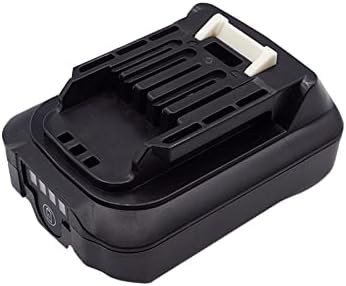
Figure 1: Top view of the SPANN 12.0V Li-ion Battery Replacement, showing the tool interface.

Figure 2: Side view of the battery, highlighting the release button.
The SPANN CS-MKT226PX is a 12.0V Lithium-ion battery with a capacity of 2500mAh (30.00Wh). It features multiple protection mechanisms including over-charge, over-discharge, over-heat, over-current, and short-circuit protection to ensure safe and reliable operation.
Compatible Models:
This battery is compatible with the following Makita battery part numbers and tool models:
- Battery Part Numbers: BL1015, BL1016, BL1020B, BL1021, BL1021B, BL1040, BL1040B, BL1041, BL1041B
- Tool Models: TD110D, TD110DWAE, TD110DZ, TD111DSAJ, TD111DZ
Setup and Initial Charging
Upon receiving your new SPANN battery, it is recommended to fully charge it before its first use to optimize performance and battery life.
- Inspect the Battery: Before charging, visually inspect the battery for any signs of damage. Do not use a damaged battery.
- Insert into Charger: Slide the battery into a compatible Makita 12.0V Li-ion battery charger. Ensure it clicks securely into place.
- Charge Fully: Allow the battery to charge until the charger's indicator light signals a full charge. Charging times may vary depending on the charger model and the battery's initial charge level.
- Remove from Charger: Once fully charged, remove the battery from the charger.
Note: This battery features no memory effect, meaning it can be charged or discharged as needed without reducing its overall capacity.
Operating Instructions
- Installing the Battery: Align the battery with the battery slot on your compatible Makita 12.0V tool. Slide the battery firmly into place until it clicks, indicating it is securely locked.
- Removing the Battery: To remove the battery, press the release button(s) located on the sides of the battery (refer to Figure 2) and slide the battery out of the tool.
- Battery Level Indicator: Some tools or the battery itself may have an indicator to show the remaining charge. Consult your tool's manual for specific details.
Maintenance and Storage
Proper maintenance and storage will extend the life of your SPANN battery.
- Cleaning: Keep the battery terminals clean and free from dirt or debris. Use a dry cloth to wipe them if necessary.
- Storage: For long-term storage, store the battery in a cool, dry place, away from direct sunlight and extreme temperatures. Ideally, store batteries at approximately 50% charge.
- Avoid Extreme Temperatures: Do not expose the battery to temperatures above 60°C (140°F) or below -20°C (-4°F).
- Regular Charging (for long storage): If storing for extended periods, recharge the battery every 3-6 months to maintain its health.
Troubleshooting
| Problem | Possible Cause | Solution |
|---|---|---|
| Battery not charging |
|
|
| Tool not operating with battery |
|
|
| Reduced run time |
|
|
Specifications

Figure 3: Bottom label of the battery showing model number, part numbers, rating, and manufacturer information.
| Feature | Detail |
|---|---|
| Model Number | CS-MKT226PX |
| Battery Type | Lithium-ion (Li-ion) |
| Voltage | 12.0V |
| Capacity | 2500mAh / 30.00Wh |
| Dimensions (L x W x H) | 86.70 x 63.70 x 40.20mm (3.41 x 2.51 x 1.58 inches) |
| Weight | 282g (9.9 ounces) |
| Protection Features | Over-charge, Over-discharge, Over-heat, Over-current, Short-circuit protection |
| Manufacturer | SPANN |
Warranty and Support
Warranty Information:
This SPANN battery replacement comes with a 365-day warranty from the date of purchase. This warranty covers defects in materials and workmanship under normal use. It does not cover damage caused by misuse, abuse, unauthorized modification, or natural wear and tear.
Customer Support:
If you have any questions, concerns, or require assistance with your SPANN battery, please contact our customer support team. Refer to your purchase documentation or the retailer's website for contact details.
When contacting support, please have your product model number (CS-MKT226PX) and purchase date available.