
voijump 2 Microphones (B0CK5PN99Z)
Voijump Portable Karaoke Machine User Manual
Model: 2 Microphones (B0CK5PN99Z)
Brand: voijump
1. Product Overview
The Voijump Portable Karaoke Machine is a versatile audio system designed for entertainment and public address. It features high-definition stereo sound, multiple connectivity options, and dynamic LED lighting, making it suitable for various indoor and outdoor events. This manual provides detailed instructions for setting up, operating, and maintaining your karaoke machine.

Image: The Voijump Portable Karaoke Machine, showcasing its compact design and included accessories.
2. What's in the Box
Please check the package contents to ensure all items are present and in good condition:
- 1 x Voijump Portable Karaoke Machine
- 2 x Wireless Microphones
- 1 x USB Charging Cable
- 1 x Power Adapter
- 1 x Remote Control
- 1 x Shoulder Strap
- 1 x AUX-in Cable
- Batteries (for microphones and remote control)
Image: A top-down view of the karaoke machine and all its components laid out on a white surface.
3. Product Features
The Voijump Portable Karaoke Machine is equipped with advanced features for an enhanced audio experience:
- Perfect HD Stereo Sound Quality: Features a high-power audio driver, advanced digital signal processor, built-in 5.25” subwoofer, and 2” tweeter for 360° stereo surround sound with strong bass and clear, balanced audio.
- Multi-functional & Easy to Use: Supports Bluetooth 5.1, USB Flash drive, Micro TF card, FM radio, and AUX-in connectivity for instant pairing with various devices. Includes a 6.35mm microphone input for additional microphones or guitars.
- Large Capacity Battery: Built-in 3.7V/5200mAh rechargeable lithium-ion battery provides 6 to 8 hours of continuous music playback on a full charge, with up to 72 hours of standby time.
- 2 Wireless Microphones: Comes with two wireless microphones that automatically pair with the machine upon power-on, ensuring ease of use and reducing fighting over a single mic.
- Colorful Dynamic Disco Lights: Integrated LED lights on the PA system can be switched on/off with an independent button and change with the rhythm of the music, creating a vibrant party atmosphere.
- Powerful TWS Mode: Allows connection of two identical karaoke systems for synchronized, true wireless stereo sound, immersing you in a richer audio experience.
- Lightweight & Portable: Constructed from exquisite and durable solid wood/leather, weighing approximately 6.3 lbs. Includes a shoulder strap and a comfortable handle for easy transport.
- Integrated Device Holder: A unique groove design on the top panel allows for convenient placement of your phone or tablet.

Image: Visual representation of the various input and play modes supported by the karaoke machine.
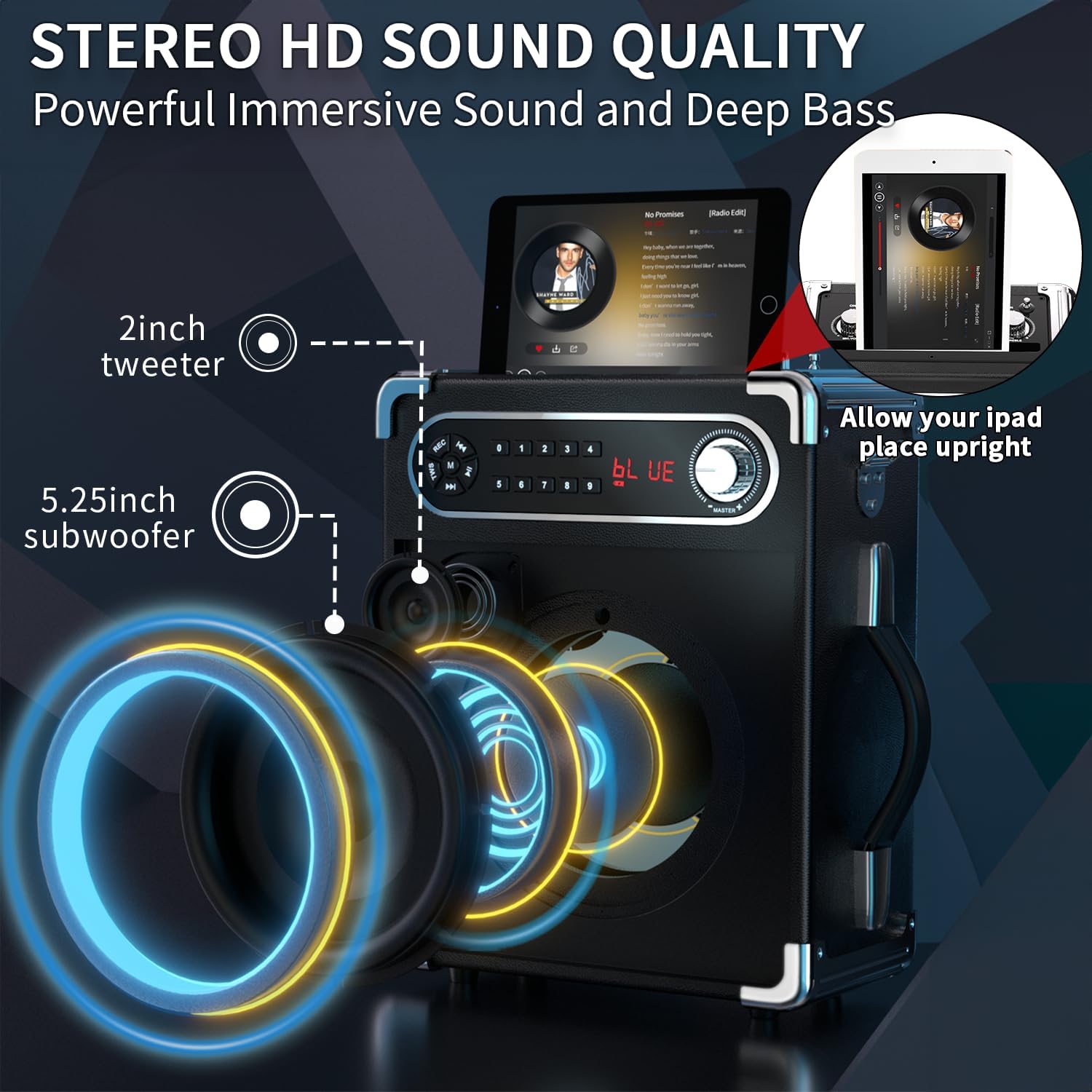
Image: An exploded view highlighting the internal 5.25-inch subwoofer and 2-inch tweeter for powerful sound.
4. Setup Guide
Follow these steps to set up your Voijump Portable Karaoke Machine:
4.1 Initial Charging
Before first use, fully charge the karaoke machine. Connect the USB charging cable to the machine's charging port and the power adapter to a wall outlet. The charging indicator will show the charging status.
4.2 Battery Installation (Microphones & Remote)
Install the provided batteries into the wireless microphones and the remote control. Ensure correct polarity.

Image: The two wireless microphones, ready for battery installation and automatic pairing.
4.3 Powering On
Locate the Power ON/OFF switch on the control panel (refer to Section 5.1). Slide the switch to the 'ON' position. The display will light up, indicating the machine is ready for use.
5. Operating Instructions
This section details how to operate your karaoke machine's various functions.
5.1 Control Panel Overview
Familiarize yourself with the control panel located on the top of the unit:
| Control | Function |
|---|---|
| Power ON/OFF Switch | Turns the unit on or off. |
| MIC VOL Knob | Adjusts the volume of the microphones. |
| ECHO Knob | Adjusts the echo effect for the microphones. |
| BASS Knob | Adjusts the bass level of the audio output. |
| TREBLE Knob | Adjusts the treble level of the audio output. |
| MASTER Volume Knob | Controls the overall master volume of the machine. |
| USB Port | For playing audio from USB flash drives. |
| TF Card Slot | For playing audio from Micro TF cards. |
| AUX IN Port | For connecting external audio devices via AUX cable. |
| MIC 1 / MIC 2 Inputs | 6.35mm inputs for additional wired microphones or a guitar. |
| LED ON/OFF Switch | Turns the disco LED lights on or off. |
| REC Button | Initiates recording via microphone to connected storage. |
| Mode Button (M) | Switches between Bluetooth, FM, AUX, USB, and TF card modes. |
| Playback Controls | Play/Pause, Previous/Next Track, Fast Forward/Rewind. |
| Numeric Keypad | For direct track selection or FM radio frequency input. |

Image: Detailed view of the karaoke machine's top control panel, showing all knobs and input ports.
5.2 Bluetooth Pairing
To connect your device via Bluetooth:
- Ensure the karaoke machine is powered on.
- Press the 'M' (Mode) button until 'BLUE' appears on the display.
- On your mobile phone, tablet, or PC, enable Bluetooth and search for available devices.
- Select 'VOIJUMP' from the list of devices. A confirmation sound will indicate successful pairing.
- You can now play audio from your device through the karaoke machine.
5.3 Using Wireless Microphones
The included wireless microphones are designed for automatic pairing:
- Ensure the karaoke machine is on.
- Turn on each wireless microphone by pressing its power button.
- The microphones will automatically pair with the karaoke machine. Adjust microphone volume, echo, bass, and treble using the respective knobs on the control panel.
5.4 TWS (True Wireless Stereo) Mode
For an immersive stereo experience, you can connect two identical Voijump Karaoke Machines:
- Ensure both karaoke machines are powered on and in Bluetooth mode.
- On one of the machines (this will be the primary unit), long-press the 'TWS' button (usually integrated with the Play/Pause button or a dedicated TWS button if present).
- The primary unit will search for the secondary unit. Once connected, a confirmation sound will be heard, and both units will play synchronized stereo audio.

Image: Illustration of two karaoke machines wirelessly connected in TWS mode, providing a wider soundstage.
5.5 LED Light Control
To control the dynamic disco LED lights:
- Locate the 'LED ON/OFF' switch on the control panel.
- Slide the switch to 'ON' to activate the lights. The lights will change colors and patterns with the rhythm of the music.
- Slide the switch to 'OFF' to turn off the lights.

Image: The karaoke machine demonstrating its Bluetooth connectivity and the LED light control feature.
5.6 Official Product Video
Watch this official video for a visual guide on the product's features and operation:
Video: An official demonstration of the Voijump Karaoke Machine, covering unboxing, key features, and operational aspects such as microphone usage, sound adjustments, and connectivity options.
6. Maintenance
Proper maintenance ensures the longevity and optimal performance of your karaoke machine:
- Cleaning: Use a soft, dry cloth to clean the exterior of the machine. Do not use abrasive cleaners or solvents.
- Storage: When not in use for extended periods, store the machine in a cool, dry place away from direct sunlight and extreme temperatures.
- Battery Care: To prolong battery life, avoid fully discharging the battery frequently. Recharge the unit regularly, even if not in active use.
- Microphone Care: Handle microphones with care. Avoid dropping them or exposing them to moisture. Remove batteries if storing for a long time to prevent leakage.
7. Troubleshooting
If you encounter any issues with your Voijump Portable Karaoke Machine, refer to the following common problems and solutions:
| Problem | Possible Cause | Solution |
|---|---|---|
| No sound from speaker | Volume too low; Incorrect mode selected; Device not connected properly. | Increase MASTER Volume. Ensure correct input mode (Bluetooth, AUX, USB, TF). Reconnect audio source. |
| Microphone not working | Microphone off; Low microphone battery; MIC VOL too low; Microphone not paired. | |
| Bluetooth not connecting | Machine not in Bluetooth mode; Device too far; Interference. | Press 'M' button to select Bluetooth mode. Move device closer to the machine. Avoid obstacles. |
| LED lights not working | LED switch is OFF. | Slide the 'LED ON/OFF' switch to 'ON'. |
| Short battery life | Battery not fully charged; High volume usage. | Ensure full charge before use. Reduce volume for longer playback. |
8. Specifications
Detailed technical specifications for the Voijump Portable Karaoke Machine:
- Brand: voijump
- Model Number: 2 Microphones (ASIN: B0CK5PN99Z)
- Power Source: Battery Powered (Built-in 3.7V/5200mAh Lithium-ion)
- Connectivity Technology: Bluetooth 5.1, AUX, USB, TF Card
- Audio Inputs: Wired microphones (6.35mm), Bluetooth devices, USB drives, TF cards, FM radio, AUX-in devices
- Speaker Configuration: 1 x 5.25-inch Subwoofer, 1 x 2-inch Tweeter
- Material: Wood/Leather
- Item Weight: Approximately 6.3 lbs
- Product Dimensions (L x W x H): 3.94 x 5.91 x 12.6 inches
- Recommended Use: Party, Family Gatherings, Outdoor Events
9. Warranty and Support
Voijump is committed to providing quality products and excellent customer service. Your karaoke machine comes with an official warranty to ensure your satisfaction.
- Quality Assurance: All Voijump products undergo professional design and quality control.
- Official Warranty: Timely after-sales support is provided to address any product-related concerns.
- Customer Feedback: Voijump continuously improves products based on customer feedback.
For detailed warranty information or technical support, please refer to the contact information provided on the product packaging or visit the official Voijump brand store on Amazon.
For further assistance, please contact Voijump customer support.
no relevant documents
Ask a question about this manual
Ask about setup, troubleshooting, compatibility, parts, safety, or missing instructions. Manuals+ will review the question and use this page’s manual context to help answer it.