
1. Introduction
Thank you for purchasing the Butterfly Elite V3 Induction Cooktop, Model AG-2200. This appliance is designed for efficient and safe cooking using induction heating technology. Please read this manual thoroughly before operating the cooktop to ensure proper use, maintenance, and to prevent any potential hazards.
Keep this manual for future reference.
2. Important Safety Instructions
To reduce the risk of fire, electric shock, injury to persons, or damage to the appliance, basic safety precautions should always be followed, including the following:
- Read all instructions carefully before using the appliance.
- Do not touch hot surfaces. Use handles or knobs.
- To protect against electric shock, do not immerse cord, plugs, or the appliance in water or other liquid.
- Close supervision is necessary when any appliance is used by or near children.
- Unplug from outlet when not in use and before cleaning. Allow to cool before putting on or taking off parts.
- Do not operate any appliance with a damaged cord or plug or after the appliance malfunctions or has been damaged in any manner. Contact the manufacturer for examination, repair, or adjustment.
- The use of accessory attachments not recommended by the appliance manufacturer may cause injuries.
- Do not use outdoors.
- Do not let cord hang over edge of table or counter, or touch hot surfaces.
- Do not place on or near a hot gas or electric burner, or in a heated oven.
- Extreme caution must be used when moving an appliance containing hot oil or other hot liquids.
- Always attach plug to appliance first, then plug cord into the wall outlet. To disconnect, turn any control to "off", then remove plug from wall outlet.
- Do not use appliance for other than intended use.
- Only use induction-compatible cookware.
- Do not place metallic objects such as knives, forks, spoons, lids, cans, or aluminum foil on the induction cooktop surface as they can become hot.
- Ensure proper ventilation around the cooktop.
3. Product Overview and Features
The Butterfly Elite V3 Induction Cooktop is designed for modern kitchens, offering efficient and precise cooking. Key features include:
- 2200W Power: For faster cooking and heating.
- Aesthetic and Compact Design: Sleek black glass surface with a modern look.
- Feather Touch Control: Easy and intuitive operation with a smooth touch panel.
- 4 Digit Dual Digital Display: Provides clear feedback on settings and cooking status.
- Auto Shut-off without Pot: Enhances safety by automatically turning off when no compatible cookware is detected.
- Over Heat Protection: Prevents damage to the appliance from excessive temperatures.
- Durable Materials: Constructed with a glass heater surface and plastic body.
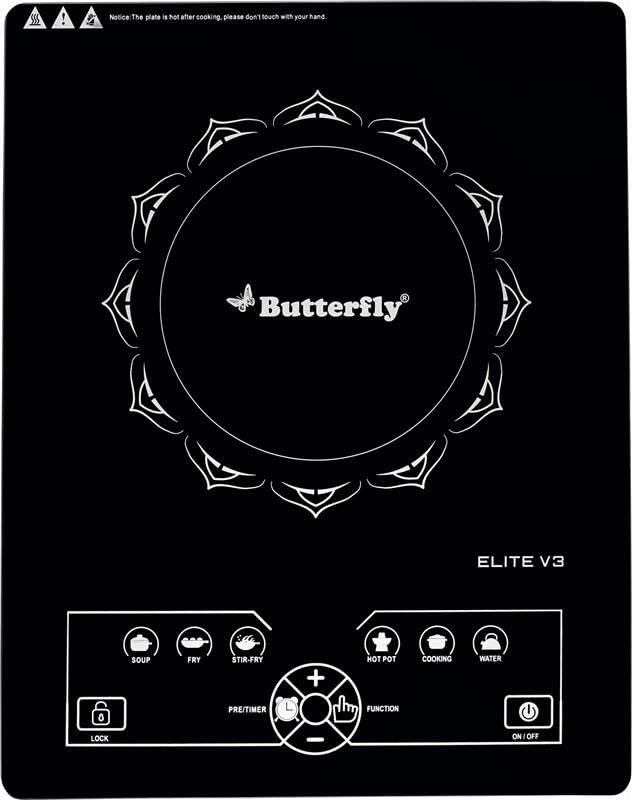
Figure 1: Butterfly Elite V3 Induction Cooktop (AG-2200)
4. Setup and Installation
- Unpacking: Carefully remove the induction cooktop from its packaging. Retain the packaging materials for future storage or transport.
- Inspection: Inspect the appliance for any signs of damage. Do not use if damaged.
- Placement: Place the cooktop on a stable, flat, heat-resistant surface. Ensure there is adequate ventilation around the unit (at least 10 cm clearance from walls or other appliances). Do not place it on a metallic surface.
- Power Connection: Plug the power cord into a standard 240V AC electrical outlet. Ensure the outlet is properly grounded and can support the 2200W power requirement of the cooktop.
- Cookware: Use only induction-compatible cookware. These typically have a flat bottom and are made of magnetic materials like cast iron, enameled iron, or stainless steel with a magnetic base.
5. Operating Instructions
The Butterfly Elite V3 Induction Cooktop features intuitive feather touch controls. Refer to Figure 2 for an overview of the control panel.
Figure 2: Control Panel of Butterfly Elite V3 Induction Cooktop
5.1 Basic Operation
- Power On: Place a suitable induction-compatible pot with food on the center of the cooktop surface. Press the ON/OFF button. The display will light up.
- Select Function/Mode: Press the FUNCTION button to cycle through various cooking modes or power settings. The 4-digit digital display will show the selected power level or temperature.
- Adjust Settings: Use the + and - buttons to increase or decrease the power level or temperature.
- Preset Modes: The cooktop may include preset cooking modes (e.g., Fry, Curry, Dosa, Idly, Milk, Water). Select these directly by touching the corresponding icon.
- Power Off: After cooking, press the ON/OFF button to turn off the cooktop. The fan may continue to run for a short period to cool down the internal components.
5.2 Safety Features
- Auto Shut-off: If no compatible pot is detected on the cooktop surface for a certain period after powering on, or if the pot is removed during operation, the cooktop will automatically shut off.
- Overheat Protection: The cooktop is equipped with a sensor that monitors the internal temperature. If it detects overheating, it will automatically reduce power or shut down to prevent damage.
6. Maintenance and Cleaning
Regular cleaning and maintenance will ensure the longevity and optimal performance of your induction cooktop.
- Before Cleaning: Always unplug the cooktop from the power outlet and allow it to cool completely before cleaning.
- Cooktop Surface: Wipe the glass surface with a soft, damp cloth and a mild detergent. For stubborn stains, use a non-abrasive cleaner specifically designed for glass cooktops. Rinse with a clean, damp cloth and dry thoroughly.
- Control Panel: Gently wipe the feather touch control panel with a soft, damp cloth. Do not use excessive water or abrasive cleaners.
- Exterior: Clean the exterior plastic parts with a soft, damp cloth.
- Do Not Immerse: Never immerse the cooktop, power cord, or plug in water or any other liquid.
- Ventilation Openings: Ensure the ventilation openings on the bottom and sides of the cooktop are free from dust and debris to prevent overheating.
7. Troubleshooting
If you encounter issues with your Butterfly Elite V3 Induction Cooktop, refer to the following common problems and solutions:
| Problem | Possible Cause | Solution |
|---|---|---|
| Cooktop does not power on. | No power supply; loose plug; power outage. | Check if the plug is securely inserted. Verify power supply to the outlet. Check household circuit breaker. |
| Cooktop powers on but does not heat. | Incompatible cookware; no pot detected; pot not centered. | Ensure you are using induction-compatible cookware. Place the pot centrally on the cooking zone. |
| Display shows an error code. | Specific error (e.g., overheating, sensor issue). | Refer to the specific error code in the full user manual (if available) or contact customer support. For overheating, allow the unit to cool down. |
| Cooktop makes unusual noise. | Normal fan operation; cookware vibration. | A slight humming sound from the fan is normal. Some cookware may vibrate slightly. If the noise is excessive or unusual, contact support. |
If the problem persists after attempting these solutions, please contact Butterfly customer support.
8. Specifications
| Model Number | AG-2200 |
| Brand | Butterfly |
| Power Consumption | 2200W |
| Voltage | 240 Volts |
| Control Type | Feather Touch Control |
| Display | 4 Digit Dual Digital Display |
| Burner Type | Induction |
| Heating Elements | 1 |
| Material | Glass (Heater Surface), Plastic (Body) |
| Item Weight | 2280 Grams |
| Color | Black |
9. Warranty and Customer Support
Your Butterfly Elite V3 Induction Cooktop comes with a warranty card included in the packaging. Please refer to the warranty card for specific terms and conditions.
For any product-related queries, technical assistance, or service requests, please contact Butterfly customer support:
- Manufacturer: Butterfly Gandhimathi Appliances Limited
- Contact Number: +91 9362 01 9362
Please have your model number (AG-2200) and purchase details ready when contacting support.