
1. Introduction
This manual provides essential information for the safe and efficient operation, installation, and maintenance of your Hotpoint H2I HD526 AS Built-in Dishwasher. Please read these instructions carefully before using the appliance and keep them for future reference.
2. Safety Information
Always follow basic safety precautions when using electrical appliances to reduce the risk of fire, electric shock, or injury. This appliance is intended for household use only. Do not allow children to operate the dishwasher. Ensure the appliance is properly grounded. Do not touch the heating element during or immediately after a wash cycle. Use only detergents and rinse aids specifically designed for automatic dishwashers.
3. Product Overview
The Hotpoint H2I HD526 AS is a fully integrated dishwasher designed to blend seamlessly with your kitchen cabinetry. It offers 14 place settings and 9 wash programs to accommodate various dishwashing needs. The appliance features a durable stainless steel interior and a removable filter for easy maintenance.

Figure 3.1: Front view of the Hotpoint H2I HD526 AS dishwasher with the door open, revealing the interior racks and the integrated control panel.

Figure 3.2: Detailed view of the control panel, showing power button, program selector, display, and various function indicators.
4. Installation and Setup
The Hotpoint H2I HD526 AS is designed for built-in installation. Proper installation is crucial for optimal performance and safety. It is recommended that installation be performed by a qualified technician.
- Unpacking: Carefully remove all packaging materials. Check for any damage during transit.
- Positioning: Ensure the dishwasher is placed on a level, stable surface. Refer to the dimensions diagram for precise cabinet requirements.
- Water Connection: Connect the water inlet hose to a cold water supply and the drain hose to a suitable drain.
- Electrical Connection: Connect the appliance to a properly grounded electrical outlet. The power cable is included in the box.
- Cabinet Integration: Secure the dishwasher to the surrounding cabinetry according to the installation instructions provided in the full manual.
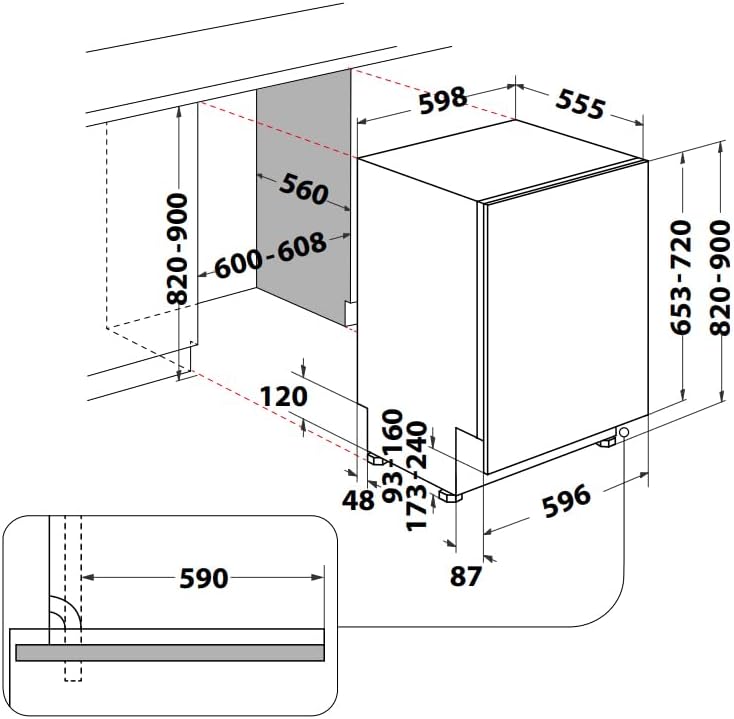
Figure 4.1: Technical diagram illustrating the required dimensions for cabinet integration and installation of the dishwasher.
5. Operating Instructions
To operate your Hotpoint H2I HD526 AS dishwasher, follow these general steps:
- Load Dishes: Scrape off large food particles. Load dishes into the racks, ensuring they do not block the spray arms.
- Add Detergent: Fill the detergent dispenser with the appropriate amount of dishwasher detergent.
- Add Rinse Aid (Optional): If desired, fill the rinse aid dispenser to improve drying performance and prevent spots.
- Select Program: Press the 'P' button on the control panel to cycle through the 9 available wash programs. The selected program will be indicated on the display.
- Start Cycle: Close the dishwasher door firmly. The cycle will begin automatically.
- End of Cycle: The dishwasher will signal when the cycle is complete. Allow dishes to cool before unloading.
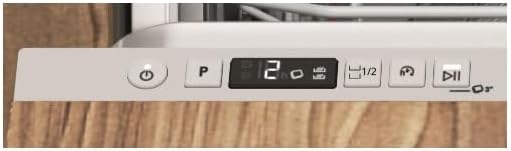
Figure 5.1: Detailed view of the power and program selection buttons on the dishwasher's control panel.
6. Maintenance and Cleaning
Regular maintenance ensures the longevity and efficiency of your dishwasher.
- Cleaning the Filters: The dishwasher features a removable filter system. Regularly clean the filters to prevent blockages and ensure effective washing. Refer to the full manual for detailed instructions on how to remove and clean the filters.
- Cleaning the Interior: Wipe down the interior with a damp cloth periodically. For stubborn stains or odors, run an empty cycle with a dishwasher cleaner.
- Cleaning the Exterior: Clean the exterior control panel and door with a soft, damp cloth. Avoid abrasive cleaners.
- Salt Reservoir: If your water is hard, ensure the salt reservoir is filled with dishwasher salt to prevent limescale buildup.
7. Troubleshooting
If you encounter issues with your dishwasher, consult the following common troubleshooting tips before contacting service.
- Dishwasher not starting: Check if the power cord is securely plugged in and the door is fully closed. Ensure the circuit breaker has not tripped.
- Dishes not clean: Verify that dishes are loaded correctly and not blocking spray arms. Check filter cleanliness and ensure sufficient detergent is used.
- Water not draining: Inspect the drain hose for kinks or blockages. Clean the filter system.
- Unusual noises: Ensure no foreign objects are in the pump area or spray arms.
For more detailed troubleshooting, refer to the comprehensive manual or contact customer support.
8. Specifications
| Feature | Specification |
|---|---|
| Model Name | H2I HD526 |
| Installation Type | Built-in |
| Place Settings | 14 |
| Number of Programs | 9 |
| Product Dimensions (L x W x H) | 55.5 x 62.5 x 91 cm |
| Internal Material | Stainless Steel |
| Special Feature | Removable Filter |
| Noise Level | 46 dB |
| Controls Type | Push-button |
| Energy Efficiency Rating | E |
| Components Included | User Manual, Power Cable |

Figure 8.1: Energy efficiency label indicating the appliance's Class E rating.
9. Warranty and Support
For warranty information, please refer to the documentation provided with your purchase or contact your retailer. Information regarding the availability of spare parts is not provided in this manual. For technical support or service inquiries, please contact Hotpoint customer service through their official website or the contact details provided in your purchase documentation.


