
1. Introduction
This manual provides essential information and instructions for using your SAMSUNG Galaxy A03s SM-A037 smartphone. Please read this guide thoroughly to ensure proper operation and to maximize your device's capabilities.
The Galaxy A03s is designed for reliable performance, featuring a long-lasting battery, a versatile camera system, and a vibrant display, all within a modern and durable design.
2. What's in the Box
- SAMSUNG Galaxy A03s Device
- Wall Charger
- Pre-Installed SIM Card
3. Device Overview

Figure 1: Front and back view of the SAMSUNG Galaxy A03s.
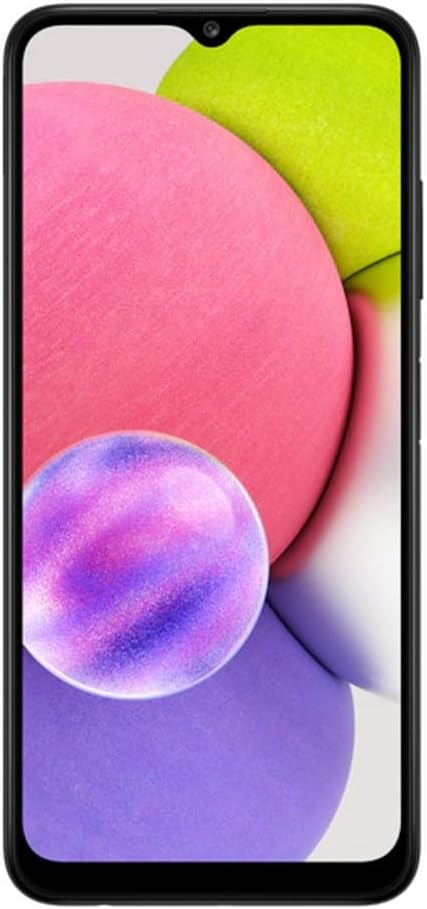
Figure 2: Front view of the SAMSUNG Galaxy A03s, highlighting the display and front camera.

Figure 3: Back view of the SAMSUNG Galaxy A03s, showing the multi-lens camera system.

Figure 4: Side view of the SAMSUNG Galaxy A03s, illustrating the slim profile and button placement.
4. Setup
4.1 Inserting the SIM Card
- Locate the SIM card tray on the side of your device.
- Insert the ejection tool (not included, but typically comes with new phones) into the small hole on the SIM card tray to open it.
- Place the pre-installed SIM card into the tray with the gold contacts facing down.
- Carefully push the tray back into the device until it clicks into place.
4.2 Powering On/Off
- To power on: Press and hold the Power/Side key until the Samsung logo appears.
- To power off: Press and hold the Power/Side key, then tap 'Power off' on the screen.
5. Operating Your Device
5.1 Unlocking the Device
The Galaxy A03s features a side-mounted finger sensor for personalized security. You can also use a pattern, PIN, or password to unlock your device.
5.2 Basic Navigation
- Swipe up from the home screen to access the app drawer.
- Swipe down from the top of the screen to access the notification panel and quick settings.
- Use the navigation bar at the bottom of the screen (or gestures, if enabled) to go back, home, or view recent apps.
5.3 Screen Sharing and Mirroring
The device supports screen sharing and mirroring functionalities, allowing you to display your phone's content on compatible external screens or during video calls.
6. Camera Features
The Galaxy A03s is equipped with a versatile multi-lens camera system to capture various moments.
- Main Camera: 50 Megapixels (details from specifications, assuming this is the main sensor)
- Other Camera Features: Front-facing camera for selfies and video calls.
The camera app provides various modes and settings to enhance your photography experience, including options for different lighting conditions and zoom capabilities.
7. Battery and Charging
The device features a 5000 Milliamp Hours (mAh) battery, providing long-lasting power for your daily activities.
- Use the provided Wall Charger to charge your device.
- Ensure the charging cable is securely connected to the device's USB-C port and the wall charger.
8. Storage
The SAMSUNG Galaxy A03s comes with 32 GB of internal memory storage. You can expand the storage capacity using a microSD card (sold separately) for additional photos, videos, and apps.
9. Display
Experience clear visuals on the 6.5-inch HD+ Infinity Display. The display offers impressive edge-to-edge viewing, making it ideal for chatting, browsing, and watching videos.
10. Performance
The device is powered by an Android operating system, ensuring smooth performance for everyday tasks. While specific processor details are not provided, the phone is designed to handle common mobile applications and media consumption efficiently.
11. Connectivity
- Wireless Carrier: AT&T
- Cellular Technology: 4G
- Connectivity Technology: Wi-Fi
- Wireless Communication Technologies: Cellular
12. Physical Features
- Color: Black
- Form Factor: Slate
- Audio Jack: No headphone jack
- Side-Mounted Finger Sensor: Integrated into the power button for convenient and secure unlocking.
13. Software
The SAMSUNG Galaxy A03s runs on the Android operating system, providing access to a wide range of applications and features through the Google Play Store.
14. Maintenance
- Keep your device clean by gently wiping it with a soft, dry cloth.
- Avoid exposing the device to extreme temperatures or direct sunlight.
- Regularly check for software updates to ensure optimal performance and security.
15. Troubleshooting
If you encounter any issues with your device, try the following basic troubleshooting steps:
- Restart your device.
- Check your network connection (Wi-Fi or cellular data).
- Ensure your device's software is up to date.
- If problems persist, consult the Samsung support website or contact your service provider.
16. Specifications
| Feature | Detail |
|---|---|
| Model Name | Galaxy A03s |
| Item Model Number | SM-A037 |
| Brand | Samsung |
| Operating System | Android |
| Screen Size | 6.5 Inches |
| Resolution | 2560 x 1440 |
| Memory Storage Capacity | 32 GB |
| Battery Capacity | 5000 Milliamp Hours |
| Wireless Carrier | AT&T |
| Cellular Technology | 4G |
| Connectivity Technology | Wi-Fi |
| Color | Black |
| Item Weight | 6.9 ounces |
| Package Dimensions | 6.46 x 2.99 x 0.36 inches |
17. Warranty and Support
For warranty information and customer support, please refer to the documentation included in your product packaging or visit the official Samsung support website.


