
Breil EW0669
Breil EW0669 Smartwatch SBT-X User Manual
Model: EW0669 | Brand: Breil
Introduction
The Breil SBT-X Smartwatch is a versatile device designed to complement your daily activities. It features a sleek design with a black case and comes with two interchangeable silicone straps in blue avio and pink, allowing for personalization. This smartwatch offers a wide range of functionalities, including comprehensive health monitoring, fitness tracking for over 100 sports, and smart notifications.

Image: The Breil SBT-X Smartwatch displaying its main unit with a blue silicone strap attached, and a separate pink silicone strap for interchangeability. The watch face shows the Breil Tribe logo.
What's in the Box
Upon unboxing your Breil SBT-X Smartwatch, you will find the following components:
- 1 x Breil SBT-X Smartwatch unit
- 1 x Extra silicone strap (interchangeable)
- 1 x Charging cable
- 1 x User Manual

Image: The retail box for the Breil SBT-X Smartwatch, showing the smartwatch, an extra strap, a charging cable, and the user manual laid out next to it.
Setup Guide
1. Initial Charging
Before first use, fully charge your smartwatch. Connect the provided charging cable to the charging port on the back of the watch and plug the other end into a USB power source. A full charge typically provides approximately 4 days of battery life, depending on usage.
2. App Installation and Pairing
To unlock the full potential of your Breil SBT-X Smartwatch, download the official SBT-X App from your smartphone's app store. The app is compatible with iOS 11.0 and Android 5.0 or later versions, and requires Bluetooth 5.0 connectivity.
- Download and install the SBT-X App.
- Enable Bluetooth on your smartphone.
- Open the SBT-X App and follow the on-screen instructions to pair your smartwatch. Ensure your watch is sufficiently charged during this process.
3. Changing Straps
Your smartwatch comes with two easily interchangeable silicone straps. To change a strap, locate the quick-release pins on the underside of the strap where it connects to the watch case. Slide the pin inwards to detach the strap. Align the new strap with the watch lugs and slide the pin back into place until it clicks securely.
Operating Your Smartwatch
The Breil SBT-X Smartwatch offers a variety of functions accessible through its touchscreen interface and the companion app.
Key Features:
- Activity Tracking: Monitor over 100 sports activities, including climbing, running, yoga, cycling, and football. The watch tracks steps, calories burned, and distance.
- Health Monitoring: Features include heart rate monitoring, blood pressure measurement, blood oxygen saturation (SpO2) tracking, sleep monitoring, and menstrual cycle tracking.
- Smart Notifications: Receive call and message notifications directly on your wrist.
- Connected GPS: Utilize your phone's GPS for accurate route tracking during outdoor activities.
- Remote Controls: Control music playback and remotely trigger your phone's camera shutter.
- Weather Updates: Get real-time weather information.
- Customizable Watch Faces: Choose from various original Breil Tribe watch faces or personalize your own by downloading more from the app.
- Anti-Loss Function: Helps locate your connected smartphone.

Image: A person wearing the Breil SBT-X Smartwatch on their wrist, demonstrating its comfortable fit and aesthetic appeal during daily use.
Maintenance
Cleaning Your Smartwatch
To maintain the appearance and hygiene of your smartwatch, regularly clean the device, especially the back part that comes into contact with your skin. Use a soft, damp cloth with a mild soap solution. Gently wipe the surface and then dry thoroughly with a clean, dry cloth. Avoid using harsh chemicals or abrasive materials.
Water Resistance
Important: The Breil SBT-X Smartwatch is not designed for water immersion activities such as showering, bathing, or swimming. Contact with water may damage the device. Avoid exposing the smartwatch to significant amounts of water to prevent malfunction.
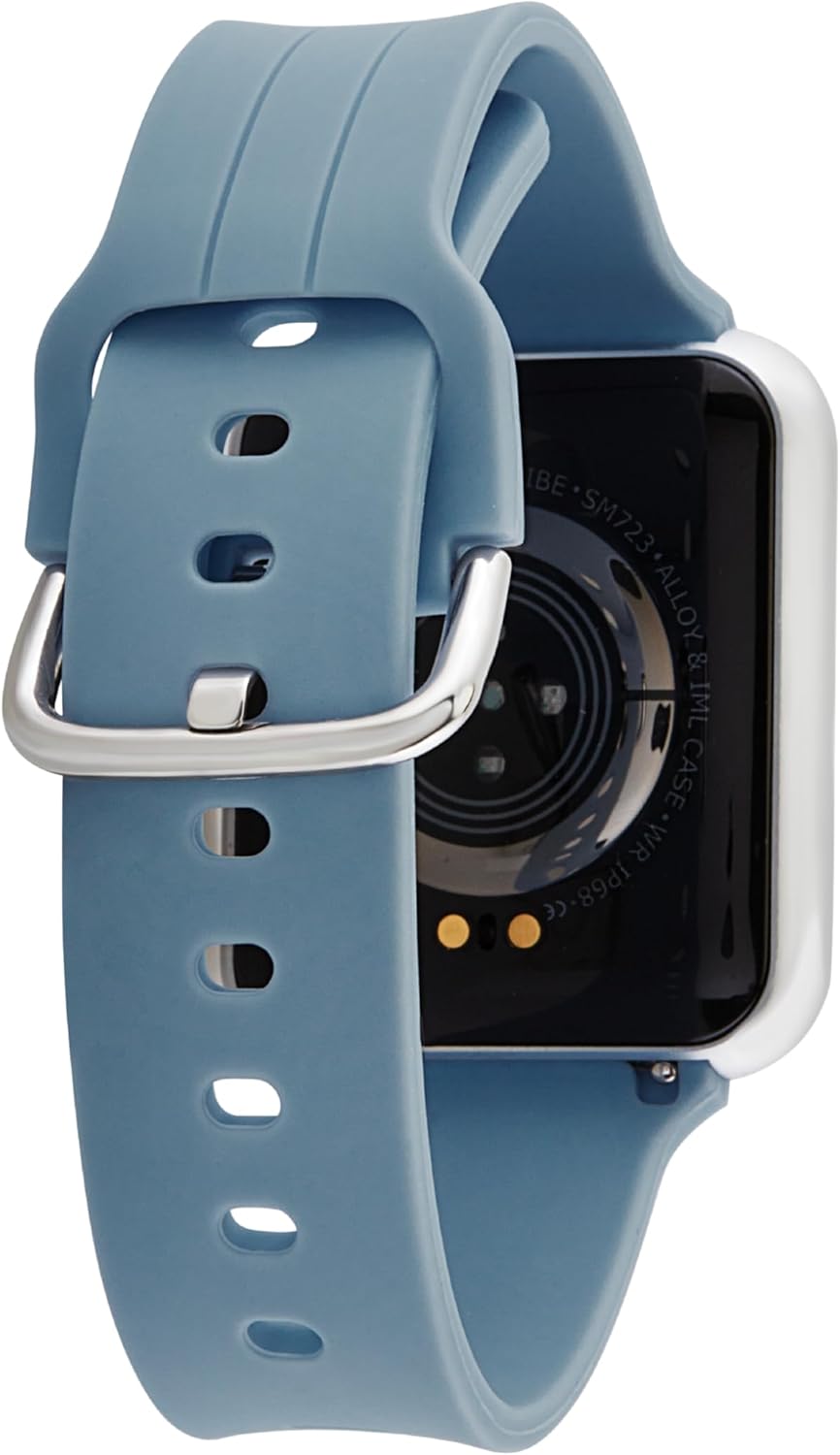
Image: A close-up view of the back of the Breil SBT-X Smartwatch, highlighting the optical sensors used for health monitoring and the charging contacts.
Troubleshooting
Common Issues and Solutions:
- Short Battery Life:
Ensure the watch is fully charged. Battery life can vary based on usage intensity (e.g., frequent notifications, continuous health monitoring, active screen). Reduce screen brightness, disable unnecessary notifications, or turn off continuous heart rate monitoring to extend battery life.
- App Disconnection:
Verify that Bluetooth is enabled on your smartphone and the smartwatch is within range. Close and reopen the SBT-X App. If the issue persists, try unpairing and re-pairing the device through the app settings. Ensure the app is updated to the latest version.
- Difficulty Changing Straps:
Ensure the quick-release pin is fully retracted when attempting to remove or insert a strap. Apply gentle but firm pressure. If a strap is particularly stubborn, ensure no debris is obstructing the pin mechanism.
- Inaccurate Health Readings:
For accurate heart rate and blood oxygen readings, ensure the watch is worn snugly on your wrist, but not too tight. Avoid excessive movement during readings. Note that the blood pressure measurement feature is for reference only and should not replace professional medical equipment.
- Notifications Not Appearing:
Check notification settings within the SBT-X App and your phone's system settings. Ensure the app has necessary permissions to access notifications. If your phone's settings hide message previews, this may affect how messages display on the watch.
Specifications
| Feature | Detail |
|---|---|
| Model Name | SBT-X |
| Model Number | EW0669 |
| Product Dimensions | 4.1 x 4.1 x 1 cm |
| Item Weight | 43 grams |
| Display Size | 41 Millimeters |
| Operating System | RT OS |
| Compatible Devices | Android, iOS |
| Connectivity Technology | Bluetooth 5.0 |
| Battery Type | Lithium Ion |
| Battery Capacity | 200 mAh |
| Average Battery Life | Approximately 4 Days (usage dependent) |
| Internal Memory | 64 MB |
| RAM Size | 128 KB |
| Input Interface | Touchscreen |
Warranty and Support
For warranty information and customer support, please refer to the documentation included in your product packaging or visit the official Breil website. You can also visit the Breil Official Store on Amazon for further assistance and product information.
It is recommended to retain your proof of purchase for any warranty claims.