1. Introduction
This manual provides essential instructions for the setup, operation, and maintenance of your new Generic Replacement IR Remote Control. This remote is designed to be compatible with various Minix Neo Android 4K HD TV Box models, including T5, X39, U9-H, X6, Z64, X88, U1, U220-XJ, U22-XJ, and Z64-A. Please read this manual thoroughly before use to ensure proper functionality and to maximize your user experience.
2. Product Overview
The Generic Replacement IR Remote Control is a direct infrared replacement for your original Minix Neo TV Box remote. It features an ergonomic design and provides basic, essential functions for navigating your TV box interface.

Image 1: Front view of the Generic Replacement IR Remote Control. This image displays the remote's layout, including the power button, directional pad with 'OK' button, volume controls, back button, home button, menu button, and settings button.
3. Setup
3.1 Battery Installation
The remote control requires two (2) AAA batteries for operation. Batteries are not included with the remote control and must be purchased separately.
- Locate the battery compartment cover on the back of the remote control.
- Press down on the tab and slide the cover downwards to remove it.
- Insert two (2) AAA batteries, ensuring the positive (+) and negative (-) terminals align correctly with the markings inside the compartment.
- Slide the battery compartment cover back into place until it clicks securely.
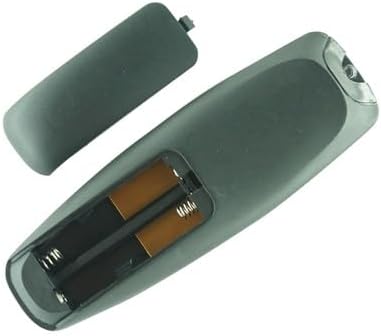
Image 2: Back view of the remote control with the battery compartment cover removed, clearly showing the two slots for AAA batteries and their polarity markings.
4. Operating Instructions
4.1 Basic Button Functions
This remote control provides essential functions for navigating your Minix Neo TV Box. Point the remote directly at your TV box for optimal performance.
- Power Button (⏻): Turns the TV box on or off.
- Directional Pad (Up, Down, Left, Right): Navigates through menus and selections.
- OK Button: Confirms selections or opens items.
- Back Button (↩): Returns to the previous screen or menu.
- Home Button (⌂): Returns to the main home screen of the TV box.
- Menu Button (☰): Accesses context-sensitive menus or options.
- Settings Button (⚙): Opens the system settings menu.
- Volume Buttons (+ / -): Adjusts the volume level.
4.2 Compatibility
This remote is an infrared (IR) replacement unit designed for the following Minix Neo TV Box models:
- Minix Neo T5
- Minix Neo X39
- Minix Neo U9-H (X8-H Plus)
- Minix Neo X6
- Minix Neo Z64
- Minix Neo X88
- Minix Neo U1
- Minix Neo U220-XJ
- Minix Neo U22-XJ
- Minix Neo Z64-A
Please ensure your TV box model is listed above for guaranteed compatibility. While this remote is a replacement, it may not offer all advanced functions present on your original remote control.
5. Maintenance
To ensure the longevity and proper functioning of your remote control, follow these maintenance guidelines:
- Cleaning: Use a soft, dry cloth to clean the remote control. Do not use liquid cleaners, aerosols, or harsh chemicals, as these can damage the surface or internal components.
- Battery Care: If the remote control will not be used for an extended period (e.g., one month or more), remove the batteries to prevent leakage and potential damage to the remote.
- Storage: Store the remote control in a cool, dry place away from direct sunlight, extreme temperatures, and high humidity.
- Avoid Drops: Protect the remote from physical impact, as drops can damage internal circuitry.
6. Troubleshooting
If you encounter issues with your remote control, please try the following troubleshooting steps:
- Remote Not Responding:
- Check if the batteries are inserted correctly with the correct polarity.
- Replace the batteries with new AAA batteries.
- Ensure there is a clear line of sight between the remote control and the IR receiver on your Minix Neo TV Box. Obstructions can block the signal.
- Move closer to the TV box to rule out range issues.
- Some Functions Not Working:
- As a replacement remote, it may not support all advanced or specific functions of your original remote. This remote is designed for basic navigation and control.
- Verify that your TV box model is listed in the compatibility section (Section 4.2).
- Intermittent Operation:
- This could indicate low battery power. Replace the batteries.
- Ensure no strong light sources (like direct sunlight or bright fluorescent lights) are interfering with the IR signal.
7. Specifications
| Product Type | IR Replacement Remote Control |
| Brand | Generic |
| Power Source | 2 x AAA Batteries (not included) |
| Color | Black |
| Special Features | Ergonomic design, basic functions only |
| Compatible Devices | Minix Neo T5, X39, U9-H, X6, Z64, X88, U1, U220-XJ, U22-XJ, Z64-A Android 4K HD TV Boxes |
8. Important Notes
- This remote control is an infrared (IR) replacement and may not offer all functions or features of your original equipment manufacturer (OEM) remote.
- Ensure the model number of your Minix Neo TV Box matches one of the compatible models listed in this manual.
- No programming is required for this remote; it operates directly with compatible Minix Neo TV Boxes once batteries are installed.
9. Support
If you have any questions or encounter issues that cannot be resolved using the troubleshooting steps provided, please contact the seller or retailer from whom you purchased this product. Provide your purchase details and a clear description of the problem for assistance.


