
1. Product Overview
The Satisure Wireless Door Open Contact Sensor Alarm Chime is designed to alert you when a door or window is opened. It features a wireless sensor and a plug-in receiver, offering a reliable alert system for homes, businesses, and offices. Key features include a wide wireless range, multiple chime options, and adjustable volume levels.
2. Package Contents
- 1 x Chime Receiver
- 1 x Door/Window Contact Sensor (with pre-installed battery)
- Mounting Hardware (adhesive tape, screws)
- User Manual
3. Setup and Installation
The door chime receiver and the door sensor are pre-paired at the factory for immediate use. Follow these steps for installation:
- Install the Sensor:
Attach the two parts of the contact sensor to your desired door or window frame. Ensure the two parts are aligned and the distance between them does not exceed 0.4 inches (approximately 1 cm) when the door/window is closed. Use the provided adhesive tape or screws for secure mounting.
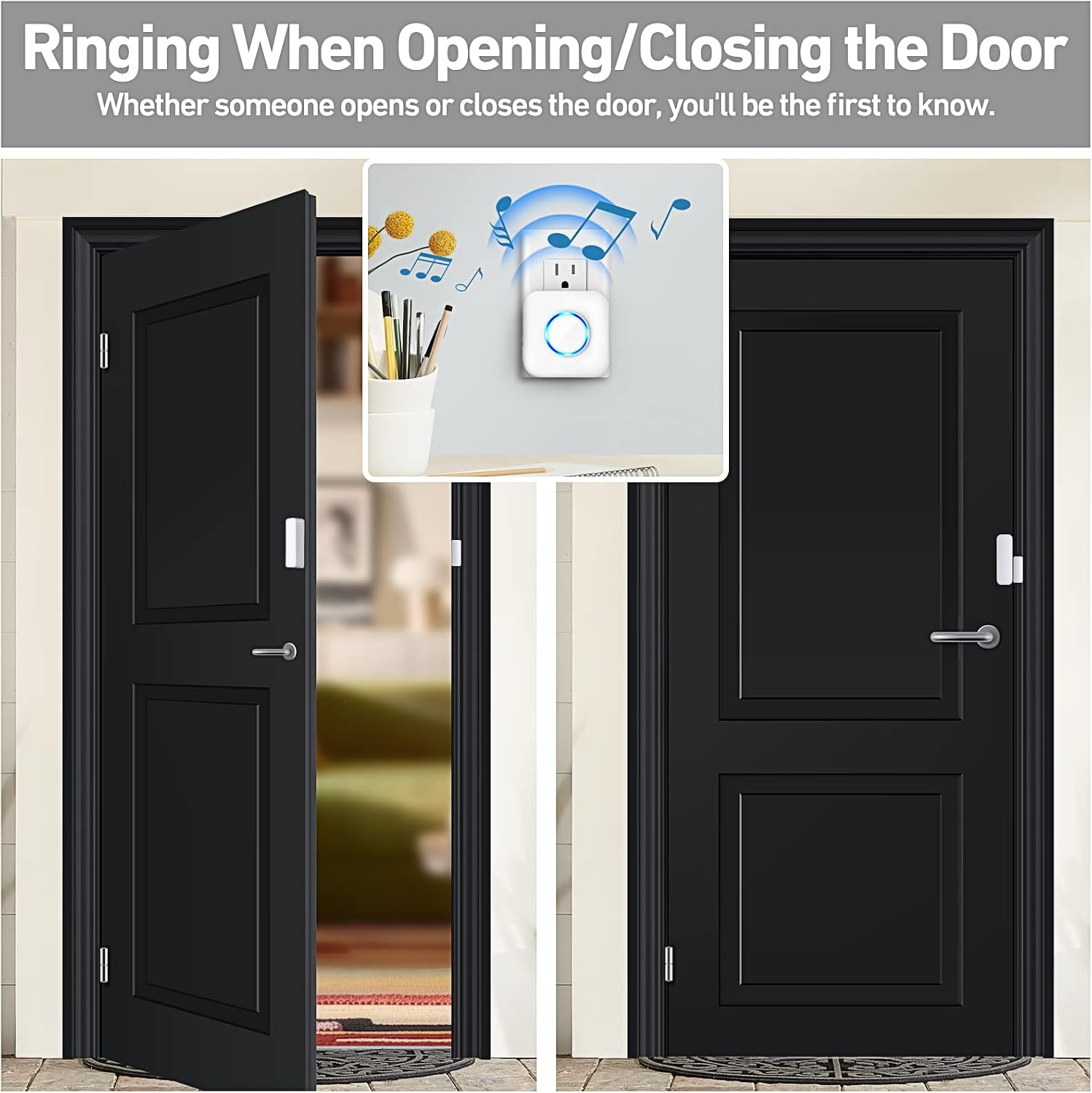
Image: The door sensor is shown installed on a door frame, with the larger part on the door and the smaller magnetic part on the frame. A chime receiver is depicted plugged into a wall outlet, indicating the system's function.
- Plug in the Receiver:
Plug the chime receiver into a standard electrical socket in your desired location. The receiver will power on and be ready to receive signals from the sensor.
Installation is now complete. When the sensor detects an opening, the receiver will sound the selected chime.
4. Operating Instructions
4.1. Chime Selection
The receiver offers 58 optional ringtones. To change the chime, press the "Music" button on the receiver. Each press will cycle through the available melodies. Stop pressing when you hear your preferred chime.
4.2. Volume Adjustment
There are 5 adjustable volume levels, ranging from 0dB (silent) to 110dB. Press the "Volume" button on the receiver to cycle through the volume settings. Select the level that best suits your environment.

Image: A close-up of the chime receiver plugged into a wall outlet, highlighting its features for selecting from 58 ringtones and adjusting between 5 volume levels (0-110dB).
4.3. Wireless Range and Expandability
The system provides a wireless range of up to 600 feet (180 meters) in open areas. This allows for flexible placement of the receiver and sensor within your property.
The Satisure system is expandable. One receiver can be paired with up to 58 sensors, and one sensor can be paired with up to 58 receivers. This allows for comprehensive coverage across multiple entry points or for multiple alert locations.

Image: An aerial view diagram of a house floor plan, depicting a central chime receiver and several door sensors placed throughout, demonstrating the extensive 600ft wireless range and multi-device pairing capability.
5. Maintenance
5.1. Battery Replacement
The door sensor is powered by an alkaline battery designed for ultra-low power consumption, allowing it to last for approximately 7200 activations. When the sensor's performance degrades or it stops transmitting signals, it is time to replace the battery.
- Carefully open the sensor casing.
- Remove the old alkaline battery.
- Insert a new, compatible alkaline battery, ensuring correct polarity.
- Close the sensor casing securely.

Image: An exploded diagram of the door sensor, illustrating its internal circuit board, battery compartment, and the alkaline battery, emphasizing its long battery life.
5.2. Cleaning
Wipe the sensor and receiver with a soft, dry cloth. Do not use liquid cleaners or abrasive materials, as these can damage the devices.
6. Troubleshooting
- No Chime Sound:
- Ensure the receiver is properly plugged into a working electrical outlet.
- Check the volume level on the receiver; it might be set to 0dB (silent).
- Verify the sensor battery. Replace if necessary.
- Confirm the sensor parts are within 0.4 inches when the door/window is closed.
- Re-pair the sensor and receiver if they have lost connection (refer to pairing instructions, if available, or contact support).
- Short Wireless Range:
- Obstructions like thick walls, metal structures, or other electronic devices can interfere with the wireless signal. Try relocating the receiver or sensor.
- Ensure the sensor battery is not low.
- False Alarms:
- Ensure the sensor parts are securely mounted and do not shift, causing intermittent contact.
- Verify the gap between the sensor parts is consistently less than 0.4 inches when closed.
7. Specifications
| Feature | Detail |
|---|---|
| Brand | Satisure |
| Model | B0CK18KZ3D |
| Power Source (Receiver) | AC Plug-in |
| Power Source (Sensor) | Battery Powered (Alkaline) |
| Voltage | 1.5 Volts (DC) for sensor battery |
| Wireless Range | Up to 600 feet (180 meters) in open areas |
| Chime Options | 58 selectable ringtones |
| Volume Levels | 5 levels (0-110dB) |
| Max Sensor-Receiver Pairing | Up to 58 sensors per receiver / 58 receivers per sensor |
| Mounting Type | Door Mount (Adhesive/Screws) |
| Color | White |
8. Warranty and Support
Satisure provides a 30-day return service from the date of purchase. Additionally, lifetime after-sales service support is available for this product. For any inquiries, technical assistance, or warranty claims, please contact Satisure customer support through the retailer's platform or the official Satisure website.
Satisure has been manufacturing security products since 1993, ensuring experience and quality in their offerings.
