1. Introduction
The KAIWEETS 450W Mini Heat Gun (Model KEH01) is a versatile, handheld tool designed for various crafting, DIY, and light industrial applications. Its compact size, dual temperature settings, and ergonomic design make it suitable for tasks such as shrink wrapping, candle making, paint removal, and soldering. This manual provides essential information for safe and effective operation, maintenance, and troubleshooting of your heat gun.

Figure 1: KAIWEETS 450W Mini Heat Gun with included reflector nozzle and stand.
2. Safety Information
Please read and understand all safety warnings and instructions before using this product. Failure to follow the warnings and instructions may result in electric shock, fire, and/or serious injury.
- General Safety: Always keep the air outlet open and maintain a proper distance from the object being heated to prevent overheating and potential fire hazards.
- Overheating Protection: The heat gun features a built-in overheating protection device that automatically cuts off the circuit if the temperature exceeds safe limits. Allow the unit to cool down if this occurs.
- Cool Down Procedure: After use, before completely shutting down the machine, switch to the lower temperature setting (Mode I) and allow it to blow air for a short period to reduce the internal temperature. This extends the service life of the heat gun.
- Ventilation: Use the heat gun in a well-ventilated area.
- Flammable Materials: Do not use the heat gun near flammable liquids, gases, or materials.
- Electrical Safety: Ensure the power supply matches the voltage requirements (110 Volts). Do not expose the heat gun to rain or wet conditions. Do not abuse the cord.
- Personal Protection: Wear appropriate personal protective equipment, such as heat-resistant gloves and eye protection, when operating the heat gun.
- Storage: Store the heat gun in a dry, secure place out of reach of children when not in use.
3. Package Contents
Verify that all items are present and in good condition upon opening the package:
- KAIWEETS Mini Heat Gun (KEH01) x 1
- Reflector Nozzle x 1
- User Manual x 1
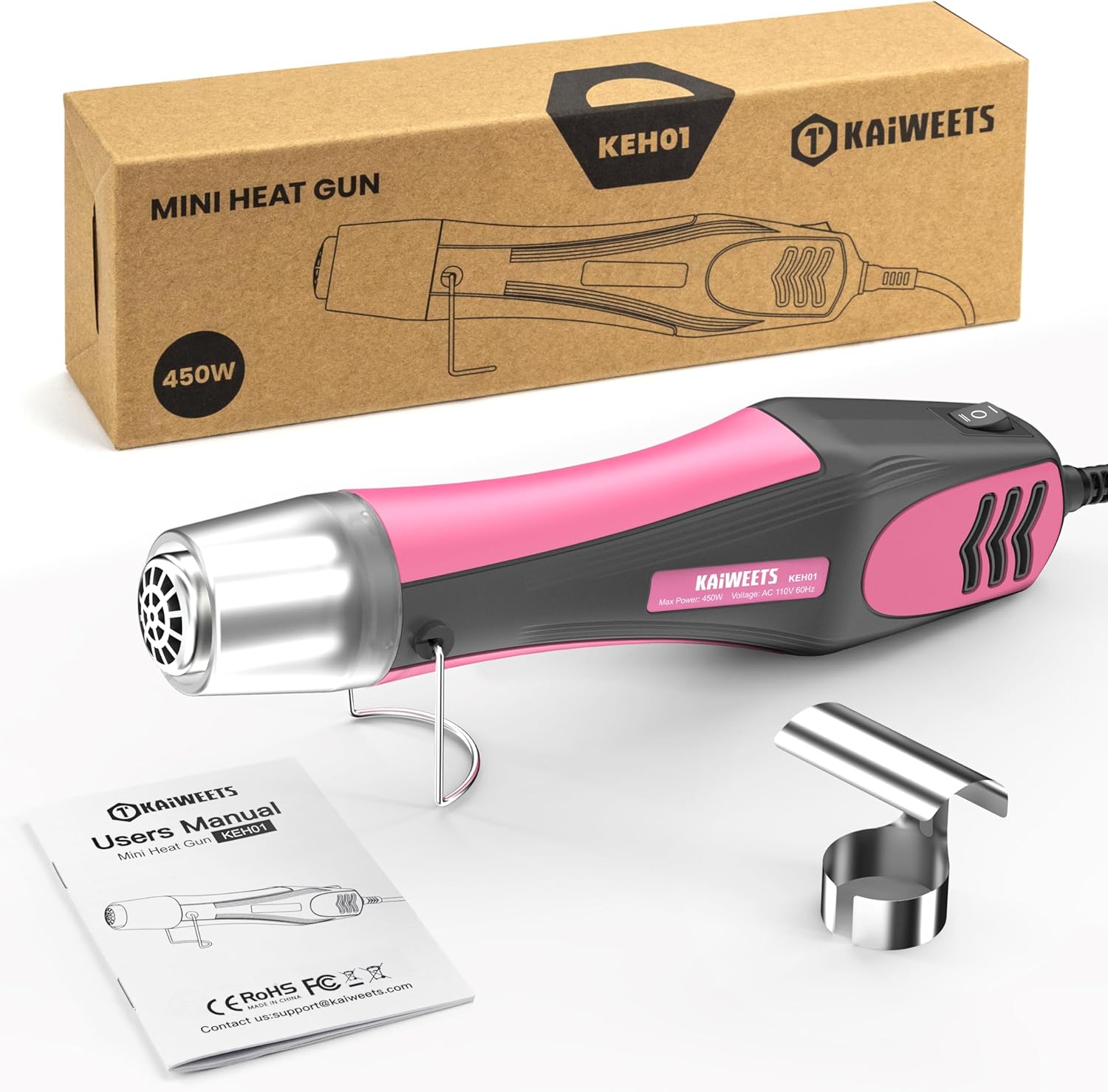
Figure 2: Contents of the KAIWEETS Mini Heat Gun package.
4. Product Features and Components
Familiarize yourself with the key features and components of your KAIWEETS Mini Heat Gun:
- Dual Temperature Modes: Offers two distinct heat settings for various applications.
- Ergonomic Design: Lightweight and portable, designed for comfortable, pencil-like grip, reducing fatigue during extended use.
- Long Power Cable: Equipped with a 4.9-foot (1.5m) double-insulated cable for extended reach and safety.
- Retractable Stand: A stainless steel bracket that can be rotated 90° to provide a stable stand for hands-free operation and to prevent scalding.
- Reflector Nozzle: Included for specialized heat shrinking or bending tube fittings.
- Built-in Overload Protection: Enhances safety by automatically cutting power in case of overheating.
- Double Hole Design Air Outlet: Designed to effectively prevent the product from overheating during operation.
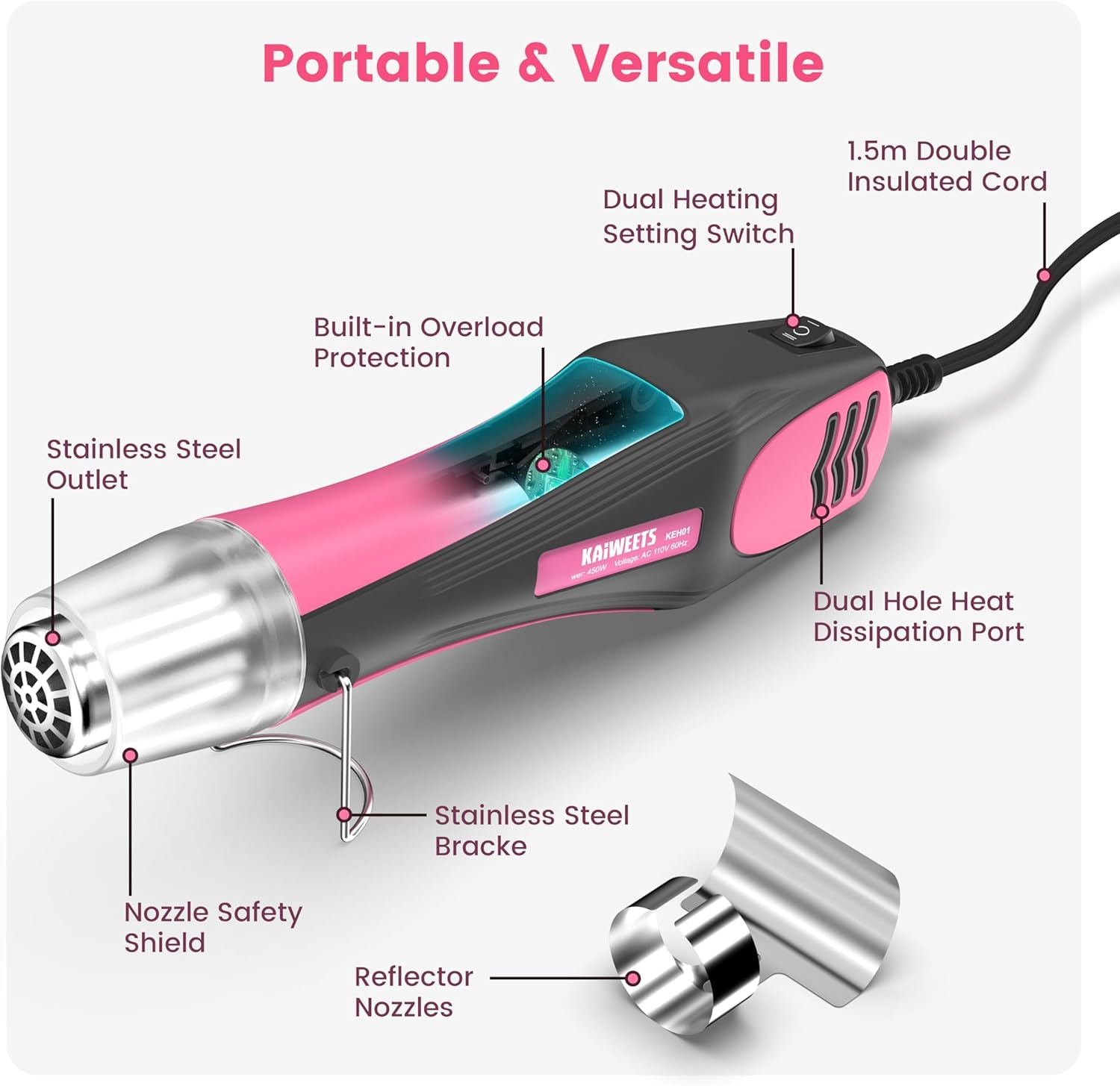
Figure 3: Labeled components of the KAIWEETS Mini Heat Gun.
5. Setup
Before first use, follow these simple steps:
- Unpack: Carefully remove the heat gun and all accessories from the packaging.
- Inspect: Check the heat gun and power cord for any signs of damage. Do not use if damaged.
- Attach Nozzle (Optional): If your application requires it, slide the reflector nozzle onto the heat gun's outlet until it is securely in place.
- Position Stand: Rotate the stainless steel bracket to the desired position for hands-free operation or storage.
- Connect Power: Plug the heat gun into a standard 110V AC power outlet.
6. Operating Instructions
The KAIWEETS Mini Heat Gun offers two temperature settings for optimal performance across various tasks:
- Mode I (Low Temperature):
- Temperature: 250°C / 482°F
- Air Flow: 300 L/min
- Applications: Ideal for delicate processes such as shrink wrapping, removing bubbles from resin, drying watercolor paintings, and other tasks requiring lower heat.
- Mode II (High Temperature):
- Temperature: 450°C / 842°F
- Air Flow: 500 L/min
- Applications: Suitable for more demanding tasks like dry paint removal, soldering, and other applications requiring higher heat.
General Usage Steps:
- Select Mode: Use the switch on the handle to select the desired temperature mode (I or II) based on your application.
- Power On: Turn the heat gun on. The heating element will quickly reach the selected temperature.
- Apply Heat: Direct the hot air stream towards the workpiece. Maintain a proper distance to avoid damaging the material. For shrink wrapping, move the heat gun evenly over the surface.
- Cool Down: Before turning off the heat gun completely, switch it to Mode I (lower temperature) and allow it to run for approximately 30-60 seconds. This helps dissipate residual heat and prolongs the life of the heating element.
- Power Off: Turn the heat gun off and unplug it from the power outlet.
- Storage: Allow the heat gun to cool down completely before storing it.

Figure 4: Illustration of dual heating settings for different applications.

Figure 5: Using the heat gun with the reflector nozzle for heat shrinking applications.

Figure 6: Wide range of applications for the KAIWEETS Mini Heat Gun in crafting and DIY.
7. Maintenance
Proper maintenance ensures the longevity and optimal performance of your heat gun:
- Cleaning: After each use, ensure the heat gun is unplugged and completely cool. Wipe the exterior with a clean, damp cloth. Do not use abrasive cleaners or solvents.
- Air Vents: Keep the air intake and outlet vents clear of dust and debris. Use a soft brush or compressed air to clean them if necessary.
- Cord Care: Regularly inspect the power cord for cuts, fraying, or damage. Do not use the heat gun if the cord is damaged. Store the cord neatly without sharp bends.
- Storage: Store the heat gun in a dry, clean environment, away from direct sunlight and extreme temperatures. Utilize the retractable stand for stable storage.

Figure 7: The double hole design air outlet helps prevent overheating.
8. Troubleshooting
If you encounter issues with your KAIWEETS Mini Heat Gun, refer to the following common problems and solutions:
| Problem | Possible Cause | Solution |
|---|---|---|
| Heat gun does not turn on. | No power supply; Damaged power cord; Internal fault. | Check if the heat gun is properly plugged into a live outlet. Inspect the power cord for damage. If the cord is damaged, do not use and contact customer support. |
| Heat gun stops working during use. | Overheating protection activated; Power interruption. | Unplug the heat gun and allow it to cool down for at least 15-20 minutes. Ensure air vents are clear. Check power connection. |
| Insufficient heat output. | Incorrect temperature mode selected; Blocked air intake/outlet. | Ensure the correct temperature mode (Mode I or II) is selected for your task. Clean any obstructions from the air vents. |
| Unusual noise or smell. | Internal component issue; Overheating. | Immediately turn off and unplug the heat gun. Allow it to cool. Do not attempt to repair. Contact customer support. |
If the problem persists after attempting these solutions, please contact KAIWEETS customer support for assistance.
9. Specifications
| Attribute | Value |
|---|---|
| Model Number | KEH01 |
| Power | 450 Watts |
| Voltage | 110 Volts |
| Temperature Mode I | 250°C / 482°F (300 L/min) |
| Temperature Mode II | 450°C / 842°F (500 L/min) |
| Item Weight | 12.3 ounces (approx. 0.35 kg) |
| Product Dimensions (L x W x H) | 9.84 x 2.17 x 1.77 inches |
| Cable Length | 4.9 feet (1.5 meters) |
| Material | ABS, Aluminum |
| Color | Pink |
10. Warranty and Support
KAIWEETS stands behind the quality of its products. Your KAIWEETS Mini Heat Gun (KEH01) comes with:
- 3-Year After-Sales Service: Providing comprehensive support for three years from the date of purchase.
- Lifetime Technical Assistance: Ongoing technical support for the lifespan of the product.
If you have any questions, concerns, or require technical assistance, please do not hesitate to contact KAIWEETS customer support. Refer to the contact information provided in the included user manual or visit the official KAIWEETS website for support details.


