
1. Introduction
This manual provides essential information for the safe operation, assembly, and maintenance of your Joywhale 12V Kids Ride on Truck. Please read this manual thoroughly before assembly and use to ensure proper function and safety.

Figure 1.1: Joywhale 12V Kids Ride on Truck (White)
2. Safety Information
WARNING: Adult supervision is required at all times. This product is not a toy for children under 36 months due to small parts and potential hazards. Recommended age: 36 months - 6 years. Maximum load capacity: 66 LBS (30 kg).
2.1 General Safety Precautions
- Always ensure the child is wearing a seat belt.
- Ensure both double-lockable doors are securely closed before operation.
- Operate the vehicle only on flat, level surfaces. Avoid slopes, uneven terrain, or public roads.
- Keep children's hands, hair, and clothing away from moving parts.
- Do not allow more than one rider at a time.
- The vehicle is equipped with a slow start function to prevent sudden acceleration.
- The remote control features an emergency brake button ('P') to immediately stop the vehicle.

Figure 2.1: Soft Start and 4-Wheel Suspension for a Smooth Ride
3. Assembly Instructions
Assembly of the Joywhale 12V Kids Ride on Truck requires adult supervision and basic tools. Follow the included detailed assembly guide for step-by-step instructions. Ensure all components are securely fastened before first use.
3.1 Key Assembly Steps (General)
- Attach the wheels and axles, ensuring proper alignment.
- Install the steering wheel and connect necessary wiring.
- Secure the seat and connect battery terminals.
- Attach any decorative elements or accessories, such as the removable shovel.
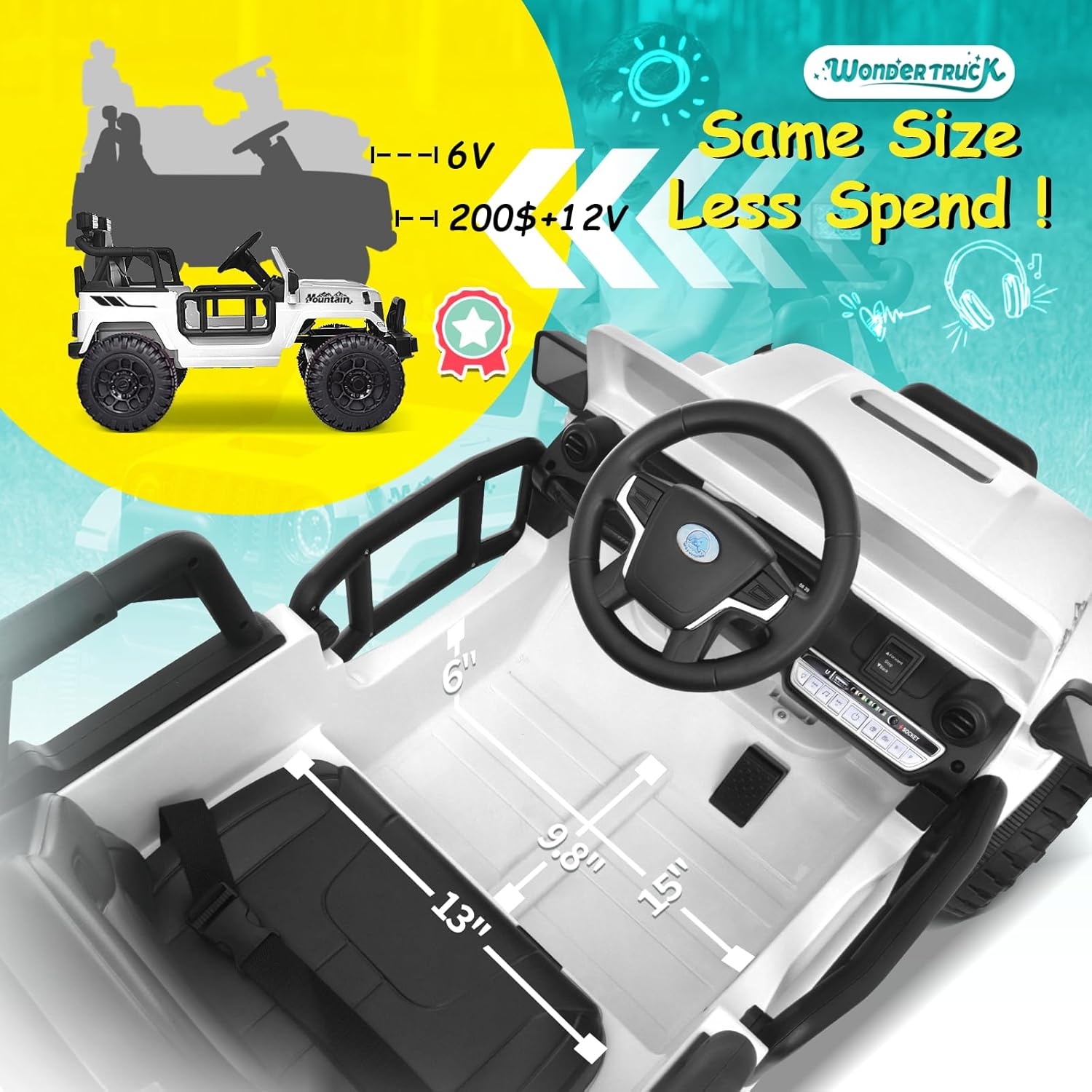
Figure 3.1: Interior View and Dimensions
4. Operating Instructions
The Joywhale 12V Kids Ride on Truck offers dual driving modes for versatile play.
4.1 Dual Driving Modes
- Parental Remote Control: For younger children or for parental guidance, use the highly sensitive remote control. It allows control of forward, backward, left, and right steering. Three speed settings are available via the remote. The 'P' button acts as an emergency brake.
- Kid's Manual Operation: Older children can operate the vehicle using the steering wheel and foot pedal. The truck can be started or turned off with a single click on the operation panel. High and low speeds are selectable.
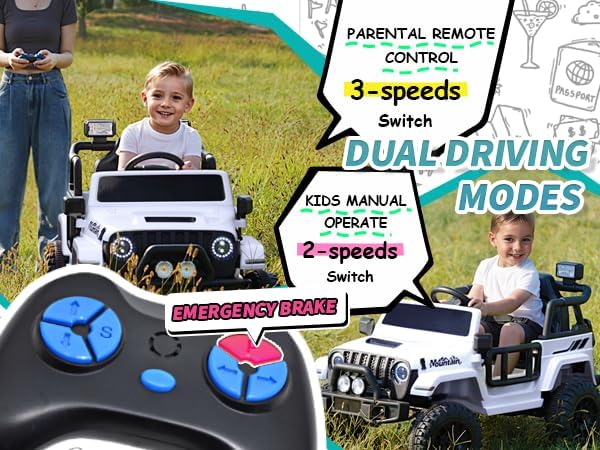
Figure 4.1: Dual Driving Modes Explained
4.2 Entertainment Features
- LED Lights: Bright LED headlights and colorful tail lights allow for play even in low-light conditions.
- Music Player: Features a wireless music player, FM radio, and real car engine sounds for an immersive driving experience. The operation panel is designed for easy use by children.

Figure 4.2: LED Lights and Music Player
5. Charging and Battery Care
The vehicle is powered by a 12V 4.5 AH battery. Proper charging and care are essential for battery longevity and performance.
5.1 Charging Procedure
- Only use the charger provided with the vehicle.
- Ensure the vehicle is turned off before charging.
- Plug the charger into the charging port on the vehicle, then into a standard wall outlet.
- Charge for the recommended duration (typically 8-12 hours for a full charge, never exceeding 18 hours).
5.2 Battery Life and Performance
Playtime typically ranges from 1 to 2.5 hours, fluctuating based on factors such as load, speed, road surface, and temperature. The vehicle features a portable handle for easy movement when the battery runs out.

Figure 5.1: Performance Overview

Figure 5.2: Portable Handle for Easy Transport
6. Maintenance
Regular maintenance ensures the longevity and safe operation of your ride-on truck.
6.1 Cleaning
- Wipe the vehicle with a soft, damp cloth. Do not use abrasive cleaners or solvents.
- Avoid spraying water directly onto electrical components.
6.2 Storage
- Store the vehicle in a dry, cool place away from direct sunlight.
- If storing for extended periods, charge the battery fully every 3 months to maintain its health.
7. Troubleshooting
If you encounter issues with your Joywhale 12V Kids Ride on Truck, refer to the common problems and solutions below.
| Problem | Possible Cause | Solution |
|---|---|---|
| Vehicle does not move | Low battery; Loose wire connection; Overload protection activated. | Charge battery; Check all connections, especially to foot pedal; Reduce load. |
| Remote control not working | Remote battery low; Remote not paired; Interference. | Replace remote batteries; Refer to pairing instructions; Move to an area with less interference. |
| Vehicle moves slowly | Low battery; Overload; Operating on rough terrain. | Charge battery; Reduce load; Operate on smoother surfaces. |
| Lights or music not working | Loose connection; Component malfunction. | Check wiring to lights/music panel; Contact customer support if issue persists. |
If the problem persists after attempting these solutions, please contact Joywhale customer support.
8. Specifications
| Feature | Detail |
|---|---|
| Model Number | WT-619 |
| Overall Dimensions (L x W x H) | 40.6 x 24.8 x 25 inches (103 x 63 x 63.5 cm) |
| Seat Width | 13 inches |
| Wheel Diameter | 9.8 inches |
| Item Weight | 33.7 pounds |
| Maximum Load | 66 LBS (30 kg) |
| Battery | 12V 4.5 AH |
| Speed Range | 1.2 – 3 MPH |
| Playtime | Around 1~2.5 Hours (varies by usage) |
| Recommended Age | 36 months - 6 years |
| Motors | Dual 12V Motors |
| Suspension | 4-Wheel Spring Suspension |

Figure 8.1: Product Dimensions and Specifications
9. Warranty and Support
For warranty information or technical support, please refer to the documentation included with your purchase or visit the official Joywhale website. Keep your purchase receipt for warranty claims.
Manufacturer: Joywhale
Contact: Refer to Joywhale's official customer service channels for support.