1. Introduction
Thank you for choosing the Generic XT98 Wireless Bluetooth Earbuds. This manual provides essential information for the safe and efficient use of your new earbuds. Please read it thoroughly before use and retain it for future reference.
2. Package Contents
Ensure all items listed below are present in your package. If any item is missing or damaged, please contact customer support.
- XT98 Wireless Bluetooth Earbuds (Left and Right)
- Charging Case
- USB Charging Cable
- Ear Cushions (various sizes)
- User Manual
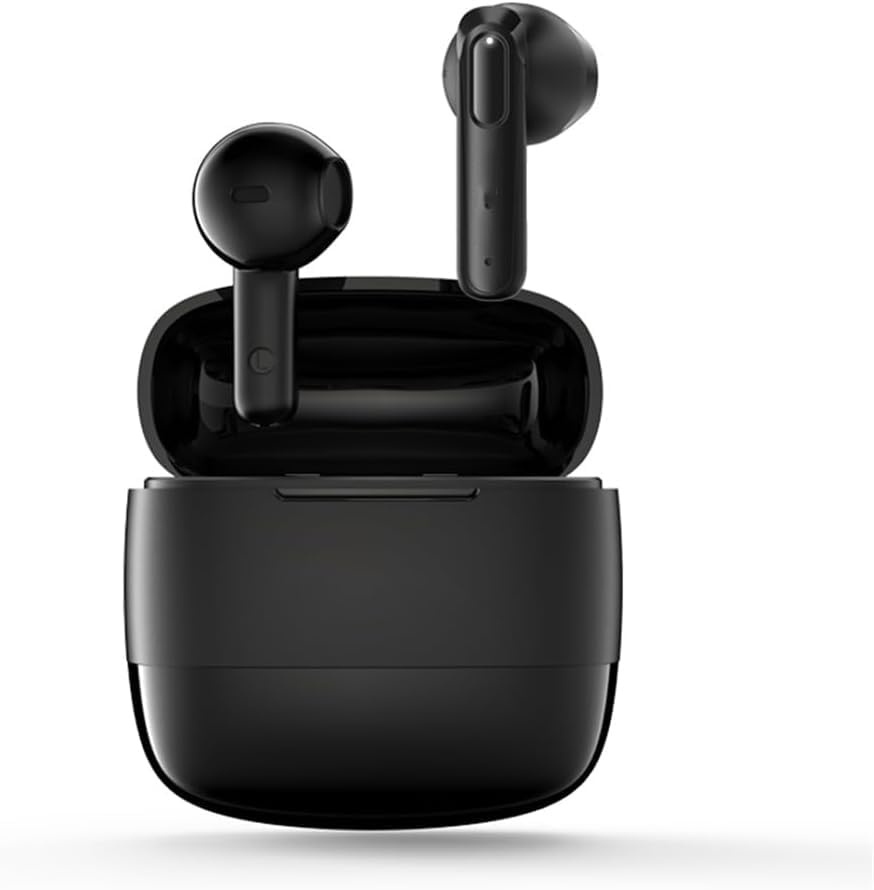
Image: The XT98 Wireless Bluetooth Earbuds shown with their charging case.
3. Product Overview
Familiarize yourself with the components of your XT98 earbuds and charging case.
Earbuds
- Touch Control Area: For managing playback, calls, and voice assistant.
- Microphone: Built-in for calls and voice commands.
- Charging Contacts: For charging inside the case.
- LED Indicator: Shows connection and battery status.
Charging Case
- Charging Port: USB port for charging the case.
- LED Indicators: Shows charging status of the case and earbuds.
- Earbud Slots: Securely holds and charges the earbuds.
4. Setup
4.1 Charging the Earbuds and Case
- Initial Charge: Before first use, fully charge the earbuds and charging case.
- Charging the Case: Connect the USB charging cable to the charging port on the case and a power source. The case's LED indicators will show charging progress.
- Charging the Earbuds: Place the earbuds into the charging case. Ensure the charging contacts align. The earbuds will automatically begin charging.
A full charge provides approximately 48 hours of playtime with the charging case.
4.2 Pairing with a Device
- Power On: Open the charging case. The earbuds will automatically power on and enter pairing mode. The LED indicator on one earbud will flash, indicating it's ready to pair.
- Activate Bluetooth: On your device (smartphone, tablet, laptop), enable Bluetooth.
- Select Device: Search for available Bluetooth devices and select "XT98" from the list.
- Confirm Connection: Once connected, the earbud LED indicator will stop flashing, and you will hear a confirmation tone.
The earbuds will automatically reconnect to the last paired device when taken out of the case, if Bluetooth is enabled on the device.
5. Operating Instructions
The XT98 earbuds feature intuitive touch controls. The following actions are performed by tapping the touch control area on either earbud.
| Action | Control |
|---|---|
| Play/Pause Music | Single tap on either earbud |
| Next Track | Double tap on the right earbud |
| Previous Track | Double tap on the left earbud |
| Answer/End Call | Single tap on either earbud |
| Reject Call | Press and hold either earbud for 2 seconds |
| Activate Voice Assistant | Triple tap on either earbud |
| Volume Up | Press and hold the right earbud |
| Volume Down | Press and hold the left earbud |
5.1 AI Noise Cancellation
The XT98 earbuds feature AI Noise Cancellation technology. This function actively filters external environmental noise, ensuring clear voice calls even in noisy surroundings. It automatically activates during calls to enhance clarity.
5.2 Stereo Surround Sound
Equipped with a 13mm speaker, the XT98 earbuds deliver high-quality stereo surround sound with enhanced bass. This provides an immersive audio experience for music and clear voice reproduction during calls.
6. Maintenance
Proper maintenance ensures the longevity and optimal performance of your earbuds.
- Cleaning: Use a soft, dry, lint-free cloth to clean the earbuds and charging case. Do not use abrasive cleaners, alcohol, or chemical solvents.
- Charging Contacts: Periodically clean the charging contacts on both the earbuds and the case with a dry cotton swab to ensure a good connection.
- Storage: When not in use, store the earbuds in their charging case to protect them from dust and damage. Store in a cool, dry place away from extreme temperatures.
- Water Resistance: The earbuds are not waterproof. Avoid exposure to liquids.
7. Troubleshooting
If you encounter issues with your XT98 earbuds, refer to the following common solutions:
| Problem | Solution |
|---|---|
| Earbuds not pairing | Ensure earbuds are charged. Turn off and on Bluetooth on your device. Forget "XT98" from your device's Bluetooth list and re-pair. |
| No sound from earbuds | Check device volume. Ensure earbuds are connected. Try playing different audio. |
| One earbud not working | Place both earbuds back in the case, close it, then open again. Ensure both are charged. |
| Charging issues | Check charging cable and power adapter. Clean charging contacts on earbuds and case. |
| Poor call quality | Ensure microphone is not obstructed. Move closer to your device. Check network signal. |
8. Specifications
Detailed technical specifications for the XT98 Wireless Bluetooth Earbuds.
- Model Name: XT98
- Connectivity Technology: Bluetooth 5.3
- Ear Placement: In Ear
- Form Factor: In Ear
- Special Features: Ergonomic, Noise Cancellation (AI Smart), Surround Sound
- Microphone Format: Built-In
- Cable Feature: Without Cable
- Material: Plastic
- Recommended Product Uses: Calling, Entertainment
- Compatible Devices: Smartphones, Laptops, Tablets, Smart Speakers, Car Audio Systems
- Control Type: Voice Control
- Manufacturer: XCYMY
9. Warranty and Support
For warranty information and customer support, please refer to the documentation provided at the time of purchase or contact your retailer. Keep your proof of purchase for any warranty claims.

