
1. Introduction
Thank you for choosing the ZMISHIBO 15.7-inch Oscillating Low Profile Ceiling Fan with Light. This modern ceiling fan is designed to provide efficient air circulation and adjustable lighting for various indoor spaces. It features a 360° oscillating function, a reversible DC motor for year-round use, 6 fan speeds, dimmable LED lighting with adjustable color temperature, and convenient control via remote or a smartphone application.

Image 1.1: ZMISHIBO 15.7-inch Oscillating Low Profile Ceiling Fan with Light.
2. Safety Information
Please read all instructions carefully before installation and use. Retain this manual for future reference.
- Electrical Safety: Always disconnect power at the circuit breaker before installing, cleaning, or servicing the fan. Ensure all electrical connections comply with local codes and ordinances. If you are unsure about wiring, consult a qualified electrician.
- Mounting: The fan must be mounted to a structurally sound ceiling junction box capable of supporting the fan's weight. Ensure the mounting surface can hold at least 35 lbs (15.9 kg).
- Blade Clearance: Ensure there is adequate clearance between the fan blades and any obstacles, including walls and furniture, to prevent injury or damage.
- Voltage: This fan operates on 120 Volts. Verify your power supply matches this requirement.
- Children and Pets: Keep children and pets away from the fan during operation and installation.
- Not Water Resistant: This product is designed for indoor use only and is not water resistant. Avoid exposure to moisture.
3. Package Contents
Verify that all components are present and undamaged upon opening the package. If any parts are missing or damaged, please contact customer support.
- ZMISHIBO 15.7-inch Oscillating Low Profile Ceiling Fan with Light
- Remote Control
- Installation Hardware (screws, wire nuts, etc.)
- User Manual (this document)
4. Specifications
| Feature | Specification |
|---|---|
| Brand | ZMISHIBO |
| Model | B0CJY3VDHB |
| Color | Black |
| Material | Acrylic, Iron, Plastic |
| Dimensions (L x W x H) | 15.7"L x 15.7"W x 6.1"H |
| Mounting Type | Flush Mount |
| Voltage | 120 Volts |
| Wattage | 60 watts |
| Light Source | LED |
| Brightness | 3300 Lumens (10%-100% dimmable) |
| Color Temperature | 3000K (Warm), 4000K (Nature), 6500K (White) |
| Fan Speeds | 6 speeds |
| Control Method | Remote Control, App Control (Bluetooth required) |
| Special Features | 360° Oscillating, Reversible DC Motor, Timer (1H/2H/4H), Light Memory Function |
| Indoor/Outdoor Usage | Indoor |
5. Setup and Installation
This ceiling fan is designed for easy installation. For detailed diagrams and step-by-step instructions, please refer to the separate installation guide included in your product packaging. Below are general guidelines:
- Prepare for Installation: Turn off power at the circuit breaker. Ensure the mounting location is suitable and the junction box is securely fastened to the ceiling structure.
- Mount the Bracket: Attach the mounting bracket to the ceiling junction box using the provided screws.
- Wire the Fan: Connect the fan's electrical wires to the household wiring according to the wiring diagram in the installation guide. Ensure all connections are secure with wire nuts.
- Attach the Fan Body: Carefully lift the fan body and secure it to the mounting bracket.
- Final Checks: Ensure all connections are tight and the fan is securely mounted. Restore power at the circuit breaker.
Note: If you encounter any difficulties during installation, please consult a qualified electrician or contact ZMISHIBO customer support.
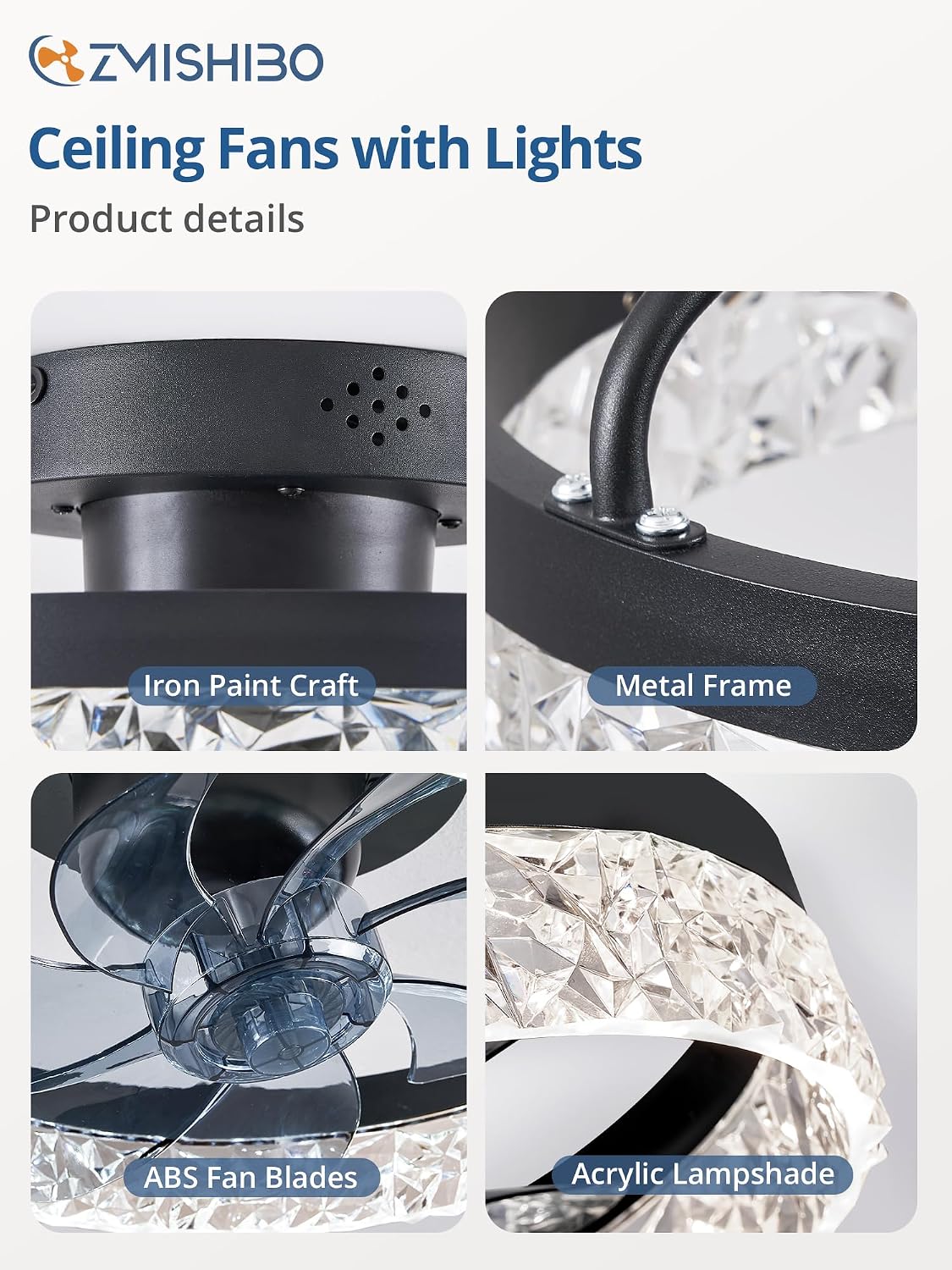
Image 5.1: Detailed view of fan components (Iron Paint Craft, Metal Frame, ABS Fan Blades, Acrylic Lampshade).
6. Operating Instructions
Your ZMISHIBO ceiling fan can be controlled using the included remote control or a smartphone application.
6.1 Remote Control and App Pairing
When using the fan light for the first time, you need to pair the remote control and the app with the fan.
- Remote Pairing: Turn on the fan's power. Within 5 seconds, press and hold the "Code Pair" button on the remote control until the fan light blinks, indicating successful pairing.
- App Pairing: Download the "fanlamp Pro" app from Google Play or the Apple App Store. Open the app and follow the on-screen instructions to connect via Bluetooth.

Image 6.1: Remote Control and App Interface for Fan Operation.
6.2 Fan Functions
- Power ON/OFF: Use the dedicated power buttons on the remote or app to turn the fan and light on or off.
- Fan Speed: Select from 6 available fan speeds to adjust airflow intensity.
- Oscillation: Activate the 360° oscillating feature for wider air distribution. The fan can also be set to a fixed direction.
- Reversible DC Motor (F/R Function):
- Summer Mode (Downdraft): Blades rotate counter-clockwise to create a cooling breeze.
- Winter Mode (Updraft): Blades rotate clockwise to circulate warm air trapped near the ceiling, promoting balanced heating.
- Timer Setting: Set the fan to turn off automatically after 1, 2, or 4 hours.

Image 6.2: Reversible Fan Function for Summer and Winter Modes.
6.3 Light Functions
- Light ON/OFF: Control the LED light independently from the fan.
- Color Temperature Adjustment: Cycle through three color temperatures: Warm (3000K), Nature (4000K), and White (6500K).
- Smooth Dimming: Adjust the light brightness from 10% to 100%.
- Light Memory Function: The light will remember the last used brightness and color temperature setting when turned back on.

Image 6.3: Color Temperature and Smooth Dimming Options.
7. Maintenance
Regular maintenance helps ensure the longevity and optimal performance of your ceiling fan.
- Cleaning: Before cleaning, ensure the power is turned off at the circuit breaker. Use a soft, damp cloth to wipe down the fan body and blades. Avoid using abrasive cleaners or solvents that could damage the finish. The enclosed design allows for easier cleaning of the blades.
- Tighten Fasteners: Periodically check all screws and fasteners on the fan and mounting hardware to ensure they are secure.
- No Lubrication Needed: The fan's motor is permanently lubricated and does not require additional oiling.
8. Troubleshooting
If you experience issues with your ZMISHIBO ceiling fan, refer to the following common problems and solutions:
| Problem | Possible Cause | Solution |
|---|---|---|
| Fan does not operate / Light does not turn on | No power supply; Loose wiring; Remote not paired. | Check circuit breaker. Ensure all wiring connections are secure. Re-pair the remote control (see Section 6.1). |
| Remote control not working | Batteries dead; Remote not paired; Obstruction between remote and fan. | Replace remote batteries. Re-pair the remote control (see Section 6.1). Ensure clear line of sight to the fan. |
| App control not connecting | Bluetooth not enabled; App not paired; Incorrect app version. | Ensure Bluetooth is enabled on your device. Re-pair the app (see Section 6.1). Verify you have the correct "fanlamp Pro" app. Some users have reported difficulties with app connectivity; ensure your app is updated. |
| Fan makes excessive noise | Loose screws; Unbalanced blades; Motor issue. | Check and tighten all mounting screws. Ensure blades are clean and free of debris. This model features a pure copper motor designed for quiet operation; if noise persists, contact support. |
| Oscillation not working | Feature not activated; Internal mechanism issue. | Ensure the oscillation function is activated via remote or app. If the issue persists, contact customer support. |
If the problem is not listed or persists after attempting these solutions, please contact ZMISHIBO customer support.
9. Warranty and Support
ZMISHIBO provides a 2-year warranty for this product. This warranty covers defects in materials and workmanship under normal use.
What to do if you have issues:
- If you encounter problems with installation, product damage, missing parts, or any other operational issues, please contact our customer support team.
- We are committed to providing support and will respond to your inquiries within 24 hours.
For support, please refer to the contact information provided in your product packaging or on the ZMISHIBO official website.