
1. Introduction
This manual provides detailed instructions for the assembly, operation, and maintenance of your oneinmil 80-inch Fireplace TV Stand. Please read this manual thoroughly before assembly and use to ensure safe and efficient operation of the product.
The oneinmil Fireplace TV Stand combines a spacious entertainment center with an integrated electric fireplace, designed to accommodate TVs up to 90 inches. It features ample storage, adjustable shelving, and a realistic electric fireplace with various flame and heat settings.
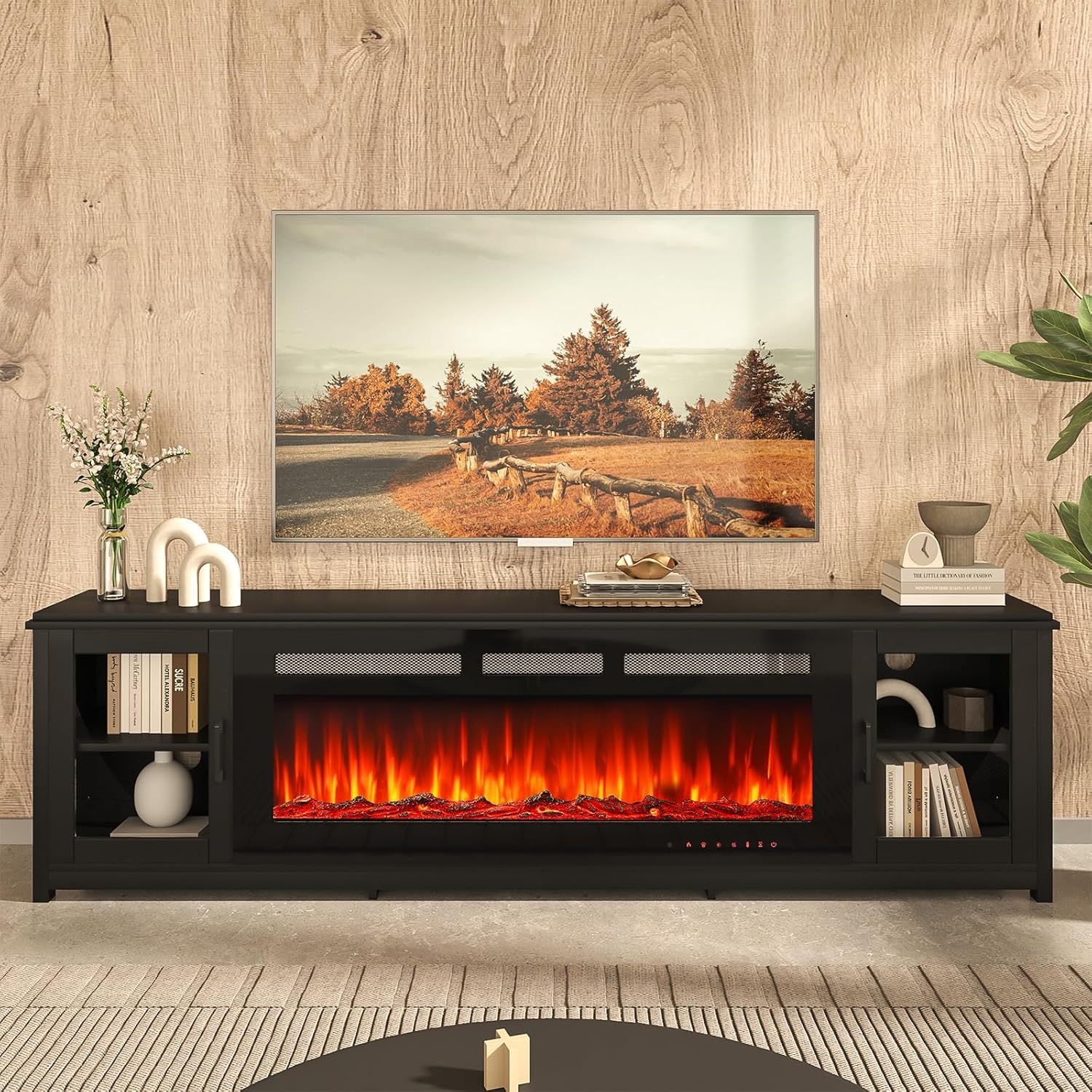
Image 1.1: The oneinmil 80-inch Fireplace TV Stand, showcasing its design and integrated electric fireplace.
2. Important Safety Information
Please read and understand all safety warnings and instructions before using this product. Failure to follow these instructions may result in electric shock, fire, property damage, or personal injury.
- Ensure the product is assembled correctly and securely before placing any items on it or operating the fireplace.
- Do not overload the TV stand. The total weight capacity is approximately 60 kg (132 lbs) for the top surface.
- The electric fireplace operates on AC120V/60Hz and offers 750W/1500W heating settings. Use only with a properly grounded outlet.
- Keep flammable materials at least 3 feet (0.9 meters) away from the front of the fireplace.
- Do not block air vents of the fireplace. Ensure proper ventilation.
- Do not immerse the electric fireplace in water or expose it to excessive moisture.
- Always unplug the fireplace before cleaning or performing any maintenance.
- This appliance is not intended for use by persons (including children) with reduced physical, sensory or mental capabilities, or lack of experience and knowledge, unless they have been given supervision or instruction concerning use of the appliance by a person responsible for their safety.
- The fireplace is equipped with a safety cut-off device to prevent overheating. If it activates, unplug the unit and allow it to cool before restarting.
3. Package Contents
Your oneinmil Fireplace TV Stand will arrive in two separate packages, which may be delivered on different days. Please ensure you have received both packages and all components are present before beginning assembly.
Package 1: TV Stand Components
Contains all wooden panels, hardware, and accessories for the TV stand frame.
Package 2: Electric Fireplace Insert
Contains the electric fireplace unit, remote control, and decorative media (carbon logs and crystal stones).
Carefully unpack all items and compare them with the parts list provided in the assembly instructions (included in Package 1). If any parts are missing or damaged, do not proceed with assembly and contact customer support.

Image 3.1: Product dimensions and packaging information, illustrating the two-package delivery.
4. Product Specifications
| Feature | Detail |
|---|---|
| Brand | oneinmil |
| Model Number | H21029+H20025 |
| Overall Dimensions (L x W x H) | 80.7" x 12.6" x 22.2" (205 cm x 32 cm x 56.4 cm) |
| Fireplace Insert Dimensions (L x H) | Approx. 50" x 17" (127 cm x 43.2 cm) |
| Material | Engineered Wood (Particleboard with melamine veneer) |
| Color | Black |
| Weight Capacity (Top) | 60 kg (132 lbs) |
| TV Size Compatibility | Up to 90 inches |
| Power Source | Corded Electric |
| Voltage/Frequency | AC120V/60Hz |
| Heat Output | 750W / 1500W |
| Temperature Range | 62°F to 82°F |
| Timer Settings | 1H to 9H |
| Flame Colors | 12 changeable LED colors |
| Flame Brightness | 5 levels |
| Safety Features | Safety cut-off device, CETL certified |

Image 4.1: Visual guide for TV size compatibility with the 80-inch TV stand.
5. Assembly Instructions
Assembly of the oneinmil Fireplace TV Stand requires careful attention to detail. It is recommended that two adults participate in the assembly process. Please allow approximately 3 hours for complete assembly.
Before You Begin:
- Read the Instructions: Thoroughly review the separate assembly manual included in Package 1 before starting.
- Clear Workspace: Ensure you have a spacious, clean, and level area for assembly.
- Identify Parts: Unpack all components and hardware. Match each piece to the corresponding number or letter in the assembly manual.
- Tools Required: Typically, a Phillips head screwdriver and possibly a hammer are needed.
General Assembly Steps:
- Assemble the main frame of the TV stand according to the numbered steps in the provided manual. Pay close attention to the orientation of panels, especially for back panel slots.
- Install the adjustable shelves into the side cabinets. These shelves can be moved up or down to suit your storage needs.
- Attach the glass doors to the side cabinets. Ensure hinges are properly aligned for smooth operation.
- Once the main frame is complete, carefully insert the electric fireplace unit into its designated opening. Secure it in place as per the fireplace installation instructions.
- Place the decorative carbon logs or crystal stones into the fireplace insert as desired. Note that the glass front may not close properly if items are placed on top of the log.
- Utilize the cable management holes at the back of the stand to organize wires and cables.

Image 5.1: Key features of the TV stand construction, including adjustable shelving and cable management.
6. Operating the Electric Fireplace
The electric fireplace can be operated using the control panel on the unit or the included remote control.
6.1 Initial Setup
- Ensure the fireplace is securely installed in the TV stand.
- Plug the power cord into a grounded 120V AC outlet.
- Insert batteries into the remote control (if not already installed).
6.2 Basic Operation

Image 6.1: Fireplace remote control and integrated control panel functions.
- Power On/Off: Press the Power button on the control panel or remote to turn the unit on or off.
- Heat Settings: Press the HEAT button to cycle between OFF, 750W, and 1500W heating modes.
- Temperature Adjustment: Use the TEMPERATURE button to set the desired room temperature between 62°F and 82°F.
- Flame Color: Press the FLAME button to cycle through 12 different LED flame colors.
- Flame Brightness: Adjust the flame brightness using the dedicated brightness control (refer to remote/panel icons). There are 5 levels of brightness.
- Light Color: Press the LIGHT button to adjust the 12 LED light colors for the crystal stone effect.
- Timer Function: Press the TIMER button to set an automatic shut-off timer from 1 hour to 9 hours.

Image 6.2: Examples of the 12 changeable LED flame colors for both crystal stone and faux log effects.

Image 6.3: The electric fireplace showcasing a blue flame effect.
7. Maintenance
Regular maintenance ensures the longevity and optimal performance of your TV stand and electric fireplace.
7.1 Cleaning the TV Stand
- Wipe surfaces with a soft, damp cloth. Avoid abrasive cleaners or harsh chemicals that may damage the finish.
- For glass doors, use a standard glass cleaner and a lint-free cloth.
- Dust regularly to prevent buildup, especially on the black melamine veneer.
7.2 Cleaning the Electric Fireplace
- Always unplug the fireplace before cleaning.
- Use a soft, dry cloth to wipe the exterior surfaces.
- Gently clean the front glass panel with a soft, damp cloth. Do not use abrasive cleaners.
- Ensure air intake and exhaust vents are free from dust and obstructions. Use a vacuum cleaner with a brush attachment if necessary.
7.3 Storage
If storing the unit for an extended period, unplug the fireplace and ensure all components are clean and dry. Store in a cool, dry place away from direct sunlight and extreme temperatures.
8. Troubleshooting
Refer to the following table for common issues and their solutions.
| Problem | Possible Cause | Solution |
|---|---|---|
| Fireplace does not turn on. | No power, power cord loose, safety cut-off activated. |
|
| No heat, but flames are visible. | Heat function is off or set to low. |
|
| Remote control not working. | Dead batteries, obstruction, remote out of range. |
|
| Unusual noise from fireplace. | Fan obstruction, loose component. |
|
| Glass door does not close properly. | Misaligned hinges, obstruction. |
|
If you encounter a problem not listed here or if the suggested solutions do not resolve the issue, please contact oneinmil customer support.
9. Warranty and Customer Support
9.1 Warranty Information
The oneinmil Fireplace TV Stand comes with a limited warranty. Please refer to the warranty card included with your product for specific terms, conditions, and duration of coverage. The warranty typically covers manufacturing defects and malfunctions under normal use.
9.2 Customer Support
For assistance with assembly, missing parts, technical issues, or warranty claims, please contact oneinmil customer support. You can typically find contact information on the brand's official website or through your purchase platform.
When contacting support, please have the following information ready:
- Product Model Number: H21029+H20025
- Date of Purchase
- Place of Purchase
- A detailed description of the issue
You can visit the oneinmil store on Amazon for more information: oneinmil Amazon Store