
Introduction
This manual provides essential information for the safe and efficient use of your Logicom ILOA 150 Fixed Wireless Phone. Please read these instructions carefully before using the device and keep them for future reference.
The Logicom ILOA 150 is a cordless DECT phone designed for home and office use, offering clear communication and essential features without an integrated answering machine. It is compatible with internet boxes, VoIP, PSTN, and ISDN systems.
Package Contents
Ensure all items are present in the box:
- 1 x Logicom ILOA 150 Handset
- 1 x Base Unit
- 1 x RJ11 Cable
- 1 x Power Adapter for Base Unit
- 2 x AAA NiMH Rechargeable Batteries
- 1 x User Manual (this document)
Product Overview
Familiarize yourself with the components of your Logicom ILOA 150 phone.
Handset
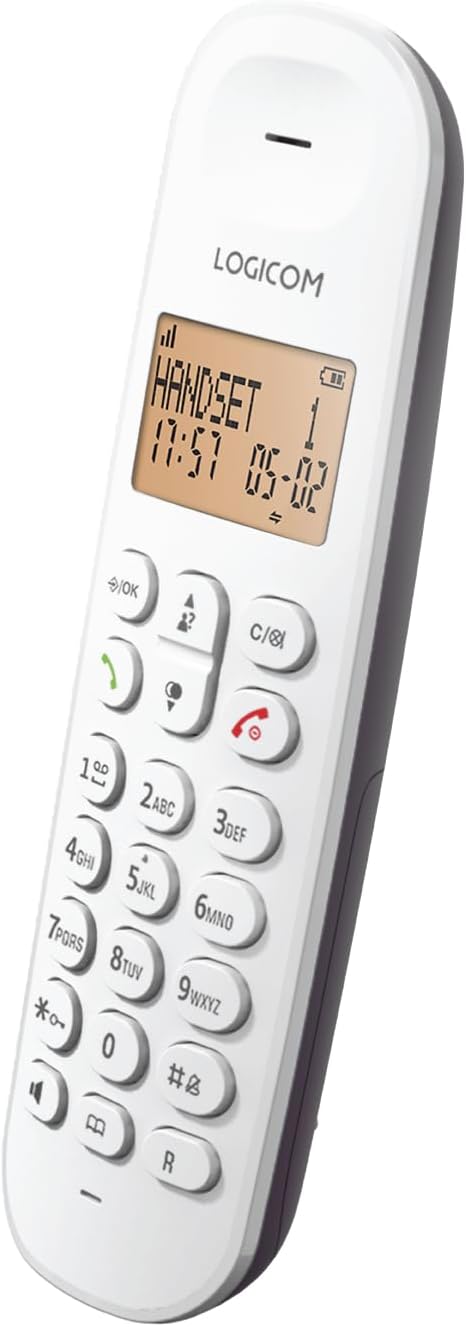
Image: Front view of the Logicom ILOA 150 handset, showing the display, keypad, and function buttons.
- Display: Large 4-line screen (1 dot matrix, 1 alphanumeric, 2 icon lines) for caller ID, menu navigation, and status indicators.
- Keypad: Standard numeric keypad for dialing and text input.
- Navigation Keys: For menu navigation and volume control.
- Call/End Keys: To initiate or end calls.
- Hands-free Key: To activate speakerphone mode.
Base Unit

Image: Top-down view of the Logicom ILOA 150 base unit, showing the charging cradle.
- Charging Cradle: Place the handset here to charge its batteries.
- Connectors: Power adapter port and RJ11 telephone line port (located on the back or bottom).
Key Features

Image: Visual representation of the Logicom ILOA 150's key features, including large screen, caller ID, redial, adjustable volume, and battery specifications.
- Caller ID display (names and numbers).
- Large 4-line display.
- Redial for the last 5 numbers.
- Adjustable ringer volume (5 levels) and 10 ringtones.
- Hands-free function.
- Energy-saving mode.
- Compatible with internet boxes.
Setup
1. Installing Batteries
- Open the battery compartment cover on the back of the handset.
- Insert the 2 AAA NiMH rechargeable batteries, observing the correct polarity (+/-).
- Close the battery compartment cover securely.
2. Connecting the Base Unit
- Connect one end of the RJ11 telephone cable to the telephone line port on the base unit.
- Connect the other end of the RJ11 cable to your telephone wall socket or internet box.
- Connect the power adapter to the power port on the base unit.
- Plug the power adapter into a mains power outlet.
3. Charging the Handset
Place the handset on the base unit's charging cradle. The handset will begin charging. For optimal battery performance, charge the handset for at least 16 hours before its first use.
4. Initial Configuration (Language, Date & Time)
Upon first use or after a power reset, you may need to set the language, date, and time. Follow the on-screen prompts or navigate through the menu:
- Press the Menu/OK button.
- Use the navigation keys to scroll to Settings or Initial Setup.
- Select Language and choose from French, English, Spanish, or Dutch.
- Set the current Date and Time.
Operating Instructions
This section details the daily use of your Logicom ILOA 150 phone.

Image: Visual representation of the Logicom ILOA 150's functions, including call transfer, intercom, mute, keypad lock, and alarm.
Making and Receiving Calls
- To Make a Call: Dial the number and press the Call button (green handset icon).
- To Receive a Call: When the phone rings, press the Call button.
- To End a Call: Press the End button (red handset icon) or place the handset back on the base.
- Redial: Press the Redial button (often the Call button or a dedicated button) to access the last 5 dialed numbers.
Hands-Free Function
During a call, press the Hands-free button (speaker icon) to activate the speakerphone. Press it again to switch back to handset mode.
Phonebook (50 Contacts)
- Press the Menu/OK button.
- Navigate to Phonebook.
- Select Add New Entry to store a name and number.
- To call from the phonebook, navigate to the desired contact and press the Call button.
Call Log (10 Numbers)
The phone stores the last 10 incoming call numbers. Press the Call Log button (often an arrow key) to view the list. You can call back a number directly from this list.
Keypad Lock
To prevent accidental dialing, you can lock the keypad. Typically, press and hold the # key or a dedicated lock key. Repeat the action to unlock.
Ringer Volume and Ringtones
You can adjust the ringer volume (5 levels) and choose from 10 available ringtones via the phone's menu settings.
Intercom and Call Transfer (for multiple handsets)
If you have multiple ILOA handsets registered to the same base (up to 5), you can use intercom and call transfer functions:
- Intercom: To call another handset, press the Intercom button (often a dedicated button or accessed via menu) and select the desired handset.
- Call Transfer: During an external call, press the Transfer button (or menu option), select the internal handset, and then hang up once the other handset answers.
Mute Function
During a call, press the Mute button (often a microphone icon) to temporarily disable your microphone. The other party will not hear you. Press again to unmute.
Alarm Function
You can set an alarm via the phone's menu. Navigate to Alarm in the settings and configure the time.
Maintenance
Cleaning
Wipe the handset and base unit with a soft, damp cloth. Do not use abrasive cleaners or solvents. Ensure no liquid enters the device openings.
Battery Care
- Use only the supplied rechargeable NiMH AAA batteries.
- Do not use non-rechargeable batteries.
- If the phone will not be used for an extended period, remove the batteries to prevent leakage.
- Dispose of old batteries responsibly according to local regulations.
Troubleshooting
| Problem | Possible Cause | Solution |
|---|---|---|
| No dial tone | Base unit not connected or powered. | Check all cable connections (telephone line, power adapter). Ensure the power outlet is active. |
| Handset not charging | Handset not correctly placed on base; dirty charging contacts; faulty batteries. | Ensure handset is properly seated. Clean charging contacts on both handset and base with a dry cloth. Replace batteries if old. |
| Poor call quality / Static | Out of range; interference; low battery. | Move closer to the base unit. Avoid placing the base near other electronic devices (Wi-Fi routers, microwaves). Charge the handset. |
| Cannot make/receive calls | Telephone line issue; handset not registered. | Check if other phones on the same line work. Re-register the handset to the base (refer to the full manual for registration steps if needed). |
| Keypad locked | Keypad lock activated. | Press and hold the # key or dedicated lock key to unlock. |
Specifications

Image: Dimensions of the Logicom ILOA 150 handset (163 mm height) and base unit (90 mm width).
| Feature | Detail |
|---|---|
| Brand | LOGICOM |
| Model Number | ILOA 150 |
| Phone Type | Cordless DECT Phone |
| Answering System | No integrated answering machine |
| Display | 4-line (1 dot matrix, 1 alphanumeric, 2 icon lines) |
| Phonebook Capacity | 50 contacts |
| Call Log Capacity | 10 numbers |
| Caller ID | Yes |
| Hands-free Function | Yes |
| Ringtones | 10 melodies, 5 volume levels |
| Batteries | 2 x AAA NiMH rechargeable (included) |
| Talk Time | Up to 7 hours |
| Standby Time | Up to 100 hours |
| Indoor Range | Up to 50 meters |
| Outdoor Range | Up to 300 meters |
| Multi-handset Support | Up to 5 handsets |
| Compatible Devices | Internet Box, VoIP, PSTN, ISDN |
| Material | Plastic |
| Country of Origin | China |
Warranty and Support
LOGICOM products are designed for reliability and performance. In case you encounter any issues or are not satisfied with your product, please do not hesitate to contact our After-Sales Service.
For warranty claims or technical support, please refer to the contact information provided on the LOGICOM official website or your purchase documentation. Our team is dedicated to finding an appropriate solution for you.
Please retain your proof of purchase for warranty purposes.


