
Introduction
The RSHTECH RSH-ST07C is a 7-port USB 3.2 powered hub designed to expand connectivity for your devices. It features a combination of high-speed USB-A and USB-C data ports, individual port control, and a versatile 2-in-1 data cable for broad compatibility. This manual provides essential information for the proper setup, operation, maintenance, and troubleshooting of your device.
Setup Instructions
Follow these steps to set up your RSHTECH RSH-ST07C USB Hub:
- Unpack the Hub: Carefully remove the USB hub, power adapter, and 2-in-1 data cable from the packaging.
- Connect the Power Adapter: Insert the DC 5V power adapter into the 'DC 5V' port on the hub. Plug the power adapter into a wall outlet. This ensures stable power delivery to all connected devices.

Image: Detail of the DC 5V power input port on the RSHTECH USB Hub.
- Connect to Host Device: Use the included 2-in-1 data cable to connect the hub to your computer or laptop. The cable features both USB-A and USB-C connectors for compatibility with various host ports. Connect the appropriate end to your computer's USB port and the other end to the 'USB-C IN' port on the hub.

Image: The hybrid 2-in-1 USB-A/USB-C data cable connecting the hub to a device.
The hub is plug-and-play and does not require additional drivers for most operating systems.
Operating Instructions
The RSHTECH RSH-ST07C hub provides multiple high-speed ports for your peripherals.
Connecting Devices
Connect your USB devices (e.g., external hard drives, flash drives, keyboards, mice, printers, cameras) to the available ports on the hub. The hub features:
- 1x USB-A 3.2 port (up to 10Gbps)
- 2x USB-C 3.2 ports (up to 10Gbps) - Note: These USB-C ports support data transfer only, not charging or video output.
- 4x USB 3.0 ports (up to 5Gbps)

Image: Overview of the RSHTECH USB Hub with all 7 ports and their respective speeds.
Individual Touch Switches
Each data port on the hub is equipped with an individual touch switch. This allows you to activate or deactivate specific ports independently without affecting other connected devices.
- To Activate a Port: Lightly tap the touch switch next to the desired port. A blue LED indicator will illuminate, signifying the port is active.
- To Deactivate a Port: Press and hold the touch switch for approximately two seconds. The blue LED indicator will turn off, indicating the port is deactivated.

Image: Demonstrating the individual touch switch functionality with an illuminated LED.
Data Transfer Speeds
The hub supports high-speed data transfer:
- USB 3.2 ports (USB-A and USB-C) offer speeds up to 10 Gigabits per second (Gbps).
- USB 3.0 ports offer speeds up to 5 Gigabits per second (Gbps).

Image: Visual representation of data transfer speeds for different port types on the hub.
System Compatibility
The RSHTECH RSH-ST07C USB Hub is compatible with a wide range of operating systems, including:
- Windows
- Mac OS
- Linux
- Chrome OS
- iPad OS
- Android
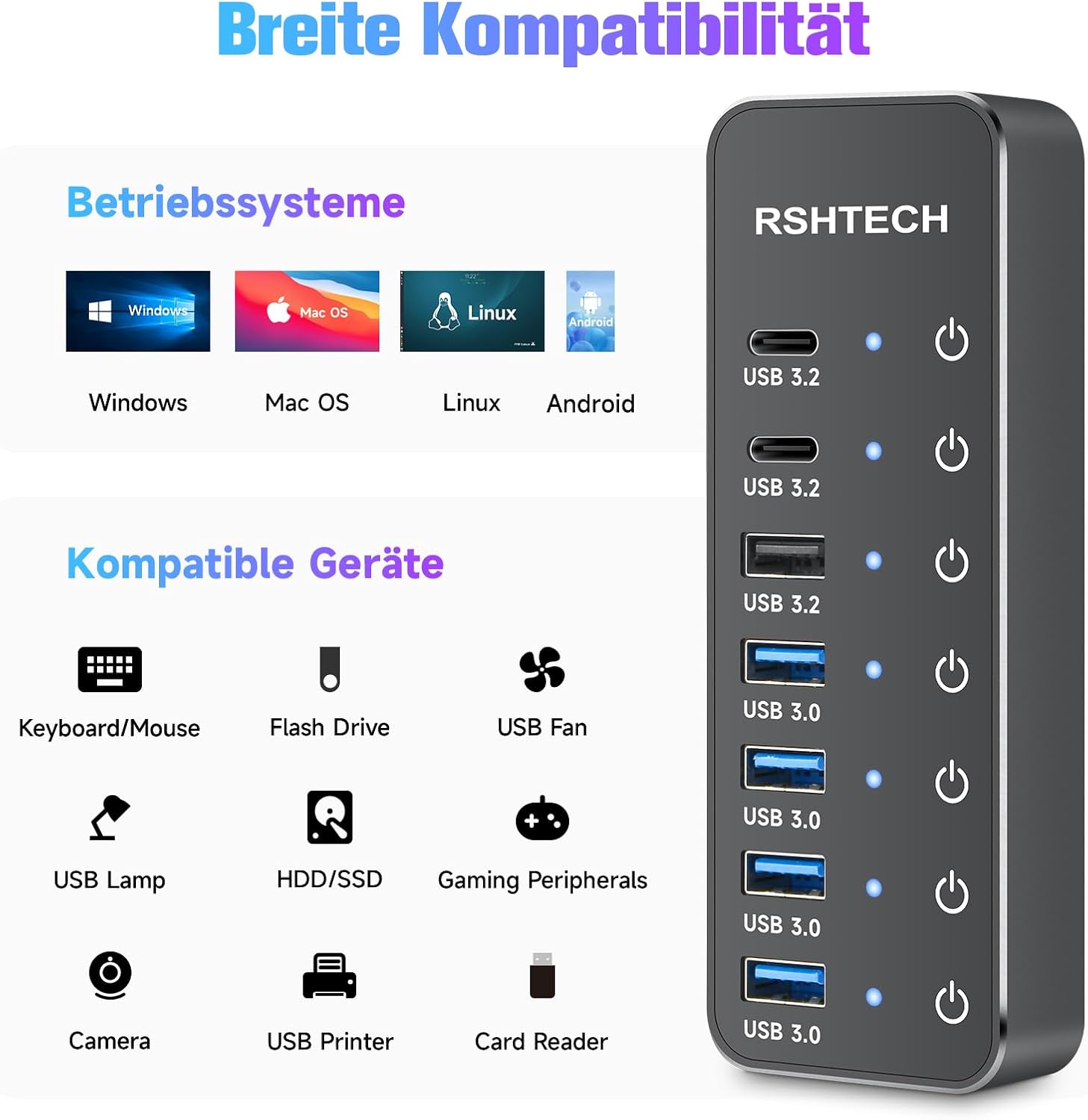
Image: Icons illustrating broad operating system and device compatibility.
Maintenance
To ensure the longevity and optimal performance of your RSHTECH USB Hub, follow these maintenance guidelines:
- Cleaning: Use a soft, dry, lint-free cloth to gently wipe the surface of the hub. Avoid using abrasive cleaners, solvents, or aerosol sprays, as these can damage the finish or internal components.
- Avoid Liquids: Do not expose the hub to water or any other liquids. If the hub accidentally comes into contact with liquid, disconnect it immediately from power and your computer, and allow it to dry completely before attempting to use it again.
- Storage: When not in use for extended periods, store the hub in a cool, dry place away from direct sunlight and extreme temperatures.
- Cable Care: Handle the data and power cables carefully. Avoid sharp bends or excessive pulling, which can damage the cables or connectors.
Troubleshooting
If you encounter issues with your RSHTECH USB Hub, refer to the following common problems and solutions:
- Device Not Recognized:
- Ensure the hub is properly connected to your computer and the power adapter is plugged in.
- Check if the individual touch switch for the specific port is activated (blue LED should be on).
- Try connecting the device directly to your computer to verify if the device itself is functioning correctly.
- Restart your computer.
- Slow Transfer Speeds:
- Ensure your connected device supports the higher USB 3.2 or USB 3.0 speeds.
- Verify that you are using the correct port on the hub for your device's speed requirements (e.g., 10Gbps devices in USB 3.2 ports).
- Confirm that your computer's USB port also supports USB 3.0 or 3.2 speeds.
- Ensure the power adapter is connected to provide sufficient power for all devices.
- Individual Port Not Working:
- Tap the touch switch for the port to ensure it is activated.
- Try connecting the device to a different port on the hub.
- Disconnect and reconnect the hub from your computer and power source.
- Hub Not Powering On:
- Check that the DC 5V power adapter is securely connected to both the hub and a working wall outlet.
- Ensure the power outlet is functional.
If problems persist after trying these steps, please contact customer support for further assistance.
Specifications
| Brand | RSHTECH |
| Model Number | RSH-ST07C |
| Total USB Ports | 7 |
| Data Ports | 1x USB-A 3.2 (10Gbps), 2x USB-C 3.2 (10Gbps), 4x USB 3.0 (5Gbps) |
| Power Input | DC 5V/3A |
| Special Features | Individual touch switches, LED indicators, Plug and Play, Anti-slip, Portable, Fast Data Transfer |
| Compatible Systems | Windows, Mac OS, Linux, Chrome OS, iPad OS, Android |
| Material | Aluminum, Acrylonitrile Butadiene Styrene (ABS) |
| Dimensions (L x W x H) | 12.9 cm x 4.7 cm x 1.8 cm |

Image: Product dimensions and cable lengths.
Warranty Information
This RSHTECH RSH-ST07C USB Hub comes with an 18-month product warranty from the date of purchase. This warranty covers manufacturing defects and issues arising from normal use. It does not cover damage caused by misuse, accidents, unauthorized modifications, or external factors. Please retain your proof of purchase for warranty claims.
Customer Support
For any technical assistance, warranty claims, or further inquiries regarding your RSHTECH RSH-ST07C USB Hub, please contact RSHTECH customer service. Refer to the contact information provided with your product packaging or visit the official RSHTECH website for support details.


